
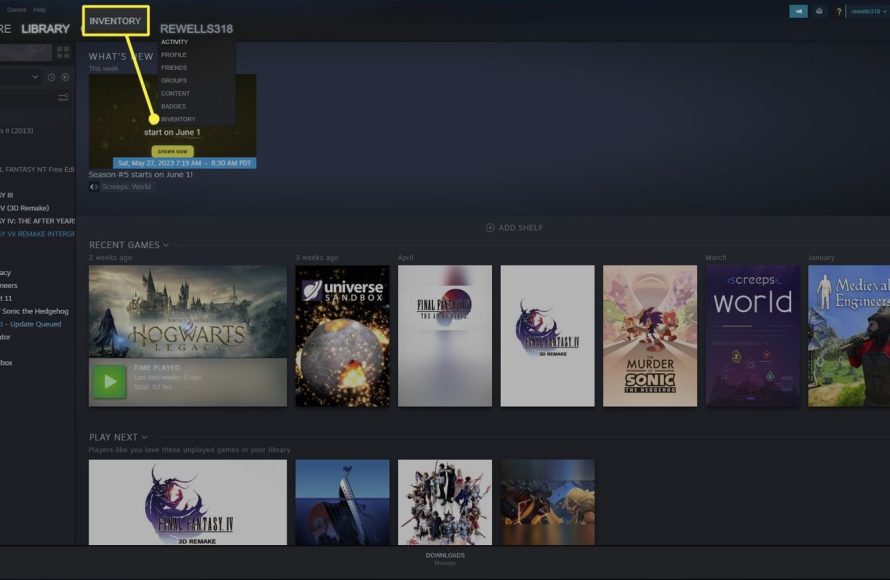
To trade in Steam games, you need to use the Steam client or website, navigate to your inventory, select the games you wish to trade, and then send a trade offer to another user.
Ever wondered how to trade in steam games with your friends, exchanging those extra copies for something new? It’s simpler than you might think. This guide provides the basics to get you trading quickly.
The process involves a few key steps within the Steam platform itself. You’ll be using their built in system. Trading is a great way to get games you want without always buying them directly.

How to Trade in Steam Games
So, you’re curious about trading games on Steam? It’s a cool way to get new games without always spending money, and it can be a lot of fun! Think of it like swapping toys with your friends, but instead of toys, it’s digital games. This guide will walk you through everything you need to know about trading on Steam, from the basics to some handy tips. Let’s get started!
Understanding Steam Trading
Before you jump into trading, it’s important to understand how the system works. Steam has a built-in feature that allows you to trade items and games with other users. These “items” aren’t just games; they can also include things like trading cards, backgrounds, emoticons, and in-game items for certain games. Think of it as a virtual marketplace for your digital goodies.
What Can You Trade?
You can’t trade every single thing on Steam. Here’s a breakdown of common tradeable items:
- Games: This is the big one! You can trade games that you own as gifts. We’ll discuss how gifts work in detail later.
- Trading Cards: These are collectible cards you earn by playing certain Steam games. You can trade them to collect a full set and craft badges.
- Emoticons & Profile Backgrounds: These are cosmetic items that personalize your Steam profile. You can get them from games, trading, or by buying them from the Steam Community Market.
- In-Game Items: Many games, like Dota 2 and Counter-Strike: Global Offensive (CS:GO), have items you can earn or purchase, which can then be traded with others.
What You Can’t Trade
Not everything is fair game for trades. Here are some things you cannot trade:
- Games you’ve already added to your library: Once you activate a game, it’s tied to your account and cannot be traded.
- Most Downloadable Content (DLC): DLC is usually not tradeable.
- Some special event items: Items that are restricted by the game developers.
How to Find Your Trade Offers
So you have got some things to trade? Great! The next thing is to find the place where trading happens. Trading on Steam is pretty easy once you know where to look.
Accessing the Trading Area
There are a few ways you can find your trade offers, let’s take a look at some.
- Through the Steam Client: Open your Steam client. Click on your username, you will see the option for “Inventory”, now you can go to trading offers by clicking on trade offers.
- Through the Steam Website: Go to the Steam website, log in, then click on your username, you will see the option for “Inventory”, now you can go to trading offers by clicking on trade offers.
- Through a Friend’s Profile: Go to a friend’s profile, click the “…” menu button on the right side, and select “Offer a Trade”.
All of these methods should get you to the same place, where all your trade offers are stored, incoming, outgoing and past trades.
Starting a Trade
Alright, now for the fun part: actually starting a trade. Here’s how to send a trade offer to another player:
Initiating a Trade with a Friend
Let’s say you want to trade with a buddy. Here’s how to do it:
- Go to your friend’s profile: Find your friend on your Steam friends list and click on their username to visit their profile.
- Click the “…” button: On the right side of their profile, you’ll see a “…” button. Click it.
- Select “Offer a Trade”: From the drop-down menu, choose “Offer a Trade.”
- Choose items: A new window will pop up. On the left side, you’ll see your inventory. On the right side is your friend’s inventory (if they have public inventory). Drag the items you want to offer from your inventory to the left side of the trade window, and drag the items you want from your friend’s inventory (if available) to the right side.
- Add a note: You can add a note about the trade if you want to.
- Click “Make Offer”: Once you have selected the desired items, click on the “Make Offer” button.
- Confirm Trade: Before completing, you might have to confirm the trade offer through your Steam app on your mobile device. This confirmation is a safety measure that helps to prevent unwanted trades.
Trading with Non-Friends
Trading with non-friends is possible, but it needs a special trade link. This link can be found in your trade settings. Here’s how it works:
- Access your inventory: Go to your Steam Inventory.
- Find the “Trade Offers” option: On the right side, click on “Trade Offers.”
- Locate your trade URL: On the right side, you will see a “Who can send me trade offers?” option, click on it and you should see your trade URL, you can either copy and paste this into the person that you want to trade with or create a QR code that they can scan.
- Share the link: Send this link to the person you want to trade with. They can use this link to send you a trade offer.
- Review and Accept: Once you get a trade offer, you have to review and accept this as you would do with a friend trade.
Important Things to Know About Trading
Trading may seem straightforward, but there are a few essential points you should understand.
Steam Guard Mobile Authenticator
To keep your account safe, Steam uses a feature called Steam Guard Mobile Authenticator. This app on your phone provides extra security. When you try to trade, Steam will ask you to confirm it through the app. This step helps prevent someone else from trading your items if they get access to your account. It’s highly recommended to set this up.
Steam Trade Holds
If you don’t have the Steam Guard Mobile Authenticator enabled for at least 15 days, trades will be held by Steam for a short while (up to 15 days). During this hold, either you or the person you are trading with can cancel the trade. This is another security measure to make sure trades are valid. This is not something that you will have to worry about if you have Steam Guard Mobile Authenticator enabled for more than 15 days.
Gifted Games
This is where things can get a little tricky. When you buy a game on Steam, you can choose to buy it as a gift. That means instead of adding it to your account, it is stored as a gift in your inventory. Here’s the important thing: you can trade this gift with others before it is redeemed. Once you click on the gift to add it to your library, that game becomes non-tradeable.
Trading for Steam Wallet Funds
You can’t trade items for Steam Wallet funds directly through the Steam trade system. You can only trade for other items. People sometimes trade valuable game items for money, but they do this outside of the Steam trading system. This involves third party sites. Trading items outside of the Steam trading system can be risky, so be careful.
Using Third-Party Trading Sites
There are many third-party websites that let you trade or sell your Steam items. While they can be convenient, use them with caution! Some of these sites might not be safe or could take your items. Always double-check a site’s reputation before using it.
Tips for Successful Trading
Now that you know how to trade, here are some tips to help you become a successful trader:
Research Prices
Before you trade, look up how much the items are worth. You can check the Steam Community Market to see how much items are being sold for. Don’t accept trade offers where you are getting ripped off. Trading cards and items usually go for a small price, while giftable games are a little bit more expensive. It is a good idea to always do your research when making a trade, this will ensure that you are not on the losing end of the trade.
Be Patient
Finding the perfect trade may take some time. Don’t settle for a bad deal if you don’t have to. This may require you to contact many people to look for the trade you want. It may take some time to find a good deal, but patience pays off.
Join Trading Communities
There are many groups and forums online where people trade Steam items. You can join one of these groups to meet other traders and find better deals. This is also a great way to learn about trading and price patterns, along with learning the language that is used in the trading community.
Be Fair
Try to make fair trades. Trading is much more fun when everyone feels like they got a good deal. If you are constantly trying to rip off other players, they will not want to trade with you. If you aim to make trades that are fair for both parties, trading will be a more fun experience.
Check Items Carefully
Always check the items you are about to trade. Don’t rely on just the item’s name or picture. Always verify the description and double-check that it’s what you think it is, because there are cases where people put up items that look similar to others but they are completely different. Scammers often try to switch the items in trade offers at the last minute, making it look like you’re receiving a very valuable item when you aren’t.
Watch Out for Scams
Sadly, there are people who try to scam others when trading. Don’t trade with people you don’t trust. Scammers usually offer really good deals that are too good to be true, so be wary of people that seem too good to be true. Never click on any strange links they send you. If an offer seems off, it probably is. Report anyone trying to scam you on Steam to help keep the community safe.
Use a Trading Bot
There are trading bots that will automatically complete a trade for you. For example, if you are looking to trade a specific trading card for another one, you can find a bot that has the card you are looking for. These bots can help speed up the trading process for you. Just be careful, and make sure the bots are from reputable sources.
Trading on Steam can be a rewarding experience. You can get new games, collect cool items, and meet other players. Just remember to be safe, do your research, and always check what you’re trading. With a little practice, you’ll become a pro at Steam trading in no time!
How to Send a Trade on Steam! Send a Steam Trade Offer!
Final Thoughts
To trade Steam games, you need to enable Steam Guard and ensure your account is not restricted. Then, find a user to trade with via their profile or trade link.
Carefully review the offered items before accepting any trade. Confirm the items are correct on the final confirmation page.
These steps are essential for knowing how to trade in steam games safely. Ensure you are trading with trusted sources for a secure experience.

