
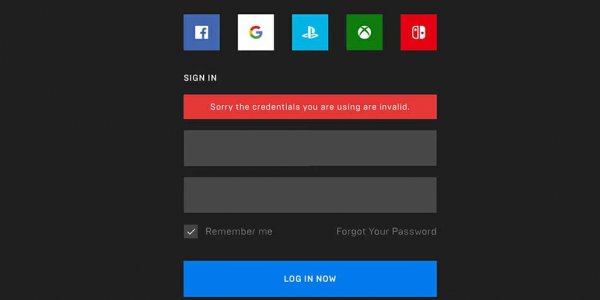
To unlock your Epic Games account, you typically need to reset your password via the ‘Forgot Password’ option on their login page, using the email address associated with the account.
Ever found yourself locked out of your Epic Games account? It’s frustrating, right? We all have those moments where we can’t quite remember our password or maybe even have a suspicion of unauthorized access. This situation makes you wonder about the correct procedure for how to unlock epic games account.
The good news is, the process is usually straightforward. Epic Games provides a clear path to regain access, and we’ll guide you through it. This simple steps will get you back in the game in no time!

How to Get Back Into Your Epic Games Account
Having trouble getting into your Epic Games account? It’s super frustrating when you just want to play your favorite games and you’re locked out. Don’t worry; it happens to a lot of people. There are several reasons why you might be having trouble, and luckily, there are also several things you can do to get back in. Let’s walk through the most common issues and how to fix them.
Common Reasons for Account Lockouts
Before we dive into solutions, it helps to know why you might be experiencing an account lockout in the first place. Knowing the cause can guide you to the correct fix. Here are some of the most frequent reasons:
- Incorrect Password: This is the most common culprit. We all have lots of passwords to remember, and it’s easy to mix them up.
- Forgot Your Email Address: Sometimes, you might not remember which email you used to sign up for your Epic Games account.
- Suspicious Activity: Epic Games might lock your account if they detect unusual login attempts from a different location or device. This is a security measure to protect your account.
- Two-Factor Authentication (2FA) Issues: If you’ve enabled 2FA, you might have lost access to the device or app that generates your codes.
- Account Suspension or Ban: If you’ve violated the Epic Games terms of service, they may have temporarily or permanently suspended or banned your account.
Recovering Your Account When You Forgot Your Password
Okay, let’s start with the most common problem: forgetting your password. Don’t feel bad; it happens to the best of us. Epic Games has a straightforward process to help you reset it.
Step-by-Step Password Reset Guide
- Go to the Epic Games website or open the Epic Games Launcher.
- Click on “Sign In,” usually located at the top right corner of the page or launcher.
- On the sign-in screen, you’ll see a link that says “Forgot Password?” Click on it.
- You will be asked to enter the email address that you used to create your Epic Games account. Make sure to type it correctly.
- Once you enter the correct email, click “Send Email.” Epic Games will then send you an email containing a special password reset link.
- Check your email inbox (and also your spam or junk folders just in case the email went there). Open the email from Epic Games.
- In the email, click on the password reset link. This will direct you to a new page where you can choose a new password.
- Choose a new password. Make it strong! A good password uses a mix of upper- and lowercase letters, numbers, and symbols. Don’t use easily guessed things like your name or birthday.
- After you have entered your new password, click “Submit.” Your password has been reset, and now you should be able to access your Epic Games account again.
Tips for Creating a Strong Password
- Use a mix of uppercase and lowercase letters (like “A” and “a”)
- Include numbers (like 1, 2, 3)
- Add symbols (like !, @, #, $, %)
- Make it long (the longer, the better)
- Don’t use easily guessed things like your name, birthday, or “password123”
Recovering Your Account When You Forgot Your Email Address
Sometimes, you might not remember the exact email you used to create your Epic Games account. This can be tricky, but it’s not a lost cause!
Steps to Recover Account Without Remembered Email
- Check Other Email Accounts: Go through all the email accounts you regularly use. Look for emails from Epic Games. Try searching for phrases like “Welcome to Epic Games” or “Epic Games receipt.” This may help you locate the email address you used to sign up.
- Ask for Help from Epic Games Support: If searching your emails does not help, then it is time to contact Epic Games customer support. They can help you find your account, but you may need to verify your information first.
- Go to the Epic Games support page.
- Look for the “Contact Us” or “Submit a Request” option.
- Explain your situation clearly, telling them that you have forgotten the email address you used for your account.
- Provide any information you remember about the account, like your username, any games you bought, or any other linked accounts.
- Be ready to give them more information, if they ask to confirm that it is really you.
- Connect Through Social Media Accounts If you connected your Epic Games account to your social media accounts or console account like Playstation, Xbox, or Nintendo accounts, you can try to log in to the Epic Games account using this options.
Dealing with Suspicious Activity Lockouts
Epic Games is always trying to keep your account safe. If their system detects something strange, like a login from a faraway place, they might lock your account to protect it. Don’t be alarmed; this is a good thing! Here’s how to manage these lockouts:
How to Handle Suspicious Activity Lockouts
- Check Your Email: Epic Games usually sends an email explaining why they locked your account. This email will have instructions on how to get it back.
- Password Reset: The email might tell you to change your password to secure your account. Follow the steps above to reset it.
- Contact Epic Support: If you can’t get back into your account by just changing the password, reach out to Epic Games support. They can investigate the situation and help you reaccess your account.
- Review your Linked Accounts: If you suspect your Epic Games account was compromised, review all linked accounts and change their password too.
Fixing Problems with Two-Factor Authentication (2FA)
Two-Factor Authentication (2FA) adds an extra security level to your account. It’s great for safety, but if you lose access to your 2FA device or app, it can become a bit of a pain. Don’t worry; you can still get back in.
Troubleshooting 2FA Problems
- Using Backup Codes: When you set up 2FA, Epic Games gave you backup codes. Check your saved documents, notes, or password manager for the backup codes. These codes can help you access your account when your usual device or app is unavailable.
- Recovering from Authenticator App Issue: If your authenticator app has stopped working, or you got a new phone, you can try to move the old data to the new device. Some authenticator app has their own method to move data between devices. if that is not possible, you will need to contact Epic Games Support, so they can help you disable 2FA on your account. After you get access back, you can set 2FA up again.
- Contact Epic Games Support: If you have no backup codes, then you should contact Epic Games Support for assistance. They will verify your account, and will help you disable 2FA for your account, and then you can set up 2FA again once you gain access to your account.
Understanding and Addressing Account Suspensions or Bans
If your account has been suspended or banned, it means you’ve done something that broke the Epic Games rules. If your account is suspended, then you should follow the process for unlocking the account; However, if your account is banned, it can sometimes be more difficult to get it back. Here’s how to address these situations:
Dealing with Account Bans and Suspensions
- Check Your Email: If Epic Games suspends or bans your account, they usually send an email explaining why. This email contains vital information on the reason, and what you can do to get your account back.
- Review the Epic Games Terms of Service: If you are not sure why your account is suspended or banned, you should check the Epic Games Terms of Service page and understand what might have led to this issue.
- Contact Epic Games Support: If you believe that your account was suspended or banned unfairly, contact Epic Games support immediately. Explain your situation and provide any supporting documents or proof to show that your account was not misused.
- Learn from Mistakes: If your account was suspended or banned due to your mistake, it is always best to learn from that, and avoid such mistakes in future.
Keeping Your Account Safe
After you get back into your Epic Games account, you will want to take some steps to make sure it stays safe. Here are a few important things to do:
Tips for Keeping Your Epic Games Account Safe
- Use a Strong Password: Choose a password that is hard to guess, and use a different password for different accounts.
- Enable Two-Factor Authentication (2FA): This makes it harder for others to get into your account, even if they know your password.
- Keep Your Email Secure: Keep your email account safe, because that is used to gain access to your Epic Games account. Use a strong password and 2FA for email accounts too.
- Don’t Share Your Password: Never tell anyone your password. Epic Games will never ask you for your password.
- Be Careful of Phishing Scams: Don’t click on suspicious links. Phishers send fake emails that look like they are from Epic Games to steal your information. Always make sure you are on the official Epic Games website before entering your info.
- Update your devices regularly: Keeping your devices and software up to date is an important part of protecting your account.
Getting locked out of your Epic Games account can be frustrating, but by understanding the common reasons for the lockout and knowing the steps to recover your account, it is definitely manageable. Always remember to follow the best practices to keep your account secure, and you’ll be back in the game in no time.
My epicgames.com account is temporarily locked . How can I unlock it ?
Final Thoughts
To regain access, begin by checking your email for Epic Games instructions. Follow the account recovery steps they provide carefully. If email access is also a problem, try alternative recovery methods, which might involve verifying information.
Contacting Epic Games support directly is another crucial step. They will guide you through necessary processes to verify your ownership. Following their given directions is paramount to regain access.
So, how to unlock epic games account? This process involves following recovery emails, using alternative methods, and talking with support. This process usually solves account access issues.

