
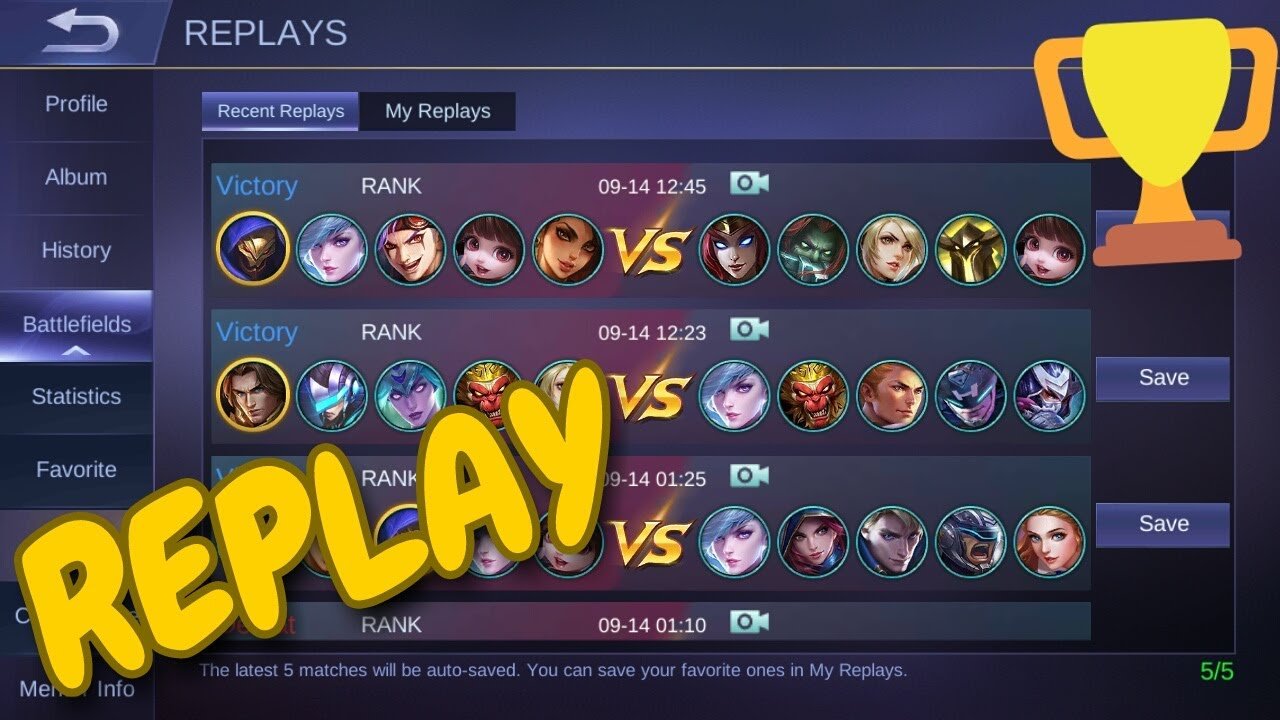
To watch game replay Mobile Legends, navigate to your profile, access ‘Match History,’ select the game, and then tap the ‘Download Replay’ option, if available.
Ever wondered how to analyze your previous matches in Mobile Legends to get better? It’s simpler than you might think. The game conveniently provides a feature that lets you review past performances, focusing on key moments. This allows you to understand strategic decisions and how they played out.
Knowing how to watch game replay Mobile Legends is crucial for improving your gameplay. By watching replays, you can spot mistakes, learn enemy patterns and refine your techniques for future matches. This can give you a significant advantage.

How to Watch Game Replay in Mobile Legends: A Complete Guide
Okay, so you just had an awesome match in Mobile Legends: Bang Bang! Maybe you pulled off an incredible comeback, or maybe you want to see where you went wrong. Either way, watching a replay is super helpful. It’s like having your own personal coach who lets you review every move. This guide will show you exactly how to watch your game replays and get the most out of them. We will look at the different ways you can watch them and what to do with the information you gather.
Why Watch Game Replays?
Before diving into how, let’s talk about why you would want to watch a replay. There are many reasons why taking some time to review your old matches can really benefit your game. Here’s the deal:
- Learn from Mistakes: Did you get ganked a lot? Did you miss a crucial opportunity to help your team? Replays let you see exactly what happened and what you could have done differently. It’s easier to spot errors when you are not in the middle of the match.
- Improve Your Skills: By studying your own gameplay, you can see which skills you use effectively and which need more practice. You can analyze your positioning, timing, and decision-making.
- Study Opponents: Watch how other players move and strategize. By seeing how they defeated you, or how they helped their team win, you can learn new ways of playing. This is especially useful if you encounter a player who seems like a better player than you.
- Share Awesome Moments: Sometimes you just want to rewatch that fantastic triple kill you just had! Replays are a great way to relive the excitement or show off to your friends.
Finding Your Game Replays
Mobile Legends keeps track of all of your matches, but finding where they are stored can be confusing. This section explains how to locate your replays.
Accessing Replays Through Your Profile
This is the most common way players access their replays. Here’s the step-by-step process:
- Open Mobile Legends: Launch the Mobile Legends app on your phone.
- Go to Your Profile: Tap on your profile picture located in the top left corner of the screen. This takes you to your profile overview.
- Find the “History” Tab: In your profile page, there are several tabs. Look for the one labeled “History” or “Match History” and tap it.
- Choose the Match: You’ll see a list of your past games. Select the specific game you want to watch by tapping it.
- Tap the Replay Button: If the match has a replay available, you’ll see a “Replay” button. It may look like a play button. Tap it to start watching your game.
Important Notes:
- Replays are not available for all game modes. Most of the time, Ranked matches and Classic matches have replay available.
- Replays are not stored indefinitely. They usually have a limit, like a few weeks of game history. If you cannot find the replay, it may have been deleted.
- Not all devices support replays. If you can’t see the replay button, your device might not be able to play it. This is rare, but it can happen.
Using the Post-Match Screen
Sometimes, you might want to jump directly into a replay right after you finish the game. Here is how:
- Finish Your Match: After the match concludes, you will be taken to the post-match result screen.
- Look for the Replay Icon: On this screen, look for a replay icon. This is the same icon as in your match history.
- Tap it: Tapping this button will take you straight to the replay. This is a faster option than going to your profile.
Navigating the Replay Interface
Okay, so you have found your game replay. Now, what does all that stuff on the screen mean? Understanding the replay interface is essential for getting all the information you want.
Basic Controls
Here’s what you need to know about controlling the replay:
- Play/Pause: The standard play/pause button. Tap it to start or stop the replay.
- Fast Forward: This speeds up the replay, allowing you to skip through unimportant parts of the game quickly.
- Rewind: Rewind the replay to go back to a specific point.
- Speed Settings: Some replays let you change the playback speed, like 2x or 4x speed. This helps you watch faster or analyze in more detail.
Additional Features
Besides basic controls, there are other useful features to explore:
- Player Perspective: You can switch to view the game from the perspective of different players. This is incredibly helpful to see what they saw during crucial moments of the match.
- Timeline: A timeline shows you the progression of the match. You can jump to a specific part of the match using this. This is very handy if you already know when a big team fight happened.
- Camera Angle: Often, you can adjust the camera angle, zoom in or out, or move the view around the map to get the best look.
- Team View: Some replays let you focus on the whole team to see team-wide strategies and movements. This view gives you a good grasp on team coordination and macro plays.
Tips for Analyzing Replays
Now you know how to find and control the replay. But how do you actually use the replay to get better? Here are some specific strategies for watching replays:
Focusing on Your Own Performance
- Early Game Mistakes: Watch your first few minutes. Were you aggressive at the right time? Did you miss any last hits on minions? How was your starting strategy?
- Positioning: Where were you when a team fight broke out? Were you too far away? Were you properly protected? Correct positioning is key.
- Skill Usage: Did you use your skills at the right time? Did you miss any crucial skill shots? Watch your decision-making during combat situations.
- Item Builds: Did you buy the right items for the match? Did you adapt your build to counter the enemy team? Analyze your choices here.
- Objective Control: Did you help your team secure key objectives like turrets, the turtle, and the lord? Replays will show you whether you are prioritizing correctly.
Observing Opponent Strategies
- Lane Dominance: How did the enemy in your lane play? What strategy did they use? This will help you anticipate their moves in your next match.
- Ganking Patterns: Where and when did the enemy gank? How did they use their skills during a gank? Try to see the weaknesses in their strategy.
- Team Coordination: How did the enemy team work together? Was there a clear leader? Pay attention to how they set up their formations.
- Item Choices: What items did the enemy buy? How did it impact the match? This can give you insight into future counters.
Using Replays for Team Improvement
- Communication: Did you communicate well with your team? What calls did you make, and what did your team do with them? Good communication can win matches.
- Team Fights: Watch the full team fight from different perspectives. How can you and your team improve your fight strategy? Team fight decision-making can be the key to winning.
- Role Understanding: Watch how your teammates play their roles. How can you complement each other better? Improving team synergy is the aim here.
Specific Scenarios
Let’s look at some specific scenarios and how replays can help.
Scenario 1: Losing a Close Game
If you lose a really close game, it is really important to watch the replay. Don’t get frustrated. Watching it can help you understand:
- The Turning Point: What was the exact moment where the game started to shift in favor of the enemy team? Pinpointing the turning point can help you learn.
- Late-Game Mistakes: Did you make any mistakes in the late game that might have cost you the match?
- Missed Opportunities: Were there any instances where you could have pushed harder or taken advantage of a weakness?
Scenario 2: Winning Dominantly
Even if you win a match easily, you can still learn from the replay:
- Effective Strategies: What worked so well that game? How can you repeat that success in your next game?
- Early Advantages: How did you get an early lead? Can you implement that in all your future matches?
- Team Synergies: What synergies worked great with your teammates? Understand which combinations work well together.
Scenario 3: Learning a New Hero
Watching replays when you are learning a new hero is very important:
- Skill Combos: How did other players use this hero? What are the best skill combos? Studying other players will help you learn.
- Itemization: What are the most effective items for this hero? Study what the pros use in their games.
- Match-ups: How does this hero perform against certain opponents? Understand the hero strengths and weaknesses.
Advanced Tips
If you really want to take your game to the next level, here are some advanced tips:
- Record Your Replays: If you find a great replay, record it using your device’s screen recording tool. This will let you keep the replay and watch it later, even if it gets removed by the game itself.
- Share and Discuss: Share your replays with your friends or team members. Discuss different moments and get feedback from others.
- Focus on One Thing at a Time: When watching a replay, don’t try to fix everything at once. Focus on improving one specific aspect each time.
- Watch Professional Replays: Watch professional players’ replays and see how they play. This can give you a high level of understanding.
By using replays effectively, you are improving your game, and having a good time while doing so. So start watching your replays and climb the ranks in Mobile Legends!
How to Watch Replays in Mobile Legends?
Final Thoughts
To view your past matches, navigate to your profile and find the match history section. From there, select the game you wish to review and tap the replay button.
You must ensure you have game replay enabled in your settings. This crucial step allows the system to record your games. Therefore, it’s important to enable it beforehand.
Now, you can analyze your gameplay and learn from past mistakes. This feature is very helpful for improving your Mobile Legends performance. With these steps, you can easily understand ‘how to watch game replay mobile legends’.

