
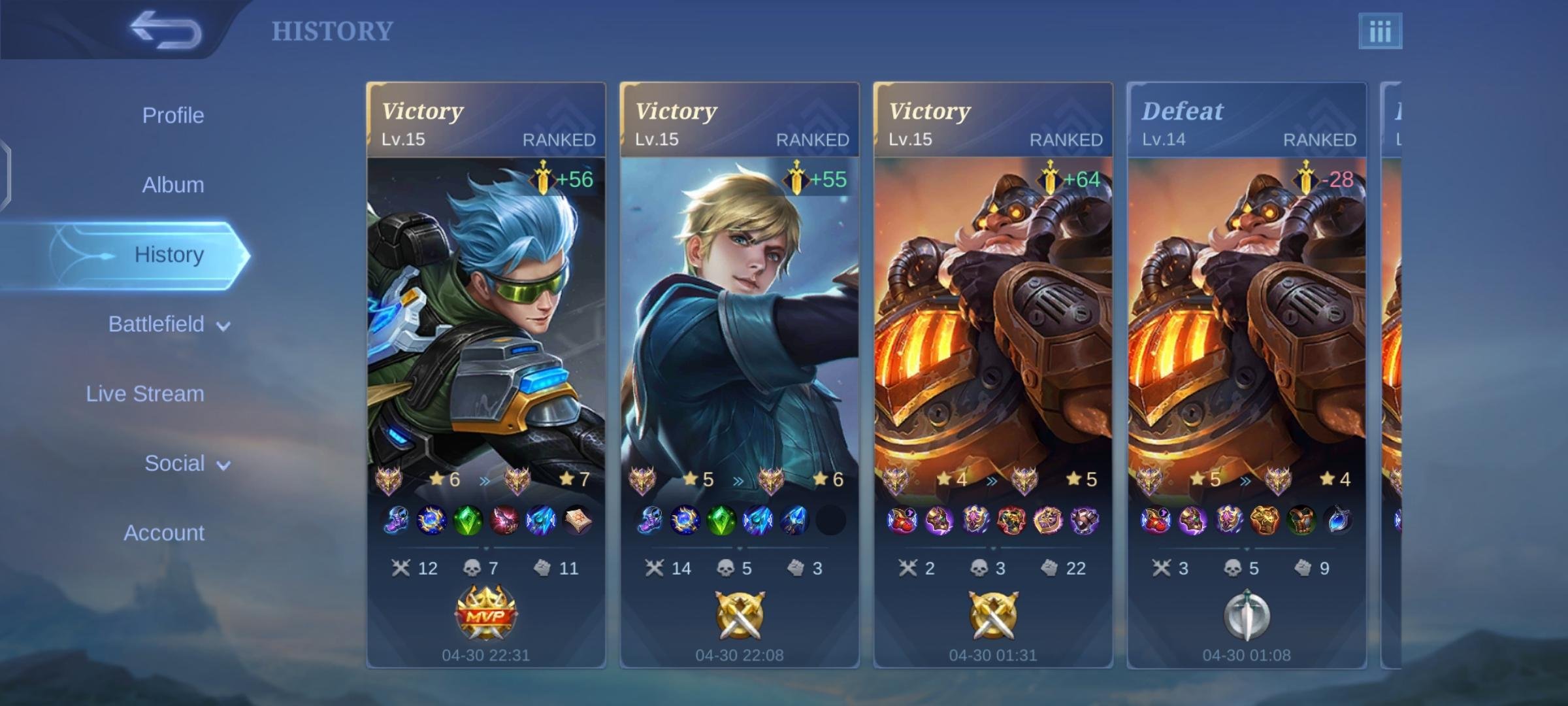
To replay a game in Mobile Legends, navigate to your profile, then to the “Match History” tab. Select the specific match, and if available, a “Download Replay” option will appear. After downloading, you can watch the replay.
Ever wanted to analyze that close call, or show off your winning moment? Learning how to replay game in Mobile Legends is easier than you think. This simple feature lets you review past matches.
It’s a great tool for improving your strategy and reliving those epic victories. Let’s dive into the steps on how you can access these game replays.

How to Replay Game in Mobile Legends
Ever had a match in Mobile Legends where you pulled off an amazing play, or maybe one where you just couldn’t figure out what went wrong? Wouldn’t it be cool to watch those moments again? Well, the good news is that Mobile Legends lets you do just that! The replay feature is a fantastic tool for both learning and showing off your skills. This article will guide you through everything you need to know about how to replay games in Mobile Legends.
Why Replay Your Mobile Legends Games?
Replaying your matches is not just for fun; it’s a great way to improve your gameplay. Here’s why you should make use of the replay system:
Learning From Mistakes
We all make mistakes, it’s part of the game. When you are in the middle of a match, it’s difficult to see what you could have done differently. By watching a replay, you get a clear view of your positioning, skill usage, and decision-making. You can pinpoint exactly where you went wrong, understand why, and then work on those aspects in your next matches. Did you overextend? Were you late to a team fight? Did you use your ultimate at the wrong time? Replays show you everything.
Analyzing Your Strengths
It is not just about what you did wrong, you can also find out what you did right. Sometimes you make an amazing play and wonder how you did that. When you rewatch your replays, you can see exactly what decisions and actions resulted in your success. Did you time your crowd control perfectly? Did you dodge a crucial ability? Analyzing your victories can help you repeat those same moves in future games. This can build your confidence and guide you to become a better player.
Sharing Cool Moments
Let’s be honest; sometimes you just want to show off an awesome play! If you managed to clutch a 1v5, or make a super smooth combination, replaying lets you record the action and share it with your friends or on social media. It’s a great way to showcase your skills and celebrate your success with the Mobile Legends community. Who doesn’t enjoy watching a triple kill or a game-winning play?
Studying Opponents
Replays are useful not just for your gameplay but for how your enemies play. By watching how your opponents move and use their characters, you can learn their strategies. What characters do they favor? How do they approach fights? Where do they position themselves on the map? This information can be useful in future matches when you encounter them again. This process also lets you develop countermeasures, anticipate their moves, and learn their weaknesses.
How to Access Your Replays
Now that you know why replaying your matches is helpful, let’s get down to the how. The process of accessing and watching your replays is pretty straightforward. Here’s how it works:
Finding the Match History
The first step is to find your match history. You can do this by:
- Opening Mobile Legends: Start by launching the Mobile Legends app on your mobile device.
- Locating Your Profile: Tap on your profile picture, which is usually located at the top left corner of the screen.
- Selecting History: On your profile page, you’ll see an option called “History.” Tap on this. It’s usually a button that looks like a clock.
Choosing a Match to Replay
Once you are in your match history, you’ll see a list of all the matches you’ve played. To choose a match to replay:
- Finding Your Game: Scroll through the list to find the game you want to rewatch.
- Looking for the Replay Icon: Next to each match, there’s a replay icon, a small icon of a play button. If the game is available for replay, this icon will be visible. Games may not have replay options if they are too old or if they were custom games, or if there was a patch.
- Tapping the Icon: Tap the replay icon next to the specific match you want to watch. This action will start downloading the replay of the game.
Downloading the Replay
Before you can watch the match, Mobile Legends needs to download the replay data. The download process usually doesn’t take long, but it depends on the speed of your internet connection. The download process works as follows:
- Wait for Download: After tapping the replay icon, the game will begin downloading the replay file. A progress bar or download percentage will usually be visible.
- Ensure Stable Internet: Make sure you have a stable internet connection during the download process to avoid any interruptions.
Watching the Replay
After the replay download is complete, you’re all set to watch the game. Here’s how to control your replay viewing experience:
- Tapping to Watch: Once the download finishes, tap again on the replay icon which will now appear differently. The replay will start to play.
- Basic Playback Controls: The replay screen has basic playback controls like play, pause, fast forward, and rewind. Use these to navigate through the replay.
- Camera Control: You can move the camera around to focus on different parts of the map. You can freely explore the map and look at the gameplay from different angles. This can let you focus on specific players, or specific action around a specific area of the map.
- Following Players: In some cases, you can choose to follow specific players. It can be your own hero or a player you want to study. This can help you get a better understanding of their gameplay.
- Using the Timeline: There’s a timeline at the bottom of the screen that you can use to skip ahead to key moments in the game. The timeline is also useful to identify specific events and can help you skip unnecessary segments of the replay.
Tips for Effectively Using Replays
To get the most benefit from the replay system, here are some tips for how to watch replays in a more effective way.
Focusing on Specific Areas
Don’t try to watch the entire match from start to finish every time. Instead, focus on specific moments or areas where you think you could improve. For example:
- Early Game: Watch the beginning of the game and see how you started. Focus on your laning phase and how you managed early game objectives.
- Team Fights: Focus on how the team fights played out. Watch your positioning, your target priority and skill usage.
- Late Game Decisions: Pay close attention to late game decisions, especially objective control and how to close out games.
Adjusting Playback Speed
Sometimes, it’s helpful to watch replays in slow motion to see the exact moment you need to focus on. Other times, you may need to speed the replay to skip moments that aren’t that important. This can help you analyze moments in the game efficiently.
Taking Notes
As you watch, make notes of key moments or decisions. You could write down specific mistakes you made and how to avoid them next time. Or, you can write down what you did well, and the key plays that resulted in a victory. You can use these notes as a guide to help you become a better player.
Using Replays with Friends
Watching replays with friends is a great way to get different perspectives. If you’re playing with your friends, or if you have teammates, you can watch the replay together. Everyone can share their thoughts, giving you an even better idea of what’s happening during the replay. You can help each other learn and improve by highlighting your mistakes and your strategies.
Limitations of the Replay System
The replay system isn’t perfect; it has a few limitations that you need to be aware of.
Replay Availability
Replays aren’t available for all game modes or match types. Sometimes you won’t have access to replays from older matches. This is often because older replays are removed to save server space.
Bug Issues
Like with any part of the game, the replay system can have bugs. Sometimes the replay may not sync correctly, or you could have issues with the camera or the controls. If you do experience bugs, try to restart the app.
Replay Files
Replays take up storage space on your mobile device. If you have many replays, it can take up some space. So, if you have limited storage, you should delete the old ones after you have watched them.
Keeping Replays Up-To-Date
Sometimes, after a patch to the game, older replays may not work. This is because the new update might have changed how the game functions, making the older replay files incompatible. If this happens, you’ll need to play new matches to create new replay files.
Common Questions About Replays
Many players have similar questions about the replay system, so let’s cover the common ones:
How Long Do Replays Last?
Replays generally last for a few weeks or months, but it also depends on server loads and game updates. Try to watch your replays as soon as possible after each match so you don’t miss out. Always save the good ones, just in case they disappear.
Can You Share Replays?
Mobile Legends doesn’t directly let you share replays within the game. However, you can record your screen while watching a replay and then share that video. You can also share your thoughts about the game with your friends, if you watched the replay with them.
How To Report In-Game Through Replay?
You can use the replay to help you report players if they are breaking the rules. By watching the replay you can carefully look at how each player was performing and if someone was cheating. Once you are sure of this, you can submit the report. It will help the Mobile Legends support to look into the matter and take action when necessary.
Can I Watch Replays on Different Devices?
Yes, you can watch replays on different devices as long as you’re using the same account. If you download a replay on one device, you will still be able to see it on another device linked to your account. However, you will need to download the replay again on the new device.
Can I Download Replays On A PC?
Unfortunately, you can’t directly download Mobile Legends replays onto your PC or watch them on your computer. The Mobile Legends app is only made for mobile devices, so the replay feature only works there. You can, however, record your phone screen while playing the replay and then transfer the video to your computer if you wish to.
Do All Modes Have Replays?
Not all game modes have replay features. Usually, classic matches, ranked games, and some special event modes will have replays available. But, sometimes custom games and certain arcade modes won’t. Check to see if the icon is available. If the replay icon isn’t showing on the game, then it’s not available.
Replaying your games is an important part of improving your gameplay. It is also a great way to learn and to share cool in-game moments. By using the replay system often, you can identify your mistakes, learn from your successes, and become a better Mobile Legends player. Remember to watch your replays with attention, focus on key moments, and learn from your past games. You have all the information you need to replay a match in Mobile Legends. So, go ahead, replay those games and take your playing skills to a higher level!
How to Watch Replays in Mobile Legends?
Final Thoughts
To recap, accessing your match replays in Mobile Legends is straightforward. Navigate to your profile, find the match history, and select the game you want. The replay option will be available if the game recorded properly.
This feature lets you review your strategies or analyze opponents’ techniques. The how to replay game in mobile legends process is quite simple. You must ensure your device has sufficient storage for saved files.

