
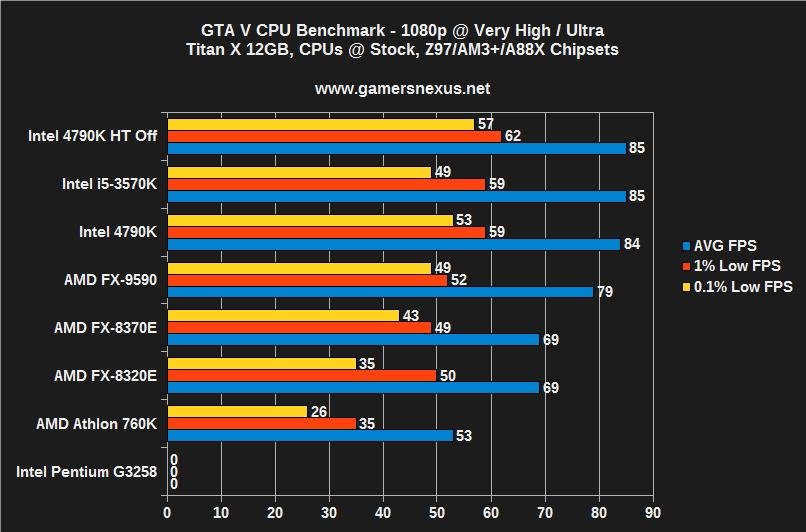
Yes, GTA is heavily CPU-based, requiring a powerful processor for optimal performance, especially in densely populated areas and during complex scenes.
Ever wondered why your frame rate drops in the city center when playing Grand Theft Auto? The answer often comes down to the central processing unit. This leads many gamers to ask, is GTA a CPU based game? The game pushes your processor to its limits, handling the vast world and countless characters.
A strong CPU becomes particularly vital for smooth gameplay, ensuring your game doesn’t stutter when things get intense. This means gamers need to consider their processor just as much as their graphics card.

Is GTA a CPU Based Game? Unpacking the Processing Power Behind Grand Theft Auto
When you’re cruising through the streets of Los Santos or causing mayhem in Liberty City, have you ever wondered what part of your computer is working the hardest? A common question among gamers is whether Grand Theft Auto (GTA), especially the newer installments like GTA V, is primarily a CPU-based game. The short answer is: it’s complicated. It’s not solely reliant on the Central Processing Unit (CPU), but the CPU plays a crucial and often overlooked role. Let’s dive deeper and understand how GTA uses your computer’s resources, particularly focusing on the CPU’s contributions.
Understanding the CPU’s Role in Gaming
Before we get into the specifics of GTA, it’s important to understand what the CPU does in a game. Imagine your computer as a team. The CPU is like the brain, handling calculations, instructions, and making decisions. In gaming, this involves things like:
- Game Logic: The CPU is responsible for calculating what happens in the game world. It figures out where characters are, how they move, what happens when you interact with objects, and much more.
- Artificial Intelligence (AI): Every character you see that isn’t another player – the cops, pedestrians, and even animals – are controlled by AI. The CPU handles the logic behind their actions and behaviors.
- Physics Simulation: When a car crashes, when objects fall, the CPU works out how they should behave according to the game’s physics.
- Handling Multiple Tasks: The CPU manages a multitude of background tasks, such as audio processing, network communication, and running your operating system at the same time as the game.
In essence, the CPU is the brains of the operation, making sure everything in the game world runs smoothly and reacts correctly to your actions. It does the math, manages complex systems, and ensures that the game responds in a way that feels accurate and immersive.
Why People Think GTA is CPU Heavy
So why is there so much debate around whether GTA is a CPU-focused title? There are several reasons that contribute to this perception:
Complex Open World Environments
GTA games, especially from GTA IV onwards, feature expansive open-world environments. These huge maps are filled with details, from buildings to moving vehicles to interactive elements. The sheer volume of objects and characters the CPU has to track and manage puts a great amount of stress on it.
Large Population Density
Unlike some open world games that have small number of people walking around, GTA cities are bustling with life. You can have hundreds of cars on the road, each with individual AI behavior, and countless non-player characters (NPCs) going about their day. The CPU works harder to handle the movement and actions of each of these characters.
Advanced Physics Engines
The physics engine in GTA is quite sophisticated, allowing for realistic car crashes, explosions, and interactions between objects. Simulating all this physics requires a lot of calculations from the CPU, contributing to its load.
Modding Communities
The strong modding community around GTA adds to the perception of CPU dependence. Mods can increase the game’s complexity dramatically by adding more vehicles, more NPCs, or altering physics, which increases the CPU demand significantly. These mods push the CPU beyond what the standard game requires, showing how a powerful CPU is key to handling increased processing load.
Past Performance Issues
When GTA IV was initially released, many people experienced poor performance due to its high CPU requirements. This initial experience has stuck with many gamers and is sometimes transferred to later releases. It highlighted the game’s heavy reliance on the CPU. While newer games like GTA V are better optimized, the idea that the series is very CPU-demanding persists.
The GPU’s Role in GTA: Not Just Pretty Pictures
Before we get too focused on the CPU, let’s talk about the Graphics Processing Unit (GPU). The GPU is like your computer’s artist; it creates the images you see on screen. While the CPU handles logic, the GPU creates the visuals. The GPU is primarily responsible for:
- Rendering Graphics: The GPU draws everything you see on screen – from character models to the scenery, buildings, and cars.
- Texture Management: It handles the detailed images (textures) that cover surfaces in the game.
- Special Effects: The GPU renders things like explosions, water effects, and weather conditions.
- Generating Frames: The GPU is tasked with drawing each frame of the game you see. The faster the GPU can generate frames, the smoother the gameplay.
In simpler terms, the GPU takes all the information from the CPU and transforms it into the world you see on your monitor. For GTA, the GPU is absolutely crucial because it determines the game’s visual fidelity, how many visual details it can render on the screen and the smoothness of the gameplay you experience.
The Interplay Between CPU and GPU
It’s important to note that CPU and GPU don’t work in isolation. They work together, hand-in-hand. The CPU prepares the information and passes it to the GPU, and the GPU renders it on the screen. A bottleneck occurs when one processor works faster than the other. If the CPU can’t keep up with the calculations, the GPU doesn’t get enough work and vice-versa. Here’s how they interact in the context of GTA:
- CPU Bottlenecks: If the CPU is weak, it cannot prepare the information quickly enough, meaning the GPU sits idle. This results in stuttering, low frame rates, and an overall poor gaming experience.
- GPU Bottlenecks: On the other hand, if the GPU is weak, it can’t render frames fast enough. This leads to low frame rates and visual lag.
- Balanced Performance: A great gaming experience in GTA happens when your CPU and GPU are well-matched, both doing their jobs effectively.
So, is GTA CPU-based? Not entirely. It’s more that a CPU is a crucial part of running the game well. The GPU handles the visual side, but the CPU is the engine managing everything happening in the game world.
GTA V: A Case Study in CPU and GPU Usage
Let’s look at GTA V as a prime example to better understand the relationship between CPU and GPU usage. GTA V is not a new game, it was launched in 2013, but it remains a standard for many PC players. So how does it use your system’s resources?
CPU Demands in GTA V
GTA V has a very complex open world that requires a lot of processing. Here are some things that contribute to high CPU usage:
- Dynamic World: The world is full of dynamic elements, with cars, pedestrians, and events occurring all the time. The CPU calculates all these changes and maintains all the elements of the game world.
- NPC Behaviors: The behavior of hundreds of NPCs in any given area is processed by the CPU, this calculation is critical for immersion of the game.
- Mission Scripts: Complex missions with triggers, dialogs, and in game events all use CPU power.
- Traffic Simulation: The AI that controls traffic needs to be processed constantly, and the CPU manages these calculations.
When you are running the game at low settings, you’re reducing the load on the GPU. However, the CPU will still be working very hard to handle the game logic and manage all the moving pieces of the game.
GPU Demands in GTA V
On the other side, GPU is also handling a lot of things to make the game looks visually stunning, here are few points for GPU demanding jobs in GTA V:
- High-Resolution Textures: The game uses high-resolution textures to make everything look crisp and detailed.
- Complex Shaders and Lighting: The lighting, shadows, reflections, and other visual effects are all processed by the GPU.
- Drawing Complex Geometries: The game’s environments are created with multiple polygons, and the GPU is responsible for rendering them all.
- Visual Effects: Explosions, weather effects, particle effects, all are handled by the GPU.
If you’re playing at higher settings with higher resolutions, your GPU will be working hard. However, even at lower settings, it still is responsible for generating images and keeping the game running smoothly.
Identifying Bottlenecks in GTA V
Here’s a basic approach to identify potential performance bottlenecks in GTA V:
- Check CPU Usage: Use tools like Task Manager (Windows) or Activity Monitor (macOS) while the game is running. If your CPU usage is consistently very high (90% or higher) even at low settings, it’s likely a bottleneck.
- Check GPU Usage: Similarly, check GPU usage during gameplay. If your GPU usage is consistently low, it might be waiting on the CPU.
- Frame Rate (FPS): Low frame rates, even at low settings, indicate a problem. If your FPS is low and your CPU usage is maxed out, it is a sign of CPU bottleneck.
- Stuttering: If the game often freezes or stutters, this may indicate a bottleneck.
It’s important to monitor both to figure out where the problem is. Often, it’s about finding the right balance between settings and hardware.
Beyond the Basics: Other Factors Influencing Performance
While the CPU and GPU are the primary players in game performance, there are other elements that can affect how GTA runs. Here are few of the factors which affects the game performance:
RAM (Random Access Memory)
RAM is important because it’s your system’s short-term memory. The game loads data into RAM for quick access. If you don’t have enough RAM, your computer will use your hard drive as temporary memory, which is much slower and leads to stuttering and performance issues. GTA, like many modern games, benefits greatly from having a good amount of RAM. 8GB is the recommended minimum for GTA V, but 16GB or even more is better.
Storage Devices (HDD vs. SSD)
The type of storage where you install the game makes a difference. Hard drives (HDD) are slower than Solid State Drives (SSD). An SSD allows for faster loading times in-game. Having the game installed on a SSD can improve load times, which in-turn helps the game to perform better. Using an SSD makes the whole gaming experience smoother and more responsive.
Operating System
The operating system you are using can have an impact on performance. Newer operating systems are usually more efficient and optimized for gaming. So, keeping your operating system updated is important for the smooth running of your games.
Background Applications
Running too many background applications while gaming can take up processing resources. Shut down unnecessary programs to make more resources available for the game. This will help the game run smoother and help to reduce the chances of experiencing issues or lags during the gameplay.
Optimizing Your Game for Better Performance
If you’re experiencing performance issues with GTA, here are some steps you can take to try and get things running smoother:
- Lower Graphics Settings: Start by lowering graphics settings such as texture quality, shadows, and reflections. Testing each setting will give you a clearer understanding of how the settings influence your game performance.
- Lower Resolution: Running at lower screen resolutions can significantly reduce the load on both the GPU and CPU.
- Update Drivers: Make sure that your graphics card drivers are up-to-date. New drivers often contain performance improvements.
- Background Programs: Shut down programs that you’re not using to free up system resources.
- Monitor Temperature: If you have issues, it’s also good to monitor your CPU and GPU temperatures. Overheating can cause performance drops.
- Upgrade Hardware: If you are not getting the performance you want, then upgrading your components is the right option. Upgrading either the CPU, GPU, or both, will likely enhance your gaming experience.
Experiment with these changes to find the right balance between image quality and good performance for your specific setup.
So, to reiterate, is GTA a CPU-based game? Not exclusively, but it relies heavily on the CPU for its complex game mechanics, world logic, and managing the large number of interactive elements within the game. The GPU provides the eye-candy, but the CPU does most of the heavy-lifting. Getting a smooth gaming experience depends on having a well balanced system that is not bottlenecked in any one particular place.
Can I play GTA V on Intel Iris Xe graphics 🤔
Final Thoughts
GTA heavily relies on the CPU for game logic, AI, and physics calculations. These are core functions, placing a significant burden on the processor. A strong CPU improves overall game performance, especially in crowded areas.
The graphics card also plays a vital role in rendering visuals. However, the core gameplay mechanics of GTA are ultimately dependent on the CPU’s power. So, is gta a cpu based game? Yes, it is, and a better CPU means smoother gameplay in this demanding title.

