
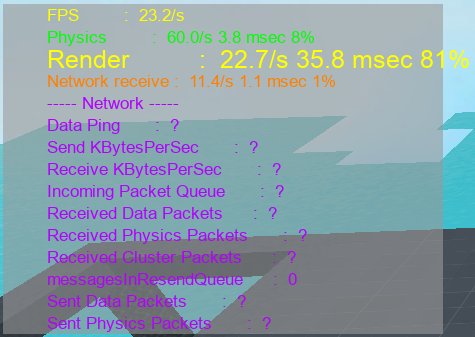
Roblox leans more heavily on the CPU for its core gameplay, but the GPU also plays a role, especially with graphics settings.
Ever wondered if your computer is sweating more from its processor or graphics card when playing Roblox? The question of “is roblox a cpu or gpu game” often pops up among players. It’s understandable given the variety of experiences available on the platform.
Knowing what component is most taxed helps you understand how to optimize your game and computer performance.
Understanding the game’s resource needs can improve your gameplay experience significantly.

Is Roblox a CPU or GPU Game?
Okay, let’s dive into the big question: Is Roblox more about your computer’s brain (the CPU) or its drawing muscles (the GPU)? It’s a bit like asking if playing tag is more about running or thinking – both are important, but one might be a little more crucial. With Roblox, the answer isn’t a simple one, because this game is a bit of a chameleon, changing its needs depending on what you’re doing within it. Let’s explore the details.
Understanding the CPU and GPU
Before we figure out where Roblox leans, it’s good to know what these two parts of your computer do. Imagine your computer is a little person.
The CPU: Your Computer’s Brain
The CPU, or Central Processing Unit, is like the brain. It handles all the thinking tasks, such as:
- Calculating game physics (how things move and bounce).
- Managing game logic (what happens when you click a button).
- Handling all the behind-the-scenes stuff that makes a game run.
The faster the CPU, the quicker your computer can think and perform these tasks. A good CPU keeps the game running smoothly, especially when there’s a lot going on.
The GPU: Your Computer’s Artist
The GPU, or Graphics Processing Unit, is like the artist. It takes the information from the CPU and turns it into what you see on your screen. It’s responsible for:
- Drawing the characters, buildings, and landscapes.
- Adding special effects, like explosions or water.
- Making everything look pretty and detailed.
The better the GPU, the more detailed and beautiful your game will look, and the smoother it’ll run at higher resolutions and frame rates. Think of it as adding more crayons and colors to your picture – a better GPU means more beautiful pictures.
Roblox: A Balancing Act
Roblox is not a single game; it’s a platform with tons of different experiences. Each game within Roblox is different, and this is what complicates the answer about CPU versus GPU usage. Generally, Roblox uses both, but the balance shifts depending on a few factors.
Factors Influencing CPU Usage in Roblox
Here are some of the things that make the CPU work harder in Roblox:
- Game Complexity: Some Roblox games have more complex rules, lots of scripts running, and lots of objects interacting. These games need more CPU power to keep things running smoothly. Imagine a simulation game with thousands of tiny moving parts – that needs a lot of calculations from the CPU.
- Number of Players: When you play with lots of other people, the CPU has to keep track of where everyone is, what they’re doing, and how they’re interacting. More players means more work for the CPU. Think of it like trying to keep track of 20 balls in the air instead of just 5.
- Physics Engine: The Roblox physics engine is responsible for how objects collide, move, and react. The more realistic the physics, the more calculations the CPU needs to do. Imagine building a complex structure out of blocks; the CPU needs to know how these blocks interact.
- Scripting: Many Roblox games use Lua scripting for unique gameplay features. These scripts are interpreted and executed by the CPU. A game with lots of complicated scripts will put more demand on the CPU.
Factors Influencing GPU Usage in Roblox
The GPU is doing its share of work too, especially when you see:
- Graphics Settings: The higher your graphics settings in Roblox, the more work your GPU does. Things like higher resolution, shadows, and reflections all make your GPU sweat. Imagine painting a picture; if you add more details and layers, you need better drawing tools.
- Number of Objects and Detail: A game with lots of objects, high-resolution textures, and detailed environments makes the GPU work harder to draw everything. A game with lots of tiny, complex pieces will make the GPU work hard to make it appear on the screen.
- Special Effects: Things like particle effects (for explosions, smoke, or magic), lighting effects, and reflections add extra strain on the GPU. Games with lots of these effects will be more demanding on the GPU.
- Frame Rate: If you’re trying to run Roblox at a very high frame rate (like 120 frames per second), this also asks your GPU to work hard. The higher the frame rate, the smoother the image will be, but this puts a lot of demand on your GPU to draw more images every second.
CPU or GPU Bottleneck?
Sometimes your computer’s parts can’t keep up with the game, causing a bottleneck. This means that one part is working super hard, while the other is waiting around, which can cause lag or make the game choppy.
CPU Bottleneck
A CPU bottleneck means your CPU is maxed out. You might notice these problems:
- The game might be slow, even if it’s not graphically complicated.
- You might experience stuttering and freezes when lots is happening.
- The frame rate will likely be inconsistent.
GPU Bottleneck
A GPU bottleneck happens when your GPU is struggling. Here are the signs:
- The game might look pixelated, low-res, or with low details, despite high graphics settings.
- You might see a significant drop in frame rate when lots of action or complex scenes occur.
- The game might feel like slow-motion.
The Roblox Experience: Case-by-Case
Let’s look at some specific types of Roblox experiences to understand where the stress falls:
Simple, Low-Poly Games
These are Roblox games with basic graphics, fewer complex elements, and usually fewer players. Examples include simple obstacle courses (obby’s) or games with basic building mechanics. For these, the CPU often takes the lead because it still handles the game’s basic mechanics, while the GPU doesn’t need to work too hard to render the simple graphics.
CPU Needs: Moderate.
GPU Needs: Low.
Action-Packed, Detailed Games
Games like simulators with detailed models, or action games with lots of effects, are different. Here, both the CPU and GPU work harder. The CPU handles player interactions, game logic, and physics, while the GPU renders all the pretty visuals, textures, and effects.
CPU Needs: Moderate to High.
GPU Needs: Moderate to High.
Massively Multiplayer Games
In these types of games, with many players in one virtual world, the CPU really needs to be strong. It must manage the positions and actions of everyone, along with keeping the server and game logic running smoothly. The GPU also works but may not be the main bottleneck.
CPU Needs: High.
GPU Needs: Moderate.
Building Games With Complex Creations
Games where players build extremely complicated structures or maps may put more pressure on both the CPU and GPU. The CPU calculates interactions and physics, and the GPU works to render the high amount of detail and objects, especially if they are intricate and have many parts.
CPU Needs: Moderate to High.
GPU Needs: Moderate to High.
Optimizing Your Roblox Experience
If you’re experiencing lag or performance issues in Roblox, here are some tips you can use:
Graphics Settings
Lowering your graphics settings in Roblox can ease the burden on your GPU. Try these:
- Reduce the graphics quality setting from ‘High’ to ‘Medium’ or ‘Low’.
- Turn off unnecessary effects like shadows or reflections.
- Reduce the resolution of your game.
Other Performance Tips
- Close any other programs running in the background that might be using up computer resources.
- Make sure your graphics drivers are up to date. Outdated drivers can sometimes cause issues.
- If you are playing on a laptop, ensure it is plugged into a power source for maximum performance.
- Make sure your computer has proper ventilation. If it’s overheating, it will not run well.
Hardware Upgrades
If you’re still having trouble after trying these tips, it might be time to think about upgrading your computer’s hardware. You might consider:
- Getting a better CPU, especially if you enjoy games with complex scripts, lots of players, or those with physics.
- Adding a more powerful GPU for more detailed graphics, higher frame rates, and smooth gameplay.
- Adding more RAM can also make a positive difference, especially if you have limited amount of it on your computer. 8GB is acceptable for some games, 16GB is preferred for more complex games.
So, is Roblox a CPU or GPU game? The real answer is that it depends! Roblox often uses both CPU and GPU, but the balance shifts depending on the complexity of the specific experience and its settings. Understanding how these components work together can help you optimize your gaming experience. By adjusting settings or upgrading parts, you can ensure Roblox runs smoothly and looks great.
CPU VS GPU: How Do They Affect Video Games?
Final Thoughts
Ultimately, Roblox leans more towards being a CPU-bound game. While the GPU handles graphics, the processing of game logic, physics, and scripting places a heavier load on the central processor. This makes the CPU a more critical factor for smooth gameplay.
Therefore, when asking ‘is roblox a cpu or gpu game’, the answer is it’s primarily a CPU-intensive experience. A powerful CPU will give you better performance overall in Roblox.

