
Yes, Unity is a good game engine, especially for beginners and those targeting multiple platforms due to its versatility and large community support.
Deciding on the right game engine can feel overwhelming. Many options exist, each with its own pros and cons. When starting your game development journey, a common question pops up: is unity a good game engine? It’s a valid question, considering the range of choices available to budding and established developers.
Unity provides a relatively gentle learning curve which makes it quite popular. It also boasts a massive asset store, and a helpful community. This means you will find plenty of resources when you are stuck.

Is Unity a Good Game Engine?
So, you’re thinking about making a game, and you’ve heard of Unity. That’s great! But the big question is: is Unity really a good choice? Let’s dig in and explore what makes Unity tick and whether it might be the perfect fit for your game-making adventures. We will cover a lot of ground, so get ready! We will go over its ease of use, the types of games you can create, costs, the community support, and everything else you need to make an informed decision.
What Exactly is Unity?
Think of Unity as a super-powered toolbox for game developers. It’s a game engine, which means it provides all the tools you need to build a game, from the very first idea to the moment players jump in and start having fun. It’s kind of like having a set of Lego bricks, but instead of building houses, you’re building whole new worlds! This engine lets you handle things like:
- Drawing graphics: Making the game look beautiful and interesting.
- Handling physics: Making sure things move realistically.
- Managing sounds: Adding cool music and sound effects.
- Writing code: Giving instructions to the game about how it should work.
Unity isn’t just for big game studios either. Lots of small teams and even individual people use it to create all sorts of amazing games.
Ease of Use: Is Unity Beginner Friendly?
One of the biggest draws to Unity is how user-friendly it is, especially when you are starting out. Let’s take a look at what makes it so accessible:
Visual Editor
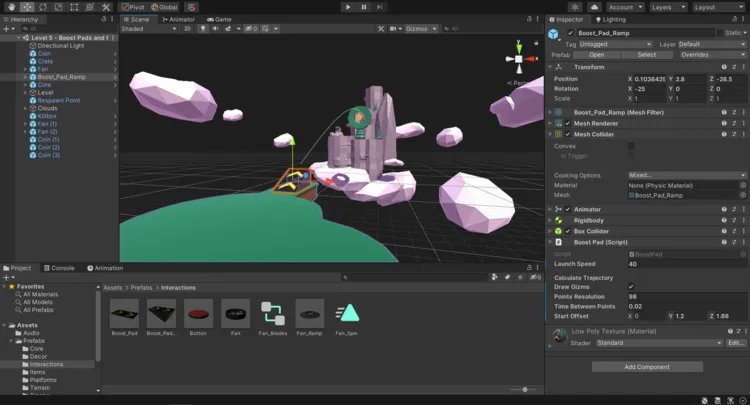
The visual editor is what you see when you open Unity. It’s like a canvas where you can place objects, characters, and other elements. You don’t always need to write code right away. You can drag and drop things around to make the level you want. This really helps beginners to understand how everything fits together before they start with the tricky stuff.
C# Programming
Unity uses a coding language called C#. While coding can seem scary at first, C# is known to be more simple and readable than many other languages. There are plenty of resources available online, like free tutorials and courses, that can help anyone learn C# step-by-step. Unity’s documentation is also fantastic, so if you’re stuck, there’s usually a good explanation available.
Asset Store
Imagine a store filled with all the things you could possibly need to build a game. That’s the Unity Asset Store. It’s filled with 3D models, sounds, pre-written code, and so much more. Many of these resources are free, which makes them great to try out! Instead of having to create all your assets from scratch, you can use these to quickly build your game and test your ideas.
What Types of Games Can You Make With Unity?
Unity is amazingly flexible. You can create almost any type of game with it. Here’s a glimpse of what you can achieve:
2D Games
Think of classic games like platformers and puzzle games. Unity makes making 2D games straightforward, using special tools and features specifically for working in two dimensions. These tools can handle things like tilemaps, animations, and collisions with ease.
3D Games
If you’re dreaming of making expansive 3D worlds with realistic characters, Unity can absolutely make this happen. It handles lighting, shadows, physics, and all the complex things involved in bringing 3D environments to life. From racing games to first-person shooters, Unity can do it all.
Mobile Games
Unity shines when it comes to mobile games. It allows you to create games for both Android and iOS devices, which makes it easy to reach a big audience. Unity lets you adjust controls and interfaces so that your game plays smoothly on phones and tablets. Many popular mobile games were made using Unity.
VR/AR Games
Want to build the future? Unity is also perfect for making VR (virtual reality) and AR (augmented reality) games. With the growth of VR headsets and AR mobile apps, Unity is a great place to start developing for these up-and-coming platforms. It lets you create immersive experiences that pull players right into the game world.
Multiplayer Games
Unity also supports multiplayer games, letting you connect players in the same game world. Unity provides features that can help you create real-time interaction between players. This allows you to make games where players can compete or play together online.
Cost of Using Unity
When considering any software, the cost is always a big concern. Here’s a breakdown of Unity’s pricing:
Personal Plan
The Unity Personal plan is absolutely free! This version is perfect for beginners, hobbyists, and anyone just starting out. There are some limitations, but it’s more than enough to learn Unity and develop your first games. The main limitation is that it’s for people making less than a certain amount of money in revenue, which means that many beginner developers don’t have to pay anything.
Paid Plans
If you are making a more serious project or are making a profit from the game you make with Unity, they do offer paid plans with more features. These plans are called Plus and Pro. They include access to more technical features and support, and are more helpful for team work. These plans vary in price, but for many small teams, these plans offer value with included features.
Important Note
Always check Unity’s official website for the most accurate and up-to-date pricing information. Sometimes, these plans change, or new ones are introduced.
Community and Support
Having a strong community and good support is vital for any game engine. Here’s what Unity offers:
Huge Community
Unity has one of the biggest communities of game developers around the globe. This means there are many people who have experience with Unity, and they are happy to share their knowledge. It’s easy to find answers to your questions by just searching the internet.
Forums and Groups
The Unity forums are a great place to ask for assistance. There are also numerous groups on social media that are all about Unity. You can ask questions, share your work, and connect with other developers. If you get stuck, someone will likely point you in the right direction.
Official Documentation
Unity provides extensive official documentation that will teach you about the engine in great detail. If you ever find yourself struggling, a good place to look is the documentation for that specific feature or part of Unity. This is a great resource for solving problems on your own.
Tutorials and Courses
You will find countless free and paid tutorials and courses for Unity online. Sites like YouTube, Udemy, and Coursera are loaded with content made by both Unity and other users. This is amazing if you like to learn by following video instructions.
Performance and Optimization
A well-performing game is important to any player experience. Here’s what you should know about Unity in this area:
Performance
Like any engine, Unity’s performance can vary based on your game and how you create it. If you develop it poorly, there may be issues. If you code it well and design it correctly, performance will not be an issue. Luckily, Unity includes tools to track game performance and identify problem areas in a game.
Optimization
Optimization is making sure your game runs smoothly. Unity offers many tools and ways to help you optimize your game. These tools let you reduce how much processing power your game needs. If you take the time to use these tools effectively, your game should run very well, even on different kinds of devices.
Advantages of Unity
Let’s recap the benefits of using Unity:
- Beginner-Friendly: Easy to learn with a visual editor and a beginner-friendly coding language, C#.
- Versatile: You can create 2D, 3D, mobile, VR/AR, and multiplayer games.
- Large Asset Store: Access to a huge library of free and paid assets to speed up development.
- Strong Community: Get help from many experienced developers through forums and tutorials.
- Free Option: The Personal plan is free for beginners and hobbyists.
- Cross-Platform: Make games for many different devices with ease.
Disadvantages of Unity
Like any tool, Unity also has some drawbacks that you should know about:
- Performance Overhead: Sometimes Unity games can have performance issues if they are not optimized properly.
- Can be Complex: Even though it’s beginner-friendly, more complex games can still be difficult to develop.
- Asset Store Costs: If you want high quality assets, you often have to pay for them in the asset store.
Is Unity the Right Game Engine for You?
The final answer to the question is that it depends on your goals. Here’s a simplified look:
If you are a Beginner
If you are just beginning, Unity is great. It is easy to use, has a free plan, and a supportive community to help you learn.
If you want to make diverse games
If you want to create different types of games, like 2D, 3D, mobile, and VR/AR games, Unity’s flexibility makes it a great choice.
If you need a community
If you would like a strong community and support system, Unity has a thriving and helpful community that will guide you through the problems you will face.
If you are working with a small team
If you are working on a small project, the low cost and many resources available in Unity can help bring your game to life.
If any of those things described above is what you need, Unity may be the perfect engine for you. It is an engine that can be easy to learn, yet can grow with you as your game development journey gets more complex. It can help you bring your dream game to life!
Unity offers an accessible starting point with the free version, a great community, and a large resource base to learn the engine. It’s used by huge studios and small indies for all kinds of games. If you do your research and use the tools properly, you can make incredible games with Unity. Take a look at its features and see if it fits your game development goals. You might just make the next big hit with Unity!
Is Unity a bad game engine!? 👩💻👾 #technology #programming #software #gamedev #gaming
Final Thoughts
Ultimately, Unity offers a very accessible entry point for developers. Its large community provides ample support and assets. The engine’s versatility suits both 2D and 3D projects.
Considering its features and ease of use, is unity a good game engine? For many, the answer is yes. However, its suitability depends on project needs and preferences. Choosing the right engine is crucial.

