
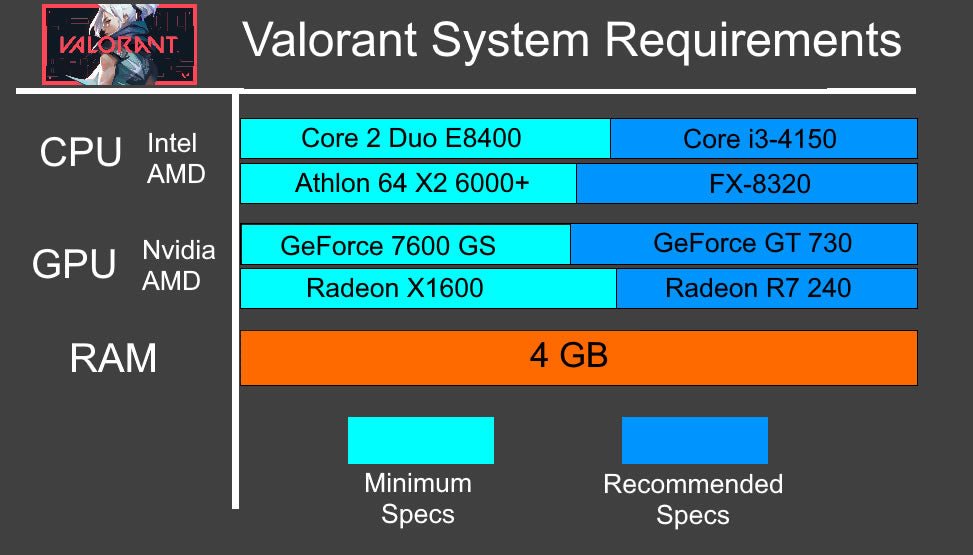
Yes, Valorant is primarily a CPU-based game, meaning its performance relies heavily on your processor.
Wondering if your PC is up to the task? Many gamers ask, “is Valorant a CPU based game?” The answer isn’t always straightforward. A game’s performance hinges on several factors, but the central processing unit plays a vital role in Valorant.
This is because the game relies on the processor for complex calculations, such as character movement and in-game actions. Therefore, a more powerful CPU can lead to smoother gameplay.

Is Valorant a CPU Based Game?
Alright, let’s get right into it. You’re here because you’ve probably heard that Valorant relies more on your computer’s brain (the CPU) than its muscle (the graphics card or GPU). It’s a pretty common question for gamers wondering how to get the best performance. So, is that statement true? Yes and no. It’s a bit more complicated than a simple yes or no. Let’s dig deeper and see what’s actually happening under the hood when you fire up Valorant.
Understanding CPU and GPU Roles in Gaming
Before we dive into Valorant specifically, let’s talk about what the CPU and GPU actually do when you’re playing a game. Think of it like this:
- CPU (Central Processing Unit): This is like the brain of your computer. It’s responsible for all the logic and calculations. In a game, the CPU handles things like player movement, game rules, enemy AI, and all the little things that make the game work.
- GPU (Graphics Processing Unit): This is like the artist of your computer. It’s in charge of taking all that information and turning it into the images you see on your screen. It renders the characters, the environments, the special effects – all the pretty stuff.
Both components work together, but they do different jobs. So, a game can be “CPU-bound” meaning that it relies more on the CPU, or “GPU-bound” meaning it relies more on the GPU. The balance between these two is different for each game.
How Valorant Uses Your CPU
Valorant, unlike some other games, has a bigger reliance on the CPU for a few key reasons. Let’s explore these.
Game Logic and Calculations
Valorant is a tactical shooter. That means there are a lot of calculations happening in real-time. Think about:
- Where each player is
- What direction they are looking
- When they shoot, what happens to the bullet
- Where the abilities go, how long they last, and what they do
All of these calculations are done by the CPU. The more players and actions on screen, the harder the CPU has to work. It needs to keep everything precise and synchronized to give every player a fair experience.
Lightweight Graphics
Valorant’s art style is intentionally not super detailed or graphically complex. It uses what people call a “low poly” style and has textures that aren’t extremely heavy. This helps make the game run on a wider variety of computer setups. But this also means the GPU does not have to work as hard as it might have to in other games. While the GPU still plays its part for rendering, this reduced graphical workload shifts some performance demand back to the CPU, where the game logic is primarily handled. The art style makes the CPU more impactful because it means the GPU is not the one that is struggling to render the game’s visuals.
The Importance of Frame Rate
In a competitive shooter, having a high frame rate (FPS) is important. A higher FPS makes the game feel smoother, reducing input lag. Input lag is the delay between when you press a button and when the action happens on the screen. The CPU plays a big role in delivering higher frame rates. When the CPU can process the game’s calculations quickly, it can tell the GPU what to draw more often, leading to more frames per second. This is why people with good CPUs often experience more fluid gameplay in Valorant.
How Valorant Uses Your GPU
While the CPU takes the spotlight in Valorant, the GPU is still important. It’s not as demanding on the GPU as some other modern games, but it absolutely needs to be up to par. Here’s what the GPU handles in Valorant.
Rendering the Game World
The GPU is responsible for drawing the entire game world on your screen. Even though Valorant’s art style isn’t demanding, the GPU has to render all the characters, environments, special effects, and more. It translates the information from the CPU to something you can see and enjoy.
Visual Settings
Your visual settings in Valorant impact how hard your GPU has to work. If you set everything to the maximum settings, your GPU will do more work. This includes things like:
- Texture Quality
- Anti-Aliasing
- Shadow Quality
- Ambient Occlusion
If you want to get better performance from your computer, especially if you’re having performance issues, reducing these settings can help your GPU perform better, freeing up some processing power.
Higher Resolutions
Playing at higher resolutions, like 1440p or 4K, also makes the GPU work harder. This is because the GPU has to render more pixels, and it requires more resources. So, if your CPU is doing well, but you have a lower-end GPU, you might have problems playing at high resolutions. It’s often recommended that if you have an older GPU you stick to 1080p resolution for Valorant, and if you have a strong GPU you can try higher resolutions.
CPU vs GPU in Valorant: Which Matters More?
So, after all that, which is more important for Valorant? Generally, the CPU matters a bit more for getting consistent high frame rates, while the GPU is still important for rendering the game visually. Here’s a breakdown to help you understand:
When the CPU is the Bottleneck
If you are seeing low frame rates, and those rates drop even more when there’s a lot happening on screen, that may mean your CPU is the bottleneck. Common signs of a CPU bottleneck in Valorant include:
- Low FPS in general
- FPS dropping considerably during gunfights or when multiple abilities are used
- High CPU usage and low GPU usage
- Stuttering or inconsistent frametimes
When the GPU is the Bottleneck
If your frames are stable, but you are seeing very low fps, then the GPU may be the problem, especially at higher settings or resolutions. Signs of a GPU bottleneck in Valorant can be:
- Low FPS that doesn’t change much when the action in the game increases.
- High GPU usage and low CPU usage
- Having better performance when you lower your settings
Testing Your System
Want to see if your system is bottlenecked by your CPU or GPU? There are a few ways you can do this.
In-Game Performance Metrics
Valorant has a built-in performance monitoring tool. You can find it in the settings menu. It shows you your FPS, CPU usage, and GPU usage. These values will give you an indication of how your components are performing.
Third Party Programs
Programs like MSI Afterburner and HWMonitor are good for monitoring the performance of your system. They give you detailed information about your hardware’s performance, such as:
- CPU usage and temperature
- GPU usage and temperature
- RAM usage
- Frame times
These programs can give you a detailed look at how your computer is handling Valorant and where the potential bottleneck is happening.
How To Improve Performance in Valorant
If you find that either your CPU or GPU is struggling, you can take a couple steps to try and get more FPS from the game.
Optimizing Your Settings
One easy way to improve performance is to lower your graphic settings in Valorant. Try the following:
- Lower all your settings to low and see how that improves performance.
- Reduce resolution to 1080p if you are playing at a higher resolution.
- Test different graphic settings to find the best balance between visual quality and FPS.
Keeping Drivers Updated
Make sure you have the most recent drivers for your video card. These drivers help your card communicate properly with the game, and game developers frequently update drivers to improve performance of different games. This can lead to significant performance improvements.
Overclocking Your System
Overclocking your CPU and/or GPU can push it to give more performance. But be aware this also pushes the hardware more, so do your research beforehand. There are many tutorials and guides for this, but it is usually only for more advanced users.
Upgrading Hardware
If none of the other tricks work, consider upgrading. A better CPU can improve performance a lot on Valorant. Make sure that if you do upgrade, the new component you are adding is compatible with the other components in your system.
Specific CPU Recommendations for Valorant
Knowing that Valorant is CPU-heavy, what kind of CPUs should you be targeting for smooth gameplay? Here are a few options.
Entry Level CPUs
For a good experience on low settings, try:
- AMD Ryzen 5 5500
- Intel Core i5-12400F
These are good choices for 1080p gaming on low-medium settings.
Mid-Range CPUs
For higher settings at 1080p or even 1440p, consider:
- AMD Ryzen 7 5700X
- Intel Core i5-13600K
These will give you consistent high frame rates and the ability to use high settings.
High-End CPUs
If you want to get every last bit of performance out of Valorant, these CPUs will work well:
- AMD Ryzen 9 7900X
- Intel Core i7-13700K or higher
These are good for high refresh monitors at higher resolutions like 1440p or even 4k.
Specific GPU Recommendations for Valorant
Even though Valorant is more CPU-focused, having the right GPU is important as well. Here are some options at different levels:
Entry Level GPUs
For 1080p gaming on low-medium settings:
- AMD Radeon RX 6600
- Nvidia GeForce RTX 3050
Mid-Range GPUs
For 1080p gaming on high settings or 1440p gaming on medium settings, consider:
- AMD Radeon RX 6700 XT
- Nvidia GeForce RTX 3060 Ti
High-End GPUs
For high refresh rates at 1440p or 4K, you can try:
- AMD Radeon RX 7900 XT
- Nvidia GeForce RTX 4070 or higher
This list is not exhaustive, and many other GPUs can perform well on Valorant. However, these are some common and very popular ones that are very capable of running the game.
In conclusion, while Valorant is definitely a game where your CPU performance matters a lot, the GPU still plays a crucial role in how the game looks and performs. Having a good balance of the two is important to have a good gaming experience. Knowing how each component works lets you figure out how to best play Valorant, and what improvements can give you a competitive edge.
Upgrade CPU or GPU to increase fps on Valorant? TenZ explains
Final Thoughts
Valorant leans heavily on the CPU for game calculations. A strong CPU ensures smooth gameplay and consistent frame rates. While a good graphics card is beneficial, the CPU is paramount for performance in Valorant.
Therefore, the answer is that is valorant a cpu based game, definitely yes. This means focusing on your CPU upgrade can significantly improve your gaming experience. Players should consider the central processor’s performance.

