
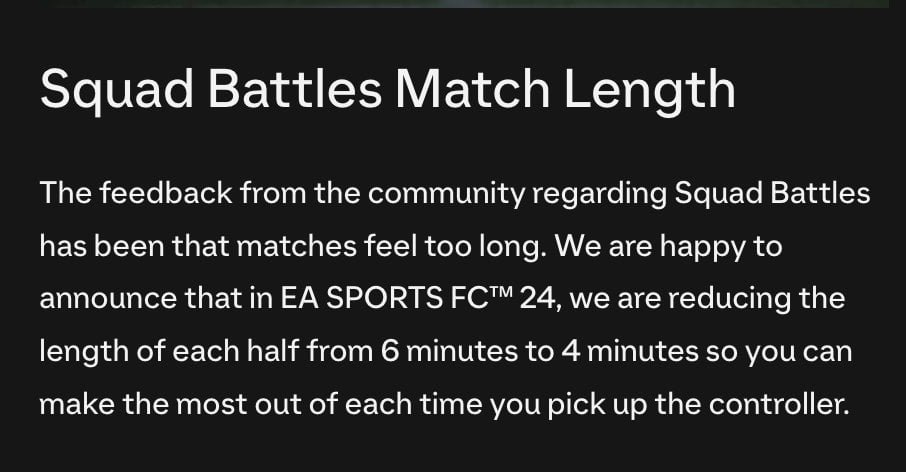
A squad battles game lasts roughly 12 minutes of in-game time, divided into two 6-minute halves.
Wondering about the time commitment for a match in FIFA’s Squad Battles mode? It’s a common question, especially when fitting in a few games around a busy schedule. So, how long is a squad battles game actually?
The good news is, it doesn’t take ages. You’ll be in and out in a manageable amount of time. Each game is split neatly into two halves for fairly consistent match durations.

How Long Is a Squad Battles Game?
Okay, let’s dive right into the heart of it: how long does a Squad Battles game actually take? This question is super important for gamers who are planning their playing time, whether you’re trying to squeeze in a quick match before school or settle in for a long session on the weekend. Knowing the time commitment helps manage our gaming schedule and make sure we get to have fun without the game overrunning our day. It’s not just about button-mashing; it’s also about strategy, planning, and making the most of your time.
The Basic Game Length
First off, each Squad Battles game in FIFA (or EA FC as it’s now known) is set up with two halves. These halves aren’t the usual 45 minutes of real-world soccer. Instead, they’re much shorter. Each half runs for just 6 minutes of game time. That means a full Squad Battles match is 12 minutes long of actual gameplay. This 12 minute gameplay duration remains constant no matter which game difficulty you play in squad battles.
Now, that’s not the whole picture. It doesn’t mean that you’ll only spend 12 minutes on each match. There are other things that contribute to total time.
Additional Time Factors
While the core gameplay is 12 minutes, several other factors lengthen the overall time spent on a Squad Battles game. These include things like loading screens, goal celebrations, replays, and other in-game breaks. Let’s break these down:
- Loading Screens: Before each game starts, there are loading screens. These can vary in length depending on your device. Older consoles might have longer loading times compared to new, more powerful devices.
- Goal Celebrations: If you’re scoring a lot (hopefully!), then celebrations take up a bit more of game time. Each celebration takes some seconds, and though it can be skipped, not all players skip them, thus they add up.
- Replays: After significant moments (especially goals), you get a replay. These are great for those epic moments, but they also add time.
- Half-Time: There is a small half-time break in between both the halves. This can sometimes be a few seconds, and sometimes it might take a bit longer.
- Menu Navigation: Before and after your games, you also have to spend some time in the menus. This can include starting a game, navigating through the menus, selecting the difficulty or confirming your team lineup. Also after the game, time is spent on viewing the rewards and going back to the squad battles lobby.
Considering all these extra moments, a Squad Battles game usually takes somewhere between 15 to 20 minutes of your real-life time. Sometimes it might take even less, say around 14 minutes, if there are not many goals or celebration and replays are skipped. But its not just the time of the game that we should consider. There is also the additional time it takes to plan your games.
Planning Your Squad Battles Games
Before you jump into playing, some planning can be helpful. This planning can be for selecting the right team, the right difficulty setting, and which games you’re going to play.
Here are some things to consider:
- Difficulty Level: Choosing the right difficulty setting will impact the amount of time you spend actually playing. Lower difficulties may end quicker if you score several goals early on. Harder difficulties may need you to play more carefully, which can also influence the time it takes to complete a match.
- Matchups Selection: When you refresh, you see several team options. Each team is not always on the same difficulty level. Some might be rated lower and some might be rated higher. Choosing your matches wisely, especially considering the rewards, can be a little time-consuming.
- Team Preparation: Before playing, reviewing your squad’s formation and player fitness can take some extra minutes.
These planning bits add to the total time you spend on Squad Battles. While the actual in-game time is always 12 minutes, the time that we spend around the game varies depending on how much we are taking our time. This is why it’s a good idea to allocate a block of time rather than just expecting to play only for 12 minutes.
How Game Difficulty Affects Game Time
The difficulty setting doesn’t directly alter the 12-minute length of the game but affects how the game unfolds, impacting the total time it takes you to finish a match. Let’s look at how:
Lower Difficulties
On lower difficulties such as Beginner or Semi-Pro, the computer-controlled opponent is easier to beat. You’re likely to score more goals faster. That means more celebrations and replays (which you can, of course, skip). Games on lower difficulties can actually be shorter overall because you dominate the ball more.
Higher Difficulties
When you are playing against World Class or Legendary opponents, the gameplay will likely be a bit different. Here are a few things that can happen:
- More Defending: You may spend more time defending. More defending means less time when the ball is at your feet.
- Fewer Goals: It may take more time for you to score. And the more difficult the game, the more time it takes to score. Because the opposition defense is tighter and more organized, you have to be more careful about your attacking approach.
- More Careful Play: On higher levels, you may find yourself being more careful with your passes and shots, trying to not lose possession. This can mean you might play more slowly.
These things can add small amounts of time to each match, pushing that 15-20 minutes up towards the 20-25 minutes mark if a match is really hard fought. While the actual playing time doesn’t change, the flow of the game does, impacting overall session duration.
Impact on Rewards and Time
One of the big reasons we play Squad Battles is for the rewards. The rewards are based on your performance for the week. Therefore, we need to be aware of the game time so that we are not late on playing the necessary amount of matches for optimal rewards. This ties in directly with knowing how long each game takes:
- Planning Your Grind: If you have specific reward goals you want to reach, knowing how long each game takes is very important. If you aim to get into the highest tiers, you need to play a number of matches over the week. If you know each game will take about 15-20 minutes, then it’s easier to schedule those matches into your week.
- Balancing Effort and Reward: It is up to each individual player to decide which difficulty they want to play at. Sometimes it may be beneficial to play on a lower difficulty to quickly get the needed squad battle points. And sometimes it is better to play on a higher difficulty to have better and more point at the expense of more time per match.
Understanding the time investment for each match helps you figure out the best way to maximize your rewards with the time you have available.
Tips for Managing Your Squad Battles Time
Time is precious. To make sure you get the most out of Squad Battles while keeping a balanced gaming time, here are some tips:
- Set a Time Limit: Decide how long you want to play before you start. This could be 30 minutes, an hour, or more. When you are done with your allocated play time, its time to turn off the console or PC.
- Skip the Extras: If you want to save time, skip celebrations and replays. These can add up and take more time out of your session.
- Plan your Matches Ahead: Use the squad refresh to look at the opponents. Plan to play the easiest teams to achieve your goals quicker, or if you are up to the challenge, play the tougher ones for more points.
- Use Quick Menus: Learn to navigate menus quickly and efficiently.
- Take Breaks: Don’t try to play too many matches in one go. Take short breaks to avoid getting tired or burnt out. This will also ensure you have a much more fresh mind when you get back to the game.
By using these tips, you can manage your time and enjoy your gaming experience without letting the game take over your life!
Squad Battles Across Different EA FC Games
While the core structure of Squad Battles – 12-minute games, added time for replays etc – has remained fairly consistent across different versions of the game in the past years. However, there can be small changes in the menu times or loading times depending on the specific game version. Here’s a general view:
- Consistency in Game Length: Generally, the 6-minute halves have been a standard for Squad Battles in recent years. You can expect the actual gameplay to remain consistently around 12 minutes no matter which edition of the game you’re playing.
- Minor Variation in Loading/Menu Times: With each new EA FC title, there may be some changes in menu design or loading times. These changes are usually minor and don’t have a big influence on the overall game time but can differ slightly from year to year.
- Console Differences: The specific console or gaming PC you are using does matter. The game on more powerful and newer consoles or PCs will load much faster and run much smoother. While the actual gameplay won’t be shorter, the amount of time you spend between matches can differ based on the device.
Therefore, whether you are playing the newest edition of EA FC or a slightly older one, the expected playtime remains similar. The same tips and methods described above can be used for any year of the game.
In short, a Squad Battles game is more than just the 12 minutes you spend on the pitch. It’s the time before, during, and after the game, including menu navigation, loading screens, and match planning. Considering all of this can help you plan your gaming sessions so that you have enough time to play and achieve your objectives while still having time for other important things in life. By understanding the different time elements involved, you’ll be able to more efficiently and enjoyably play your squad battles.
Is Squad Battles Worth It in EA Sports FC 24?
Final Thoughts
A full Squad Battles game lasts approximately 12 minutes of in-game time. This includes two 6-minute halves, and any extra time added for stoppages. The actual duration might vary slightly depending on how many pauses occur.
However, the total time commitment becomes longer when you factor in loading screens and menu navigation. Therefore, plan for around 15-20 minutes per match when you play. Knowing how long is a squad battles game helps you plan your game sessions.

