
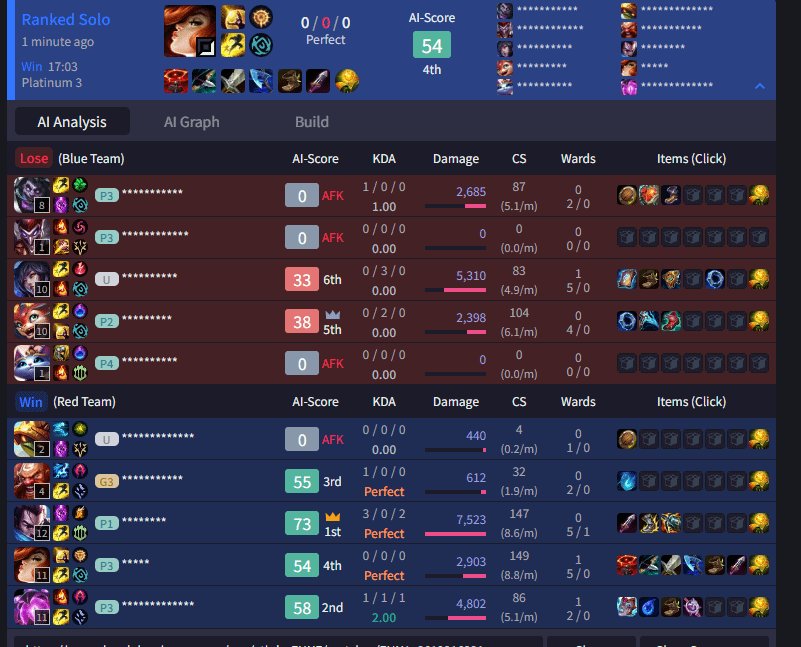
The game client disconnects some players, and while Vanguard might contribute, it’s not the sole cause of all disconnections.
Have you experienced frustrating disconnects during intense League of Legends matches? Many players are questioning if the Riot Vanguard anti-cheat software is to blame for these issues. The question on everyone’s mind is vanguard causing people to dc league games, and it’s a valid concern. We’re diving into the reasons why you might be losing connection mid-game.
While Vanguard certainly has a role in how League runs on your system, it is not always the source of disconnection problems. These problems can often arise from various other factors. These can include server issues, internet problems, or even outdated hardware.

Is Vanguard Causing People to DC in League Games?
Let’s talk about something that’s been bugging a lot of League of Legends players: getting disconnected, or “DC’ing,” from games. It’s super frustrating, right? You’re in the middle of an awesome battle, maybe about to make a big play, and then… poof! You’re staring at the loading screen again. Lately, many people have been pointing fingers at Riot Games’ anti-cheat system, Vanguard, wondering if it’s the culprit behind these annoying disconnections. So, is Vanguard causing players to DC from League of Legends games? Let’s dive in and see what’s going on.
Understanding Vanguard: What is it?
Before we point any fingers, let’s understand exactly what Vanguard is. It’s Riot Games’ custom-built anti-cheat software. Think of it like a super-powered security guard for their games, including League of Legends. It works by running in the background of your computer, watching for any shady activity that might give players an unfair advantage. This includes things like cheating programs or scripts. It’s meant to make the game more fair and enjoyable for everyone.
Vanguard works at a very deep level of your computer, meaning it’s always running, even when you’re not playing a Riot game. This “always-on” nature is actually what some people are concerned about, as it can sometimes interfere with other software or processes on your computer.
The Connection Between Vanguard and Disconnects: The Theory
The theory goes like this: because Vanguard operates so deeply within your system, it might be interacting with other programs or drivers in a way that causes your connection to the game server to drop. Imagine it like this: if two kids are playing, and one kid starts yanking on the other’s arm, it might make them stumble. That’s kind of what people think is happening with Vanguard and League of Legends. They think the heavy and deep operation of Vanguard might be interfering with the game processes leading to disconnects.
Players report experiencing disconnections at random times during matches, sometimes repeatedly. This has led some people to directly associate the problem with Vanguard, especially when these issues started becoming noticeable after Vanguard’s introduction into League of Legends.
Investigating the Claims: Is there Evidence?
Okay, so we’ve heard the theory. But is there real evidence to back it up? This is where things get a little complicated. There’s no simple “yes” or “no” answer. While many players believe Vanguard causes disconnects, it’s hard to definitively prove that’s the only reason, or even the main reason. Here’s what we know:
- Correlation vs. Causation: Just because disconnections increased around the same time Vanguard was implemented, it doesn’t automatically mean Vanguard caused them. This is the difference between correlation (they happened at the same time) and causation (one thing directly made the other happen). Many things can cause disconnects like internet issues, computer issues and game issues.
- Community Feedback: There is definitely a lot of player feedback saying that disconnects are worse since Vanguard. We can’t just ignore the sheer volume of players stating they are experiencing this issue and linking it to Vanguard.
- Official Response: Riot Games, the company that makes League of Legends, is aware of these concerns. However, they haven’t officially confirmed that Vanguard is causing widespread disconnect issues. They have acknowledged reports of issues and said they are investigating. They often emphasize troubleshooting general internet and computer problems as an initial step.
Other Potential Culprits for Disconnects
Before we completely blame Vanguard, we have to remember that tons of other things can cause disconnections in online games. Here are some major culprits that could be causing the disconnections that players are experiencing:
Internet Connection Issues
This is often the main reason for disconnections in any game. Check your home internet to see if there’s anything wrong with it. Here are some things you should check:
- Weak Wi-Fi signal: If you’re using Wi-Fi, try moving closer to your router, or better yet, use an ethernet cable for a more stable connection. A weak signal causes the connection to be unstable and inconsistent, therefore, increasing the chances of disconnecting from the game.
- Overloaded Network: If multiple people in your house are using the internet, this could slow down your connection. If there are people watching videos, downloading files or playing games at the same time, it could all be competing for bandwidth. Consider the usage of others on the internet at the same time as you.
- Internet Service Provider (ISP) Problems: Sometimes, the problem is with your ISP itself. There might be outages or maintenance. Contact your ISP if you think this is the cause.
- Old Router: Older routers can struggle with modern internet demands. If your router is a few years old, it might be time to update it. A good router makes a big difference to the speed and stability of your internet, which can prevent disconnects.
Computer Performance Problems
Your computer itself can also be the reason why you’re disconnecting. Your computer needs to be fast and reliable to run League of Legends without any issues. Here are some of the issues to look out for:
- Outdated Drivers: Make sure your computer’s drivers, especially graphics card drivers, are up-to-date. Outdated drivers can cause all sorts of weird issues, including disconnections. You can update drivers by going to your computer’s settings or through the specific graphics card control panel.
- Overheating: If your computer gets too hot, it might start to malfunction, causing disconnections. Make sure your computer is well-ventilated and that the fans are running properly. If your computer gets too hot, it might not work as well. Clean your vents regularly to ensure good airflow, and consider using a cooling pad if you play on a laptop.
- Not Enough RAM: If your computer doesn’t have enough RAM, it might struggle to run League of Legends properly. You could try closing other applications before running the game to help. If you regularly run a lot of programs at once, you might need to upgrade your RAM if you are experiencing disconnects due to this.
- Background Applications: Too many programs running in the background can also slow down your computer. Close any unnecessary applications before playing. Even programs you don’t actively use can be eating up memory and slowing things down.
Game-Specific Issues
Sometimes, the problem is with the game itself. Here’s what that can look like:
- Server Problems: Riot’s game servers aren’t always perfect. Sometimes, there are server issues that can cause disconnections. Check the official League of Legends status page to see if there are known problems. When the servers are experiencing problems it can sometimes be widespread so it’s best to check before you attempt any other solutions.
- Game Bugs: Like any software, League of Legends can have bugs, which sometimes cause disconnects. Riot Games regularly releases updates to fix these issues. Make sure to update your game whenever a new patch comes out, as these can address bugs that are causing issues for you.
Software Conflicts
Sometimes, other software on your computer might be conflicting with League of Legends or Vanguard. These types of softwares can cause disconnects or make your game lag and affect your gameplay. Here’s what you need to watch out for:
- Overlays: Overlays from programs like Discord or Steam can sometimes cause problems. Try turning them off to see if that helps. Overlays add a layer of interaction on top of your game. Sometimes, this additional layer can cause conflict with League of Legends.
- Anti-Virus Software: In some cases, your anti-virus software might be blocking parts of the game or Vanguard. You might need to add an exception for them or temporarily disable your anti-virus to see if that helps with disconnect issues. Anti-virus software is designed to be very cautious. This can sometimes mean that they prevent safe programs from running as well, which is what you need to be careful of.
Troubleshooting Disconnects: How to Fix It
If you’re experiencing disconnects, don’t worry! There are steps you can take to try and fix the problem. We will now delve into some things that you can do to fix your disconnect issues:
Basic Troubleshooting Steps
These are some basic steps you should take to ensure that everything is working as it should:
- Restart Your Computer and Router: This is often the easiest and quickest fix. Turning both devices off and then on again can help with temporary problems.
- Check Your Internet Connection: Use an internet speed test to check your speed and ping. This can help you determine whether the problem is with your internet connection.
- Update Drivers: As we discussed above, keeping your drivers up to date is important for optimal computer performance. Make sure you check for new driver updates on a regular basis.
- Close Unnecessary Programs: Make sure to close any programs you are not using while you play League of Legends.
Advanced Troubleshooting Steps
If the basic troubleshooting steps didn’t help, there are some more advanced steps you can try. But remember that they’re more complicated and should only be done with caution:
- Temporarily Disable Vanguard: You can temporarily turn off Vanguard to see if it stops your disconnects, this can help you identify whether or not it is the culprit. Check the Riot Games support website on how to disable Vanguard. Please remember that you won’t be able to play League of Legends when Vanguard is turned off, it is only for testing purposes.
- Whitelist League of Legends and Vanguard: Add exceptions for League of Legends and Vanguard in your antivirus and firewall settings. This can stop the antivirus from blocking parts of the game from running properly.
- Clean Boot Your Computer: A clean boot can help identify software conflicts by starting your computer with only essential programs running. This process is more complex, so make sure to follow instructions carefully. You can find tutorials on the internet on how to clean boot your computer safely.
- Reinstall League of Legends: If all else fails, try reinstalling League of Legends and Vanguard to fix any potentially broken files. Sometimes, files might get corrupted and stop working properly. This can usually be fixed with a reinstallation.
What Riot is Doing
Riot Games is actively working to improve Vanguard and address player concerns. They regularly release updates to improve its performance and compatibility. They also monitor player feedback and game data to identify potential issues. They also encourage players to report issues through official channels, like in their official help page or Reddit, to help them track down and fix these problems. Riot is trying its best to fix the issues players are having with Vanguard.
It’s also good to remember that anti-cheat software is constantly evolving. As cheaters find new ways to gain an advantage, anti-cheat systems need to be updated to stay ahead of them. This process sometimes can cause problems with regular users which is a part of the process.
A Final Word
So, is Vanguard definitely causing all those disconnects? The answer isn’t a simple yes or no. While some players do have issues that might be related to Vanguard, it’s important to remember that many other things can cause disconnections. Things like internet issues, computer problems and the game itself can all lead to disconnections.
By taking some basic troubleshooting steps and staying informed, we can all work together to make sure we have a good time playing League of Legends. Keep trying to find solutions for the disconnects, and stay connected to the community so we can stay informed on this issue.
Why Does Nadia Stand Like This? 😂
Final Thoughts
Reports suggest connectivity issues and crashes plague some players. These problems happen during League of Legends matches, raising suspicions. This leads to the question: is vanguard causing people to dc league games?
Further investigation is needed to pinpoint the root cause, however many speculate. These disruptions might be linked to Vanguard software, or other factors. It is essential to observe and document carefully for accurate analysis. The community must share their experiences.
Ultimately, is vanguard causing people to dc league games remains a main concern. More evidence must surface for conclusive answer to this issue. Players need a stable and reliable game experience.

