
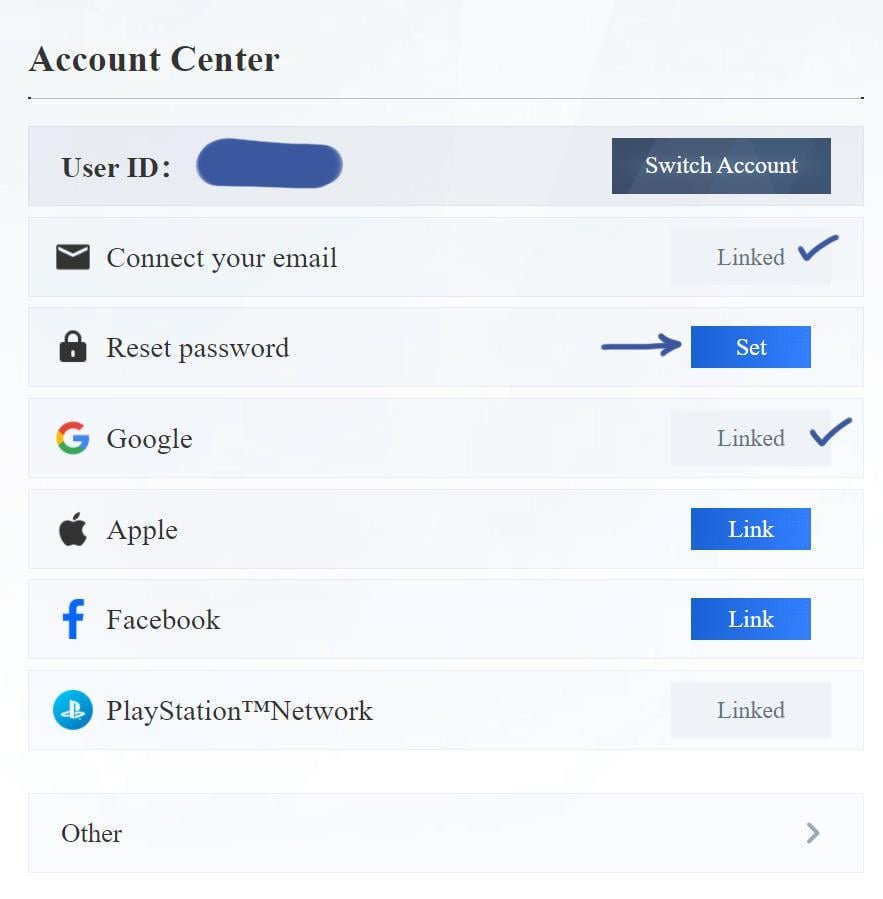
Kuro Games account linking typically involves connecting your game account (e.g., from Punishing: Gray Raven) to a social media account or email address to save your progress, access cross-platform play, and ensure account security.
Worried about losing your precious game progress in Punishing: Gray Raven? We understand the feeling! That’s why mastering Kuro Games account linking is so important.
It’s your safety net, ensuring your hard-earned characters and achievements are safe.
This article will guide you through the process. Think of it as your quick guide for Kuro Games account linking to prevent potential headaches down the road.

Kuro Games Account Linking: A Comprehensive Guide
Connecting your Kuro Games account to other platforms can enhance your gaming experience. It offers convenience and ensures your progress is saved. This guide explains the process and benefits of linking your Kuro Games account.
Why Link Your Kuro Games Account?
Linking your account offers several advantages. It ensures data backup and provides cross-platform access. You gain access to exclusive rewards, too.
Data Security: Linking prevents data loss in case you change devices.
Cross-Platform Play: Play your favorite Kuro Games titles on multiple devices with the same progress.
Exclusive Rewards: Receive special in-game items and bonuses for linking.
Available Linking Options
Kuro Games typically supports multiple linking options. These usually include social media platforms and dedicated gaming accounts. Knowing these options helps choose the most convenient one for you.
Google Account: Link using your Google account for easy access.
Facebook Account: Connect through Facebook for social integration and convenience.
Apple ID: iOS users can link with their Apple ID.
Email Address: Use your email address as an alternative linking method.
How to Link Your Kuro Games Account
The linking process is generally straightforward. Follow these steps to connect your account successfully. The in-game settings menu is usually where you begin.
Step 1: Access Settings: Open the game and navigate to the settings menu.
Step 2: Find Account Options: Look for account linking or user center options.
Step 3: Choose Platform: Select the platform you want to link (e.g., Google, Facebook).
Step 4: Follow Prompts: Follow the on-screen instructions to authorize the connection.
Step 5: Verify Connection: Ensure the linking is successful by checking the account settings.
Troubleshooting Common Linking Issues
Sometimes, linking can be problematic. This section covers some common issues and how to resolve them. Addressing these quickly prevents frustration.
Incorrect Credentials: Double-check your login details for the platform you are linking.
Network Issues: Ensure you have a stable internet connection.
Account Already Linked: Verify that the account you are trying to link isn’t already connected to another Kuro Games account.
Platform Restrictions: Some platforms may have restrictions based on region or age.
Game Updates: Make sure your game is updated to the latest version.
Specific Linking Instructions for Popular Kuro Games
Each Kuro Games title may have slightly different linking instructions. This section provides specific guidance for some popular games. Knowing the subtle differences helps.
Punishing: Gray Raven Account Linking
Punishing: Gray Raven offers various linking options. The process is simple, but here’s a quick guide. Be aware of the game’s specific menu layout.
Step 1: Open the Game: Launch Punishing: Gray Raven on your device.
Step 2: Access Player Profile: Tap on your avatar to open the player profile.
Step 3: Account Settings: Look for “Account” or “User Center” settings.
Step 4: Link Options: Choose the platform you want to link (Google, Facebook, etc.).
Step 5: Follow Instructions: Complete the linking process by following the on-screen prompts.
Linking to Third-Party Services
Some Kuro Games might allow linking to third-party services. This adds more layers of integration. Understand the risks and benefits.
Twitch Integration: Link to Twitch for streaming rewards and benefits.
Discord Connection: Connect to Discord for community features and updates.
Gaming Platforms (Steam, etc.): Link to gaming platforms for seamless access.
Unlinking Your Kuro Games Account
You might need to unlink your account for various reasons. The process is usually similar to linking. Here’s how to do it.
Access Account Settings: Navigate to the account settings within the game.
Find Linked Accounts: Look for a section that displays your linked accounts.
Choose Account to Unlink: Select the account you want to remove.
Confirm Unlinking: Follow the prompts to confirm your decision.
Be Aware of Consequences: Note that unlinking might affect your game progress or access to certain features.
Security Considerations for Account Linking
Security is paramount when linking accounts. Ensure you understand the potential risks. Take precautions to protect your information.
Use Strong Passwords: Create strong, unique passwords for all your accounts.
Enable Two-Factor Authentication: Add an extra layer of security with 2FA.
Be Wary of Phishing: Avoid clicking suspicious links or sharing your credentials.
Monitor Account Activity: Regularly check your linked accounts for any unauthorized activity.
Review Permissions: Understand what permissions you are granting when linking.
Benefits of Using Kuro Games Account System
Using Kuro Games’ dedicated account system brings many benefits. These include better game management and cross-game synergy. Take full advantage of these benefits.
Centralized Account Management: Manage all your Kuro Games titles from one account.
Cross-Game Rewards: Earn rewards in one game that can be used in another.
Unified Profile: Maintain a consistent profile across all Kuro Games titles.
Improved Security: Enhanced security features to protect your account.
Kuro Games Account Linking and Cross-Progression
Cross-progression lets you continue your progress on different devices. Account linking is crucial for this. Let’s explore how this works.
How Cross-Progression Works: Linking your account saves your progress to the cloud.
Supported Devices: Check which devices support cross-progression for your favorite game.
Potential Limitations: Be aware of any limitations or restrictions on cross-progression.
Tips for a Smooth Account Linking Experience
Follow these tips to ensure a hassle-free account linking experience. Preparation can save you time and frustration. These suggestions are highly practical.
Read Instructions Carefully: Understand the linking process before you begin.
Prepare Credentials: Have your login details ready for all platforms.
Check System Requirements: Ensure your device meets the requirements for linking.
Test the Connection: Verify that the linking is working properly after completion.
Contact Support if Needed: Don’t hesitate to reach out to Kuro Games support if you encounter any issues.
Understanding Data Privacy and Account Linking
Data privacy is a significant concern. Understand how Kuro Games handles your data when linking accounts. Always review the privacy policy.
Kuro Games Privacy Policy: Familiarize yourself with their data handling practices.
Data Sharing: Understand what data is shared between platforms.
Your Rights: Know your rights regarding your data and account information.
Opt-Out Options: Explore options for limiting data sharing.
Keeping Your Linked Accounts Secure
Maintaining the security of your linked accounts is crucial. This protects your data and prevents unauthorized access. Prevention is better than cure.
Regular Password Updates: Change your passwords regularly for all linked accounts.
Security Software: Use antivirus and anti-malware software to protect your device.
Be Cautious of Public Wi-Fi: Avoid linking accounts on public Wi-Fi networks.
Monitor for Breaches: Stay informed about potential data breaches and take necessary precautions.
Using Account Linking for Social Features
Account linking often enhances social features in games. This can improve your gaming experience. Connecting with friends is easier.
Finding Friends: Easily find and connect with friends on linked platforms.
Sharing Achievements: Share your in-game achievements and progress on social media.
Inviting Friends: Invite friends to play with you through linked accounts.
Social Rewards: Earn rewards for connecting with friends and sharing your gameplay.
Kuro Games Account Linking and Tournament Participation
Linking your account might be required for tournament participation. This ensures fair play and proper identification. Be prepared for this requirement.
Tournament Requirements: Understand the linking requirements for specific tournaments.
Account Verification: Ensure your linked account is verified for eligibility.
Prize Distribution: Linked accounts facilitate prize distribution and management.
Future Trends in Kuro Games Account Linking
Account linking is constantly evolving. Future trends might include more advanced integration. Stay informed about these potential changes.
Blockchain Integration: Potential for integrating with blockchain technology.
Advanced Security Features: Expect more robust security measures in the future.
Expanded Platform Support: Support for a wider range of platforms and services.
Personalized Experiences: Enhanced personalization based on linked account data.
Resolving Conflicts Between Linked Accounts
Sometimes, conflicts arise between linked accounts. This section helps resolve these issues. Be proactive in addressing these issues.
Identify the Conflict: Determine the nature of the conflict (e.g., duplicate accounts).
Contact Support: Reach out to Kuro Games support for assistance.
Provide Information: Provide accurate and detailed information about the issue.
Follow Instructions: Follow the support team’s instructions to resolve the conflict.
Account Linking and Game Updates
Game updates can sometimes affect linked accounts. This section explains how to handle these situations. Prepare for potential disruptions.
Backup Your Data: Always back up your game data before updating.
Check for Compatibility: Ensure your linked accounts are compatible with the latest update.
Re-Link if Necessary: You might need to re-link your accounts after an update.
Monitor for Issues: Keep an eye out for any issues after updating the game.
The Importance of Email Verification in Account Linking
Email verification adds an extra layer of security during account linking. This confirms your identity. Always complete this step.
Verification Process: Follow the instructions to verify your email address.
Security Benefits: Enhanced security against unauthorized access.
Account Recovery: Easier account recovery in case of forgotten passwords.
Access to Features: Email verification might be required for certain game features.
Linking Your Account Across Different Kuro Games Titles
If you play multiple Kuro Games titles, linking your account across them can be beneficial. This offers a unified experience. Maximize these benefits.
Shared Progress: Potential for shared progress or rewards across games.
Consistent Profile: Maintain a consistent profile and identity.
Easy Switching: Seamlessly switch between different Kuro Games titles.
Account Linking and Customer Support
Account linking can streamline the customer support process. This allows support staff to quickly verify your identity. Expedite support requests.
Easier Identification: Linking helps support staff identify your account quickly.
Faster Resolution: Linked accounts allow for faster issue resolution.
Access to Information: Support staff can access relevant account information.
When to Avoid Linking Your Kuro Games Account
While linking offers benefits, there are situations where it might be best to avoid it. Consider these circumstances. Prioritize your security.
Unfamiliar Platforms: Avoid linking to platforms you don’t trust.
Security Concerns: If you have security concerns about a platform.
Unnecessary Linking: If you don’t need the benefits of linking.
Test Accounts: Avoid linking personal accounts to test accounts.
How to connect your WuWa account to PS5
Final Thoughts
Ultimately, account linking ensures your progress remains safe, irrespective of the device you use. Securing your game data becomes simpler.
Therefore, take steps to correctly link your account to prevent any potential data loss situations.
Successful ‘kuro games account linking’ means you can enjoy your favorite games without worry. Don’t delay; set up ‘kuro games account linking’ today to protect your gaming future.

