
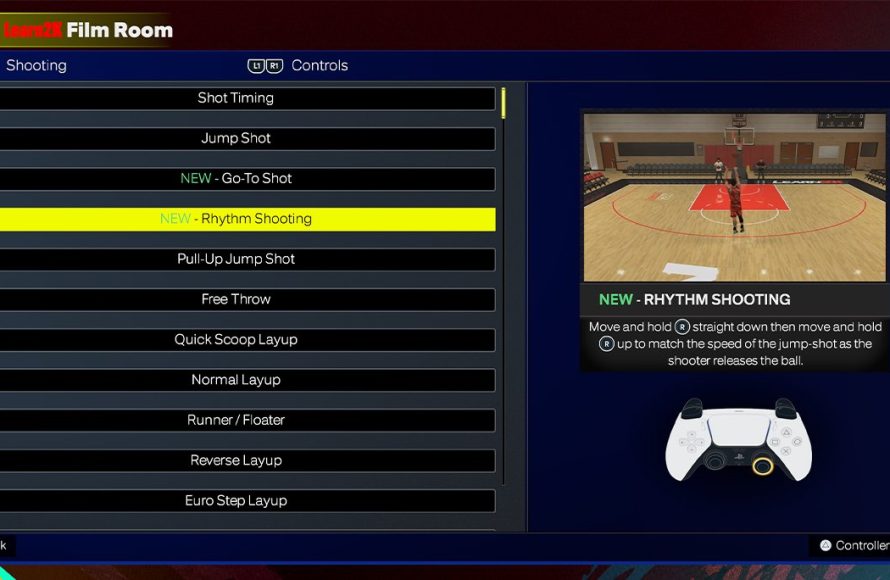
NBA 2K25 accessibility features
include options for visual, auditory, and motor adjustments, such as customizable button mapping, text-to-speech, and colorblind modes, aiming to make the game playable for a wider range of users.
Gaming should be fun for everyone, and that’s something the developers of NBA 2K25 seem to understand deeply. The game includes a variety of settings tailored to different needs, allowing more gamers to enjoy the experience. NBA 2K25 accessibility features allow players to customize many aspects of the game. They have made changes to include more players.
Options now span beyond basic control adjustments. The developers have worked to address visual and hearing needs with these changes. These thoughtful inclusions really show a focus on inclusion.

NBA 2K25 Accessibility Features
Hey there, basketball fans! We’re diving deep into something super important today: how NBA 2K25 is making sure everyone can join the fun, no matter their abilities. Video games are for everyone, and it’s awesome to see companies like 2K making big steps to make that a reality. We’re going to explore all the cool accessibility features they’ve added, from controls to visuals and everything in between. So, lace up your virtual shoes and let’s jump in!
Controller Customization Options
Okay, let’s talk about how you actually play the game – the controller! NBA 2K25 gives you many ways to set up your controller so it works best for you. This is super helpful because everyone holds their controller a little differently, and everyone’s fingers might work a bit differently too. Having lots of options means more people can play comfortably.
Re-mapping Buttons
Imagine you really struggle to press the button for a jump shot. No problem! You can go into the settings and change it to a different button that’s easier for you to reach. You can do this for almost any button on the controller. So if you want to dribble with the L2 button instead of the R2, go for it! It’s all about making the game work for you. This is a crucial feature for players who might have trouble using certain buttons or who have a preferred button layout that feels more natural. By making controls easily customizable, the game ensures a more enjoyable experience for all. Players are no longer stuck with a default setup that could be difficult or impossible for them to manage effectively.
- Change any button to do what you need.
- Make dribbling easier or shooting easier – it’s up to you.
- Play with a controller set up that feels natural for you.
Stick Sensitivity Adjustments
The sticks on your controller are how you move around the court and make certain moves. But sometimes, they might feel too sensitive (you move too fast) or not sensitive enough (you move too slow). NBA 2K25 lets you change how sensitive the sticks are. If you need to make very small, precise moves, you can lower the sensitivity. If you want to make big, quick movements, you can increase the sensitivity. Finding the perfect setting makes the game feel smoother and easier to control. This is particularly helpful for players with fine motor control challenges. The ability to fine-tune stick sensitivity can make all the difference between having fun and feeling frustrated.
- Make the movement sticks respond exactly how you want them to.
- Move your player with better control.
- Adjust sensitivity to your precise needs.
Preset Controller Schemes
For those who might be new to customization, or just want an easier start, NBA 2K25 offers several preset controller layouts. These presets are designed for different playing styles and needs, and can be a great starting point for further adjustments. Players can try out these different setups to find one that feels comfortable, or use them as a basis for their own customized controls. The availability of these presets makes it quicker and simpler for everyone to jump into the game. Instead of trying to figure out what every button does, players can choose a layout designed to make a specific style of play more comfortable.
- Jump right into the game with ready-made setups.
- Try different styles of play that are preset.
- Easier for beginners to get started.
Visual Accessibility Options
Now, let’s talk about what you see on the screen. Making the game look good is one thing, but making sure everyone can see what’s happening is even more important. NBA 2K25 has a bunch of options to make the game visually easier to follow. No squinting needed!
Colorblind Modes
For people who have trouble seeing certain colors, the game includes colorblind modes. These modes change the colors of the game so they’re easier to see. For example, if you struggle with red and green, you can pick a mode that changes those colors to blues and yellows. This is a huge help because it means you can tell the difference between your team and the other team without any hassle. It also makes it easier to see the game’s interface, menus, and other important visual elements. These modes ensure that no player is at a disadvantage due to their color vision. By including a variety of colorblind modes, the game caters to a broader spectrum of visual needs and preferences.
- Makes it easier to tell teams apart.
- Change the colors of the game for better vision.
- Lets players with color vision deficiency see the game clearly.
Text Size Adjustments
Sometimes, the text in games can be super tiny and hard to read. In NBA 2K25, you can make the text bigger, so you don’t have to strain your eyes to read menus, stats, and other important information. This is particularly useful for people with vision challenges or those playing on smaller screens. Adjusting text size means that players can easily follow the game’s narrative, understand tutorial instructions, and navigate the different game modes without difficulty. This feature, small as it may seem, makes a big difference in terms of comfort and overall gameplay experience.
- Make the words on the screen bigger.
- Read menus easily without straining.
- Helps all players to easily understand in-game texts.
Contrast Options
Adjusting the contrast can make a big difference in how clearly you see things in the game. If the colors are too close together, it can be hard to tell what’s going on. With the contrast options, you can make colors stand out more, so it’s easier to see different parts of the game, players, and even the ball. This is a helpful visual option that is often overlooked but plays a key role in making the game more enjoyable for a wider range of players, especially those with light sensitivity issues.
- Make colors pop more for easy viewing.
- See the game elements easier, even in bright or dark scenes.
- Adjust visuals so you don’t struggle with color clarity.
Motion Blur Settings
Motion blur can sometimes make things look blurry and hard to follow, especially when the action is fast-paced. NBA 2K25 lets you adjust how much motion blur there is, or even turn it off completely. This can help make the game look clearer, especially for people who are sensitive to motion or have visual issues. Giving players control over motion blur settings ensures that each player can tailor their viewing experience to their specific comfort level.
- Reduce or turn off motion blur.
- See the game with greater clarity.
- Reduce visual distractions, especially during fast action.
Audio Accessibility Features
The sound in a game is a big part of the experience. It’s not just about hearing the crowd roar; it’s also about hearing important cues that help you play the game. NBA 2K25 has some sound options that make sure everyone can hear what’s happening. These can also help players who might have challenges with visual elements by providing crucial audio cues.
Volume Controls
You can adjust the volume of different parts of the game, like the music, the crowd, and the sounds of the game. This is a big help, if you are having trouble hearing certain sounds, you can turn up the important sounds and turn down the sounds that are just in the background. For example, if you need to hear the game commentary better, you can turn it up while lowering the background music. Or, if you need the cues that tell you when to shoot, you can turn the crowd noise down. This allows players to customize the audio experience to their specific requirements, whether it’s needing clearer commentary or emphasizing in-game sound effects. Having individual volume sliders makes it easy to prioritize what is most important.
- Adjust different volume levels as you need.
- Hear important game cues.
- Balance the game audio.
Audio Cues
Some players rely on sound to help them know what to do. The game gives important audio cues, like beeps or tones, that tell you when to make a shot or when the ball is going out of bounds. These sounds are designed to help players who might not see the visual cues, or for those who like to play with the sound for a more immersive experience. Audio cues become particularly vital for players with visual disabilities, providing another source of information. These audio cues add another dimension to the game, ensuring that players can react quickly and make the right moves.
- Hear sound clues to help you.
- Receive audio feedback for game actions.
- Helps those who rely on sound rather than just visuals.
Mono Audio Option
For those who have difficulty hearing sounds in stereo, NBA 2K25 provides a mono audio option. Mono audio combines all the game’s sounds into a single channel, making it easier for players with hearing impairments to clearly understand every element of the game’s audio. When using stereo, sounds come from different directions, which can sometimes be disorienting or even hard to hear for people with single-sided hearing loss. Mono audio helps ensure that everyone has equal access to sound information.
- Combines the game’s sounds into a single audio channel.
- Easier for some people to hear every sound.
- Ensures no sounds are missed in the game experience.
Gameplay Assistance Features
It’s not just about seeing and hearing the game, it’s also about how you actually play it. NBA 2K25 includes some really awesome features to help people who might find the game tricky. These are designed to make the game more accessible without taking away the challenge or fun of playing.
Difficulty Adjustments
If you find the game too hard, no problem! You can change the game’s difficulty to be easier. There are different levels of difficulty, so you can pick the level that feels just right for you. On the easiest setting, you can learn the game and have fun without feeling overwhelmed. You can adjust the difficulty anytime, so if you find the game too easy, you can make it harder. This lets all players learn at their own pace. By allowing for adjustments on the fly, it allows for a more tailored experience, keeping the game engaging and enjoyable for everyone.
- Make the game easier or harder to play.
- Select the perfect challenge for you.
- Learn at your own pace.
Simplified Controls
Some people might find all the buttons and moves in the game confusing. NBA 2K25 has options to simplify the controls. These options let you perform complex actions like shooting or passing with fewer button presses, making it easier for players to manage the game controls. This doesn’t make the game too easy but rather provides a method for people who may struggle with advanced controls, still having fun and competitive game play. The simplification can be toggled on or off to cater to varying comfort levels and provide a more accessible experience for everyone.
- Do cool moves with fewer buttons.
- Simplify the button combinations.
- Make the game easier to play and enjoy.
Adaptive Game Speed
Sometimes, the game might feel too fast to keep up with. NBA 2K25 allows you to adjust the speed of the game, slowing it down to give you more time to react to what’s happening. This is super helpful for players who might need a little extra time to make decisions. You can adjust the speed of the game to a level that’s comfortable and still competitive. The game is more enjoyable when you can follow the action and the speed isn’t making it too challenging. This option lets each player feel like they’re playing the game at their own pace.
- Slow down the game to make it easier.
- Give yourself more time to react.
- Play the game at a speed that feels right for you.
Future Accessibility Improvements
It’s clear 2K is working hard to make NBA 2K25 more accessible. It’s exciting to think about what future features and improvements they might add to make the game even better for everyone. Games should be fun and inclusive for all, and the steps 2K is taking are making a real impact.
Community Feedback
Game developers often listen to players to find out what they can do to make the game even better. By sharing feedback, players can help shape future accessibility features. That’s why your opinion is really important! By listening to what players say and what their needs are, they can learn what works and what can be improved. This approach will make sure that everyone has a say in creating the best possible gaming experience.
- Tell the game developers what you need.
- Share what would make the game more accessible for you.
- Your opinion helps make the game better for everyone.
Continuous Updates
Accessibility isn’t a one-time thing. Game developers often need to make changes and updates as they go to improve the game. With the feedback from the community, they often find ways to make the game even more user-friendly. You might see new features and options added to the game as time goes on. This means the game will get even better for everyone. Developers are committed to creating a game that will always be fun and easy to play for everyone.
- Expect new features over time.
- Future updates may include even more awesome accessibility options.
- The game will always be improving.
Expanding Support
The goal of future accessibility features is to make sure the game is playable by as many people as possible. This could include support for more types of controllers or more options for sound and visuals. The more diverse the options, the more players are able to find a way to play that feels comfortable. We all want to share our passion for basketball and having features that help make sure everyone can join in on the fun is so important. Game developers want everyone to be able to play the game comfortably.
- Expect support for even more devices.
- Even more options for customization.
- The developers want everyone to join in.
NBA 2K25 is making big strides towards being a game that everyone can enjoy. The changes we’ve talked about today really are important and they make a big difference. As technology moves forward, game companies are making sure that video games are made for everyone to enjoy. It’s great to see that they are making an effort to be inclusive, and that means so many more people can join the fun of gaming. We hope you have learned a thing or two about what accessibility options are included in the game. So let’s all get out there and play some basketball, because with these features it’s easier for anyone to join in.
3 tips to help you score in 2k25
Final Thoughts
NBA 2K25 accessibility features ensure a more inclusive gaming experience. These options, like customizable controls and menu narration, allow more players to enjoy the game. The developers made sure to include features which cater to various needs.
Players can now easily tailor the game to their preferences. This is a must for a wider audience. This focus benefits all kinds of gamers.

