
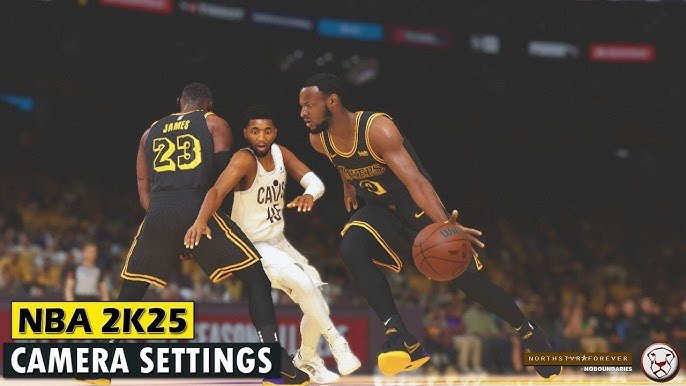
The NBA 2K25 camera setting system provides players with a range of customizable views, including broadcast, 2K, and baseline options, alongside adjustable zoom and height preferences.
Getting your view just right in NBA 2K can be a game changer. The NBA 2K25 camera setting system is crucial for finding the perfect perspective on the court. Many players struggle with camera angles, but the game gives you the tools you need.
Experimenting with different presets and fine-tuning zoom and height is vital. Finding a camera setting that matches your play style makes all the difference. You will perform better when you can see the game comfortably.

NBA 2K25 Camera Setting System
Get ready to see the court like never before in NBA 2K25! The camera setting system lets you change how you view the game, making it a more fun and personal experience. It’s like being a director of your own basketball movie, choosing the best angles for all the action. Whether you love watching the game up close and personal or from a wider view, NBA 2K25’s camera settings give you the power to customize your play.
Understanding the Basics of Camera Views
Before diving into the specifics, let’s talk about the different kinds of camera views you’ll find in NBA 2K25. Each view offers a unique perspective that can impact how you play and how much you enjoy the game. It’s not just about looking at the court; it’s about finding the view that helps you make the best plays and enjoy the game most. Here’s a quick run through of the common viewpoints available, each serving a unique purpose:
- 2K Cam: This is the classic view, the one that most people are used to in NBA 2K games. It puts you right behind the player, giving you a good look at the action around you. It’s a good general-purpose view for many types of play styles.
- Broadcast View: As the name suggests, it mimics how you would watch a real basketball game on TV. It offers a wider view of the court. This can be helpful for seeing the whole play develop. You can see where each player is positioned.
- High View (or Skybox): This view looks down on the court from above. It gives a broad view of the court, great for planning plays and seeing player movement. If you like to have a strategic viewpoint this one might be for you.
- Side View: This view places the camera on the sidelines. It offers a unique way to see the game and can help you focus on specific plays and player movement on the sideline.
- Custom View: The beauty of NBA 2K25’s camera system really shines with this option, which enables you to create your own camera experience, and fine-tune the camera’s position and behavior.
Each camera angle changes the way the game looks and feels. It can even impact your playing strategy and how well you see certain aspects of the game. Finding the right view for you can greatly enhance your gameplay experience!
Digging into Camera Options
Now that we understand the basic camera views, let’s look at the options you have to fine-tune these perspectives. NBA 2K25 gives you lots of flexibility in camera settings, allowing for a truly personalized experience.
Camera Zoom
The zoom setting allows you to move your view closer to the action or further away. A closer zoom can make you feel more involved and see the details of the player’s actions better. You might prefer this if you are good at close ball handling. A wider zoom can show more of the court, which can be great for planning and reacting to defensive shifts. A wider field of view may be good for those who like to see playmaking evolve. The ideal setting often depends on your own personal play style and what you value in your game view.
Camera Height
The height setting adjusts how high the camera floats above the court. A lower camera height gives you a more intimate, ground-level view. This gives you the feeling of actually being on the court. A higher camera height provides a broader view of the court. It can help with seeing play development and player movement, giving a top-down feel. It’s all about finding a balance that lets you see what you need to see and enjoy the game from your preferred perspective.
Camera Angle
The camera angle allows you to move the camera view horizontally around the court. Adjusting this angle can make a big difference in how you see plays developing. You can shift the view so that it is a little more behind the action, or more off to the side, depending on your preference. This is particularly useful for getting the exact line of sight that feels most comfortable and advantageous to your gameplay.
Camera Speed and Movement
Beyond positioning, NBA 2K25 allows you to adjust how the camera moves. The speed and fluidity of the camera can significantly impact how the game feels. The smoothness of the camera movement can be tweaked to your preference to provide an experience that is not jarring or feels uncomfortable. Whether you like quick, responsive changes or slow, fluid transitions, the settings are there for you to change.
Why Camera Settings are Important
Camera settings are way more than just a visual preference. They are a fundamental part of your game experience. The correct camera setup can give you advantages in gameplay while enhancing how much you enjoy the game. Let’s take a look at why it’s so important:
Improved Gameplay Performance
Believe it or not, camera settings can impact how well you play. A view that is too close can make it hard to see where your teammates are, while a view that’s too far can make it hard to see player movements. The right camera angle for you can let you see passing lanes better, defend more efficiently, and overall make smarter plays on both offense and defense. The key is to choose a setting that maximizes your performance, giving you the clearest picture of the court so you can react to the flow of the game. A tailored camera setup can be the difference between making the winning shot or not seeing it coming.
Personalized Gaming Experience
Everyone likes to play in their own unique way. Customizable camera options in NBA 2K25 allow you to tailor the game view to your liking. This is great for making the game more enjoyable. If you prefer a more cinematic experience, you can use a broadcast view with smooth camera movement. If you are more competitive and strategic, you can go for a higher view with a more strategic angle. It’s your game, and you have the tools to make it look and feel just how you want it to.
Reduced Eye Strain and Discomfort
Playing for long periods can sometimes strain your eyes if the camera view is not set properly. A good camera angle and level of zoom can significantly reduce eye strain. A poorly set camera can cause you to squint or strain your eyes unnecessarily. By finding the best view, you can ensure that your eyes are relaxed and comfortable while playing, allowing you to enjoy longer gaming sessions without discomfort.
Tips and Tricks for Finding Your Perfect Camera Setup
With so many options, finding the best camera setup for you may seem like a chore. Here are some tips and tricks to help guide you to find your ideal camera setup:
Experiment with Different Presets
NBA 2K25 comes with a bunch of preset camera views. Try them all to see what suits your game. Start with the standard 2K Cam, then move onto the Broadcast view or Skybox view and see if these fit your preferences. These are great places to start before making any adjustments yourself, offering a great baseline for customization. Testing a few presets gives you a good understanding of what settings you like best.
Adjust Incrementally
Once you find a preset that you like, start changing one setting at a time. Making multiple changes at once can make it hard to figure out what you like or do not like. Try adjusting the camera zoom first, then the height, and then the angle. By going one step at a time, you can pinpoint the exact settings that feel the best and work well for you. This approach keeps you in control of each change and makes sure you’re working toward your perfect setup.
Consider Your Play Style
Think about how you play basketball in the game. If you are a playmaker and like passing a lot, you may benefit from a wider view. This will allow you to see all your teammates on the court. If you love to control the ball and take over the game yourself, a closer view might be better for you. Adjust your camera view based on what kind of player you are. This will help you play better and enjoy the game more. Camera settings should complement your way of play.
Take Breaks and Re-evaluate
After making some adjustments, play some games and see how it feels. If your eyes start to hurt or it doesn’t feel right, take a break. Come back later with a fresh set of eyes and try different settings. It’s possible that what feels good today might not feel as good later. Don’t be afraid to change things up as you become more skilled and as your own preferences develop. The goal is to keep your game enjoyable and comfortable, not just to find a camera setting and leave it.
Practice in Different Game Modes
The best camera view in one game mode may not be the best for all the game modes. The camera view that works well in MyCAREER may be different than the one you may need in the competitive modes, such as MyTEAM or online matches. Test out your settings in different modes to make sure they are perfect for the different situations you will face in the game. This ensures you are prepared for anything the game throws at you.
Check Out Online Communities
Don’t forget to check online forums or social media groups. You can find other players who may have similar ideas, or are dealing with the same issues as you. There are many players online who may have found some very helpful and innovative camera settings that you might like. Reading about other player’s experiences can help you understand more about what works for them, and you might find something that is suitable for your specific gameplay. It’s a great place to get new ideas and make the best decision for your camera setup.
Specific Camera Settings for Different Modes
The flexibility of the NBA 2K25 camera system allows you to create different camera settings for different game modes. Here are some example setups that can make your experience better.
MyCAREER
When you are going through the storyline of MyCAREER, you might want to feel more in the moment, as if you are actually there in the game. A slightly zoomed-in 2K cam or a custom camera angle close to the player could be the best view for this mode. This gives you more personal feel to the gameplay and allows you to connect with your player. Try experimenting with slight adjustments to zoom and height to find what feels most natural and enhances your experience in this mode.
MyTEAM
In MyTEAM you must have the ability to see the big picture and how all of your players are moving. Using the Broadcast view might be more beneficial for this mode, as it helps you see everything more clearly. In the highly strategic environment of MyTEAM, seeing the court from a wider perspective lets you make better plays. Another option to try would be a Skybox view which can also be beneficial if you are strategically minded. Choose a viewpoint that gives you a great look at the court so you can develop the best plays.
Play Now Online
Playing online can be a bit more competitive than playing offline. In this environment, having a good camera view is crucial. A stable and consistent camera view, like a slightly customized 2K cam, is often a good idea. Making sure the camera is at the right zoom level and angle, where you can see your players without issue, will give you a distinct advantage during online gameplay. The key here is to pick something that minimizes surprises and gives you a clear view of everything that is going on so that you can react quickly.
Practice Mode
The practice mode is where you should spend some time experimenting with different views and camera settings. Try all different camera angles and camera heights and see what feels most natural and most comfortable. If you are a player who likes to practice their dribbling moves, you may want to try a closer, more focused view, so that you can see exactly what the player is doing. But if you want to practice team play you might want to test out some higher view settings to see where the players are moving. This is the best place to try all the different settings and to understand how they feel before you go into any other mode.
Advanced Camera Customization
For players who really like to tweak the game, NBA 2K25 lets you create a custom camera setup with many fine-tuning options. This lets you play the game the exact way you want. Here are some of the advanced options you can adjust.
Camera Follow Speed
The speed the camera tracks the ball and the players during gameplay will have an impact on how you perceive the action. Some players prefer a quick, responsive camera that follows the ball closely. Others prefer a slower camera, which gives a smooth and more comfortable view of the play as it develops. Try to find a balance that works best for you, so that the camera movements feel natural.
Camera Rotation Speed
The speed of the camera rotation, as you adjust the view to see the court from different angles, also needs to feel natural. It is all about personal choice, some players like a faster, more responsive rotation that allows them to check their surroundings quickly. Other players want a slower, more fluid rotation that is easier on the eyes. Test out the different options and see what works best for you during high-pressure moments. A finely-tuned camera rotation speed can help you remain comfortable in fast-paced gameplay.
Camera Shake
The camera shake effect adds a sense of drama and excitement to the game. Some may want the camera to shake more during moments of high energy, like during fast breaks and dunks. But others may want less camera shake or none at all, so that the camera is more stable. The camera shake effect should be personalized to your preferences. You can make the gameplay look more realistic, or you can make it easier on your eyes.
The camera setting system in NBA 2K25 puts you in charge of how you view the game. With many customizable options and modes, you have full control. By understanding the different settings, and trying out the options that are available, you can create a gaming experience that is truly yours. By following the tips in this guide, you will be able to find the view that enhances your skills, keeps you comfortable, and allows you to get the most out of your experience playing NBA 2K25.
5 SECRET Settings That You NEED To Use In NBA 2K25
Final Thoughts
Ultimately, fine-tuning camera angles significantly impacts your in-game experience. Players should experiment with various perspectives to find their ideal view. NBA 2K25 camera setting system offers a lot of customization options.
Testing different settings is important to match your playing style. A comfortable camera provides better control. The perfect setting makes all the difference in your gameplay.

