
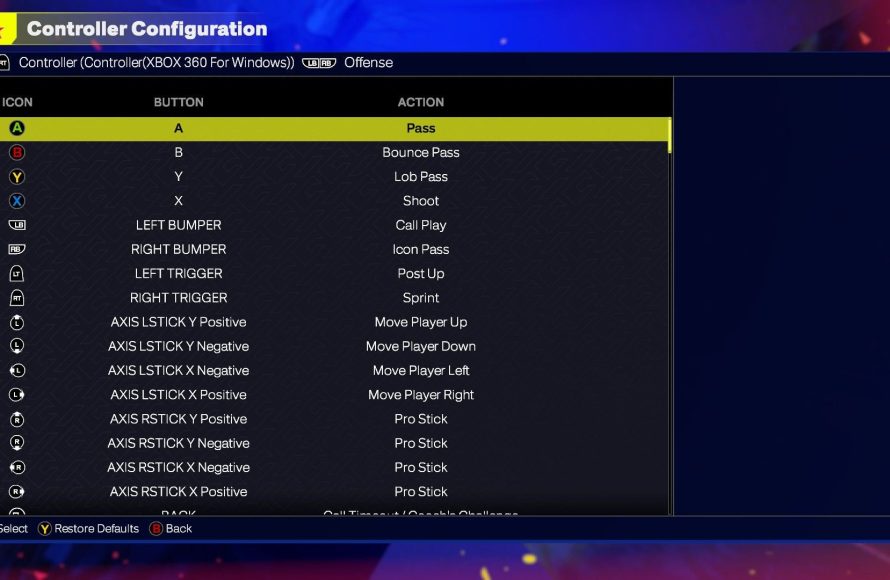
The NBA 2K25 control layout primarily uses the right stick for dribbling moves, face buttons for shooting and passing, and triggers for defensive actions, offering a familiar yet refined scheme.
Alright, let’s talk controls, shall we? The court is calling and you need to know how to answer. We’re diving deep into the specifics of the game today, focusing specifically on NBA 2K25 control layout analysis.
Understanding these controls is vital to compete at your best. Without the right knowledge of button combinations, the competition will have the upper hand. We can help you with this.

NBA 2K25 Control Layout Analysis
Okay, basketball fans! Let’s talk about something super important for dominating the court in NBA 2K25: the controls! You can have the coolest virtual sneakers and the highest-rated player, but if you can’t move them right, you’re in trouble. This year, the game aims to be even more realistic, which means the way you handle the controller matters a lot. We’re going to break down all the button layouts, explain what each thing does, and offer some tips to help you become a real baller in the game.
Dribbling and Movement
First things first, let’s talk about getting around the court. This is where your left stick comes into play. It’s like the steering wheel for your player. Pushing it in different directions makes your player move. But there’s more to it than just running!
Basic Movement
Just like in real basketball, you need to know how to move with and without the ball. The left stick controls movement, but how fast you move or even if your player is moving on the court, depends on a few key elements:
- Left Stick: Controls the direction your player runs or walks.
- Holding R2/RT (Sprint Button): Makes your player sprint. Be careful, because sprinting too much will tire your player out, and they’ll move slower and won’t be able to make shots as well.
Dribbling Techniques
Dribbling in 2K25 is more than just bouncing the ball. It’s about control, deception, and creating openings. The right stick is where the magic happens for dribbling:
- Right Stick (Flick): Flicking the right stick in different directions will make your player do crossover dribbles, step backs, hesitation moves, and other fancy tricks. Experiment to see which moves work best for you.
- Right Stick (Hold) : Holding the right stick will enable some dribbling moves, you have to use it with left stick to make different moves.
- L2/LT (Protect Ball): Holding this will enable your player to protect the ball from defenders.
The key here is practice and figuring out the timing of the movements. Don’t just mash the right stick; be precise with your flicks and you’ll be crossing up defenders in no time.
Shooting Mechanics
Scoring is the name of the game, right? NBA 2K25’s shooting system takes some time to get used to, but once you get the hang of it, you can start raining threes!
The Jump Shot
Getting the perfect jump shot down is very important. Here are key components:
- Square/X (Shoot Button): Tap this to do a quick shot or press and hold for normal shoot. Holding it allows you to control the shot meter.
- Shot Meter : The shot meter appears above your player’s head. The goal is to release the shoot button when the meter is in the green window for a good shot.
- Timing : Timing is everything. Releasing your shoot button too early or too late will result in poor shots.
Learning the timing of your player’s shot animation is very important. Practice with different players to find their sweet spots.
Layups and Dunks
Sometimes, you’ll need to drive to the basket for an easy layup or a power dunk.
- Square/X (Near the basket) : Press the shoot button near the basket to do a layup. Press and hold, it will lead to dunks.
- Right Stick (Driving) : Flicking the right stick while driving towards the basket allows different kind of layups.
- Turbo/Sprint : Sprint towards basket using R2/RT and press square to do a powerful dunk.
Passing and Playmaking
Basketball is a team sport, and good passing is the key to success. Here’s how to make your teammates happy with perfect passes:
Basic Passing
Here are the basic passes in the game:
- X/A Button (Pass) : Press to do a simple pass to the nearest teammate.
- Circle/B Button (Bounce Pass) : Use this to bounce pass the ball to a teammate.
Advanced Passing
Here are some advanced passes:
- Triangle/Y Button (Lob Pass) : Use this button to make a lob pass for your teammate when he drives to the basket.
- Hold X/A Button (Icon Pass) : Hold the button and the icons will appear over your teammates. Then, press the button of the teammate whom you want to pass the ball to.
- L1/LB Modifier : This button will help you to perform dribbling moves and passes. You can use it for some advanced passes.
Good passing creates open shots and keeps your offense moving. Don’t be a ball hog; share the rock!
Defense and Rebounding
Good offense is important, but playing good defense is just as important in NBA 2K25. Let’s dive into the controls you need to be a lockdown defender:
Basic Defensive Movements
- Left Stick : Use it to move your player and stay in front of the opponent dribbling the ball.
- R2/RT (Sprint) : Use it to keep up with fast players, but remember to not overuse it.
- L2/LT (Defensive Stance) : Holding this will make your player move in a defensive position and you can move side to side and up/down.
Stealing and Blocking
- Square/X Button(Steal) : Tap this to steal the ball from opponent player.
- Triangle/Y Button(Block) : Press it when opponent player tries to shoot the ball. But be careful of committing fouls!
Rebounding
Rebounding is all about positioning and timing. It’s a crucial part of the game:
- Triangle/Y Button(Rebound) : Press it when a shot is missed to go for the rebound.
- Left Stick : Use it to position your player so that you will get the rebound.
Off-Ball Controls
What about when you don’t have the ball? You can still make an impact on the game. Here’s how:
- Left Stick (Move): Use the left stick to move your player on court while he is not in possession of the ball.
- L1/LB Modifier: Use L1/LB to call for the screen from other teammates.
- X/A Button (Call for Ball) : If you are open, press the button to call for a pass.
Advanced Techniques and Tips
Now that we have covered the basic controls, let’s look at some advanced moves and tips to make you a better player.
Pick and Roll
A very good technique is to call for a pick and roll and then drive to the basket or shoot if open:
- L1/LB (Call for Screen): Press the button and your teammate will come to screen for you.
- Drive To Basket or Shoot: After using the pick and roll you can choose to drive or shoot depending upon the situation.
Post Moves
Posting up a defender near the basket can be a good opportunity for easy score. Here’s how:
- L2/LT (Back to Basket): Hold the button to post up against the defender.
- Right Stick: Use the right stick to do different moves like fading away, or drop step.
Practice Makes Perfect
The best way to learn the controls is to practice. Spend some time in the training mode to master your dribbling, shooting, and passing skills. Play a few exhibition games to practice in a live environment. Don’t be afraid to experiment and find what works best for you. Remember, consistency is the key.
The controls in NBA 2K25 might seem a little much at first, but once you learn the basics and experiment with the advanced techniques, you’ll be playing like a pro in no time. Don’t get discouraged if you don’t get everything right away. Keep practicing and you will get there. Good luck and have fun on the virtual court!
Watch This Before Playing NBA 2K25…
Final Thoughts
In short, NBA 2K25 control layout analysis reveals subtle changes. The stick skills remain key for dribbling and shooting. Timing for jumpshots still requires precision.
Overall, players will notice a slightly refined experience. The controller setup feels mostly familiar. The core mechanics remain as essential skills.
Therefore, learning the new nuances becomes paramount. A firm grasp of the control system helps win games. A dedicated practice will always improve gameplay. The NBA 2K25 control layout analysis highlights both continuity and change.

