
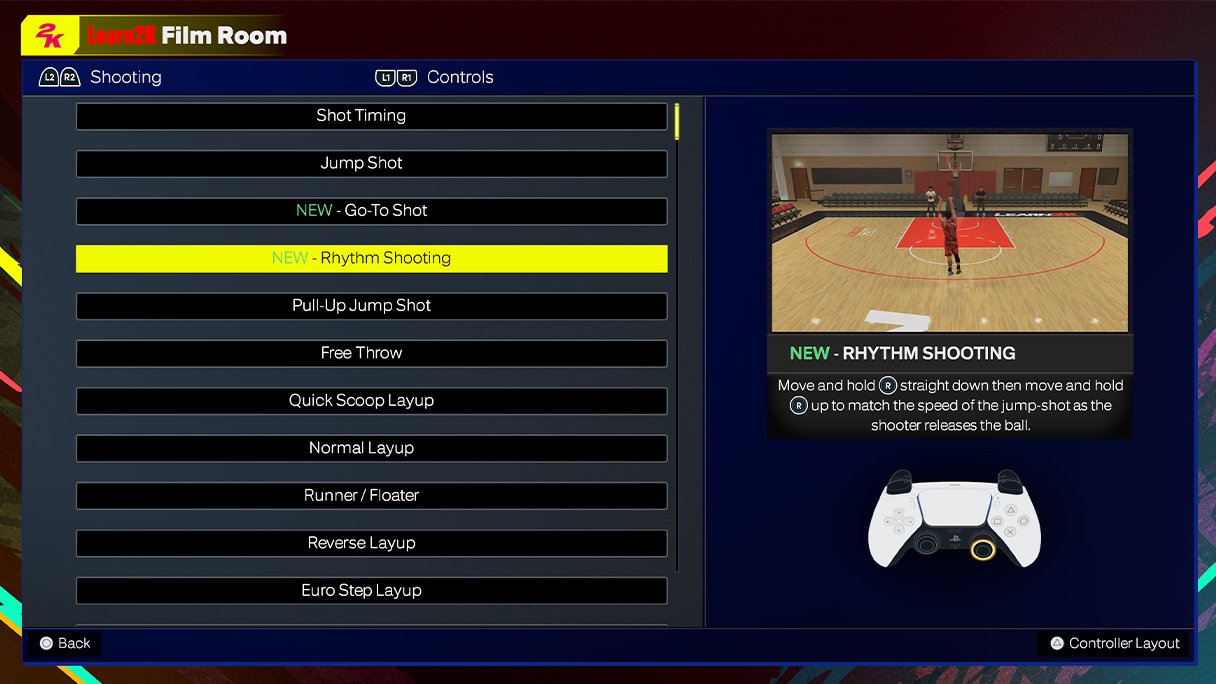
The NBA 2K25 control layout details will likely retain a similar structure to previous iterations, featuring familiar button mappings for shooting, passing, dribbling, and defensive actions, with potential minor tweaks to accommodate new gameplay mechanics.
Ready to dominate the virtual court? Many players eagerly await the release of NBA 2K25, and a crucial aspect is understanding the controls. This article provides insights into the NBA 2K25 control layout details, so you can jump straight into the action.
We’ll break down the expected button configurations and any potential changes the developers might introduce. This will ensure you’re prepared to execute those highlight-reel plays.

NBA 2K25 Control Layout Details
Alright, basketball fans! Let’s dive into the nitty-gritty of how you’ll be controlling the action in NBA 2K25. Whether you’re a seasoned vet or a rookie just picking up the controller, knowing the ins and outs of the control layout is super important. It’s how you’ll pull off those amazing dunks, nail those clutch three-pointers, and play awesome defense. Think of it as your instruction manual to becoming an NBA 2K superstar. We’re going to break down everything, from the basic moves to the fancy footwork. Get ready to learn all about the controls that will help you dominate the court in NBA 2K25!
Basic Movement and Player Control
Let’s start with the basics—moving your player around the court. The left analog stick is your best friend here. Push it in any direction and that’s where your player will go. Simple, right? But it’s not just about moving; it’s about moving with purpose. Here’s how you can use that stick to really make a difference:
- Walking and Running: A gentle nudge will get your player walking, while pushing the stick all the way gets you running. You need to choose the right speed based on the play!
- Changing Direction: Quick flicks of the left stick let you change direction quickly, dodging defenders. Think fast feet, like a real basketball pro.
- Off-Ball Movement: When you don’t have the ball, use the left stick to get into position for a pass or to set a screen. Your movement here can help your team score, even when you aren’t holding the rock.
Now, let’s talk about the right analog stick. This bad boy is mostly used for shooting and dribbling moves, but we’ll get into that more in the next section.
Shooting Controls Explained
Shooting is the bread and butter of basketball! In NBA 2K25, there are a few ways to get the ball in the basket. Let’s take a look:
Using the Square Button/X Button
- Tap for a Simple Shot: Press and release the button quickly to take a standard jump shot. Pay attention to the timing, as a perfect release is the key.
- Hold for a Meter Shot: Hold the button down to bring up the shot meter. Release when the bar hits the green for the best chance of making the shot.
- Adjusting Your Shot: When shooting, consider your distance from the basket and your player’s skill. Closer shots have a higher make percentage, but players with higher skills can nail long shots.
Using the Right Analog Stick
- Flick for a Shot: The right stick is for players that want a little more creativity and control over their shot. A simple flick up on the stick will give you a basic jumper.
- Pull Back and Push Forward: Pull the right stick down and push it back up for a jump shot. This allows a more organic and natural feeling to the motion.
- Different Moves: Different flicks and movements can give you a wide variety of shots. This includes step backs, fade aways and more. Experiment to get a feel for it!
It might feel like a lot at first, but with a little practice you’ll be sinking shots from all over the court!
Dribbling and Ball Handling
Okay, let’s move on to how you control the ball when you’re dribbling. It’s not just about bouncing; it’s about having the right moves to get past defenders and set up the best shots. Here’s the breakdown:
Basic Dribbling Moves
- Left Stick Movement: Use the left stick while dribbling to control your player and the ball. Quick left and right motions allow for crossovers.
- Speed Boost: Press and hold the R2/RT trigger while moving to speed up your dribble. However, watch out because running at full speed might make you lose control of the ball!
Advanced Dribbling with the Right Stick
This is where you can really show your skills!
- Crossovers: Quickly flick the right stick to the left or right while dribbling to perform a crossover. This move is great for getting by defenders.
- Hesitations: A quick flick can also lead to a hesitation dribble, throwing off your opponent’s timing.
- Behind the Back: Flick the stick down and to the left or right to pull off a behind-the-back move, another fantastic move to make defenders look silly.
- Between the Legs: Flick the stick to the opposite hand of your dribble to go between the legs. These tricky dribbles can make space for a shot.
Practice is important when learning all the dribbling controls and how you can string them together to make even better moves. Mix these moves together to become a master ball handler.
Passing and Playmaking
Basketball is a team sport! Passing is just as important as scoring. Here’s how you make smart passes in NBA 2K25:
- Basic Pass: Press the X/A button to make a simple pass to the closest open teammate. This is your go-to pass for everyday situations.
- Icon Passing: Press R1/RB then press one of the four face buttons (X/A, Circle/B, Square/X, Triangle/Y) to pass to the player associated with that button. This is how you take control of who gets the ball.
- Lob Pass: Hold down triangle/Y for a lob pass, great for alley-oops. Get creative and have some fun with these passes.
- Bounce Pass: Hold down Circle/B for a bounce pass, a good option when there are defenders nearby. Bounce passes are very helpful to get passes around defenders.
Knowing when and where to pass is vital to good basketball! Don’t force a bad pass, use the open players to your advantage.
Defensive Controls
Defense wins championships! Knowing how to play defense in NBA 2K25 is the way to victory. Here’s how you can stop your opponents:
Basic Defense
- Moving: The left stick controls your player’s movements on defense, just like offense. Keep moving to stay in front of the ball.
- Hands Up: Use the right stick to put your hands up and contest shots. A well-timed hand in the face can make a difference between a made and missed shot.
- Intense Defense: Hold L2/LT and move with the left stick to move with your player in a more controlled way on defense. This can make it easier to stay in front of opponents.
Advanced Defensive Techniques
- Steals: Press the square/X button to try and steal the ball. Be careful, though, because reaching in too often can cause a foul!
- Block: Press the triangle/Y button to jump and try to block a shot. Timing is key to a successful block.
- Rebounding: Use the left stick to get into good position for the rebound and hold the triangle/Y button to jump and grab the board. Winning the rebound battle can be vital to winning.
Defense is a mix of positioning, timing, and knowing when to try and make a play. Practice makes perfect, and good defense will help you win games.
Off-Ball Controls (No Ball)
What about when you don’t have the ball? Even when not on offense, your player can still be very useful! Here are some things you can do when you don’t have the ball:
- Cutting: Move with the left stick to cut to the basket and get open for a pass. Timing is important to make the right cut.
- Screening: Press the circle/B button to set a screen for a teammate. Good screens can set up wide open shots or allow you to get to the basket.
- Get open: If you’re being guarded too closely, move around until you get open and call for the ball using the X/A button. Getting a pass is much easier if you have space.
Off-ball movement is an often overlooked aspect of the game, but it is a very valuable part of any successful team.
Special Moves and Advanced Controls
Want to spice up your game? NBA 2K25 has some cool special moves that can give you an edge. These aren’t as straight forward as other moves, and it takes time to master them.
- Post Moves: When your player is in the post (near the basket), the right stick can be used for post moves, like fadeaways and hooks.
- Alley-Oops: A great way to get highlights, you can pass an alley oop using L1/LB and the triangle/Y button or you can go up for the dunk by holding the right stick down and then pushing it upwards to catch and dunk the alley oop.
- Signature Moves: Certain players have special moves and animations tied to specific button combinations, so try and get used to your favorite players’ moves.
These controls add depth to the game and can allow you to create some fantastic moves. Experiment and see what you can do!
Tips for Mastering the Controls
Learning all of these controls can feel a bit overwhelming at first. Here are a couple tips to help you get good and become an amazing player at NBA 2K25:
- Practice Mode: Spend time in practice mode learning the controls and moves. This is a great place to learn without the stress of a game.
- Start Simple: Don’t try to learn everything at once. Start with basic movements, passing and shooting, and gradually move on to more complex controls.
- Watch Tutorials: There are tons of tutorials online that can show you exactly how to execute different moves. Use these to improve your game.
- Play Regularly: The more you play, the more natural the controls will feel. Consistent practice is the only real way to improve.
With consistent practice and patience, you’ll go from a newbie to an expert in no time. It will take time and dedication, but it’s very fun to see your progress!
Understanding the controls in NBA 2K25 is your first step to domination on the court. While it might seem overwhelming, the controls are intuitive and rewarding once mastered. The more you play, the more natural these moves will feel. So, grab your controller, head to the court, and start practicing! You’ll be dropping threes, crossing up defenders, and playing incredible defense in no time. Happy gaming, and see you on the court!
NBA 2K25 Shooting Tips: Best Controller Settings Visual Cues #nba2k25 #2k25
Final Thoughts
In summary, expect tweaks to the dribbling and shooting mechanics, requiring practice. The offensive controls will likely feel more intuitive with revised button inputs.
Defensive gameplay might see adjustments to steal and block actions. You must learn these changes for maximum game performance.
Ultimately, familiarity with the NBA 2K25 control layout details becomes key to enjoying the game. Adapt and refine your skills with the new system.

