
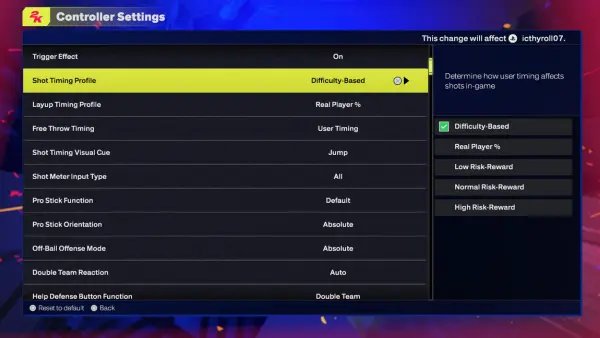
‘Adjusting NBA 2K25 difficulty involves navigating the game’s settings menus to modify sliders impacting gameplay aspects like AI aggressiveness, shooting percentages, and defensive effectiveness.’
Tired of either dominating or being dominated in every match of NBA 2K25? It’s a common issue, and that’s why we’re diving into the core of game experience – the NBA 2K25 difficulty adjustment guide.
Finding the sweet spot between challenging and fun is key to enjoying the game. We will show how to fine-tune the settings and create an experience that feels tailor-made for you.
This guide will help you understand and modify those crucial sliders, allowing you to customize the challenge in every game. So, get ready to create the perfect level of competition.

NBA 2K25 Difficulty Adjustment Guide
So, you’ve got your hands on NBA 2K25, huh? That’s awesome! It’s a super fun game, but sometimes, the computer players can seem like they’re either way too easy or way too hard. That’s where difficulty settings come in. This guide will walk you through all the different ways you can make the game feel just right for you. We’re going to talk about everything from the basics to some sneaky tricks to get the game playing just how you want it.
Understanding the Core Difficulty Levels
NBA 2K25, just like the previous games in the series, gives you different main difficulty levels to pick from. These control how smart the computer players are and how well they can make shots and defend. Let’s break them down:
- Rookie: This is the easiest level. The computer players aren’t very smart, and they miss a lot of shots. This is great for getting used to the game or if you’re new to basketball games. Think of it as training wheels!
- Pro: A step up from Rookie, Pro level starts to challenge you a bit. The AI players start making better decisions and hitting more shots. It is still pretty forgiving for casual players.
- All-Star: Now things are getting serious. All-Star mode makes the computer players more skilled. They will make fewer mistakes, and they’ll start playing much better defense. This is the go-to difficulty for experienced players looking for a solid challenge.
- Superstar: Here’s where the game really ramps up. Superstar makes the computer players extremely tough. They are amazing at defense, and they almost never miss open shots. This is for expert players who want a serious basketball challenge.
- Hall of Fame: The toughest of them all. Hall of Fame makes the AI incredibly precise and tactical. It’s designed to push even the very best players to their limits. Be prepared for a real test of your skills if you choose this one.
Beyond the Basics: Fine-Tuning Your Experience
While those main difficulty levels are a good starting point, NBA 2K25 also allows you to tweak specific game settings. This can make the game easier or harder without completely changing the AI’s overall behavior. These smaller adjustments can give you the perfect gameplay balance.
Adjusting Game Sliders
Game sliders are settings that allow you to adjust how well players do certain things. Think of it as giving one team or side a boost or penalty. You can find these in the game’s settings menus. Here’s a breakdown of some key sliders you can adjust:
- Shooting Sliders: These control how likely players are to make shots. You can increase or decrease the success rate for different types of shots, like layups, mid-range shots, and three-pointers. For example, if you find that the computer is making too many threes, you can lower their three-point slider to give yourself a better shot to win. Similarly, if you’re struggling to make layups, you could raise your layup success rate.
- Dunking Sliders: You can adjust how often dunks happen. If you think there are too many dunks happening in a game, you can reduce the dunking frequency slider. On the other hand, if you love seeing monster jams, you could raise it for more aerial excitement.
- Stealing Sliders: These control how often players successfully steal the ball. If you think steals are too common, lower the slider. Conversely, if you want more steals in the game, raise the frequency.
- Rebounding Sliders: This adjusts how frequently players grab rebounds, both on the offensive and defensive ends. Tweaking this can give you more possessions and chances to score. If you are getting outrebounded by a lot, you can change this slider to give your team a boost.
- Fouls Sliders: These determine how often fouls are called. You can increase or decrease the frequency of all foul types, like shooting fouls, reaching fouls, and blocking fouls. Adjusting this can give you more free throws or reduce the number of stoppages in the game.
- Speed and Acceleration Sliders: These affect how fast players move and how quickly they get up to speed. If you want a quicker, more arcade-style game, you can increase the speed and acceleration of players. If you prefer a more methodical pace, you can decrease them.
- Defensive Awareness Slider: This adjusts the defensive behavior of players. Higher levels mean the players are more aware of the ball and try to defend more effectively. Lower it to make the computer defense less challenging and less perfect.
Using Custom Game Rules
Besides sliders, NBA 2K25 allows you to adjust the game rules. This can greatly affect how each match flows, providing new challenges or making things easier.
- Quarter Length: Adjust how long each quarter is. Shorter quarters mean quicker games, while longer quarters give you more time to make plays and rack up points. If you want faster game you can shorten it.
- Game Speed: This can change the overall pace of the game. Increasing it can make the game feel more fast-paced, while slowing it down can create a more deliberate, strategic feel.
- Fatigue Effects: You can control how quickly players get tired during the game. Increasing fatigue makes it more important to make substitutions to give your players a rest.
- Injuries: Adjust how often injuries occur. If you prefer a more realistic experience you can adjust it to high.
Strategies for Finding the Perfect Difficulty
Alright, now you know all the options you have. So how do you actually find that sweet spot, the perfect level for you? Here’s some tips:
Start with the Basics and Increase Gradually
Don’t jump straight to Hall of Fame unless you’re incredibly skilled. Start with Rookie or Pro and play a few games. If you win too easily, try the next level up. This way, you’ll slowly build your skill and won’t get too frustrated. If you are a casual player, you can always adjust the difficulty in settings.
Adjust Sliders Step-by-Step
Instead of changing multiple sliders all at once, adjust one or two at a time and play a game or two to see how it affects gameplay. This will help you understand exactly which slider is affecting you and how much. For example, if you’re losing every rebound battle, try increasing your team’s rebounding slider a little and see if it makes a difference. If you want to shoot the ball better, you can slightly increase the shooting slider.
Pay Attention to Your Strengths and Weaknesses
Do you struggle with defense? Maybe lower the CPU defense awareness slider. Are you great at offense? Consider raising the CPU’s shooting sliders, or their defensive awareness to give yourself a good challenge. You can tailor the game to focus on aspects of basketball that challenge you and give you a better experience. Adjusting the slider according to your strengths and weaknesses can lead to a satisfying and rewarding gaming experience.
Don’t Be Afraid to Experiment
It’s your game, so try out different settings. There’s no right or wrong way to play. Experiment with the sliders until you find the setup you like best. If you are bored with your current settings, try something new. It’s all about finding what makes the game fun for you.
Using MyLeague/MyNBA for Fine Tuning
If you want complete control over your game experience, consider using MyLeague or MyNBA. These modes allow you to extensively change nearly all of the settings of your game. You can completely customize a single team or an entire league, from finances to injuries, to all the gameplay settings. It gives you incredible control to craft the experience you’re looking for.
Practice Makes Perfect
Remember that the most effective way to make NBA 2K25 more enjoyable is by practicing. The more you play, the more you’ll improve. As you get better, you might find that you want to increase the difficulty settings to provide a new level of challenge. Practice mode helps a lot here so try to spend more time there.
Community Feedback and Sliders
If you are finding it hard to tweak all the settings on your own, you can always see what other players have done. Lots of players share their preferred slider settings online. You can try these settings and see if any of them work for you. If you like a particular setup, you can always keep using it. Keep in mind that everyone has different skills and styles, so you might have to do slight modifications.
Be Patient
It may take some time to adjust the difficulty settings just right. Don’t get discouraged if it takes a few tries to get it perfect. Play around with different options and take the time to see how it affects the game experience.
Specific Scenarios and How to Adjust Difficulty
Let’s take a look at some specific problems you might face and how to deal with them with difficulty settings.
Struggling with Scoring
If you’re having trouble getting the ball in the hoop, you can adjust the difficulty by:
- Increasing your team’s layup, mid-range, and three-point sliders.
- Lowering the opponent’s defensive awareness slider.
- Adjusting the shooting sliders to make them more favorable to you.
- Making sure you choose the right players for the positions.
Getting Outrebounded Too Much
Losing all the rebound chances? Here’s how to fix it:
- Raising your team’s rebounding slider.
- Lowering the opponent’s rebounding slider.
- Make sure you are using the correct players for rebounding.
- Position your players correctly so they are in good position to grab the ball.
Too Many Turnovers
Are you giving the ball away too easily? Try this:
- Lowering the CPU steal slider.
- Adjusting the passing sliders to make it easier to complete passes.
- Be more mindful of when you pass the ball.
- Don’t make risky passes which can lead to turnovers.
Computer Players Are Too Good at Shooting
Are computer players making nearly every shot?
- Lower the CPU’s shooting sliders.
- Increase your team’s defensive awareness slider.
- Increase your steals and blocks sliders.
- Play better defense by switching between players to cover them.
Games Are Too Easy
If you are dominating your opponents every game, you need to increase the difficulty by:
- Increasing the main difficulty level (Pro, All-Star, etc.).
- Lowering your team’s shooting sliders and other related sliders.
- Raising the opponent’s defensive awareness slider.
- Changing the game speed to be slower.
Finding the right difficulty in NBA 2K25 doesn’t have to be frustrating. With the different game modes, difficulty levels, sliders, and game settings you can adjust, you can easily craft an experience that feels perfectly balanced to you. This guide has given you everything you need to adjust those settings. Remember to experiment, be patient, and most importantly, have fun.
NBA 2K25 Shooting Tips: Best Controller Settings Visual Cues #nba2k25 #2k25
Final Thoughts
Fine-tuning gameplay with various sliders and difficulty settings is crucial for a satisfying NBA 2K25 experience. Players should experiment with these adjustments to achieve their ideal challenge. The best settings depend on individual skill level and preferred style.
Finding the sweet spot prevents frustration and makes each game engaging. Adjusting these options also allows players to tailor the game to fit their specific needs. Remember that a balanced approach often yields the most fun.
Ultimately, the NBA 2K25 difficulty adjustment guide offers the tools to personalize the game. It allows you to make it as challenging or as accessible as desired. This approach ensures the enjoyment for every player.

