
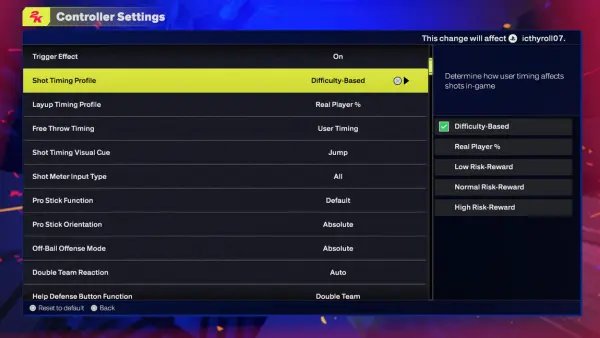
NBA 2K25 difficulty curve settings allow players to adjust the game’s challenge, influencing AI opponent strength, gameplay speed, and required skill for success.
Have you ever felt like you were either breezing through games or getting absolutely demolished on the court? That’s where the NBA 2K25 difficulty curve settings come into play, because they impact your whole experience. They are designed to give players control over how tough the game is.
These settings are not just about making things harder, they’re about finding the sweet spot where the challenge matches your skill level. You can tweak things until you have the right amount of challenge. This system really lets you personalize your game.

NBA 2K25 Difficulty Curve Settings
Alright, let’s talk about something super important for any NBA 2K25 player: difficulty settings! It’s like picking your favorite ice cream flavor – everyone has a preference. And just like how some like it simple, and others like it with all the toppings, NBA 2K25 gives you lots of ways to change how challenging the game is. These settings aren’t just about making the computer harder to beat; they’re about crafting the exact type of basketball experience you want. Whether you’re new to the game, a seasoned vet, or somewhere in between, understanding these settings will let you play the game at your pace and feel like a total baller!
Understanding the Basics: Difficulty Levels
Before we dive into the nitty-gritty, let’s talk about the main difficulty levels. NBA 2K25 offers a range of options that are pretty easy to grasp:
- Rookie: This is the easiest setting, great for beginners or if you just want a relaxing game where you can score a bunch. The computer will make simple mistakes, and you’ll have more room to learn the controls.
- Pro: A step up from Rookie. It’s still pretty forgiving, but the computer starts playing a bit smarter. It’s a good place for players who are comfortable with the basic game mechanics but want a little challenge.
- All-Star: Now we’re talking! All-Star provides a solid challenge and is considered the ‘normal’ difficulty setting for many players. The computer will play real basketball, and you’ll need to think about your strategy.
- Superstar: This is where things get serious. The computer is very smart, makes fewer mistakes, and will punish you for errors. This setting will test even experienced players and make you feel like you’re in a real NBA game.
- Hall of Fame: The toughest difficulty in the game. The computer is an absolute beast. It makes almost no errors, plays exceptional defense, and scores with high efficiency. Only the most skilled and dedicated players will find regular success here.
Each level changes how the computer plays, including shot percentages, defensive intensity, and even its tendency to foul. Think of it like this: Rookie is like playing with training wheels, while Hall of Fame is like trying to drive a race car blindfolded!
Beyond Difficulty: The Sliders
While the basic difficulty levels give you a good starting point, the real magic happens when you start messing with the sliders. These are individual settings that control different parts of the game. You can adjust these to fine-tune your experience to be exactly what you want. These sliders offer a level of control that is truly impressive. Let’s go over some of the most important ones.
Offensive Sliders
These sliders primarily affect how your team and the computer team perform when they have the ball. Here are a few key offensive sliders you should know about:
- Inside Shot Success: This controls how often shots near the basket go in. A higher value makes layups and dunks easier.
- Close Shot Success: This impacts the effectiveness of shots taken just a little further out than inside shots. Think post hooks and short jumpers.
- Mid-Range Shot Success: This slider tweaks how often mid-range jumpers will go in. Adjust this if you find mid-range game is too easy or difficult.
- 3-Point Shot Success: You guessed it! This slider affects how often three-pointers find the bottom of the net. Lower values can simulate how challenging long-range shots are in real life.
- Layup Success: Adjust how easily players can finish at the rim. Lower it if you think too many layups are going in, and higher it for more fluid offenses.
- Dunk Frequency: Controls how often players go for dunks. If you want more highlight reel plays, increase this setting.
- Shot Coverage Impact: How much of effect a defender’s position has when trying to make shot. If you make this higher, shots when defenders are near, becomes challenging.
Adjusting these allows you to create a scoring experience that suits you. For example, if you want lots of high-scoring games, increase those success sliders. If you prefer a gritty, defensive game, bring them down.
Defensive Sliders
Now, let’s talk about the other side of the ball. The defensive sliders give you control over how well your team and the computer defend against shots.
- Help Defense Strength: This slider determines how aggressively teammates help on defense. Higher values will lead to more double teams and rotations.
- Steal Success: How easy it is to steal the ball. Set it lower to decrease steals or higher to increase them.
- On-Ball Defense Effectiveness: How well players can defend one-on-one. Increase for tight defense and lower it for some open space.
- Block Success: How often players are able to block shots. Lower values mean fewer blocks and higher values mean a more rim-protecting atmosphere.
- Fouls: Adjust how often fouls get called. If you find the game is too whistle-heavy, lower this. If you think there aren’t enough fouls being called, increase it.
- Defensive Awareness: This controls how smart your teammates are when it comes to defending.
These sliders can completely change how the game feels. A low setting on help defense might mean you have to defend one-on-one more, while high setting can make defense feel much more team oriented.
Attribute Sliders
These sliders manipulate players attributes and how they perform on the court.
- Speed: Adjust how fast the players can run on the court. Lower values make the game slower and more deliberate.
- Acceleration: Controls how quickly players speed up and slow down. Set it higher for more agile players and lower if you want to make movements feel heavier.
- Vertical: Adjusts how high the players can jump. Higher values means that players can jump higher and for more dunk opportunities.
- Strength: Controls the strength of the players. Set it lower to decrease the power of players, and higher to increase the power and physicality on the court.
- Stamina: Adjusts the stamina of the players and how quickly they tire out. Lower values means they tire out quickly, and higher value means they can stay on the court longer.
Other Important Sliders
While the offensive and defensive sliders are crucial, there are some other sliders you might want to tinker with:
- Game Speed: This one controls the overall speed of the game. If you like a faster pace, turn it up. Prefer slower, more methodical play? Turn it down.
- Ball Handling: This affects how well players can control the ball and perform dribble moves.
- Passing Accuracy: Adjust how accurately passes are made. Lower it for tougher passes and higher for smoother and more accurate passing game.
Creating Your Perfect Game
The real fun begins when you start experimenting with these sliders and find the perfect combination for you. Here are some tips on how you can approach adjusting the sliders:
- Start Slow: Don’t go changing everything at once. Adjust one or two sliders at a time. Play a couple of games and see how it feels. If you adjust too many at once, it becomes hard to understand what changes made what difference.
- Focus on Your Frustrations: Are you getting blocked too much? Turn down the block slider. Are your 3-pointers not going in? Adjust that slider.
- Read the Descriptions: The game gives you descriptions of what each slider does. Take your time to read them carefully.
- Community Settings: Don’t be afraid to look online for slider sets that other players have made. Many people share their favorite combinations, which might be a great place to start.
- Practice and Adjust: The most important thing is to keep adjusting the sliders until you feel that you’re getting a good experience. What’s fun for someone else might not be fun for you.
Examples of Difficulty Setups
To give you a few ideas, here are some examples of custom slider setups you can try:
The Realism Setup
This setup aims to emulate real-life NBA basketball. It’s perfect for players who want a challenging but believable experience.
- Game Speed: Slightly slower
- Shot Success Sliders: Slightly lowered for both user and CPU
- Defensive Sliders: Moderate values
- Fouls: Slightly increased
- Attribute sliders: Adjusted for realism
The Arcade Setup
This setup cranks up the excitement and scoring.
- Game Speed: Higher
- Shot Success Sliders: Higher
- Dunk Frequency: Increased
- Fouls: Lowered
- Attribute sliders: Slightly higher
The Competitive Setup
This setup is designed for players who want a challenging game with realistic scoring.
- Game Speed: Normal
- Shot Success Sliders: Moderate values
- Defensive Sliders: Increased
- Fouls: Normal values
- Attribute sliders: Normal values
MyCAREER and Difficulty
If you’re playing MyCAREER, the difficulty settings will have a significant impact on how you earn badges, upgrade your player, and progress through your career. Starting on a lower difficulty lets you build confidence and earn badges quicker, while a higher difficulty provides more of a challenge.
You can typically adjust difficulty before each game in MyCAREER, so you can increase it as you become more skilled. Many players will start out with a Pro or All-Star difficulty and gradually increase it to Superstar or Hall of Fame for a more rewarding experience.
The Importance of Finding Your Setting
Ultimately, the best difficulty settings are the ones that make the game enjoyable for you. Don’t let anyone tell you that you should play on a certain difficulty. It’s all about finding that sweet spot where you feel challenged but not frustrated. The beauty of NBA 2K25 is that you can make the game bend to your preferences. So get in there, tweak those sliders, and make every game a slam dunk!
Remember, the goal is to have fun! Experiment, adjust, and most importantly, enjoy playing basketball your way!
NBA 2K25 Best Jumpshot Shot Profile Setting: High Risk Reward Shooting Tips #nba2k25 #2k25
Final Thoughts
Adjusting NBA 2K25 difficulty curve settings greatly impacts your gameplay experience. Finding that perfect balance is key for both casual and serious players. These settings let you tailor the challenge to your specific skill level.
Experimenting with different sliders allows you to customize the game. This helps you fine-tune how challenging the AI opponents behave. Consider the various options within the NBA 2K25 difficulty curve settings, and you can make your experience much better.

