
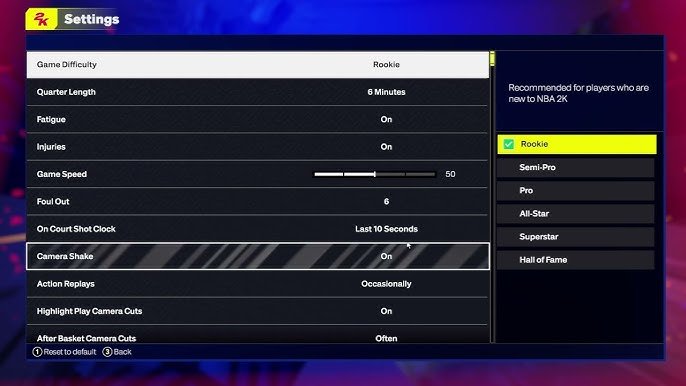
NBA 2K25 game difficulty settings range from rookie to hall of fame, influencing AI opponent skill and gameplay challenges.
Finding the right challenge in a sports game can make or break your experience, and NBA 2K25 is no different. The game offers various skill levels to suit everyone, whether you are a beginner or a seasoned player.
Choosing the appropriate NBA 2K25 game difficulty settings is crucial for enjoying the game. Select too high a level, you might get frustrated, but a lower one can be too easy. This article explores how different choices impacts the game.

NBA 2K25 Game Difficulty Settings: Finding Your Perfect Challenge
Getting into NBA 2K25 is super exciting, right? You’re ready to hit the court, make amazing plays, and become a basketball superstar. But before you start dominating (or maybe getting dominated!), it’s important to understand the game’s difficulty settings. These settings let you customize how challenging the game is, making sure you have a fun and engaging experience no matter your skill level. Whether you are a beginner just learning the ropes or a seasoned pro looking for a real test, there’s a setting just right for you. Let’s explore the various difficulty options in NBA 2K25 and see how they affect your gameplay.
Understanding the Basics: Difficulty Levels Explained
NBA 2K25 offers several preset difficulty levels, each designed to provide a different experience. These are the main ones you’ll encounter:
Rookie Difficulty
This is the easiest setting, perfect for brand new players, or anyone who just wants a relaxed, stress-free experience. On Rookie, the computer-controlled players will make more mistakes, and your team will generally have an easier time scoring and defending. It’s a great way to learn the basic controls and get familiar with the flow of the game. Think of it like playing a friendly scrimmage; the focus is on having fun and getting comfortable with the game’s mechanics. Here’s what you can expect when playing on Rookie difficulty:
- Opponent AI (Artificial Intelligence) is forgiving, making simple mistakes often.
- Your players have an easier time making shots, even if they’re not perfect.
- Defensive pressure from the other team is minimal, giving you space to operate.
- Stealing and blocking are easier to perform effectively.
- The game is generally slower paced, giving you more time to react.
Pro Difficulty
Stepping up from Rookie, Pro difficulty provides a more realistic basketball challenge. The computer-controlled players are smarter and more coordinated. You’ll need to play smarter and execute your plays with more precision. It’s still approachable for newer players who are ready to move beyond the easiest setting, and it will help you improve your basketball skills within the game. Here is how the Pro difficulty differs:
- The AI plays with more skill, making better shots and defending more effectively.
- Your opponents are less likely to make simple mistakes.
- You will need to start paying more attention to things like player positioning and passing lanes.
- Defending becomes a little tougher, requiring better timing and positioning.
- The pace of the game picks up compared to Rookie difficulty.
All-Star Difficulty
All-Star difficulty is where things start to get serious. This is the preferred setting for many players who are familiar with the game. You will have to start strategizing, and not just rely on your player’s skills. The game will demand more from you in terms of basketball IQ and execution. This setting is a great way to really hone your skills and see how far you can push your abilities in the game. Expect these changes when playing on All-Star difficulty:
- The AI becomes a good competitor, making smart plays both offensively and defensively.
- You will need to execute good strategy and teamwork to score consistently.
- Opponents become more aggressive on defense, forcing you to make better decisions.
- Timing your shots, passes, and movements is crucial to success.
- The game speed is at a steady pace.
Superstar Difficulty
Superstar difficulty is a significant jump from All-Star. It’s designed for players who want a very difficult challenge and want to really test their skills. The computer-controlled players are incredibly skilled, making few mistakes. They will punish you for poor decisions. If you are on this difficulty, you will need to be ready to bring your A-game every possession. It’s very rewarding if you can win games on this setting, and you know you can compete with the best of the best. Here’s a look at what makes Superstar so challenging:
- The AI plays at a high level, using advanced techniques and making very few errors.
- Opponents take advantage of even small mistakes you make.
- Defending becomes significantly harder, requiring excellent timing and positioning.
- You will need to use advanced strategies like pick-and-rolls, screens, and offensive sets to score consistently.
- The game pace becomes even faster and more demanding.
Hall of Fame Difficulty
Hall of Fame difficulty is the toughest setting in NBA 2K25. This is designed for true veterans of the game who want the ultimate challenge. Opponents are super skilled, and will make you work for every single basket. You must play close to flawless basketball to achieve success. It’s a test of your skill, strategy, and mental fortitude, and is meant to push you to your absolute limits. It is not for the faint of heart, but a great way to see how much you can really push yourself. Here’s what playing on Hall of Fame will feel like:
- The AI makes virtually no mistakes and plays with extreme precision.
- Every single possession matters, and even small errors will be punished.
- Defending requires perfect timing, movement, and decision-making.
- You will need to use every basketball strategy you know to score and defend.
- The game runs at the fastest pace, demanding you keep up or risk losing badly.
Diving Deeper: Customizing Your Experience
While the preset difficulty levels are great starting points, NBA 2K25 also lets you adjust even more specific settings to tailor the game to your liking. This is where you can really fine-tune the challenge to match your specific preferences and needs. Let’s look at some of the individual settings you can tweak:
Game Sliders: The Power is in Your Hands
Game sliders are incredibly useful. They allow you to customize specific aspects of gameplay like shooting success, rebounding, and steal percentages. These sliders give you total control over the game. If you think your players are making too many shots, you can lower the shooting success slider. If you’re getting beat on the boards constantly, you can increase the rebounding ability for your players or lower it for the opposition. Here are some example settings that you can adjust using game sliders:
- Shooting Ability: Adjust how accurate shots are. You can make shooting easier or more difficult based on your preferences.
- Rebounding Ability: Change how often players grab rebounds.
- Stealing Ability: Increase or reduce how often steals can happen.
- Blocking Ability: Control the frequency of blocks in the game.
- Fouls: Adjust how often fouls are called and the severity.
- Game Speed: Adjust the pace of the game.
- Player Speed and Agility: Change how fast and how agile the players are.
- AI Tendencies: Modify how frequently the AI uses certain actions, like shooting or driving to the basket.
Individual Player Settings: Focus on the Details
Beyond the overall difficulty and gameplay sliders, you can also adjust settings related to individual player performances. This allows you to further tailor the game to your preferences. For example, if you’re playing MyCAREER, you might find the default settings for your player’s attributes too easy or too hard. By tweaking these settings, you can create a truly personalized game experience. Some of the player specific settings you can alter include:
- Player Speed and Acceleration: Adjust how fast your player moves and accelerates.
- Shooting Ability: Modify your shooting accuracy.
- Dribbling: Control how well you can handle the ball.
- Passing: Adjust the accuracy of your passes.
- Rebounding: Change your effectiveness in rebounding.
- Defending: Modify your ability to defend.
- Strength and Stamina: Increase or decrease your player’s strength and how quickly their stamina drains.
Controller Settings: Make it Your Own
The controller settings are also an important part of personalizing your experience with NBA 2K25. Adjusting these can make the controls feel more intuitive and responsive for you. These settings can make a big difference in how the game feels to play. Some controller options that you can change are:
- Shot Meter: Change how the shot meter is displayed, or turn it off entirely for a more difficult experience.
- Dribbling Controls: Choose how you want to control your dribbling moves.
- Passing Controls: Adjust the button layout for passing.
- Defensive Controls: Change the buttons for your defensive actions.
- Vibration: Change how much your controller vibrates.
Finding What’s Right For You
With so many options, it may take some time to find the perfect settings for you. Don’t be afraid to experiment. Here’s a simple approach to help you find the settings that are just right:
- Start with a Preset: Begin by choosing one of the main difficulty settings that sounds appealing (Rookie, Pro, All-Star, Superstar, or Hall of Fame).
- Play a Few Games: Play several games on that difficulty to see how it feels.
- Adjust as Needed: If it feels too easy, move up a difficulty level or make adjustments with game sliders. If it feels too hard, go down a difficulty or adjust the sliders to make the game more forgiving.
- Experiment with Sliders: Don’t be afraid to change the game sliders to tweak specific areas of gameplay that you find to be too easy or too difficult.
- Try Player Specific Settings: If you’re playing a mode like MyCAREER, remember to adjust your player settings to match your preferences.
- Don’t Give Up: Keep tweaking until you find the perfect challenge. It’s a process, and what is right for one person might not be perfect for someone else.
Remember, the goal is to have fun while also being challenged. The game difficulty should make you want to keep playing and improve your skills, not make you give up from frustration. By understanding the options and taking the time to adjust the settings, you can make your NBA 2K25 experience just right for you.
Ultimately, the best difficulty is the one that makes the game most enjoyable for you. If you are brand new to NBA 2K25, starting on Rookie or Pro is an ideal way to learn the basics. You can work your way up to higher difficulty levels as you get better. If you already have plenty of experience, you might want to try All-Star, Superstar, or Hall of Fame from the start. Take your time to experiment, and find the perfect balance for your playing style.
By exploring all the customization options, and the variety of difficulty levels, you will ensure that you have the optimal experience with NBA 2K25. This means you will have the most fun possible, and you will keep coming back to play more and more.
NBA 2K25: How to Change Game Difficulty
Final Thoughts
Ultimately, selecting the right setting is key to enjoyment. Different options provide varied challenges. Players should experiment to find their perfect balance.
Adjusting NBA 2K25 game difficulty settings is crucial. It personalizes the gameplay experience, matching your skill level. A carefully chosen difficulty can make or break the fun factor.
Therefore, spend time calibrating the NBA 2K25 game difficulty settings. Tailoring the challenge ensures engaging and rewarding sessions. This will maximize your time on the court.

