
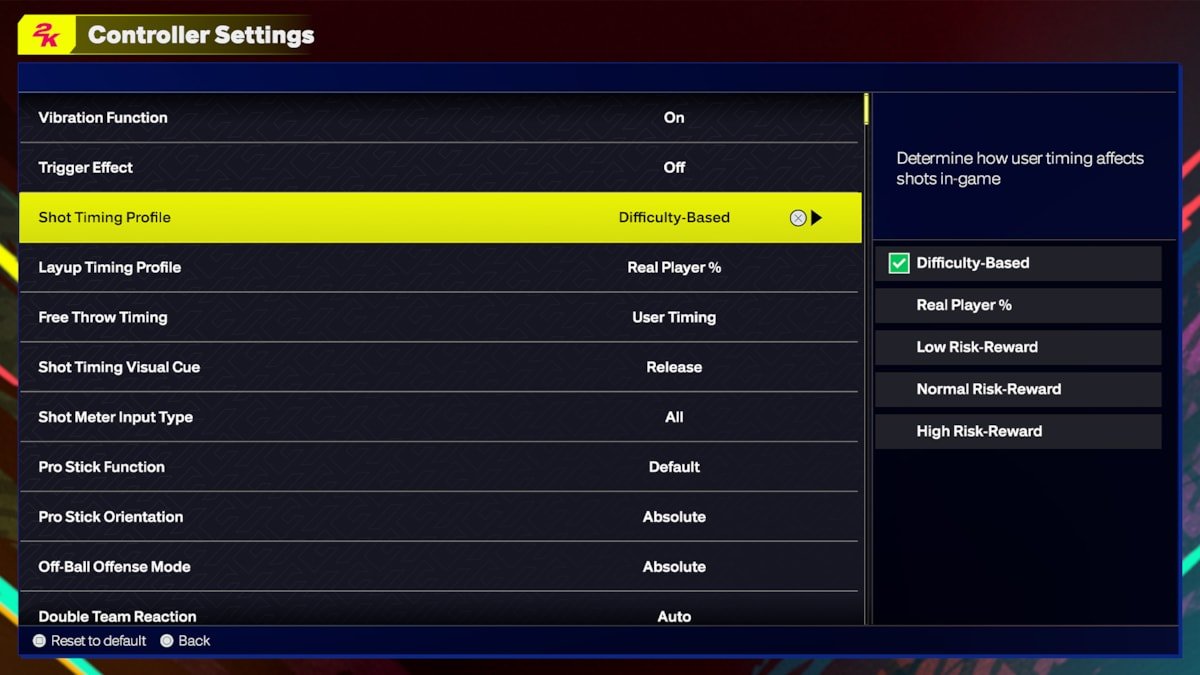
The optimal NBA 2K25 game settings often depend on individual preference and skill level, but adjusting camera angles, controller options, and difficulty sliders can significantly impact gameplay.
Tweaking your experience is key with the upcoming release; let’s talk about NBA 2K25 game settings. Getting everything just right can be the difference between a frustrating loss and a satisfying win on the virtual court.
Finding the perfect settings might take some experimenting, but it’s time well spent. Many players focus on controller options and visual preferences as a good start.
Adjusting these will allow you to fine-tune your gameplay to your specific style. It can really change your game.

NBA 2K25 Game Settings: Your Guide to a Perfect Game
Getting the game settings just right in NBA 2K25 can make a huge difference in how much fun you have. Whether you’re a seasoned pro or just starting out, tweaking these options allows you to create the exact basketball experience you’re looking for. This guide will walk you through all the important settings and how they can impact your gameplay. Let’s dive in!
Difficulty Settings: Finding Your Challenge
First things first, let’s talk about difficulty. NBA 2K25 offers different difficulty levels to match your skill. If you’re new, starting at a lower difficulty is a great idea. As you get better, you can bump it up. Here’s a quick look at the options:
- Rookie: This is the easiest setting. The computer opponents aren’t very tough, and you’ll find it easier to score and defend. Great for learning the ropes.
- Pro: This is a good step up from Rookie. The computer players become more aware and put up a better challenge. If you’re comfortable with the basics, this is a good starting place.
- All-Star: Now things get interesting! On All-Star, the computer is smart and tough. You’ll need good strategies and skills to win.
- Superstar: Get ready for a serious test! Superstar level is very hard. The computer plays nearly perfect, and every move you make has to be on point. This is for expert players.
- Hall of Fame: This is the hardest setting in NBA 2K25. The computer players will be extremely skilled, making it very difficult to win. Only the very best players should try it.
It’s very important to choose the right difficulty level, as a too easy game can be boring, and a too difficult one can be frustrating. The ideal setting should challenge you but still be fun and rewarding.
Custom Difficulty
If the preset difficulty levels aren’t perfect, don’t worry! NBA 2K25 lets you adjust things further. You can change specific sliders to control how the AI plays. Things like the AI’s shot accuracy, how well they play defense, and even their aggressiveness can be modified. Playing around with these sliders allows you to make the game suit your individual skill and preferences.
Gameplay Settings: How the Game Feels
Beyond difficulty, the gameplay settings have a big effect on how the game plays. These settings control things like the game’s speed, how players move, and how responsive the controls are. Here are some important areas:
Game Speed
The Game Speed setting changes how fast everything happens in the game. If you like a faster paced style of play, increase the game speed. This will make the game feel more energetic and less realistic. If you want a slower, more calculated style of play, decreasing the game speed will help. A lower speed provides more time to plan your moves and execute plays.
Controller Vibration
Controller vibration adds to the immersion in NBA 2K25. When your player makes contact or a big play happens, the controller will vibrate. Some players like this, as it adds another layer of feedback, while others find it distracting. It is up to you, you can turn vibration on or off depending on your preference.
Shot Meter Type
The shot meter helps you time your shots correctly. NBA 2K25 offers different types of shot meters. Some are simpler, while others are more complex. Try them out and see which one you find easiest to use. You can also turn the shot meter off entirely for a more realistic experience.
Shot Timing
Shot Timing lets you decide how strict the game is when judging your shots. Real Player % requires you to focus on the timing, so your players stats matter to make the shot. User Timing will require you to time the jump shot perfectly for your player to make it. You can adjust it to be more forgiving or more precise, depending on how challenging you want it to be.
Camera Settings
The camera angle is a crucial setting for many players. NBA 2K25 lets you choose from several different cameras angles. The 2K camera, which follows the player closely, is the default. Other options like broadcast views and custom views can give you a different perspective. Find the camera that lets you see the court and the players in a way that works best for you.
Presentation Settings: Customizing the Look
The way the game looks and feels is as important as how it plays. NBA 2K25 lets you customize the game’s presentation. Here’s how:
Commentary Volume
The game commentary is an important part of the experience. You can adjust the volume of the commentators separately from the game sound effects. If you find the commentary too loud or distracting, turn it down. If you want to hear the commentators clearly, turn it up. This is entirely personal preference.
Crowd Volume
The crowd sounds really add to the game’s atmosphere. Adjusting crowd volume helps to keep them engaging but not overwhelming. You can increase or decrease the volume depending on your liking.
Replay Settings
Replays are a big part of basketball. In NBA 2K25 you can change how often replays appear during a game. If you like seeing replays of big plays and dunks, you can turn them on. If they annoy you, you can turn them off. You can also adjust how long the replays last.
In-Game Menu and Overlay
The menu and overlay in the game can be adjusted for less or more information on the screen. You can change what kind of information you see during a game. This includes scores, player stats, and other useful data. If you want a clean, uncluttered screen, turn some of this off. If you want more information, turn it on.
MyCAREER Settings: Shaping Your Player’s Journey
MyCAREER is a very popular mode in NBA 2K25. It allows you to create your own player and take them through their NBA journey. There are specific settings for this mode that can impact your experience.
Player Creation Settings
When you make your player, you can customize things like height, weight, position, and skills. These choices have a big effect on how your player performs. If you make a tall player, they’ll be great at rebounding but may not be as fast. If you make a small, quick player, they might be better at driving to the basket, but not great at defending centers. Choose these options wisely depending on what play style you prefer.
Badges and Takeover
As you play through MyCAREER, you will gain badges and a takeover meter. Badges enhance your player’s abilities, and you get to customize which ones you want your player to focus on. Takeover is a boost that happens after you have played well during a game, you will be able to take over with a special ability for a short period of time. The settings related to these options allow you to tailor your play style during the games.
Practice Settings
Practice is a very important part of MyCAREER. It’s where you can work on your skills and get better. NBA 2K25 lets you set up your practice routines to target specific skills that you want to improve. This will make your player stronger overall. Make good use of practice to get your skills to a high level.
Difficulty in MyCAREER
Just like in regular games, you can set the difficulty in MyCAREER. If you’re struggling, you can lower the difficulty. You can make it harder as you get better. This way, the mode will continue to challenge you, and it doesn’t get too easy or too hard, helping you to grow.
MyTEAM Settings: Building Your Dream Squad
MyTEAM is a popular mode where you build your dream basketball team. This mode has settings specific to how you want to play. Let’s look at a few settings that can help.
Lineup Settings
In MyTEAM, you create your team by collecting player cards. The game allows you to set up different lineups, with different players, for specific game types. This includes deciding on your starting five and who comes off the bench. You can also manage your player’s contracts, which will be necessary to keep playing games. Plan your team wisely to give you the best chance of winning.
Gameplay Settings in MyTEAM
The gameplay settings affect how each of the game modes play within MyTEAM. Whether it’s single player or multi player games, how the game feels to you is dependent on this. Adjust them until you get your game to play just right.
Auction House Settings
The auction house in MyTEAM is where you buy and sell player cards. You can search for specific cards you want, bid on auctions, and list your cards for sale. This is a big part of building your team. It is good to get familiar with the settings in the auction house to make the most out of it.
Online Settings: Playing with Others
Playing online is a lot of fun in NBA 2K25. Here are some of the settings that affect playing with others:
Matchmaking Settings
Matchmaking is how you get paired up with other players. You can choose to play in ranked or unranked games. Ranked games will match you with people of a similar skill level, while unranked games will pair you with random players. You can adjust these settings to suit your preference.
Communication Settings
While playing online, you can talk to other players using voice chat or text chat. You can adjust your communication settings to decide who you can communicate with. You can turn voice chat off if you prefer not to talk to strangers, or you can mute specific players. The choice is up to you.
Region Settings
You can choose to play on servers in specific regions. Selecting a region that’s close to you can give you better connection speeds and less lag. It’s best to select a region that is close by. This will give you the best possible online experience.
Accessibility Settings: Making the Game Enjoyable for Everyone
NBA 2K25 includes a lot of accessibility settings to help players with disabilities enjoy the game. These include:
Subtitle Settings
If you have trouble hearing, you can turn subtitles on. Subtitles will put the text for dialogue and commentary on the screen. You can also customize the size and color of the subtitles to make them easier to read.
Colorblind Mode
For those with color vision problems, you can turn on a colorblind mode. This will adjust the colors in the game to make them easier to see. These different modes make sure all players can clearly see what’s going on.
Control Customization
You can customize the controls to fit your needs. If you have difficulty pressing certain buttons, you can change the controls to make it easier. You can also use different controllers, and each button can be customized as needed.
Taking time to adjust all of these NBA 2K25 game settings will enhance the game, helping it feel perfectly suited to your play style. Don’t be afraid to try different things until you find the settings that are ideal for you. Whether you are playing MyCAREER, MyTEAM, or online games, these settings will help to keep the game fresh and engaging.
BEST SETTINGS, TIPS and TRICKS on NBA 2K25 (NEW SHOT TIMING PROFILE)
Final Thoughts
Tweaking NBA 2K25 game settings allows for a personalized and enjoyable experience. Players can fine-tune difficulty and controller options. These adjustments help match skill levels and preferences. Experimenting creates your perfect setup.
Adjusting gameplay sliders will modify the pace of the game. You can control AI behavior to suit your style. These detailed options greatly influence how the game feels. Therefore, spending time on NBA 2K25 game settings will improve your enjoyment.

