
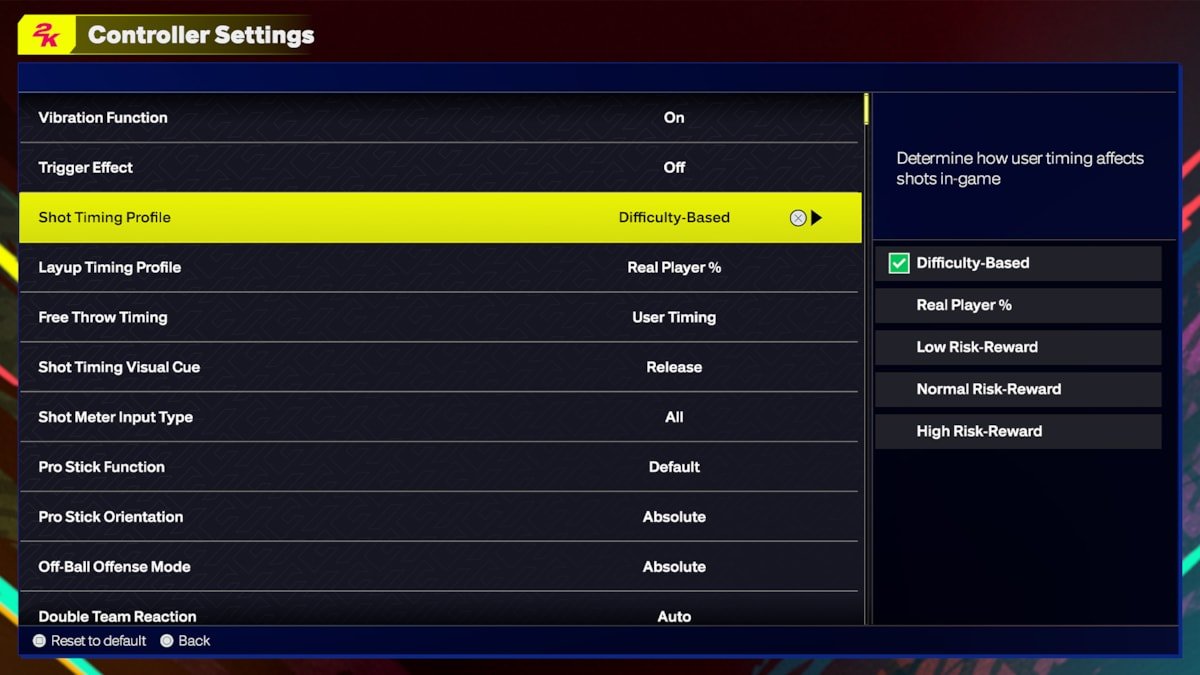
NBA 2K25 gameplay configuration allows players to adjust settings for difficulty, controls, camera angles, and various on-court rules to customize their gaming experience.
Fine-tuning your settings is key to dominating the court. NBA 2K25 gameplay configuration offers a range of options that can significantly impact your success and enjoyment of the game. Getting these adjustments right will improve your virtual basketball journey.
Understanding and optimizing these settings lets you create a gaming experience that suits your playing style and skill level. We’ll explore these customizations that can affect everything from shot timing to defensive strategy.

NBA 2K25 Gameplay Configuration: Getting the Game Just Right
Okay, so you’ve got NBA 2K25 fired up and ready to go. That’s awesome! But before you jump into a high-stakes game, it’s important to spend a little time looking at the gameplay settings. These settings let you change how the game feels and plays. Think of it like adjusting the controls on your favorite toy to make it fit perfectly in your hands. There are tons of options, and finding the right ones can be the difference between winning like a pro and losing big. We will look at everything in detail. So, let’s dive deep and make your NBA 2K25 experience the best it can be!
Understanding the Basics: Difficulty Levels
First things first, let’s talk about difficulty. This is a big one! NBA 2K25 has different difficulty settings to match your skills. If you are new to the game, you might want to start with the easiest settings. As you get better, you can make the game more challenging. Here is a quick look:
- Rookie: This is the easiest setting, good for people who have never played NBA 2K before. The computer players aren’t that smart, and you’ll have an easy time scoring.
- Pro: A step up from Rookie, this setting is for people who are getting used to the game. It offers a decent challenge.
- All-Star: This level is for players who know the game well. The computer will play smarter and make fewer mistakes.
- Superstar: Get ready for a real challenge! The computer will use all the tricks in the book, and you’ll need to play your absolute best to win.
- Hall of Fame: This is the most difficult setting. Only the most skilled and experienced players should try this setting. Be prepared for a very tough game.
Choosing the right difficulty is key. If the game feels too easy, try a harder setting. If you are losing every game, try a level that is less challenging.
Controller Settings: Fine-Tuning Your Controls
Now, let’s talk about your controller. NBA 2K25 lets you change how your controller works. You can adjust how sensitive the sticks are, how strong your passes are, and more. These options are super useful for finding what feels right to you. Here’s what you can usually tweak:
Shooting Controls
Shooting in NBA 2K25 is more than just pressing a button. You can change the way you shoot to match your style. One key setting is the shot meter. You can choose if you want it to show or not. If you turn it off, you will need to use your own timing and feel for when to release the ball. Let’s look at some options:
- Shot Meter: You can turn it on or off. If it’s on, you’ll see a bar that shows you how well you are timing your shot. If you turn it off, your timing has to be perfect.
- Shot Feedback: See how good (or bad) your shot was! This shows you if you were too early or late. This is good when you’re learning, but you might want to turn it off if you are an advanced player.
- Shot Type: You can choose between a button press or using the right stick. Using the stick gives you more options, like fadeaway shots, but you need to learn to use it.
Dribbling Controls
Dribbling is a big part of NBA 2K25. You can change how your player moves with the ball. These settings will have a huge impact on your ball handling, crossover, and how you beat defenders. You can pick your way to dribble the ball and move around the court.
- Dribble Style: This setting changes how your player moves the ball. Some styles are faster, while others are more fancy. Pick the style that fits your play.
- Iso Moves: You can choose how your player will respond when you try to break down your defender with moves. There are different style of moves, pick which one you are most comfortable with.
Passing Controls
Passing is how you get the ball to your teammates, and you can control how these passes work. You can choose how strong the passes are and how accurate they are. You want to make sure that you pass to your open teammates. So let’s see what are the options that we have in this category.
- Pass Type: Do you want simple passes or do you want to be able to direct where your passes go, you can choose your preferred pass type.
- Receiver Control: This setting lets you pick who gets the ball. You can pass to the person you want or let the computer pick.
- Icon Passing: This lets you choose which teammate gets the ball by selecting an icon above their heads. This allows for precise passing.
Movement Controls
How your player moves without the ball is also important. You can change how fast you run and how quick your player turns. This can help you beat defenders or get to the open spot on the court.
- Movement Sensitivity: Adjust how sensitive the stick is when moving your player. The higher the setting, the faster the player will turn and move.
- Turbo Button: You can choose how your player uses the turbo to run faster, this affects the player’s stamina.
Camera Settings: Seeing the Court Your Way
The camera is your eye on the court. NBA 2K25 gives you many options for how you want to see the game. You can change the angle and the zoom to find the view that suits you best. Some players like seeing more of the court, while others like a closer, more personal view.
Camera Angle
There are many different camera angles in the game. Let’s look at a few common ones:
- 2K: This is the standard camera view, following the action closely. This is the most used view in the game.
- Broadcast: This gives you a feel for what you would see on TV. It is high and a little zoomed out.
- Baseline: This camera is behind the basket. It’s good for seeing the action in the paint.
- Custom Camera: The best option to have! You can choose your own view that works for you the best.
Camera Zoom and Height
Besides the angles, you can also choose how close or far away the camera is and how high it is.
- Zoom: You can make the camera zoom in to see the details or zoom out to see more of the court.
- Height: Adjust the camera height up or down to get a different view of the court.
Game Rules and Sliders: Customizing the Experience
NBA 2K25 lets you change more than just the controls. You can also tweak the game’s rules and settings to create the perfect game for you. These options are called sliders, and they change things like the game speed, how hard players get tired, and how often they make shots. You have the control to make the game as realistic or as arcade-like as you want.
Game Speed
You can change how fast the game plays. Some players like a fast-paced game, while others like a slower, more realistic pace.
- Game Speed Slider: Move the slider to the left to slow down the game or to the right to speed it up.
Fatigue
Players get tired during the game, but you can adjust how fast they get tired. If you want a realistic game, you might want to make them tire out more quickly. If you want a more arcade style, they can have more energy.
- Fatigue Slider: Adjust how quickly players get tired during the game.
- Stamina Slider: This setting lets you change how quickly the stamina recovers for the players.
Gameplay Sliders
This is where you can fine-tune how players play on the court. Here are some examples:
- Shooting Sliders: Change how often players make shots, both close and far. You can make it easier or harder to make shots.
- Dunking Sliders: Adjust the frequency and success rate of dunks. If you like to see more dunks, adjust this slider higher.
- Stealing Sliders: Change how easy it is to steal the ball. You can make it easier or more difficult.
- Block Sliders: Adjust how often players block shots. This can affect how many shots are rejected in a game.
Rules Customization
You can also change some of the rules of the game. Here are some options:
- Fouls: You can change how often fouls are called. Some players like to have strict rules, while others want less interruptions.
- Game Time: You can adjust how long the quarter lasts for. A longer quarter means a longer game.
- Clock Control: Decide if you want the clock to run off on every possession.
Advanced Settings: Going Deeper
If you really want to fine-tune the game, you can explore the advanced settings. These settings give you control over even more details of how the game plays. These settings are only for advanced players. Let’s go through a few:
AI Behavior
These settings affect how the computer-controlled players act. You can adjust how they play on offense and defense.
- Offensive Awareness: This changes how smart the computer players are on offense. The higher it is, the better they move and make passes.
- Defensive Awareness: This changes how smart they are on defense. With a higher setting, they’ll make more steals and blocks.
- Team Play Styles: Choose what type of offense the AI will run like, how much they try to score in the paint or how much they try to shoot from three.
Animation Settings
You can adjust how fast and realistic the animations are in the game.
- Animation Speed: You can choose how fast the players move in the game. This affects how smooth it feels to play.
- Transition Animation: Adjust how the animations change from one to another.
User Timing
Change how much control players have on timing their shots, passes, and dribbling. This makes the game harder but more rewarding.
- Shot Timing Impact: Make it easier or harder to make perfectly timed shots.
- Passing Timing Impact: Make it easier or harder to get passes to your teammates on time.
Finding the right configuration for NBA 2K25 might take some time and testing, but the results are worth it. Don’t be afraid to try out different settings until you find what makes you feel like a true NBA star. Remember to start with basic options, and as you get comfortable and have a good grip on the basics, you can then move to advanced settings. Now, you are ready to play the game and have the most fun possible!
This detailed exploration provides a comprehensive understanding of NBA 2K25’s gameplay configuration. Experimenting with these settings is key to finding what works best for your playstyle, ensuring a personalized and enjoyable experience on the virtual court. With these adjustments, you can fine-tune your game to your exact preference and compete like the best of them.
BEST SETTINGS, TIPS and TRICKS on NBA 2K25 (NEW SHOT TIMING PROFILE)
Final Thoughts
Tweaking gameplay settings is crucial for enjoying NBA 2K25. Experiment with sliders to find your perfect balance of realism and arcade fun. Player speed, shooting difficulty, and defensive intensity are key options to adjust.
Finding the correct setup impacts how you play. Take time testing different options. Proper NBA 2K25 gameplay configuration results in a more enjoyable and personalized gaming experience.

