
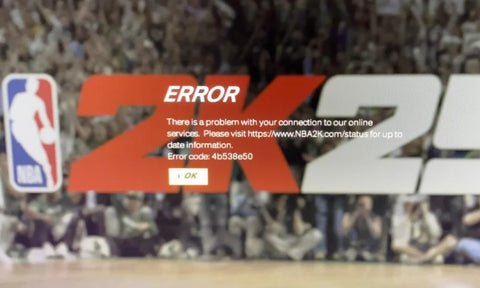
NBA 2K25 server issues typically stem from high player traffic, game updates, or unforeseen technical glitches on 2K’s end.
Frustration mounts as players encounter constant disconnections and lag. Many gamers are finding it incredibly difficult to enjoy their favorite mode. The topic of discussion within the gaming community is the frustrating NBA 2K25 server issues, which are certainly impacting gameplay. These problems often result in lost progress and make online play nearly impossible.

NBA 2K25 Server Issues: Why Are You Lagging?
Okay, gamers, let’s talk about something that’s probably making you throw your controller at the wall – NBA 2K25 server issues. You’ve got your team ready, your skills are sharp, and you’re about to drop 30 points, but then… bam! Lag, disconnections, and error codes pop up like unwanted party guests. It’s frustrating, and we all feel it. This article will dive deep into all the server problems you might be facing, why they happen, and what you can do about them (even if it’s just a little bit). We’ll explore the common problems and help you understand what’s really going on behind the scenes.
Understanding the Basics: What are Game Servers?
Before we jump into the chaos, let’s quickly talk about what game servers actually are. Think of them as the central hub for all NBA 2K25 online action. These powerful computers host the game world, connecting you with other players, tracking your stats, and managing everything that happens in the game when you are playing online. When servers are working well, the game runs smoothly. But when something goes wrong with these servers, that’s when we see all the lag, disconnects, and error messages that can make it feel like you’re playing underwater.
How do they work?
Game servers handle a lot, very quickly! They manage everything from player movement and ball physics to scoring and online matchmaking. All of this needs to be constantly communicated between your console or PC and the game servers. When the system works smoothly, that communication is seamless. However, if there’s a problem on the server side, or with your internet connection, everything can slow down or completely stop working.
Common NBA 2K25 Server Problems
Let’s get into the meat of it, the specific problems that might be causing you a headache. These issues pop up regularly, and understanding them is the first step to dealing with them. Here are some of the most common NBA 2K25 server problems:
- Lag and Latency: This is probably the most annoying problem. Lag means there’s a delay between your actions and what happens on the screen. The game becomes slow and unresponsive, like you are watching your game in slow motion. It can turn a simple shot into a missed one, and that winning basket into a losing one.
- Disconnects: You’re in the middle of an important game and then poof! The game kicks you out with a message saying you’ve lost connection to the server. You lose all your progress and get angry. Disconnects can happen for many reasons, but often indicate a problem with the server or your connection to it.
- Error Codes: Error codes are like the game’s way of saying “something is not right!”. These messages usually have a bunch of numbers and sometimes letters, and are designed to help developers diagnose and solve the problem. But for the player, they usually just mean you can’t play.
- Matchmaking Issues: Finding a game can be like searching for a lost sock in a mountain of laundry. You sit in the matchmaking queue, sometimes for a very long time. Sometimes you get matched with people who are way too high or too low in skill.
- MyCareer Problems: If you are playing MyCareer mode, you are also connected to the servers. You might see progress not saving correctly, lost VC, or problems with your player’s attributes.
- VC Issues: Virtual Currency (VC) is a big part of the NBA 2K world. Sometimes, people face problems like VC not appearing after purchase or not being rewarded after games.
Why Do Server Issues Happen?
So, why are these server issues happening in the first place? There are many reasons why the NBA 2K25 servers might be having trouble. Here are some common ones:
Server Overload
Like a popular restaurant at lunch hour, game servers can get overcrowded, especially after a new game release or a big update. When too many players try to connect at the same time, the servers get overwhelmed, leading to lag and disconnects. This usually happens during peak hours when most people are at home and playing.
Software Bugs and Glitches
Sometimes, the problem isn’t the server capacity but the game software itself. Bugs or glitches can cause errors, disconnects, and other issues with server performance. Developers usually fix these problems with game updates (patches) but it takes time to identify and correct all the problems.
Internet Connection Problems
It is not always the game servers’ fault. Sometimes your home internet connection is the problem. Poor Wi-Fi signal, slow speeds, or issues with your internet service provider can also cause lag and disconnects. A bad connection to the internet can make the game difficult to play, even when the servers are in perfect condition.
Maintenance and Updates
Like a car needing a tune-up, servers need maintenance to keep them running smoothly. Game developers often take the servers offline for scheduled maintenance or updates, which can disrupt your game time. They do this to improve server performance and fix the issues we discussed above, but it does mean a short period of downtime for us.
Geographical Distance
Where you are located in the world, in relation to the game servers, can have an impact. If you are far away from the servers you are connected to, you will experience higher latency because it takes longer for data to travel. This results in more lag in game.
How to Check Server Status
Before you start smashing your controller, it is important to check to make sure the problem is not just on your side. Checking server status can help you figure out if it’s something you can fix or if it’s an issue for the game developers.
Official 2K Support Pages
The best place to start is the official NBA 2K support page. They often have updates on server issues and planned maintenance. You can look at this information to see if the problems are on their end. Check their website often, it is a good resource for current updates.
Social Media
Social media platforms like X (formerly Twitter) are often filled with updates from both the game developers and other players. Check what people are saying, if lots of players report server issues at the same time then it is most likely a server problem, not an internet problem on your end. Follow the official NBA 2K accounts and use hashtags related to server problems.
Third-Party Server Status Websites
There are also third party websites that track server status for many games, including NBA 2K. These websites gather information from multiple sources to give a quick view of server issues and status. While they can be helpful, you should always take information from unofficial sites with a pinch of salt.
Community Forums
Game community forums are a great place to talk to other players. You can share your problems and see if others are experiencing the same issues. It can be helpful to talk to people who are having the same problems you are, and see if they have any ideas or solutions.
Troubleshooting Tips: Things You Can Try
Okay, so you’ve determined it is not your internet connection and it might be server issues. While you can’t fix the servers directly, there are some steps you can take to try and improve the situation on your side. Here are some troubleshooting tips that might help:
Restart Your Game and Console
It might sound obvious, but sometimes the easiest solution is the best. Close the game completely and restart your console or PC. This can clear up any temporary glitches that are causing problems. Restarting your router/modem might also help.
Check Your Internet Connection
Make sure your internet connection is working well. Run a speed test to check your upload and download speeds, and also ensure that your router is working properly. Sometimes a simple restart of your home network can fix connection issues.
Use a Wired Connection
If you are using Wi-Fi, try switching to a wired connection using an Ethernet cable. Wired connections are usually more stable than Wi-Fi connections, which can reduce lag and disconnects. This is generally a recommended connection for gaming.
Close Background Apps
Having too many apps running in the background on your console or PC can slow down your connection and make your game run poorly. Close any apps you aren’t using to free up system resources and improve the performance of your game.
Update the Game
Make sure you have the latest version of NBA 2K25 installed. Game updates often include fixes for bugs and server issues. Keeping your game updated ensures you are using the latest working version.
Check for Updates to Your System Software
Just like the game, you need to make sure your console or PC has the latest updates installed. These updates can fix bugs that affect game performance. Make sure your system is up to date before playing to avoid problems.
Change Your DNS Server
Sometimes, the default DNS servers provided by your internet service provider can cause connection issues. Changing to a public DNS server like Google Public DNS or Cloudflare DNS can sometimes improve your connection to game servers.
Contact Support
If you have tried everything, and you are still facing problems, it’s time to contact the game developers support team. They might be able to help with specific problems, and also make them aware of the issues other players are experiencing.
Long-Term Solutions and What To Expect
Server issues are part of modern gaming, but that doesn’t mean they can’t be improved. Here’s what you can expect long term, and what game companies are working on to make server issues less likely:
Server Upgrades
Game companies are always working on improving their server infrastructure. This involves adding more servers, improving network performance, and implementing technology to handle the constant increase of people playing. While this takes time to do, it can reduce server overload and improve gameplay.
Better Matchmaking
Game developers are also working on improved matchmaking systems to ensure players are placed in games with other players of similar skill levels. A well balanced matchmaking system makes sure more games are fair. This can also make matchmaking faster.
Regular Updates
Game updates aren’t just about new content; they also contain important fixes to server problems and game code. You can expect regular updates that aim to solve these problems and improve your game. Game companies need to keep working to provide the best experience.
Communication With Players
Game companies are starting to communicate better with the players through social media, forums, and official support websites. They do this so that people know what is happening and why they are experiencing problems. Good communication is very important for players to feel understood.
Player Responsibility
While developers are working to improve the servers, players also have a responsibility to make sure they have a good internet connection and are following basic troubleshooting steps. Making sure you are doing your part can ensure a smooth game.
It’s normal to feel frustrated when these issues ruin your game, but remember that game developers are usually working to make these issues better, even if it doesn’t always feel like it. By using the information and tips listed above, and understanding that things get improved over time, you can have a better gaming experience despite server problems.
How To Fix Unable to Connect to 2K Server For NBA 2K25
Final Thoughts
Ultimately, the persistent NBA 2K25 server issues continue to frustrate players. Gamers face lag, disconnections, and trouble accessing online modes. These problems negatively impact the overall experience for many.
Developers must prioritize fixing these server problems. Addressing player feedback and providing stable gameplay is crucial. We all want smooth games, not constant interruptions due to NBA 2K25 server issues.

