
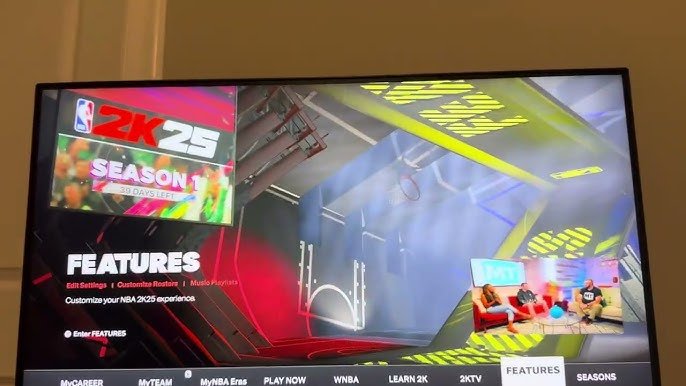
The NBA 2K25 user experience tutorial focuses on guiding players through navigating the game’s menus, understanding its controls, and utilizing features effectively for optimal gameplay.
Ready to jump into the court but feel a bit lost? This NBA 2K25 user experience tutorial will get you up to speed quickly. We understand that a new game can sometimes seem overwhelming. This guide will show you the best way to move through all the different menus and options.
We will also cover the control schemes and offer advice on making the most of the game’s functions. You will feel like a pro player before you know it. So, prepare to dominate!

NBA 2K25 User Experience Tutorial
Alright, basketball fans! So you’ve got your hands on NBA 2K25 and you’re ready to hit the court. But before you start dropping threes and throwing down monster dunks, let’s take a tour of the game and make sure you’re navigating it like a pro. This isn’t just about knowing the buttons; it’s about getting the most fun out of your experience. Think of this as your personal coach for all things user experience in NBA 2K25. We’ll break down everything from the main menus to the nitty-gritty of gameplay settings. Get ready to become an NBA 2K25 expert!
Navigating the Main Menu
The main menu is your starting point for everything in NBA 2K25. It’s like the lobby of a giant basketball stadium, and it can seem a little overwhelming at first. But don’t worry, we will walk through it together.
The Home Screen
The first screen you see is the home screen. This is where you will find all the latest news, announcements, and maybe even some cool rewards. It’s like your daily sports paper, but in video game form. You might see things like:
- New event announcements
- Daily or weekly challenges
- Game updates
- Promotions and offers in the store
Take a minute to check this out each time you start the game – you never know what cool stuff you might find!
Quick Play
Want to jump right into a game? The Quick Play option is your ticket. It’s perfect for when you want some fast-paced action without going into long game modes. You will see different options, including:
- Play Now: This lets you pick teams and play a regular NBA game.
- Play Online: This takes you online to play against other people.
- Play with Friends: You can invite your friends to join the game.
MyCAREER
This mode is where you make your own basketball superstar. You’ll create a player, go through their career, and hopefully become the best of all time. This is a very deep mode with lots to explore, including:
- The Player Builder: Where you make your player look and act how you want.
- The Neighborhood: Where you can wander around, play games, and level up your player.
- Games and Story: Play your games and follow your career storyline, see how your skills will match with other players.
MyCAREER is a big part of NBA 2K25, and it’s worth spending a good amount of time in this mode.
MyTEAM
MyTEAM is the mode for card collectors and team builders. You get to make your dream team by collecting player cards. You can play online, earn rewards, and compete against other players. Here’s what it includes:
- Card Packs: Open up card packs to get new players, coaches, and more.
- Challenges: Complete challenges to earn rewards and improve your team.
- Online and Offline Games: Compete against other players or in single-player modes.
MyNBA
This mode is for the real basketball strategists. Here, you can be the boss of a whole NBA team. You control everything from trades to drafts to your team’s strategy. It’s like running an actual NBA franchise. In this mode you’ll encounter:
- Franchise management: Control the team roster, draft picks, and everything about your franchise.
- Customization Options: You can change many of the rules and settings, create your own team, or move current teams to new cities.
- Different Eras: Start the game in different eras of the NBA history.
Settings
The settings menu is where you can adjust the game to your liking. Here, you can customize things like:
- Gameplay Difficulty: Change how hard or easy the game is.
- Audio Levels: Adjust the music, sound effects, and commentary.
- Video Settings: Change how the game looks.
- Controller Settings: Adjust your buttons and controls.
Don’t be afraid to play around with the settings to get the perfect experience for you.
Understanding the In-Game HUD
Once you’re on the court, the Heads-Up Display (HUD) will give you a lot of information. Knowing how to read it is important. Let’s get familiar with the most important parts.
Scoreboard
The scoreboard is usually at the top of the screen. It tells you the score, the current quarter, and how much time is left. It’s simple, but it’s essential! You’ll see each team’s score, the quarter number, and the remaining time on the game clock. Pay attention to this if you want to keep your team in the game.
Player Indicators
Each player on the court has an indicator above their head or near their feet. These indicators usually show:
- Player Name: So you can see which player is which on the court.
- Stamina Bar: This bar shows how tired your player is. If it’s low, they will move slower and won’t perform at their best.
- Player Icon: A little symbol that helps you tell the difference between your team and the other team.
Shot Meter
When you go for a jump shot, you’ll see a shot meter appear. This meter helps you time your release for a perfect shot. Watch it carefully! There are different types of shot meters:
- The Visual Meter: This meter is often a line, and you want to release your shot at the best point.
- The Haptic Meter: You’ll feel when to release your shot with your controller’s vibration.
Gameplay Prompts
Sometimes, the game will show you prompts on the screen. These prompts are there to help you understand what to do. They might tell you:
- Which button to press to do a specific move
- Tips on how to play better
- Warnings or notices about the game
Advanced User Experience Features
Now, let’s look at some of the things that make NBA 2K25 a fun and unique game.
Controller Customization
You are not stuck with just the default controller settings. You can change them to fit your style. Go to the settings menu and you will be able to re-map the controls. This can help you make the most out of the game, if you are used to a specific style of controls.
Tutorials and Training Modes
If you are new to the game or just want to practice a new skill, the game includes tutorials and training modes. They teach you the basics, and they can also help you improve your advanced skills.
Accessibility Options
NBA 2K25 wants everyone to enjoy the game, no matter your abilities. This is why they offer accessibility options. These options include features for those with vision or hearing needs or other challenges.
Dynamic Difficulty
The game has a dynamic difficulty, which can be adjusted automatically while playing, and helps you improve more naturally. This means the game can get harder if you’re playing too well, or easier if you’re struggling a little bit. It’s like having a coach who always knows what you need.
Tips for a Smooth Experience
Here are a few tips that will help you enjoy the game even more:
- Start with the Tutorials: They’re there for a reason. Don’t skip them!
- Take it slow: Don’t try to learn everything at once. Focus on one thing at a time.
- Use the training modes: Practice makes perfect! Use these modes to work on new skills.
- Join online communities: You can learn tips from more experienced players.
- Don’t be afraid to experiment: There is no right or wrong way to play. Find your style.
- Adjust the settings: Make the game fit what feels right for you.
- Take breaks when needed: If you are frustrated, it’s okay to step away from the game for a bit.
Alright, you now know a lot about the user experience in NBA 2K25. Remember, the most important thing is to have fun, practice, and explore the game. You’ll be dribbling, shooting, and dunking your way to victory in no time!
With all of these tips and tricks, you should be able to navigate NBA 2K25 like a pro. Whether you’re looking to start your career in MyCAREER, build the ultimate team in MyTEAM, or make franchise decisions in MyNBA, understanding the game’s interface is important. Keep practicing and exploring, and you will become a master on the virtual court. Have fun playing basketball!
23 Tips And Tricks You NEED To Know In NBA 2K25!
Final Thoughts
With dedicated practice of these tips, you will gain proficiency navigating the game. The detailed guidance allows you to quickly improve your play. You can certainly enhance game enjoyment.
This NBA 2K25 user experience tutorial is your pathway to a smoother and more intuitive gaming experience. Remember that regular practice of these strategies will help you win. This will definitely make you a better player.

