
Home » Play Games » Christmas Hidden Object
Find these:
Tap an object in the picture when you spot it • 💡 3 hints per scene • Advent scenes open December 1 to 20
This christmas hidden object game hides 11 treats in every picture: a golden key in the workshop clutter, a candy cane in the market crowd, a snow globe on the shelf. Your job is simple. Read the list, scan the scene, and tap each object when you spot it. There are 25 cozy scenes in all, 75 stars to earn, and a fresh Advent scene opening every day from December 1 to December 20.
New to hidden object games? Start with the Cozy Living Room. The first scene teaches the whole game in about a minute. Then work through the preview scenes and come back each December day for a new one.
🔍 Hidden Object🎄 25 Scenes📅 Advent Calendar🆓 Free📱 Mobile Friendly
🔍 Sharp Eyes Win
No timers chasing you and no lives to lose. Just a busy Christmas picture, a list of 11 hidden things, and your own eyes.
📅 Advent Calendar
Five scenes are open all year. Twenty more open one a day from December 1 to 20, and once a scene opens it stays open for good.
⭐ 75 Stars
Every scene pays up to 3 stars. Fast, hint-free searches earn all 3. Finish every open scene at 3 stars for a perfect board.
💡 3 Hints a Scene
Stuck on the last object? A hint pulses a pink ring around something still hiding and tells you which part of the scene to search.
In this guide
- How to play
- The 25 scenes
- How the Advent calendar works
- Stars, hints and wrong taps
- 7 tips for finding objects faster
- Frequently asked questions
How to play
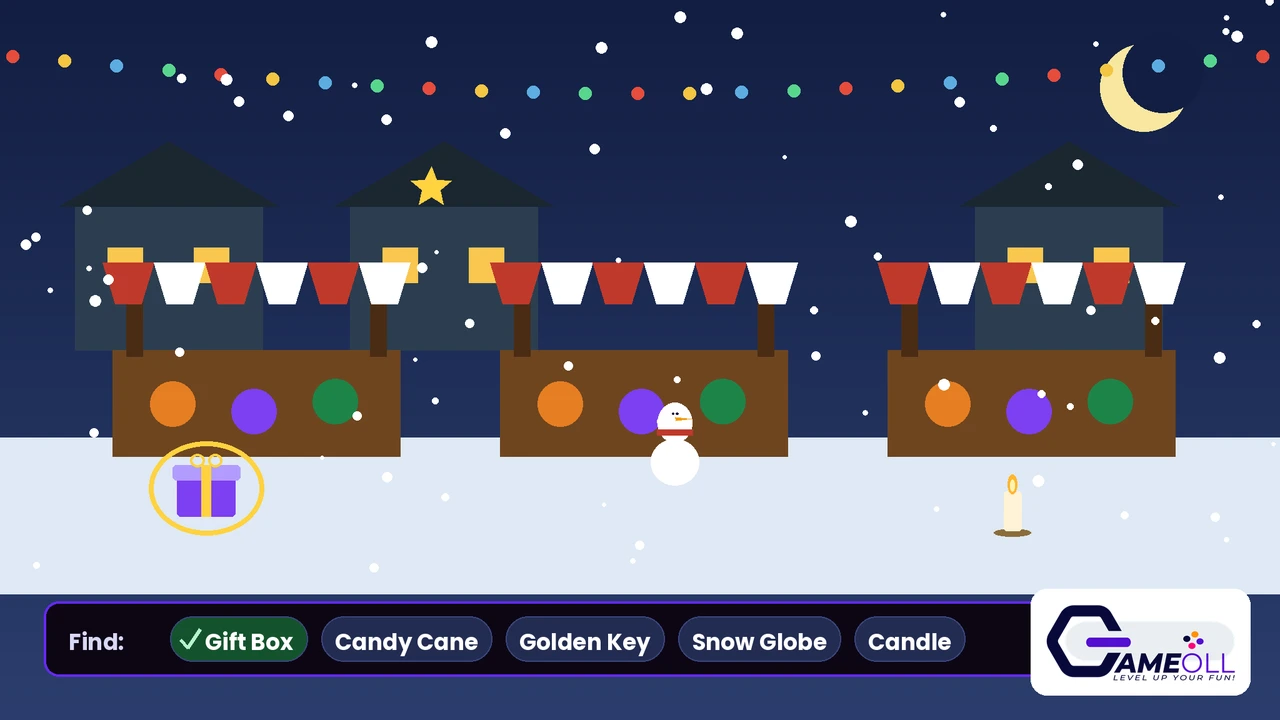
Pick a scene. The picture fills the stage and a list under it names the 11 objects hidden inside. Tap an object in the picture when you spot it. A gold ring marks it found, and its name is crossed off the list. Find all 11 to finish the scene.
A tap in the wrong place is counted as a wrong tap, but nothing worse happens. Three wrong taps in a row gently shake the list to slow you down for a second. There is no fail state in this game. The only race is against your own best time.
| Step | What to do |
|---|---|
| 1 | Tap ▶ Play Daily Peek, or open 🎄 All Scenes and pick any open scene. |
| 2 | Read the find list under the picture. |
| 3 | Scan the scene and tap each object when you spot it. |
| 4 | Use 💡 Hint when one object will not show itself. You get 3 per scene. |
| 5 | Find all 11 objects to earn your stars and your best time. |
The 25 scenes
Five preview scenes are open all year: the Cozy Living Room, Santa’s Workshop, the Christmas Market, the Snowy Village Square and the Gingerbread Kitchen. They are the full game, not a demo. You can earn all 15 of their stars in July if you like.
The other 20 scenes form the Advent calendar. The Reindeer Stable opens on December 1. The Toy Shelf Attic follows on December 2, then the Winter Forest Cabin, the North Pole Post Office, the Candy Shop Window and 15 more, one each day, until The Night Before Christmas opens on December 20. Every scene hides a different set of 11 objects in a different setting, from a frozen pond to a harbour strung with lights.
How the Advent calendar works
The calendar runs on your own device’s date. Before December, locked scenes show the day they open, so you can see exactly what is coming. In December, one new scene unlocks each morning. After December 20 every scene is open.
Once a scene opens, it stays open. Nothing locks again in January, and nothing expires. The menu also shows a Daily Peek: the newest open scene, ready with one tap. It is the fastest way to keep up with the calendar on a busy day.
Leave a scene half finished and it waits for you. Your found objects, your hints, your wrong taps and your time are saved in this browser and restored exactly where you left them, with a welcome-back line when you return.
Stars, hints and wrong taps
Each scene pays up to 3 stars. Finish with no hints used and a time of 2 minutes 30 seconds or better to earn all 3. Use one hint, or take a little longer, and the scene pays 2. Anything heavier pays 1, and a finished scene always pays at least 1. Stars are kept per scene, so replaying a scene can only raise its rating, never lower it.
Hints are strong but limited. One hint pulses a pink ring around an object that is still hiding and names the part of the scene to search: the top left, the bottom right, the centre and so on. Wrong taps, by contrast, cost nothing but pride. They are counted on the scene and shown at the end, and 3 in a row shake the find list as a gentle nudge to slow down and look.
7 tips for finding objects faster
- Read the whole list first. Your eyes find shapes much faster when they know what to look for.
- Scan in a pattern: top left to bottom right, row by row, instead of jumping around the picture.
- Look at edges and corners. Designers love hiding small objects where the eye rests last.
- Check behind big shapes. A drum behind the tree and a key beside the fireplace are classic hiding spots.
- Mind the colours. A red stocking hides well in a red market stall. Look for the outline, not the colour.
- Save hints for the final two objects. Early objects are easy; the last candle is the one that hides.
- Replay for stars, not speed. On a second visit you already know half the hiding spots.
Frequently asked questions
What is a hidden object game?
A hidden object game shows you a busy picture and a list of things hidden inside it. You study the picture, spot each listed object, and tap or click it to cross it off the list. The fun is in the searching: small objects tuck themselves into clutter, corners and matching colours.
How many scenes are in this christmas hidden object game?
There are 25 scenes. Five preview scenes are open all year, and 20 Advent scenes open one per day from December 1 to December 20. Every scene hides 11 objects and pays up to 3 stars, so the full game holds 275 hidden objects and 75 stars.
How does the Advent calendar work?
One Advent scene unlocks each day from December 1 to December 20, based on the date on your device. Locked scenes show the day they open. The menu’s Daily Peek button takes you straight to the newest open scene.
Do Advent scenes close again after Christmas?
No. Once a scene opens, it stays open for good. Your stars, best times and half-finished scenes are saved in your browser and never reset.
How do the stars work?
Finish a scene with no hints and a fast time for 3 stars. One hint or a slower time pays 2 stars, and any finished scene pays at least 1 star. Replaying a scene can raise its stars but never lower them.
Can I play on my phone?
Yes. The game runs in your browser with no download and no sign-up. Scenes are drawn to fit your screen, tap targets stay big enough for a fingertip, and your progress is saved on the device you play on.
🏆 Final Verdict
This is GameOLL’s coziest game: 25 hand-drawn Christmas scenes, 275 hiding spots, and a December calendar that gives you a reason to come back every single day. Play the five open scenes now, then follow the Advent doors all the way to The Night Before Christmas.
A note on originality: hidden object games are a classic picture-search format. Every scene, object drawing and line of code on this page is original to GameOLL, drawn in code for this game. No other maker’s artwork or scene layouts are used.
Last updated: November 8, 2026