
Roblox collaboration tools primarily allow developers to simultaneously work on the same game, sharing assets and scripts in real-time.
Ever wondered how massive Roblox experiences are built? It’s rarely a solo project! Teams of creators work together, and that’s where Roblox collaboration tools become crucial. These tools enable efficient teamwork.
They allow multiple people to edit the same game at the same time. This way, the development process becomes faster and smoother. Sharing assets and scripts among team members makes a big impact.

Roblox Collaboration Tools: Building Worlds Together
Have you ever dreamed of building an amazing Roblox game, a super cool hangout, or maybe even a whole new virtual world? It’s much more fun with friends, right? That’s where Roblox collaboration tools come in! These tools help you team up with other creators, no matter where they are. Think of it like working on a big LEGO project with your buddies – everyone gets to add their ideas and make it awesome together. Let’s explore how these tools work and how they can make your Roblox building journey even more fun!
Understanding the Basics of Team Create
The heart of Roblox collaboration is something called “Team Create.” Team Create is like a shared building space inside Roblox Studio. Instead of working alone, you and your friends can all jump into the same place at the same time and build together. It’s like having a giant whiteboard where everyone can draw, erase, and add their own creations. Here’s the scoop on how it works:
How to Start a Team Create Session
Starting a Team Create session is easy. It’s the first step to building your dream project with your friends. Here’s a simple guide:
- Open Roblox Studio and create a new game or open an existing one.
- Go to the “View” tab at the top of the screen.
- Click on “Team Create.”
- A window will pop up. Click the “Turn On” button.
- Now, invite your friends! Click the “Invite” button. A list of your friends will show up. Pick the friends you want to build with, and send them an invite.
Once your friends accept the invitation, they can join your studio and help you build. Make sure you have a good plan before you start, so everyone knows what they should work on!
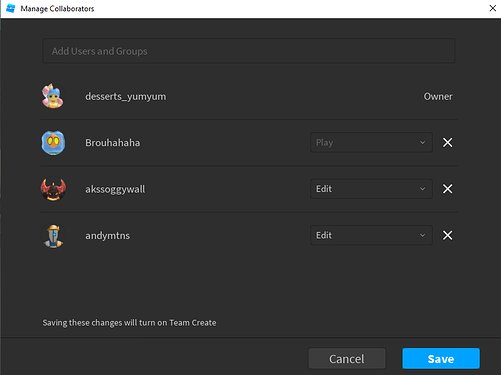
Permissions: Who Can Do What?
When you have multiple people working on the same project, it’s very important to decide who can do what. Just like in a real construction crew, some people might be good at building walls and others at designing furniture. In Team Create, you can set permissions to give different levels of access. This ensures that everyone has their role and avoids accidental mistakes. For example:
- Owners: They are the creators of the game, usually, they are the one who invites all the builders. They have all rights and permissions and have complete control over everything like, building, inviting people, changing permissions, etc.
- Editors: They can build, edit, and change the game world. Usually they are your building team.
- Viewers: They can see the game world and watch all of the changes, but they can’t change anything. This is good for people who just want to check the project’s progress or test the game.
You can change permissions in the Team Create window. This helps you keep control of your project while still letting everyone contribute. Always make sure to give the correct level of access to your team members for efficient building and less errors.
Advanced Collaboration Features
Team Create isn’t just about placing blocks. Roblox has extra features that will help you build even more efficiently and effectively when you are building as a team.
Real-Time Editing and Synchronization
One of the coolest things about Team Create is that all the changes happen in real-time. This means you can see your friends building and creating stuff live, as they are doing it! If someone moves a tree or adds a new house, you’ll see it instantly. It’s like being in the same room even when you are far away. This feature helps the building process to be very fluid and interactive, so everyone knows exactly what’s going on with the game at any moment. This can prevent miscommunication and keep everyone on the same track, ensuring that the whole team is in sync.
The Chat Feature
Communication is key to any team project. In Team Create, you have an in-built chat feature which is very essential for any team project. Instead of using other apps for chatting, you can easily talk to your team members while you’re in the studio. You can discuss ideas, share tips, or ask for help – all without leaving the Roblox studio. It’s like having a built-in walkie-talkie. This tool is extremely important for effective teamwork. It helps the team brainstorm and stay on the same page, ensuring everyone understands their tasks. It’s a good idea to use chat regularly to keep the team in sync and help avoid any miscommunications.
Version History: Turning Back Time
Mistakes happen, right? What if you accidentally delete something important? Don’t worry. Team Create has a cool feature called version history. It’s like a rewind button. It keeps a record of all the changes you make to the game and you can always go back to an earlier version. So, if someone makes a mistake or the team decides to go back to a past version of the game, you can always find it in the version history. You just need to click a button to turn back the time and go to the previous versions. This feature is a great safety net, helping you keep your creations safe and easily fix any issues that occur. It’s a very useful tool for any team that is working on Roblox projects. If you make any error, version history got your back. It helps to work without being worried.
Using the Asset Manager Together
The Asset Manager is a crucial tool in Roblox Studio. It’s where you save and manage all your game assets, like models, textures, and sounds. When you work as a team, the Asset Manager keeps things organized. Everyone has access to the same assets and can use them in their creations. It’s like having a shared toolbox where everyone can get what they need. This makes the project consistent and saves time because everyone uses the same assets instead of creating them individually. Always keep your asset manager organized, so that it is easier for everyone to find what they need. When used correctly, it can greatly enhance the quality and consistency of your projects.
Best Practices for Effective Collaboration
Teaming up on Roblox projects can be a lot of fun. But, just like any team work, you have to follow some rules for it to work smoothly. Here are some best practices to make your collaborations successful:
Plan Before You Build
Before you start placing blocks, take some time to plan with your team. Make sure to discuss what you want to create. Think about what kind of game you want to build, what it will look like, and what features you want to include. Making a simple sketch or writing down ideas can really help your team. If you start building before making a proper plan, there are many chances that you will make mistakes and have to restart a lot. Planning saves your time and allows everyone to know the end goal of the project. Here is a small checklist to get started:
- Discuss what your game will be about.
- Make a sketch or write down your main ideas.
- Decide who will do what.
- Set clear goals and deadlines.
Always plan out your project before you start, this will help your team stay organized and work with high efficiency.
Assign Roles and Tasks Clearly
In any team project, everyone must have a specific role and task. Deciding who will do what can prevent people from getting in each other’s way or stepping on someone’s task. You can assign roles based on your friends’ interests and skills. For example, some might be great at building houses, while others might be good at designing characters or creating music. Assigning clear roles allows your team to be organized and responsible for their assigned work. Here are a few examples of roles you could use in your team:
- Lead Builder: Takes charge of main structures and overall design.
- Terrain Designer: Works on the land, mountains, and water.
- Scripting Master: Handles the game’s logic and actions.
- Character Designer: Creates cool characters and NPCs.
- Sound Designer: Adds music and sound effects.
When everyone has a specific job to do, the team will work smoothly and efficiently, making the building experience fun and productive.
Use the Chat Function for Constant Communication
Always make sure to communicate with your team regularly. If you have any new ideas, any questions or any problems you should always talk it out in the chat feature. Use the chat feature as much as you can, this allows everyone to be on the same page about the project’s progress. Keep communicating regularly, this avoids a lot of problems in the future. Good communication is key to creating something awesome together. It’s important to not assume that your team knows what’s going on, always keep them updated.
Regularly Save Your Progress
Saving your work is very important. It’s always a good idea to make sure you regularly save your projects by clicking the “Save to Roblox” button. It’s a very good habit to save your work frequently, this will make sure you do not lose all your work by any accident or any other technical error. Roblox might also automatically save your project. However, don’t rely on the auto save feature, it is good practice to manually save. Saving ensures that all your hard work is kept safe and you can access it at any time. Regular saving helps the team’s progress to be continuous, without the worry of losing any work.
Test Your Game Together
Once you’ve built some things, it’s always a good idea to test your game with your team. Playing the game together is fun, it can help you find problems. Your team can catch bugs or other problems and fix them. Testing allows you to see if your game is working as you planned, and if there are any glitches or other problems. By working together to find issues, you can build a better final product. Also, playing the game with the whole team will be a fun experience. It brings the team closer and motivates them to build even more awesome games.
Tools Beyond Team Create: Other Useful Collaboration Methods
While Team Create is a vital tool, Roblox offers more ways to collaborate. It’s a good idea to explore these alternative methods to enhance your building process.
Collaborative Scripting
Scripting is an important part of making Roblox games. It’s how you make things move, interact, and do cool things. Usually, developers work on scripts independently and then merge their work together. But there are tools to allow teams to work on scripts together. Using tools like shared code editors and version control systems allows multiple developers to work on the same script at the same time. It also allows the developers to track changes and fix errors. It improves the scripting process, making it easier for teams to create amazing game mechanics.
Using Discord for Team Communication
While Team Create offers an in-built chat feature, many teams prefer to use Discord. Discord is a great platform for team communication. You can create a dedicated server for your project, set up voice channels, and share important updates. Discord allows you to share images, videos, and other files related to your project. Discord is very flexible and provides features for better team communication and coordination. Discord is mostly a great choice for teams that want a more dedicated and feature-rich platform for their collaboration.
Sharing and Using Models and Assets
Roblox makes it easy to share models, sounds, and other assets with other creators. Instead of starting everything from scratch, you can use pre-built assets. This saves a lot of time and effort. You can also collaborate with your team to create new assets together and share it. By sharing and reusing assets your team can ensure the game has a consistent look and style. By working collaboratively to create assets and models you can build even more quickly. It also opens up other collaboration opportunities by using existing assets created by other creators.
By using all of the mentioned tools above, you can build awesome Roblox games together. Team Create is a good place to start, and you can slowly explore the more complex features. With good planning and teamwork, you can build anything in Roblox. Remember to communicate with your team, plan your work, and test your games frequently. Keep on building and having fun!
Collaboration tools make building in Roblox even better. They let you team up with your friends, share ideas, and create together. You’ll learn a lot from each other and make much cooler and bigger projects than you could on your own. When you’re working together on a building project, always communicate, plan ahead, and be respectful of everyone’s ideas. When you use the tools in the correct way, you will create awesome stuff. So, get some friends and jump into Roblox Studio, and let your creativity go wild. You will find the possibilities are infinite, and you will have a great time.
Best Roblox Studio Plugins! #shorts
Final Thoughts
Effective teamwork is vital for Roblox development. Roblox collaboration tools greatly simplify group projects. Developers can share assets and work simultaneously. This improves workflow and project completion speed.
These tools allow for version control and real-time feedback. It prevents conflicts and encourages team communication. With suitable features, anyone can achieve development goals. Effective use of Roblox collaboration tools ensures better games.

