
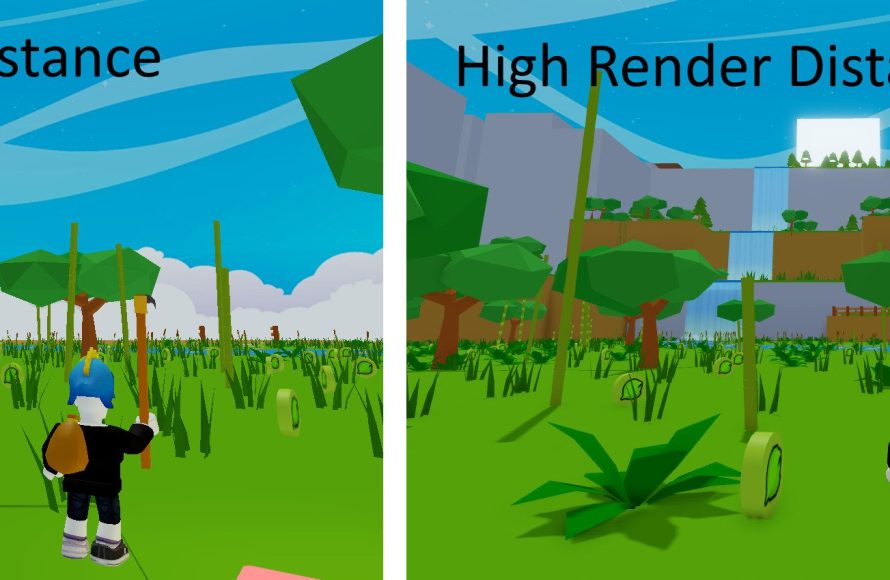
Custom rendering in Roblox games allows developers to control the visual aspects beyond default settings, enabling unique art styles and performance optimizations.
Have you ever wondered how some Roblox games achieve such distinctive visuals? It’s all thanks to the power of roblox custom rendering in games. Developers can step beyond the usual look. They create breathtaking experiences through clever manipulation of how graphics appear.
This opens a whole new realm of possibilities. Developers gain increased control over the rendering pipeline. This control results in specific aesthetic goals and performance enhancements.

Roblox Custom Rendering in Games
Ever looked at a Roblox game and thought, “Wow, that looks different!”? That’s often because the game creators are using custom rendering! Instead of relying only on Roblox’s standard look, they tweak how everything appears. Think of it like giving your favorite toy a brand-new paint job. It’s still the same toy, but it looks much cooler and unique. Custom rendering lets developers create a totally distinct visual style for their games, making them more immersive and interesting.
Why Bother with Custom Rendering?
Why would someone go through all the trouble of changing how things look in a game? Well, there are many reasons! Imagine a game set in a spooky forest. The standard Roblox lighting might make it look too bright. With custom rendering, a developer can make the shadows deep and the atmosphere creepy. It’s like adding a special filter to the world. Here are some main benefits:
- Unique Visuals: Stand out from the crowd! Custom rendering creates a special look for your game that players won’t see anywhere else.
- Improved Immersion: A game that looks and feels the way it should sucks players in, making them feel more like they are actually in the game world.
- Artistic Vision: Developers have creative ideas. Custom rendering lets them show that vision fully.
- Better Performance: Sometimes, custom rendering can even make the game run smoother by being more efficient than default rendering. This is not always the case but it is a goal many pursue.
- Specific Themes: Whether you want a cartoon look, realistic look, or something completely different, custom rendering makes it possible.
Understanding the Basics: What is Rendering?
Before we go too deep, it’s important to understand what “rendering” actually means. In simple terms, rendering is the process of taking all the information about a game – like where objects are, what colors they have, and how light is hitting them – and turning it into the image you see on your screen. It’s like a chef taking all the ingredients and making a delicious meal. The Roblox engine has built-in systems that handle most of this automatically, but custom rendering allows game developers to take control of this process.
How Rendering Happens in Roblox
Think of the rendering process like a series of steps. Here’s a simplified look:
- Data Collection: The game engine gathers all the information about objects, lights, and cameras.
- Processing: It figures out how the objects should look based on the information it collected.
- Drawing: Finally, the engine draws all the pixels to create the image.
Custom rendering lets developers modify or even replace parts of these steps. Instead of using the standard process, they can use their own tools and techniques to create new visual effects.
Key Custom Rendering Techniques in Roblox
So how exactly do developers change the way things look? There are several methods they use, each offering unique effects. Let’s explore some popular techniques:
Post-Processing Effects
Imagine taking a photo and then adding cool filters. That’s basically what post-processing effects do. They are applied after the initial scene is rendered, modifying the final image. Some examples of post-processing effects that developers can create in Roblox are:
- Bloom: This makes bright parts of the game glow, making light sources appear more intense. It’s often used to give a scene a magical feel.
- Color Grading: Changes the overall color palette of the game. You might use this to make the game more warm and inviting or dark and moody.
- Depth of Field: Makes objects in the foreground sharp and the background blurry, like looking through a camera lens.
- Motion Blur: Adds a blur effect to moving objects, making fast action feel more dynamic.
- Chromatic Aberration: Adds a colored fringe effect along edges, making the game look like it was filmed through a lens. It’s often used for sci-fi effects.
Custom Shaders
Shaders are like tiny programs that run on your computer’s graphics card and are responsible for deciding how each pixel looks. They’re the real powerhouses behind custom rendering. Developers can write their own shaders to change things like:
- Surface Appearance: Modifying the way surfaces reflect light. For example, making metal shiny or cloth matte.
- Texture Mapping: Changing how textures look on surfaces. They can make things look more realistic or give them special properties.
- Lighting Effects: Creating more advanced lighting, like shadows that change color or dynamic light sources.
Custom shaders are very powerful and can make a huge difference in how the game looks. They are a more advanced aspect of custom rendering, but can take visual fidelity to the next level.
Custom Lighting
Lighting is vital in a game’s look. Instead of relying on the default Roblox light sources, developers can make their own. This involves:
- Creating Custom Light Sources: Making lights that behave in a different way than normal Roblox lights, such as spotlights or area lights.
- Shadow Techniques: Using custom shaders to make shadows more detailed and realistic.
- Global Illumination: Making lighting that bounces around the scene, giving a more natural and realistic look.
Custom lighting can bring a lot of depth and atmosphere into a game.
Custom Skyboxes and Atmosphere
The skybox is what you see in the far background, and atmosphere affects how things appear in the distance. Developers can change this too:
- Custom Skyboxes: Replacing the default sky with a custom image or animation. This makes game world feel more unique and custom.
- Fog Effects: Adding fog or haze to the distance, making the game feel more mysterious or creating depth.
- Atmospheric Scattering: Making light interact with the atmosphere, which changes how distant objects look.
Custom skyboxes and atmosphere can make the game environment really captivating.
The Tools for Custom Rendering
Creating all these fancy effects isn’t magic, of course! Developers use specific tools to achieve their goals. Here are some key tools and concepts:
Lua Scripting
Lua is the programming language used in Roblox. Developers use Lua scripts to control many aspects of the game, including rendering. They use it to:
- Apply Post-Processing Effects: Scripting which effects to enable and how they work.
- Handle Custom Shaders: Setting up how custom shaders apply to different game objects.
- Control Custom Lighting: Scripting custom light sources and how they interact with the world.
Surface Appearance
SurfaceAppearance is a Roblox feature that lets you control the texture, color, and other visual properties of a part. Developers use it for things like:
- Applying PBR (Physically Based Rendering) Materials: This allows you to create more realistic materials by controlling how they reflect and absorb light, leading to better surface detail.
- Using Normal Maps: Adding fine details to a surface without using high polygon counts for performance. Normal maps can make surfaces like stone or fabric look much more realistic.
- Using Metalness Maps: Defining what areas of your model should look metallic.
- Changing textures using decals: Applying pre made textures to models.
ViewportFrames
ViewportFrames are like a window into a smaller virtual world. Developers can use them to:
- Create Mini Displays: Making screens or devices that show content within the game.
- Generate Unique Visual Effects: Rendering objects in a special way to make them look like they are holographic.
- Implement UI Elements: Use them for user interface components, like item previews.
Game Engine Features
Roblox’s game engine itself has features that make custom rendering easier, including:
- RenderStepped: An event that triggers every frame to render, letting developers update rendering effects smoothly.
- Camera manipulation: To make things like depth of field, etc.
- Light objects: Roblox provides different kinds of lighting objects that can be used for rendering purposes.
- Part Objects: The base elements for the game’s structure.
The Challenges of Custom Rendering
While custom rendering is powerful, it’s not always easy. There are some challenges that developers need to manage:
Performance
Complex rendering effects can slow down the game, especially on older devices. Developers need to optimize their work so that the game runs smoothly for everyone. This involves:
- Careful Shader Coding: Shaders can be very taxing on hardware. They need to be written efficiently.
- Optimizing Effects: Making sure effects aren’t too intensive by using simpler methods.
- Testing: Making sure the game runs well on different types of computers and devices.
Complexity
Writing custom shaders and other rendering code can be difficult. It requires a good understanding of math and programming concepts.
Debugging
Finding and fixing errors in custom rendering code can be tricky. Developers have to be very detail-oriented when debugging their games. It requires specific tools and careful testing to find what went wrong.
Examples of Amazing Custom Rendering in Roblox Games
The best way to understand the impact of custom rendering is to see it in action. There are many Roblox games that have really pushed the boundaries of visual quality:
- Realistic Simulations: Some games aim for a realistic look, using custom lighting and textures to create stunning environments.
- Stylized Art: Other games go for a completely unique look that stands out from the crowd.
- Horror Games: Games use custom rendering to make the atmosphere very creepy, with deep shadows and spooky effects.
- Sci-Fi Games: Games use visual techniques like bloom, color grading, and more to make futuristic looking environments.
These games demonstrate just how much can be achieved with custom rendering.
Custom rendering in Roblox opens up a whole new world of possibilities. It’s not just about making games look better. It’s about giving developers the ability to fully express their creative vision, create new ways for games to be visually appealing, and to make games that feel unique and special. As technology improves, we will continue to see even more amazing results with custom rendering.
Roblox hitboxes be like
Final Thoughts
In short, exploring the possibilities of Roblox custom rendering in games offers developers great flexibility. Players can enjoy visually unique experiences through specific graphic choices. This control helps in achieving diverse artistic styles within the Roblox platform.
Ultimately, effectively utilizing Roblox custom rendering in games allows for enhanced visuals and performance optimization. Developers can push boundaries by creating more engaging gameplay. This benefits both game creators and the wider player community.

