
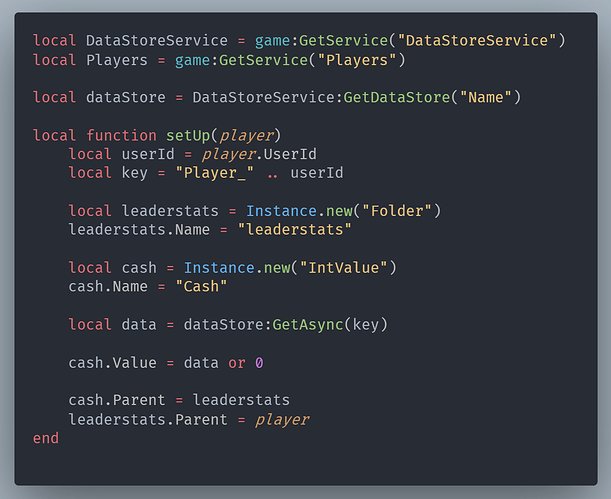
Understanding Roblox Datastore Service allows developers to save and load player data, ensuring progress is not lost between sessions.
Have you ever wondered how your carefully earned in-game progress remains when you return to Roblox? That’s where understanding Roblox Datastore Service becomes crucial. This service acts as a persistent storage solution, enabling developers to save player stats, items, and other important information.

Understanding Roblox DataStore Service
Have you ever played a Roblox game and wondered how it remembers your progress? Like, how does it know you’re level 10 and have a cool pet when you come back later? That’s where the DataStore service comes in! It’s like a super-smart notepad that Roblox games use to save important information about players. This information could be anything from how much gold they have to their favorite character’s clothing.
What is the DataStore Service?
The DataStore service is a powerful tool built into Roblox. It allows game creators to store and retrieve data for each player in their games. Think of it like a personal file cabinet for each player, where the game can keep all sorts of important information.
Why is DataStore Important?
Without DataStore, your game progress would disappear every time you left the game. Imagine losing all your hard work every time you close Roblox! That would be frustrating, right? DataStore prevents this, making sure players can always pick up where they left off.
It’s also key for other things, like leaderboards and inventory systems. DataStore helps keep all that data safe and available for players.
How Does DataStore Work?
The DataStore service works by saving data on Roblox’s servers. This is like a giant computer that holds all the information for many games. When a player joins your game, the game can access their information, like the saved gold and items, from these servers.
When the player makes changes, the game sends the updated information back to the servers to be saved. It’s a continuous process of saving and loading player data.
Key Concepts of DataStore
Let’s explore some important ideas about how DataStore functions:
- Keys: Think of keys like labels for your files. Each piece of data you store must have a unique key, like “PlayerGold” or “CharacterLevel”. This allows the game to find the correct information later.
- Values: Values are the actual information you are storing. It could be a number, like 100 (gold), a word, like “Warrior” (player class), or even a table with many details.
- DataStore Names: You can organize data into different data stores, each with a name. You might have a data store for player progress and another for game settings. It helps you keep the data organized.
Types of Data You Can Store
DataStore can store several types of data:
- Numbers: Like player level, currency, or experience points.
- Strings: Like a player’s username or character name.
- Booleans: True or false values, like whether a player has completed a quest.
- Tables: You can store complex information using tables, like a list of items in a player’s inventory or the statistics for a particular character.
Getting Started with DataStore Scripting
To use DataStore, you’ll need to use scripts in Roblox Studio. Scripts are like instructions that tell the game what to do. Here’s how it usually works:
Accessing the DataStore Service
First, you’ll need to access the DataStore service itself. In a script, you would write something like this:
local DataStoreService = game:GetService("DataStoreService")
This line of code gets the DataStore service so that you can then use its functions.
Creating a Data Store
Next, you need to create a specific data store where you will save the player’s data. You would do this by providing a name to your data store. Here’s an example:
local myDataStore = DataStoreService:GetDataStore("MyGameProgress")
In this example, “MyGameProgress” is the name of your data store. You can name it whatever you want, as long as it helps you organize your data.
Saving Player Data
Now, let’s see how to actually save data. When a player leaves your game, you need to save their information. Here’s an example of how to save a player’s gold:
local function saveData(player)
  local playerGold = player.leaderstats.Gold.Value
  local success, errorMessage = pcall(function()
  myDataStore:SetAsync(player.UserId, { Gold = playerGold })
   end)

   if success then
       print("Saved data for player " .. player.Name)
   else
     warn("Failed to save data for " .. player.Name .. ": " .. errorMessage)
   end
end
In this code, player.UserId is used as the key, which is unique for each player. {Gold = playerGold} is the value. SetAsync saves the information. pcall is used here to handle any potential errors.
The SetAsync function makes sure that changes get saved. It’s important to save the data regularly so that player progress is not lost.
You need to be careful with saving data to make sure you don’t save too frequently, which can cause you to get throttled by Roblox servers.
Loading Player Data
When a player joins the game, you need to load their saved data. Here is how you can do it:
 local function loadData(player)
  local success, playerData = pcall(function()
  return myDataStore:GetAsync(player.UserId)
   end)

 if success then
      if playerData then
      local gold = playerData.Gold or 0
      player.leaderstats.Gold.Value = gold
         print("Loaded data for player " .. player.Name .. ", Gold: " .. gold)
      else
        print("No data found for player " .. player.Name)
      end
  else
     warn("Failed to load data for " .. player.Name .. ": " .. playerData)
  end
 end
Here, GetAsync retrieves data from the server using the player’s UserId. The code checks if there is saved data. If data exists it sets the gold for the player.
If no data is found for the player, a message will be shown in the output of Roblox studio.
Handling Player Join and Leave Events
Now, we need to put this together by listening for when players join and leave the game:
 game.Players.PlayerAdded:Connect(function(player)
   loadData(player)
 end)

 game.Players.PlayerRemoving:Connect(function(player)
   saveData(player)
 end)
This code ensures that when a player joins, their data is loaded, and when they leave, their data is saved.
Important Considerations
Using DataStore effectively means considering a few important factors:
Data Limits and Throttling
Roblox sets limits on how much data you can save and how often. You shouldn’t save data every second because you can be throttled (slowed down). Make sure you plan how often you save data to avoid issues.
Error Handling
Sometimes, saving or loading data may fail due to network problems. It’s important to handle these errors gracefully. Use functions like pcall to handle potential errors and provide a backup system if needed.
Use try-catch or pcall statements to ensure your game continues functioning if DataStore fails.
Data Security
Do not store sensitive player information in DataStore. It’s also very important to avoid giving cheaters a way to change the data. You should perform server-side validation to ensure data integrity.
You should never store player passwords or other confidential information in datastore.
Data Organization
Plan how to organize your data efficiently. Use keys that make sense, and organize data into different data stores if needed. This helps you keep track of your information.
Advanced DataStore Techniques
As you get more comfortable with DataStore, you might want to try more advanced techniques:
Data Versioning
When you update your game, the format of the data you save might change. You can use data versioning to handle this. This allows older player data to be compatible with the new format.
Using OrderedDataStores
OrderedDataStores are like regular DataStores but also allow you to rank data. They’re great for creating leaderboards. You can get the top players based on the data they have.
Data Migration
When you need to change how data is saved, you can use data migration. This means moving old data into a new format in a smooth way. This can prevent issues from arising in your game.
Tips for Effective DataStore Usage
- Save often, but not too often: Saving after a major action or when a player leaves is a good practice.
- Use unique keys: Make sure you choose keys that are easy to understand and unique for each player.
- Test thoroughly: Always test your DataStore scripts to make sure everything is working correctly.
- Document your DataStore structure: Keep track of what data you are saving, and which keys you are using, it’s helpful for when you need to change your code.
The DataStore service is a vital tool for creating complex and engaging games on Roblox. By understanding how it works and following good practices, you can create a more enjoyable experience for your players.
Save Player Data with Roblox Datastores
Final Thoughts
Understanding roblox datastore service allows developers to save player data persistently. It is essential for creating engaging games.
This service manages things like player progression and inventory. Proper use avoids data loss issues.
Therefore, learning the nuances of roblox datastore service is crucial. It leads to reliable gameplay experiences.

