
Data analysis in Roblox user experience informs design decisions by tracking player behavior and preferences. This process directly impacts game engagement and retention.
Ever wondered why some Roblox games are hits and others miss the mark? It’s often because of how well developers understand their players. Effective use of Roblox data analysis in user experience is key to building engaging and fun games.
Tracking player actions, session times, and in-game purchases provides valuable insights. This data guides developers to make informed choices, improving everything from level design to gameplay mechanics. Understanding this data can greatly boost your game’s success.

Roblox Data Analysis in User Experience
Have you ever wondered how game creators on Roblox know what players like and don’t like? It’s not magic! They use something called data analysis. Imagine you’re building a super cool LEGO castle. You’d want to know if people like the towers, the drawbridge, or the secret passages, right? Roblox game developers do the same thing, but with data.
Why Data Matters for Roblox Games
Data is like a secret detective, always watching and learning. In Roblox, it helps developers figure out:
- What parts of the game are most popular?
- Where do players get stuck or confused?
- How long do players typically spend playing the game?
- Are players spending in-game Robux in a particular area?
- What are the most common player complaints?
By looking at this data, developers can make their games even better! They can make changes that make the game more fun, easier to play, and more engaging. They’re aiming for an amazing player experience.
Understanding Key Metrics in Roblox
There are many different types of data that Roblox developers can track. Let’s explore some of the most important ones.
Player Retention
This is a super important metric! It tells developers how many players come back to the game again and again. If a lot of players stop playing after only a short time, that’s a sign the game might need some changes. Think of it like this: if your friends play your video game once and never play again, you might want to add some extra fun stuff to get them to return.
Key retention metrics include:
- Day 1 Retention: How many players return to the game the day after they first played?
- Day 7 Retention: How many players come back after a week?
- Month 1 Retention: How many players are still playing a month later?
Session Length
This metric measures how long players play a game each time they log in. A longer session length usually means players are really enjoying themselves and having fun. If sessions are short, developers might need to find ways to keep players more engaged.
For example, a game with exciting mini-games or difficult challenges might have longer session lengths.
Player Engagement
This is like measuring how much players are interacting with different parts of the game. It’s not just about how long they play, but what they’re doing while they’re playing.
Player engagement metrics include:
- Number of Interactions: How often do players click buttons, use items, or talk to other players?
- Specific Feature Usage: Are players using the crafting system, driving vehicles, or visiting a particular part of the map?
- In-game Purchase: Which items or boosts are players spending their Robux on?
Conversion Rates
This metric is super important if a game has in-game purchases. It shows the percentage of players who are spending Robux in the game. It tells developers how well the game is encouraging players to buy items or boosts.
If a lot of players are spending money, that’s a good sign they like what the game has to offer and how they can use their Robux. If few players make purchases, developers might think about how to improve the system.
Error Tracking
It’s important for developers to know if a game has any glitches, bugs, or if players face any technical issues. Error tracking data helps developers find and fix those problems quickly, so everyone has the best experience possible.
This can involve keeping an eye out for:
- Crashes
- Script errors
- Loading issues
- User interface problems
Gathering Data: The Tools of the Trade
Roblox provides developers with different tools for collecting data. These tools are like the developer’s microscope, allowing them to see all the details of how players are using their game.
Roblox Analytics Dashboard
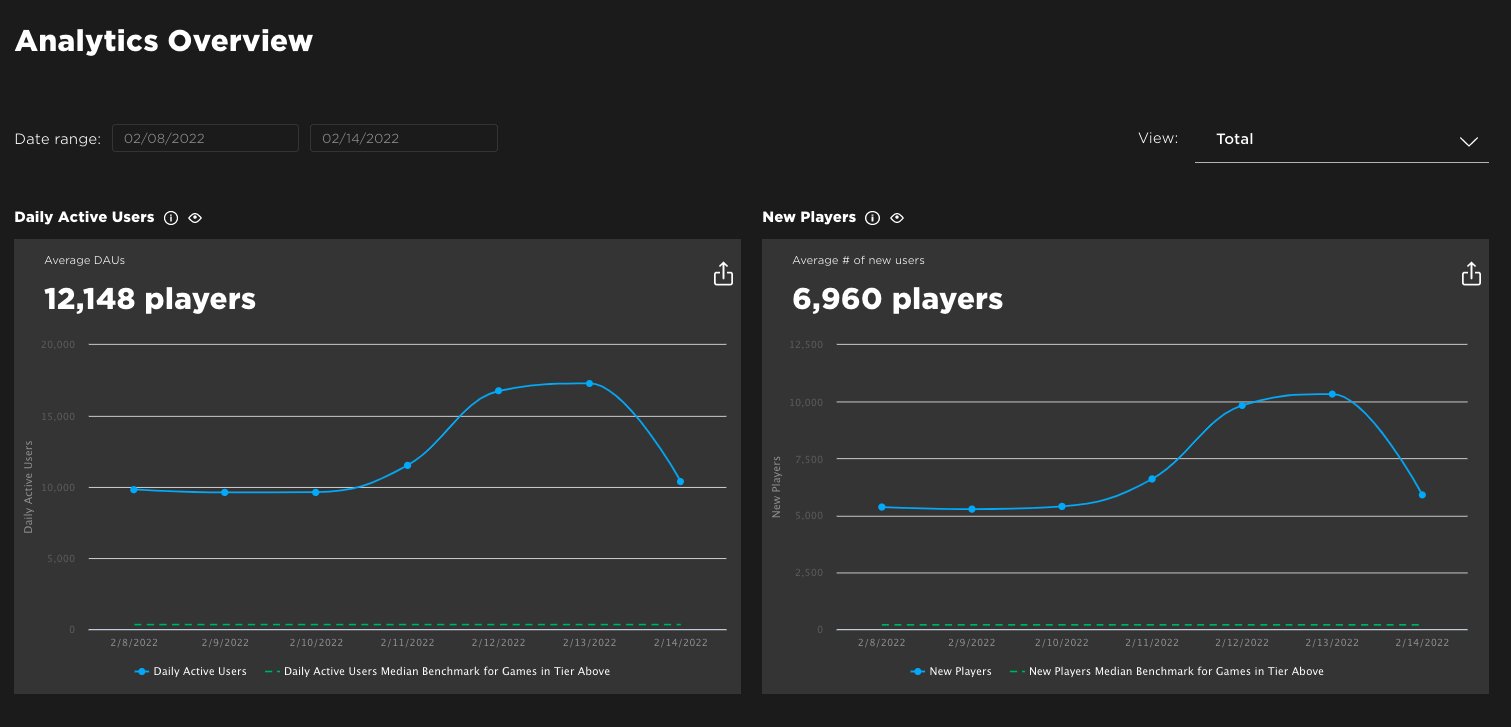
This is the main place where developers can see all the basic game metrics like player counts, retention rates, and session lengths. It’s like the central command center for data! It gives a quick overview of how the game is performing overall.
The Roblox Analytics Dashboard shows important things like:
- Daily Active Users (DAU): How many different people play the game each day.
- Monthly Active Users (MAU): How many different people play the game each month.
- Average Session Length: How long players play each time on average.
- Retention: How many players return to play again.
Custom Telemetry
Sometimes, the built-in data isn’t enough. Developers can add their own special tracking systems to monitor specific events in their game. For example, they can track how often players use a certain item or complete a specific quest. It is like having a personal reporter following players around, recording what they do!
Custom telemetry helps answer very specific questions, such as:
- How many players complete a specific level?
- How often do players use the chat feature?
- Which items are purchased most frequently?
Player Feedback
Even with all the data, there is no better way to understand what players want than to hear what they have to say directly. Player feedback can come from many places, such as in-game chat, social media, and other player platforms.
Developers use this feedback to identify common pain points and understand how to fix them. Player feedback can provide invaluable insight that data alone cannot provide!
Sources of player feedback include:
- In-game chat: What are players saying while they play?
- Discord servers or other community platforms: What are players discussing?
- Game reviews or comments: What are players saying about their experience on Roblox?
- In-game survey forms: Direct feedback from players through a survey.
Applying Data Analysis to Improve User Experience
Now that we have a good handle on what data is collected and how it’s done, let’s discuss how data helps developers make their games better. Data isn’t just about collecting information; it’s about using that information to improve the game for players. The data analysis allows developers to gain valuable insights about the user behavior and then they use those insights to modify the game for an enhanced user experience.
Identifying Pain Points
Pain points are areas of the game where players are having trouble. Data can help developers find these trouble spots.
For example, if a lot of players are getting stuck on a certain level, the data might show a low completion rate for that level, which makes it a pain point. The developers can then take another look at that level and find ways to make it easier or less confusing.
Ways data help identifying the pain points:
- Low completion rates for certain levels or challenges
- High frequency of players quitting the game in specific areas
- Commonly reported issues on the forum or chat
Optimizing Game Balance
Game balance is about making sure that a game is fair and fun for everyone. Data can help developers make sure that certain things aren’t too easy or too hard.
For example, if the data shows that a particular weapon is too powerful, developers might adjust its stats so it’s more balanced with other weapons. Similarly, if a game is too difficult, developers can adjust its difficulty or add tutorials to make it more accessible.
Examples of how data can help with balancing a game:
- Adjusting the power of different items, weapons, or abilities
- Balancing the difficulty of different levels
- Making the rewards for completing tasks more equal.
Improving Onboarding
Onboarding is how players are introduced to a game when they first play it. If players don’t understand how to play, they might quit early. Data can help developers see if new players are getting confused.
For example, if a lot of new players are quitting early, it means the onboarding might need improvements such as better tutorials, easier starting levels, or clearer instructions.
Using data to improve the onboarding process:
- Identifying areas where new players get confused.
- Adjusting the tutorials based on user behavior.
- Simplifying the game’s mechanics for newcomers
Personalization
Data can be used to make the game feel more personal to each player. For instance, the game can be tailored to the player’s unique play style.
For example, if a player uses a specific weapon a lot, the game could show that weapon more often or make more upgrades available for it. Personalization is not just about data; it is about making players feel valued.
How data can help with personalization:
- Offering different game modes or challenges based on player preferences.
- Showing specific items or characters that are tailored to individual user choices.
- Adapting the difficulty of the game based on player skill.
A/B Testing
A/B testing is like a science experiment for games! Developers try two different versions of a feature and see which one performs better with players. Data helps developers determine which change is more successful.
For instance, the game could have two different versions of a new interface. One version has larger buttons, and the other version has smaller buttons. By collecting data from both, the developers can find out which design players prefer.
Steps of A/B testing:
- Creating two versions of a feature (Version A and Version B).
- Showing Version A to some players and Version B to other players.
- Analyzing data to see which version performs better.
- Implementing the best version for all players.
Ethical Considerations in Data Analysis
Using data is powerful, but it’s important to do it responsibly. Developers need to be careful about how they collect and use player data, keeping things safe and fair for everyone. It is not just about collecting data, it is about protecting player’s privacy and well-being.
Some important things to consider are:
- Privacy: Player data should be kept safe and not shared with anyone who shouldn’t have it.
- Transparency: Players should know what kind of data is being collected about them and how it is being used.
- Fairness: Data shouldn’t be used to give some players an unfair advantage or to exclude others.
Developers need to handle player information with care and ensure that they are responsible in the data they analyze. By having responsible data practices, developers build trust with their players.
In conclusion, data analysis is super important for making great Roblox games. It allows developers to really understand what players like, fix problems, and make their games the best they can be. By looking at data, Roblox developers make sure that all the players have an amazing experience and want to play the game more. Using data analysis is not just about improving games, it’s about creating games that players truly love.
Data Informed Decision Making: Roblox Use Case for More Metrics | Adam Mills
Final Thoughts
Effective Roblox data analysis in user experience is vital. It allows developers to understand player behavior and preferences, guiding crucial design decisions. Analyzing play patterns, engagement metrics, and user feedback significantly improves game satisfaction. This iterative process helps craft more enjoyable and compelling experiences for players. Ultimately, informed data usage drives higher retention rates.

