
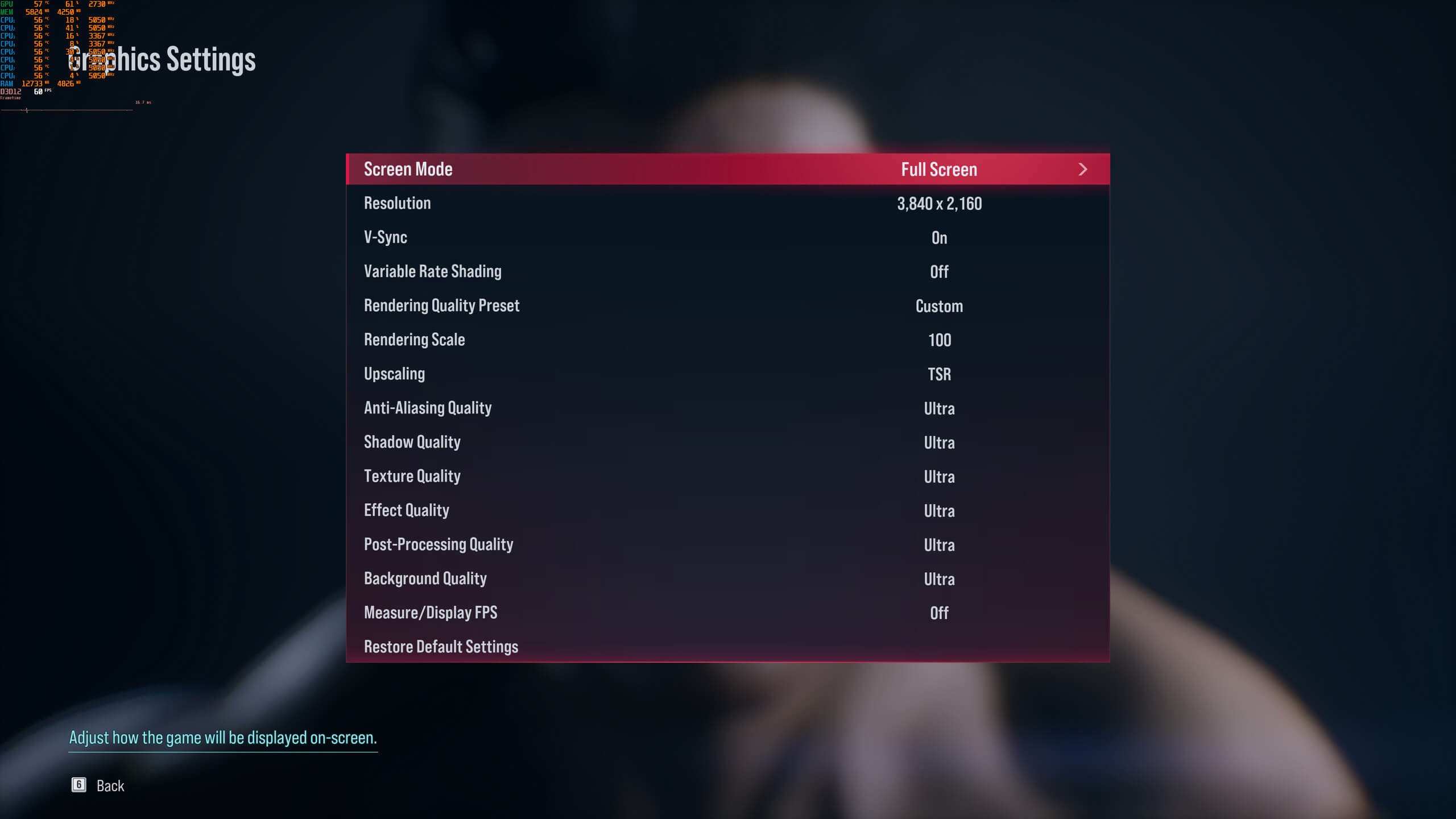
The Tekken 8 graphics performance analysis reveals that the game generally runs smoothly on modern hardware, but players may need to adjust settings for optimal frame rates at higher resolutions.
Have you been wondering how Tekken 8 performs on different PCs? We dive into a thorough Tekken 8 graphics performance analysis. We are going to explore frame rates, graphical settings, and how various hardware configurations cope with the game.
This analysis will give you information about what to expect and how to tweak the game for the best visual experience. Get ready to see how this fighting game pushes modern systems.

Tekken 8 Graphics Performance Analysis
Alright gamers, let’s dive deep into the world of Tekken 8’s graphics and see how it performs on different systems. We’re talking about frame rates, resolutions, visual settings, and everything in between. Whether you’re playing on a powerful gaming PC or a console, this analysis will help you understand what’s going on under the hood and how to get the best possible experience. Tekken 8 is a visually stunning game, and we’re going to break down exactly what makes it tick.
The Visual Feast: Understanding Tekken 8’s Graphics Engine
Tekken 8 uses the Unreal Engine, and boy, does it show! This engine allows for amazing character models, realistic lighting, and detailed environments. But what does that really mean for you, the player? Let’s break it down:
Character Models: From Pixels to Personalities
The characters in Tekken 8 look incredible. They’re not just simple polygons; they are incredibly detailed, with lifelike facial expressions, intricate clothing, and even visible muscle movement. You can see the individual threads of their outfits and the fine lines on their faces. This high level of detail demands quite a bit from your system.
- High Polygon Count: Each character model is made up of a massive number of polygons, giving them smooth, realistic curves.
- Detailed Textures: Characters and clothing have high-resolution textures that add to the realism. Think of the difference between a low-res image and a sharp, clear picture.
- Facial Animations: Advanced facial animation systems make the characters seem alive, capturing their emotions during battles. This adds a lot to the drama of each fight.
Environments: Arenas Come to Life
The fighting stages aren’t just simple backgrounds; they’re dynamic and interactive. From bustling city streets to serene temples, each environment is packed with detail, also these environments can have a huge impact on performance.
- Dynamic Elements: Many stages have elements that react to the action, such as falling debris or water splashes.
- Environmental Detail: From individual leaves on trees to the texture of stone walls, the level of detail in each stage is impressive.
- Lighting Effects: Realistic lighting and shadow effects make the environments look even more immersive. The way light interacts with the characters and surroundings adds a lot to the visual quality.
Special Effects: The Flash and Bang
Special moves, rage arts, and other visual effects add to the intensity of the matches. These are not just simple flashes; they often involve complex particle effects and motion blur.
- Particle Effects: Fire, sparks, and other effects involve hundreds or even thousands of small particles that need to be rendered in real time.
- Motion Blur: Adding blur to fast movements can make them feel more powerful but can also impact performance.
- Screen Shake: Big hits often cause the screen to shake which can also add to the immersive experience.
Performance on Different Platforms: PC, PlayStation 5, and Xbox Series X|S
Tekken 8 is available on PC, PlayStation 5, and Xbox Series X|S. Each platform has its strengths and weaknesses when it comes to performance. Let’s compare how each of these platforms handle Tekken 8:
PC Performance: Flexibility and Customization
On PC, you have the most control over your graphics settings. You can tweak almost every aspect of the game to balance visual quality and performance. This also means that the performance can vary wildly depending on your specific hardware.
Key PC Settings and Their Impact
Let’s look at some key graphics settings and how they affect performance:
- Resolution: Increasing the resolution (e.g., from 1080p to 1440p or 4K) makes the game look sharper but requires more graphics processing power.
- Texture Quality: Higher texture quality settings make the game look more detailed, but use more video memory (VRAM).
- Anti-Aliasing: Smooths out jagged edges but also takes some processing power.
- Shadow Quality: High shadow quality settings add more detail to shadows but can reduce performance.
- Effects Quality: Affects the quality of special effects like explosions and fire. Turning this down can improve performance.
- Post Processing: Controls various effects like motion blur and bloom. Turning some of these off can be useful if you want more fps.
Recommended PC Specs for Tekken 8
To get the best experience, you need the right hardware. Here’s a general guide:
- Minimum Specs: For the lowest settings at 1080p, you’ll need at least an Intel Core i5-6600K or AMD Ryzen 5 1600 processor, 8GB of RAM, and an Nvidia GeForce GTX 1050 Ti or AMD Radeon RX 570 graphics card.
- Recommended Specs: For high settings at 1080p or 1440p, an Intel Core i7-8700 or AMD Ryzen 5 3600 processor, 16GB of RAM, and an Nvidia GeForce RTX 2060 or AMD Radeon RX 5700 graphics card are recommended.
- Ultra Settings: For 4K gaming at max settings, you’ll need an Intel Core i9-12900K or AMD Ryzen 9 5900X processor, 32GB of RAM, and an Nvidia GeForce RTX 3080 or AMD Radeon RX 6800 XT graphics card.
It’s also important to have enough VRAM on your graphics card especially at higher resolutions. If you notice stuttering, try lowering texture or resolution. Always make sure your graphics drivers are up to date.
PlayStation 5 Performance: Optimized for Console
The PlayStation 5 is designed to run games smoothly. Tekken 8 on PS5 is generally a polished experience, focusing on consistent performance over maximum graphics fidelity.
Performance Modes on PS5
The PS5 version generally targets 60 frames per second at 4K resolution. There’s often not a lot of settings you can tweak as it’s designed to just work.
- Resolution: The PS5 uses upscaling techniques to achieve 4K output. This process allows the game to look sharp without requiring as much processing power as native 4K.
- Target Frame Rate: It aims for a smooth 60 fps, which is critical for fighting games where timing is crucial.
- Visual Fidelity: The PS5 has a consistent visual experience with high texture quality and most visual effects enabled.
Xbox Series X|S Performance: Similar but with Variations
Like the PlayStation 5, the Xbox Series X|S consoles offer a consistent experience, but there can be slight performance differences between the Series X and the Series S.
Performance Differences Between Series X and Series S
- Xbox Series X: This console targets a similar 4K/60fps experience as the PS5. It generally has the same visual settings.
- Xbox Series S: While the Series S also aims for 60 fps, it may need to scale back resolution to achieve it. You might see it run at 1080p or 1440p upscaled to 4K, with some effects potentially tweaked to maintain smooth performance.
The main difference is that the Series X has more processing power and can handle the higher resolutions more easily. The Series S still provides a great Tekken 8 experience, it just has to make some trade-offs.
Troubleshooting Graphics Performance Issues
Sometimes, no matter how good your system is, you may run into performance issues. Here’s how to troubleshoot common problems:
Common Performance Problems
- Stuttering: This happens when the game’s frame rate fluctuates wildly, causing the game to appear to jump.
- Frame Drops: The frame rate suddenly drops, making the game feel jerky and unresponsive.
- Input Lag: There is a delay between your controller input and the action on screen.
- Overheating: If your system is overheating, it can also lead to performance issues.
Troubleshooting Steps
Here’s what you can do to address these problems:
- Lower Graphics Settings: Start by reducing your resolution, texture quality, shadow quality, and other settings. Testing them one by one can pinpoint which settings have the biggest impact.
- Update Graphics Drivers: Make sure your graphics card drivers are up to date. New drivers often include performance improvements and bug fixes.
- Close Background Apps: Close any unnecessary programs running in the background to free up system resources.
- Check Overheating: Ensure your system is adequately cooled. Make sure your fans are clean and working properly. You can also look into cooling systems like water cooling, if you use a pc.
- Run the Game in Fullscreen: Running in windowed mode or borderless windowed mode can sometimes impact performance, so try to run the game in fullscreen.
- Check Your System’s Temperature: If you have access to software that monitors your hardware’s temperature, then it is important to monitor the temperature of cpu and gpu when running the game, so that it doesn’t overheat, because overheating can decrease the performance of the game.
Future Optimization and Patches
Developers often release patches to fix bugs and optimize performance. Keep an eye out for updates that may improve your Tekken 8 experience.
- Game Updates: Game developers often make changes to the game to improve performance, so be sure to install any patches.
- Driver Updates: Similarly, updating your graphics drivers can also provide performance improvements.
- Community Feedback: Game developers can also make tweaks and changes to the game based on feedback from the community.
Tekken 8 is a great looking game, and like most games, its performance can vary depending on your platform. PC gamers have the most control over their experience, but also need to be aware of their system’s capabilities. Console players have a more consistent experience, even if they can’t tweak the settings directly. With proper knowledge of your system and the right troubleshooting techniques, you can enjoy the game at its finest.
Tekken 8 Is Absolutely Superb – DF Tech Review – PS5/Xbox Series/PC/Steam Deck
Final Thoughts
Tekken 8 graphics performance analysis reveals a generally well-optimized experience across various platforms. Players can achieve smooth gameplay with appropriate settings adjustments. The game offers impressive visuals while maintaining decent performance levels.
The analysis shows that certain features, like ray tracing, demand more resources. Lowering graphical options can considerably improve frame rates on less powerful hardware. Overall, careful configuration enables satisfactory performance.

