
Roblox metaverse game design centers on creating engaging player experiences within the Roblox platform, focusing on interactive elements, world building, and community features.
Ever dreamt of crafting your own digital world? The possibilities within Roblox are vast, allowing you to build intricate games that draw in players. Understanding the nuances of roblox metaverse game design is key to achieving this. This includes careful consideration of gameplay mechanics and how players interact.
Designing with a community in mind is crucial in Roblox. You should be creating shared experiences and fostering interaction. Good design will allow you to build something fun, engaging, and keep players coming back.

Roblox Metaverse Game Design: Building Your Own Digital World
So, you want to make your own game on Roblox, a place where millions of people play and explore? That’s awesome! Designing a game in the Roblox metaverse is like building a giant, amazing LEGO castle, but instead of bricks, you use code and creativity. It’s more than just making a game; it’s about creating a whole world for others to enjoy. Let’s dive into the exciting world of Roblox metaverse game design and see how you can start making your dream game a reality.
Understanding the Roblox Metaverse
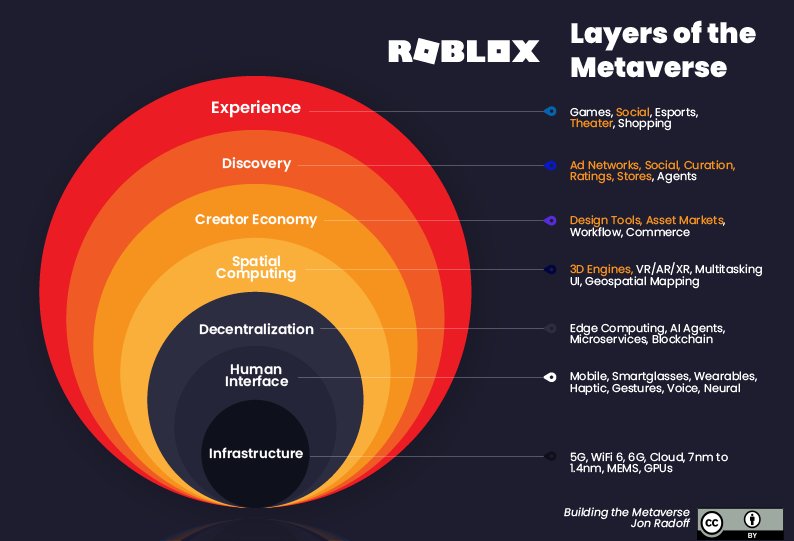
First, what exactly is the “Roblox metaverse”? Think of it as a big online playground where people can play games, explore different places, and even make friends. It’s a shared virtual space that’s always changing because players can add new games and experiences. In this metaverse, you, as a designer, have the power to build amazing things. But before you start building, let’s learn a bit about the basics.
Key Elements of the Roblox Metaverse
- Experiences: These are what we typically call “games.” They can be anything from a racing game to a role-playing adventure.
- Avatars: Players use avatars, which are like digital characters, to explore the metaverse. You can design your game to look great with all kinds of avatars.
- Social Interaction: A big part of Roblox is being able to connect with other players. Think about how players will talk to each other and play together in your game.
- Creator Tools: Roblox provides free tools, called Roblox Studio, that you can use to build your games. It’s easy to learn and really powerful.
Planning Your Roblox Game
Before you begin coding, it’s super important to plan your game. Imagine you are building a house, you wouldn’t start by just throwing bricks anywhere. You would first draw a blueprint. The same is true for Roblox game design.
Brainstorming Game Ideas
This is where you can let your imagination run wild. Ask yourself these questions:
- What kind of game do you want to make? An adventure game? A building game? A puzzle game?
- What will be the main goal of the game? What will players do?
- Who is your target audience? Younger players? Older players?
- What makes your game special? What will make people want to play it?
Don’t worry about being perfect right away. Just come up with as many ideas as possible, even if they seem silly at first. You can always choose the best idea later.
Creating a Game Document
Once you have a basic idea, write it down. This doesn’t have to be a fancy document, just something to guide you. Think of it as your game’s instruction manual. You should write down things like:
- Game Title: What will your game be called?
- Game Description: A short explanation of what your game is about.
- Gameplay Mechanics: How does the game work? What can players do?
- Map Design: What will your game world look like?
- Main Objectives: What are the goals for players?
- Art Style: Will your game be bright and colorful? Or dark and spooky?
Having a plan will help you stay on track and makes the building process much smoother. It’s like having a roadmap for your game journey.
Getting Started with Roblox Studio
Now that you have a plan, it’s time to get your hands dirty. Roblox Studio is the free program where you build your games. It might seem intimidating at first, but it’s actually very user-friendly.
Navigating the Interface
When you open Roblox Studio, you’ll see a few different panels:
- The 3D Viewport: This is where you see your game world.
- The Explorer: This shows all the parts of your game, like models, scripts, and sounds.
- The Properties Panel: This is where you can change the details of the objects in your game, like colors and sizes.
- The Toolbox: This is where you find pre-made models, sounds, and other assets.
Take some time to explore these panels and get comfortable moving around. You can also watch tutorials online to help you learn the basics. It’s like learning how to use a new art tool – it might take some practice but it’s worth the effort.
Building Your First Scene
Let’s start building a simple scene. You can add parts like blocks, spheres, and cylinders from the toolbox. Place them on the ground and start creating your game world. Think about creating interesting landscapes, buildings, or even obstacles for your players. Remember to use the properties panel to change their colors, materials, and sizes to fit your idea.
Scripting in Roblox: Bringing Your Game to Life
While building is fun, scripting is what makes your game really interactive. Scripts are lines of code that tell the game what to do. Roblox uses a programming language called Lua. Don’t worry if you have never written code before, it’s not as hard as it sounds, and there are many resources available to help you learn.
Introduction to Lua
Lua is a simple but powerful language. Here are a few basic concepts:
- Variables: These are like containers that hold information. For example, a variable can hold the player’s score.
- Functions: These are blocks of code that perform specific tasks. For example, a function can make a character jump.
- Events: These are things that happen in the game, like a player touching an object. Scripts react to events.
Start with simple scripts like making a door open when a player touches it or a character move when you press a key. There are tons of tutorials online that will teach you step-by-step how to write these. It’s like learning magic spells, where each line of code makes something cool happen.
Implementing Basic Gameplay Mechanics
Using scripts, you can add all kinds of mechanics to your game. Here are a few examples:
- Movement: Make players able to walk, run, and jump.
- Scoring: Keep track of player points.
- Combat: Allow players to fight enemies.
- Inventory: Let players collect and use items.
- Interactions: Let players interact with objects and other players in the game.
Don’t try to do everything at once. Start with a few core mechanics and build from there. It’s like adding levels to your LEGO castle – you start with the basics and then make it bigger and better.
Designing Engaging Game Environments
The environment in your game is really important. It’s what players see and interact with all the time. So, you want to make it look interesting and fun. Think about the games you love to play, what is it about their world that makes them so enjoyable.
Creating a Unique World
Consider what kind of feeling you want your game to evoke. Do you want it to be a cozy, happy place? Or something more mysterious and adventurous? Here are some tips:
- Use different textures and materials: Mix grass, stone, wood, and metal to make your world look more interesting.
- Add details: Use small objects like trees, rocks, and flowers to bring your world to life.
- Think about lighting: Experiment with different lights to create different moods.
- Add landmarks: Make sure there are interesting points of interest in the world to guide players.
Remember, the way your game looks will really impact how players feel when they are playing it. You want to make them feel like they are in a real place with its own unique character.
Level Design Principles
Good level design helps players explore your game world smoothly and know where to go. Here are some important things to keep in mind:
- Clear Paths: Make it clear where players need to go. Use roads, signs, or visual cues.
- Interesting Locations: Add hidden areas, secrets, or puzzles to keep players engaged.
- Pacing: Change the intensity of your level design throughout the game to keep the game fun for players.
- Variety: Don’t make all your levels look the same. Change up the layouts and challenges.
Level design is like telling a story with your environment. You want to guide players on a fun and exciting journey.
Testing and Iterating Your Game
Once you have a basic version of your game, it’s time to test it out. It’s important to play your own game and see how well it works. It’s also helpful to get other people to play it. This is where you can find any problems and improve your game.
Gathering Feedback
Ask your friends or family to play your game and give you their honest opinions. Pay attention to the following:
- What do they enjoy the most? What parts of the game do they love?
- What do they find confusing? What parts of the game are difficult to understand?
- Are there any bugs or glitches? Do they experience problems while playing?
- Any other suggestions? Do they have any ideas about how you can improve the game?
Don’t be afraid of criticism. It’s a chance to make your game even better. It’s like being an inventor, you test out your inventions and make changes as needed.
Making Improvements
After you collect feedback, you can use it to improve your game. This is an ongoing process, and you’ll likely make many changes during the development of your game. Here are some things you might want to change:
- Fix bugs and glitches: Make sure there are no problems preventing the players from playing your game correctly.
- Balance gameplay: Adjust the difficulty so that the game is challenging but not too hard.
- Add more content: Add new levels, characters, or challenges to keep players engaged.
- Optimize your game: Make sure your game runs smoothly on different devices.
This process of testing and fixing is called iteration, and it’s very important in game development. Each change helps you create a better experience for your players.
Monetization Strategies in Roblox
If you want to make money from your game, there are options available. Roblox allows you to use in-game purchases to earn Robux, the platform’s virtual currency, which you can exchange for real money.
In-Game Purchases
You can sell virtual items in your game, such as:
- Cosmetics: Avatars, clothing, and other visual customizations.
- Power-ups: Items that give players an advantage in the game.
- Special access: Entry to exclusive areas or features of your game.
Remember to make sure these purchases are fair and not essential for players to progress in the game. You want to provide value to your players and make the purchasing experience enjoyable.
Other Monetization Methods
Besides in-game purchases, you can also use other methods, such as:
- Sponsored content: Partner with companies to include their products in your game.
- Premium access: Offer premium versions of your game with extra features.
- Game passes: Allow players to pay a one-time fee to access special privileges.
Think about different ways to monetize your game and how it will impact your players’ experience. You want to balance fun and profitability.
Community and Collaboration
A big part of making a successful Roblox game is being active in the community and working with others.
Engaging With Players
Respond to comments, listen to player feedback, and build a community around your game. This will help you gain valuable insights about your game and increase its popularity. Here are some ways to connect with your players:
- Create a Discord server: A place where players can chat about your game.
- Respond to comments: Acknowledge player feedback and suggestions.
- Host events: Hold contests, competitions, or in-game parties.
Collaborating with Other Developers
You don’t have to work alone. Connect with other Roblox developers and work on projects together. This will allow you to learn new skills, share ideas, and expand your network. Here are some of the benefits of collaborating:
- Share ideas and skills: Combine your knowledge and skills with others to make better games.
- Speed up development: Split the workload and get games done faster.
- Learn from others: Discover new tools and techniques from fellow creators.
Being part of the Roblox community helps you grow as a developer and also helps grow your game.
Creating a game in the Roblox metaverse is a rewarding experience. It’s a chance to bring your ideas to life and share them with the world. It takes time and effort, but by following the steps above and using your imagination, you can create an experience that many will enjoy. Remember to plan your game carefully, learn the tools, test regularly, and always be open to learning. Now, go out there and build something amazing!
Who actually makes money in Roblox? How to create the most successful metaverse?
Final Thoughts
Ultimately, successful Roblox metaverse game design relies on creativity and understanding user experience. Developers must build engaging worlds with clear objectives for players. Iteration and feedback greatly improve game quality.
Effective roblox metaverse game design also requires careful attention to performance. Optimization ensures smooth gameplay for all users. A thriving game community further strengthens a successful project.

