
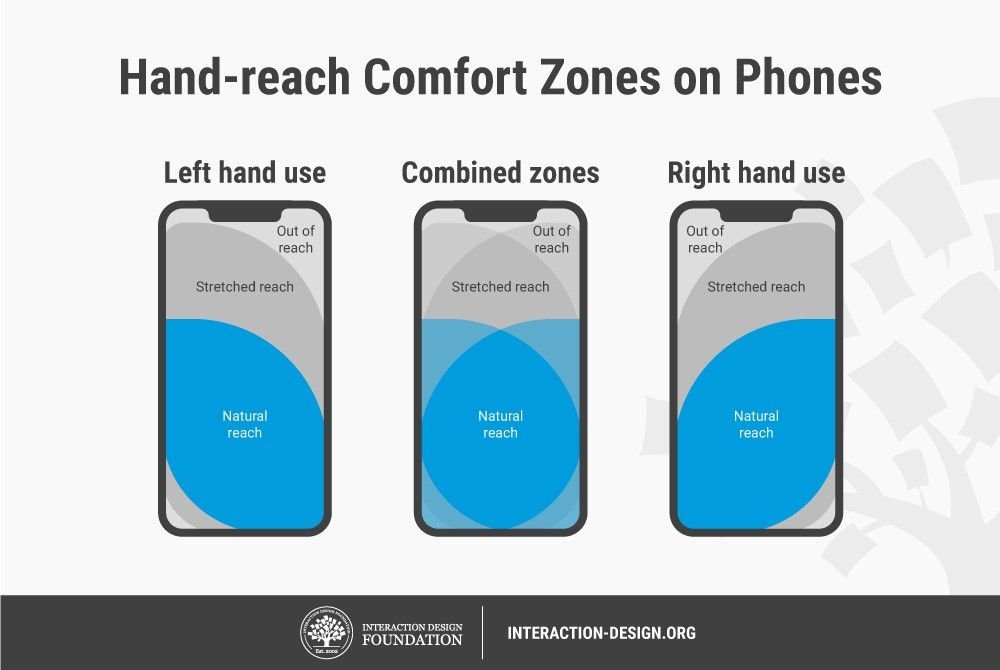
The Roblox mobile user experience often involves navigating a slightly condensed interface optimized for touch, and it sometimes includes minor differences from the desktop version in controls and performance.
Playing Roblox on your phone brings a unique set of interactions and challenges compared to a computer. The smaller screen presents certain considerations developers and players must understand. Optimizing for touch controls becomes crucial, making navigation simpler and direct.
These adjustments create a different feel than playing on a larger screen. While many aspects remain similar, the roblox mobile user experience does demand particular attention to detail.

Roblox Mobile User Experience: A Deep Dive
Playing Roblox on your phone or tablet is super popular, and for good reason! You can jump into tons of different games, connect with friends, and even make your own creations, all from the palm of your hand. But how good is that experience, really? We’re going to take a close look at what it’s like to play Roblox on mobile, the good parts, the not-so-good parts, and how you can make your time on the go even better.
Navigating the Roblox Mobile App
First things first, let’s talk about the app itself. When you open the Roblox app on your phone, you’ll see a few important areas.
The Home Screen
The home screen is like your central hub. Here’s where you’ll find:
- Recommended Games: Roblox suggests games they think you might like based on what you’ve played before. It’s a great way to find something new and interesting.
- Continue Playing: See those games you were playing before? They’re right here, so you can jump back in quickly.
- Friends Activity: See what your buddies are up to! What games they’re playing or if they’re online.
- Search Bar: Need to find a specific game or person? Use the search bar at the top!
The Game Page
Tapping on a game takes you to its page. Here, you can see:
- Game Description: Find out what the game is all about. Some games have short descriptions, and others tell you much more about what to expect.
- Player Count: See how many other people are playing the game right now.
- Game Thumbnails & Videos: Get a sneak peek at what the game looks like before you start playing.
- The Play Button: Ready to dive in? Just hit that play button!
The Menu
The menu is usually at the bottom of your screen and is where you can access all sorts of things:
- Avatar Editor: Change how your Roblox character looks with different clothes, accessories, and more.
- Messages: Check your messages from friends or groups.
- Friends: See who’s online and send friend requests.
- Groups: Find and join different communities within Roblox.
- Settings: Change your account settings, control your privacy and more.
Game Controls on Mobile: Moving and Interacting
One of the biggest differences between playing on a computer and playing on mobile is how you move your character and interact with the game. It’s very different using touch controls than a keyboard and mouse! Let’s break down the most common types of mobile controls on Roblox.
Virtual Joysticks
Most games use a virtual joystick that you control with your thumb. This joystick is usually on the left side of your screen. You push your thumb around on it to move your character. It takes a little time to get used to, but it becomes second nature with practice. The responsiveness can vary between games; some might feel perfectly smooth, while others could feel a little bit clunky.
Jump and Other Action Buttons
Action buttons are usually on the right side of your screen. The most common action button is for jumping. Some games have extra buttons, like actions to interact with objects or to use special abilities. It is essential to get familiar with how these are laid out and how they work.
Camera Controls
You can move the camera view by swiping your finger around the screen. This helps you see what’s happening around your character. Some people find it easier to get used to this than others. If it feels a little difficult at first, just keep practicing! Also, some games implement a lock-on or a first person camera which simplifies the camera handling.
Challenges of Mobile Controls
Even though many games have tried to make mobile controls work well, they do present some challenges.
- Smaller Screens: It can sometimes be tricky to see the whole game when playing on a smaller phone screen. You may find that menus or certain in-game elements are hard to see or difficult to tap.
- Accidental Taps: Sometimes your fingers might slip, or you might tap something by mistake. This can be frustrating, especially during a tough part of a game.
- Precision: It is harder to make precise movements using touch controls than a keyboard or a controller. Games that require a lot of aiming or quick movements can feel more challenging on a mobile device.
While there are challenges, many games do a great job of adapting controls to mobile, and there are plenty of ways to get better with touch controls.
Graphics and Performance on Mobile
Roblox on mobile doesn’t always look exactly the same as it does on a computer. The graphics quality and how well a game runs can change depending on a couple of important things.
Device Performance
The kind of phone or tablet you use makes a big difference. Newer phones and tablets generally run Roblox games much smoother and look better because they have better processors and graphics cards. Older devices may struggle with very detailed games, leading to lower quality visuals or performance problems.
Game Optimization
How well the game creator optimized the game for mobile devices also impacts performance. Games that are designed with mobile in mind will often run much better than games that were built mainly for computers. This includes using fewer details or choosing more efficient methods of generating graphics. Game designers will often tweak game settings to ensure that they run well on many different devices, and these choices can influence a game’s looks and how smoothly it runs.
Mobile Graphics Settings
In many games, you can change graphics settings. Lowering these settings can make games run more smoothly, but they might not look as nice. Experimenting with these settings can help you find a balance between good looks and smooth gameplay for your specific mobile device.
The Mobile Social Experience: Connecting with Friends
Roblox is a social platform, and the mobile app is great for connecting with friends on the go.
Chatting
The mobile app allows you to chat with friends using the in-game chat or through private messages. This feature helps you coordinate game plans, share funny moments, or just have a casual conversation. The chat is usually displayed on the screen and uses a touch keyboard. However, sometimes it can take up space on a small screen and can be challenging to use effectively in an intense game situation.
Playing with Friends
You can easily join the games that your friends are playing or invite them to join you. This makes it easy to have fun together, no matter where you are. It really brings a community feel to the Roblox world.
Finding New Friends
Many games have a great social atmosphere, and it’s easy to meet and become friends with people while playing. This helps the Roblox platform feel more vibrant and engaging.
Mobile-Specific Features
Roblox on mobile also has some features that are unique to mobile.
Touch-Optimized Interface
The entire interface is built for touchscreens. Buttons are bigger, and menus are optimized for easy navigation using your fingers. This makes it simple to interact with the application, no matter the size of your mobile device.
Push Notifications
You can receive push notifications on your mobile device when friends join games, send you messages, or when there are important updates in the game world. This keeps you connected, even if you’re not actively playing, and can be especially useful if you’re waiting for your friends to come online.
Mobile Data Usage
Roblox can use up data if you’re not connected to WiFi, which you may need to keep in mind. Depending on how much you play and which games you play, your mobile data consumption will change. If data is a concern, try to use WiFi whenever possible or adjust your data settings on your device.
Common Problems and How to Solve Them
Sometimes, things might not go as smoothly as you hope. Let’s discuss a few common issues and how you can try to fix them.
Lag and Freezing
If a game is running slowly or freezing, try these tips:
- Close Other Apps: Other apps running in the background can make Roblox run slower. Close the apps you’re not using.
- Restart the App: Sometimes simply closing and restarting the Roblox app can clear up some issues.
- Lower Graphics Settings: Turning down the graphics settings in the game can help your device run smoother.
- Check Your Internet: A poor internet connection can lead to lag and freezing. Make sure you have a good WiFi connection or a strong mobile data signal.
- Device Storage: Full storage on your mobile phone can slow down apps and programs. Ensure you have enough storage on your phone, this will allow it to run applications more efficiently.
Battery Drain
Roblox can use a lot of battery power, especially if you’re playing for a long time. Here are a few ways to help:
- Lower Screen Brightness: A brighter screen uses more power. Turn the screen brightness down to save battery.
- Use Power Saving Mode: Enable power saving mode on your phone to help extend your battery life.
- Close Background Apps: Running apps in the background consumes unnecessary energy, make sure that they are closed.
- Plug in to Charge: If you have the opportunity, plug your phone or tablet in to charge while you’re playing.
Controls are Unresponsive or Clunky
If you feel like the touch controls are not working well or are hard to handle, consider these suggestions:
- Restart the Game: Sometimes, restarting the game can fix touch controls that are not behaving correctly.
- Check Your Device: Make sure your screen is clean and dry. Sometimes smudges can make it harder to use touch controls effectively.
- Adjust Sensitivity: Some games have sensitivity settings for touch controls. Try tweaking those to see if they feel more comfortable.
Making the Most of Roblox Mobile
Want to have even more fun playing Roblox on your mobile device? Here are some tips:
Explore Different Games
Don’t be afraid to try new things! There are so many different games to play, from adventures and roleplaying to puzzle games and simulations. You can look through recommendations, browse categories, or ask friends about what games they like.
Customize Your Avatar
Changing how your avatar looks is a big part of the fun. Experiment with different clothes, accessories, and more to show off your own unique style.
Connect with Friends
Roblox is more fun with friends. Play with your buddies, meet new people, and make the game experience better for you and those around you.
Be Patient
Sometimes games take time to load or the controls take time to get used to. Be patient, keep practicing, and don’t give up too quickly! Also, games are sometimes buggy or they have glitches. If you find these, be patient, and hopefully the game creators will resolve the issues.
Look for Mobile Optimized Games
Some creators have gone the extra mile to design their games for a mobile experience. Try to find these games, as these are more likely to run well and have better controls for your phone or tablet.
The Future of Roblox Mobile
The mobile version of Roblox is getting better and better all the time. The developers are always working on improving game performance, making the app easier to use, and adding new features. As mobile devices get more powerful, the experience on phones and tablets will only keep getting more impressive. This means more possibilities for playing and creating, all from the convenience of your mobile device.
In conclusion, the Roblox mobile user experience is a mixed bag of fun and some frustrations. While the accessibility and ability to play anywhere make it incredibly appealing, the challenges of touch controls, game optimization, and screen limitations cannot be overlooked. However, with the continuous improvements and adjustments made by developers and game creators, the mobile experience is on an upward trend, providing more exciting and enjoyable possibilities for players of all ages.
Mobile UI/UX for Roblox Q&A with Cindering and UndoneBuilder
Final Thoughts
Roblox mobile experience offers convenient gameplay, but users sometimes face interface challenges and performance variations. Optimizing controls and reducing lag are crucial for improvement.
Developers should prioritize mobile-first design. This will create smoother navigation and enhanced interaction for all players. A better Roblox mobile user experience results in higher player satisfaction.

