
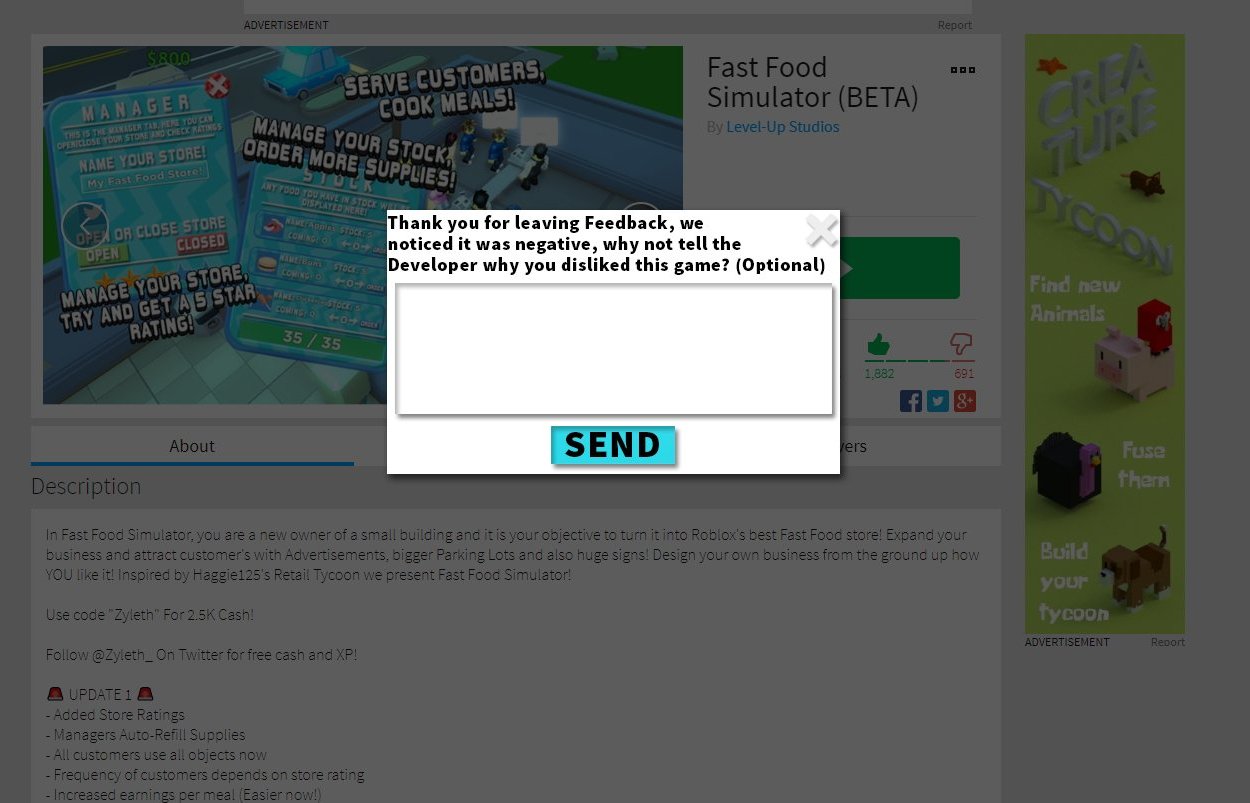
Roblox player feedback systems allow developers to gather insights, identify issues, and improve their games by collecting player opinions and reports.
Have you ever wondered how your favorite Roblox games keep getting better? It’s not magic; it’s often the result of thoughtful Roblox player feedback systems. Developers use these systems to understand what players love, what frustrates them, and what they’d like to see changed. These tools range from simple thumbs-up buttons to in-depth surveys and bug reporting tools. Utilizing these methods, game creators can make informed decisions based on real player experiences.

Roblox Player Feedback Systems: Making Games Better Together
Have you ever played a Roblox game and thought, “Wow, this is awesome!” or maybe, “Hmm, I wish this was a little different”? Well, the good news is that Roblox game creators really care about what you think! They use something called “player feedback systems” to hear what you have to say and make their games even better. Let’s dive into how these systems work and why they’re so important.
Why Player Feedback Matters on Roblox
Imagine building a really cool Lego castle. You’d probably want to know if your friends liked it, right? Did they think the towers were too short? Did they think the moat was too small? It’s the same with Roblox games! Creators spend lots of time making these worlds, and your feedback helps them know what’s working well and what they could improve. Without your feedback, games might stay clunky or boring. Player feedback is like a secret weapon for making games fun!
The Power of Community
Roblox is all about community. It’s not just about playing games; it’s about making friends, sharing experiences, and building things together. Player feedback systems help strengthen this community by letting everyone have a voice. When creators listen to players, it makes everyone feel like they’re part of the game’s development. It shows they care what you think.
Types of Feedback Systems on Roblox
Roblox game creators use different ways to hear what you think. Here are some common types:
In-Game Surveys and Polls
Sometimes, while you’re playing, a pop-up might appear asking you a question or two. This is usually a quick survey. It might ask about how you’re enjoying the game, what you liked the most, or what you think could be changed. These surveys are short and sweet, so they don’t take too much time away from the game, but give creators valuable information. Creators also use in-game polls to get quick opinions on different features or changes they’re thinking about making. For example, a poll might ask if you prefer the red or blue sword in a battle game. This allows creators to gather feedback on a specific feature before implementing it.
The Roblox Rating System
You probably know about the like and dislike buttons on game pages. This is a simple way to give a quick rating to a game. A thumbs-up means you think the game is great, and a thumbs-down means you think it needs improvement. This system gives game creators an overall idea about how people feel about the game. However, sometimes we need to provide more information on why we think a game is great or not so great.
Game Forums and Comments
Many games have their own forums or comment sections, either on the Roblox platform or elsewhere. These areas allow players to leave more detailed feedback. You can write about what you enjoyed, report bugs (problems in the game), or give ideas for new features. This kind of feedback is great because it’s more specific, letting creators know the exact things they need to look into. Game forums can also become great places for discussions with other players where we can share experience with the game.
Social Media Engagement
Many Roblox creators connect with their players through social media platforms like Twitter, Discord, and others. These platforms offer a chance for players to directly talk to game creators. Creators often share updates, ask for feedback, and run contests on these platforms. They are great spots to see more real-time communication between player and developer.
Bug Reporting Systems
Sometimes games have problems, which we call “bugs.” These can be glitches, errors, or things that don’t work quite right. A good bug reporting system allows players to report these issues in a clear way. Usually, the system asks for details about what happened, where it happened, and any error messages you saw. This is extremely helpful for creators to quickly find and fix problems.
How Creators Use Player Feedback
Okay, so you’ve given some feedback. What happens next? Well, game creators take this information very seriously! Here’s what they do:
Identifying Problems
First, creators look for common complaints. If many players say the same thing, like “This level is too hard,” it is an important sign that something needs to be addressed. These common complaints help creators identify which issues are the most important to fix. For example, if many players report they cannot reach a certain area in the game, game creators will look into how they can fix it and make the area accessible.
Prioritizing Improvements
Next, creators decide which issues to work on first. They usually focus on the biggest problems or the ones that are affecting the most players. They might not be able to fix everything right away, but they prioritize things that will make the biggest impact on the player’s experience. If game developers see that players hate a certain feature, they will likely try to rework the feature or remove it altogether.
Making Game Updates
After deciding what to fix, creators make changes to the game. They fix bugs, change levels, add new features, and so on. Then, they release these updates and often ask for feedback again. It’s like a cycle – feedback helps creators make the game better, and then they want more feedback to keep improving. Game developers will ask players to test out the new update, before releasing it to everyone.
Communicating with Players
Good creators communicate with players about what they are doing with the feedback. They might post updates about changes they are making or explain why they made certain decisions. This shows that they are listening and care about what their players think. These regular updates will ensure that players feel they have a part in the game development process.
Tips for Giving Good Feedback
Giving good feedback is an important skill! Here are some things to keep in mind when you’re sharing your thoughts:
Be Specific
Instead of just saying “This game is bad,” try to explain why you think it’s bad. For example, you could say, “The controls feel too slow,” or “I can’t figure out how to do the quests.” Specific feedback helps creators know what to fix.
Be Polite
Even if you’re not happy with something, try to be polite when giving feedback. Remember, game creators are people too, and they’ve put a lot of work into their games. Being respectful makes them more likely to listen to what you have to say.
Focus on the Game
Stick to feedback about the game itself. Don’t focus on personal things or get into arguments with other players. Stay focused on how the game can be improved. For instance, say, “This character model is too simple for the game,” instead of saying, “this creator’s character design is bad.”
Offer Solutions
If you can, try to suggest solutions or ideas when you give feedback. Instead of just saying, “This level is too hard,” try saying, “This level is too hard. Maybe it would be better if there were fewer enemies at the same time”. Giving solutions is a very important part of feedback for creators.
Provide Different Types of Feedback
If you liked the game, provide positive feedback about why you like the game. This can be as valuable as negative feedback. If you do find an issue in the game, make sure that you are clear in your explanation so the creators can understand your problem and work towards fixing it. Providing all different types of feedback makes the overall process more balanced.
Example of good and bad feedback
Let’s see some examples of good feedback vs bad feedback.
| Type of Feedback | Example |
|---|---|
| Bad Feedback | “This game sucks! I hate everything.” |
| Good Feedback | “The game is fun, but I feel like the jumping is a little too sensitive, making some platforming parts really hard. Also, the music for the game is really catchy!” |
| Bad Feedback | “This level is too difficult.” |
| Good Feedback | “This level is too difficult for the current player skill level. Maybe if the level had a checkpoint in the middle, it would be better.” |
| Bad Feedback | “This game is boring!” |
| Good Feedback | “This game is not fun for me. I think it would be more interesting if there were more things to do and more mini-games within it.” |
The Impact of Feedback
Player feedback is really powerful. It can help creators make games more enjoyable, engaging, and successful. When creators take feedback seriously, it leads to better games for everyone. Here’s how player feedback improves Roblox games:
- Improved Gameplay: Feedback helps creators improve the overall mechanics of the game. This makes the game smoother and more fun to play.
- New Content: Your ideas can lead to new characters, items, and features. It’s like you’re helping to create the game with them!
- Bug Fixes: By reporting bugs, you help creators make sure that the game works properly. This creates a smoother and more enjoyable experience for everyone.
- Stronger Community: Listening to players builds a sense of belonging and trust. This creates a healthy gaming community around the game.
Future of Feedback
As Roblox grows, feedback systems will keep getting better and smarter. We might see more ways to provide feedback, like more detailed surveys, or AI-powered systems that can automatically organize feedback and find patterns. The future of Roblox is linked with the feedback that players provide. It is important to provide quality feedback so creators can continue to improve the games. The future of these games is with the players.
Player feedback is the key to making Roblox games awesome. It helps creators fix problems, add new stuff, and make games that everyone loves. As a player, you have a really important role in helping shape the games you enjoy. Remember to give specific, polite, and helpful feedback, and you’ll be part of making the Roblox world an even better place to play. By working together, we can make Roblox games the best they can be.
When you publish your first Roblox game…
Final Thoughts
Effective Roblox player feedback systems are crucial for game improvement. Developers should actively seek and implement user suggestions. These systems directly impact player satisfaction and engagement.
Robust feedback helps refine game mechanics and identify bugs. Prioritizing user input leads to better and more enjoyable experiences. Improving how players share their views creates stronger communities. Roblox player feedback systems need continuous refinement.

