
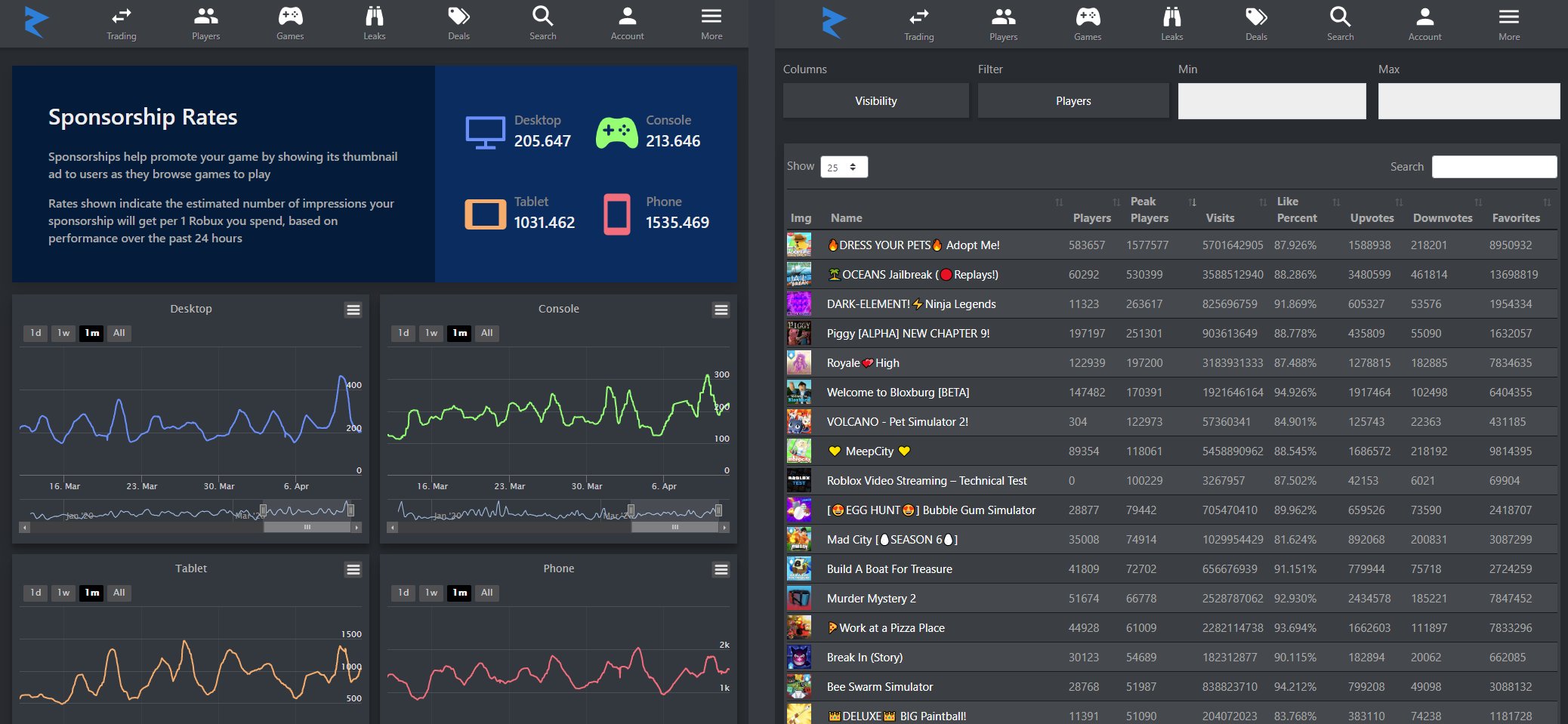
Tracking Roblox player stats often involves using third-party websites or in-game leaderboards provided by game developers to see progress, scores, and other performance metrics.
Ever wonder how you stack up against other players in your favorite Roblox games? Many people want to understand their game performance and progress. This desire leads us to the fascinating world of Roblox player stats tracking.
Knowing your stats, like win-loss ratios or points scored, can greatly improve your gameplay. It allows you to identify areas of strength and weakness. Then, you can focus on improving your skills and rise in the leaderboard.

Roblox Player Stats Tracking: Going Beyond the Game
Have you ever wondered how to really see how good you are at your favorite Roblox games? It’s not just about winning, it’s about understanding your progress! Roblox player stats tracking gives you a peek behind the curtain, showing you exactly how you’re performing. Think of it like a report card for your gaming skills. It’s a way to see what you’re doing well, where you can improve, and how you stack up against your friends (or even the best players!). Let’s dive deep into what player stats tracking is all about and how you can use it.
Why Track Your Roblox Stats?
Tracking your Roblox stats isn’t just for hardcore gamers. It can be helpful and fun for anyone who enjoys playing on the platform. Here’s why:
Improve Your Gameplay
When you can see exactly what you’re doing in a game, you can start to see patterns. Maybe you’re amazing at collecting items but could use some practice in combat. Or maybe you’re a building master but need to work on your speed. Seeing these patterns can help you focus on what you need to improve, so you get better and better.
Set Goals and Achieve Them
Player stats tracking allows you to set goals for yourself. Want to beat your highest score? Get to the next level faster? Tracking your progress helps you see how close you are to hitting those targets. It’s like a video game inside a video game!
Compare Yourself to Others
It’s fun to see how you’re doing compared to your friends or other players in the community. Are you faster? Have more points? Stats tracking can help you gauge where you stand. This can add an exciting competitive element to your gameplay experience.
Have More Fun!
Let’s be real; seeing your numbers go up is just plain satisfying. Stats tracking can turn your games into an even more enjoyable and rewarding experience. It’s that little boost that can make your playtime even better.
What Kind of Stats Can You Track?
The specific stats you can track depend on the game you are playing, but some of the most common data points include:
- Score: The most basic stat, showing how many points you’ve earned in the game.
- Kills/Defeats: How many enemies you’ve taken down or how many times you’ve been defeated.
- Wins/Losses: Your record of wins and losses.
- Time Played: How much time you’ve spent playing a specific game.
- Level/Experience: How far you’ve progressed in the game.
- Items Collected: How many special objects you’ve gathered during gameplay.
- Accuracy/Hit Rate: How precise your actions are, such as in shooting games.
- Distance Travelled: How much distance you cover in some racing games or similar.
- Currency Earned: The amount of in-game money you have gained.
These are just some examples. The kind of data tracked will be different in each game. Some might track very unique things, like the number of times you’ve jumped or how many buildings you’ve built.
How to Track Your Stats in Roblox
There isn’t one single way to track every stat on Roblox. You’ll find that each game has its own unique system. Here are the common ways you can track your stats:
In-Game Leaderboards
Many Roblox games feature leaderboards directly within the game. These often show the top players, but usually also display your own stats as well. These leaderboards are a great way to quickly compare yourself to other players. It might display your score, kills, or some other statistic based on the game.
In-Game Menus and Interfaces
Many games have menus, often accessible by clicking a button, that show your personal stats. Look for a button that might be named “Stats”, “Profile,” or something similar. This will show your specific game progress. Look around in the game’s menus carefully, they might be tucked away somewhere.
Third-Party Websites and Tools
There are some third-party websites and tools designed to track stats for certain Roblox games. Please be careful when using these. Always check reviews and be sure they’re safe before connecting them to your Roblox account. If they seem too good to be true, they probably are!
It’s good to check reviews and safety before going with these websites, be safe always.
Understanding Leaderboards
Leaderboards are great tools for keeping tabs on how you’re playing, and to see who else is playing. However, each leaderboard is not the same. There is some differences between them. Let’s understand a bit about the leaderboards.
Global Leaderboards
These show the top players across the entire game. It’s like a world championship scoreboard! These are often competitive and motivate many players to climb higher.
Friend Leaderboards
These will show you how you rank among your Roblox friends. If you and your friends like the same games, they can create a healthy competition amongst you guys.
Local Leaderboards
In some games, there might be leaderboards that display who’s doing well in a specific server or within your current playing session.
How to Read Leaderboards
Leaderboards are often ranked by a specific stat. Make sure you check what that is. Here is an example for that:
- If it is ranked by score, the highest score will be on top.
- If it is ranked by kills, the player with the most kills is on top.
- Make sure that you are looking at right rank and compare yourself with others.
It’s important to look carefully and see what kind of ranking system is being used in that specific game.
Tips for Using Stats Tracking Effectively
Focus on Improvement, Not Just Numbers
Don’t get too caught up in just trying to get the biggest numbers. Instead, use your stats to see where you can get better at playing the game. Look for weak points and put efforts to improve there.
Set Realistic Goals
Don’t aim for the top spot on the first day. Start with small, achievable goals. For example, aim to increase your score by 10% next session, or get more kills in each match. Slowly, but surely, you’ll see improvement over time.
Track Your Progress Over Time
Look back at your progress. That’s the best part of stat tracking! What was your score last week? How many levels have you climbed in the past few days? Keep track of your overall growth and be proud of the progress you have achieved.
Don’t Get Discouraged
Everyone has their off days. Don’t get discouraged if your stats go down sometimes. The main goal is to learn, improve, and have fun. Treat it like a learning experience and move on. Focus on the next game and do better next time.
The Future of Roblox Stats Tracking
Roblox is constantly changing, and its stat tracking systems are likely to evolve as well. We might see more advanced tracking, more detailed stats, or new ways to use data to help players improve. It’s an exciting time to be a Roblox player!
A Note About Privacy
While tracking stats is fun and helpful, it’s important to be aware of your privacy. If you’re using third-party tools, make sure they are safe and secure. Don’t share your login information with unknown sources. Keep all your Roblox account information private and secure. It’s always better to be safe and responsible when using online services and tools.
Roblox Player Stats Tracking – Table
Here is a table that summarises the key aspects we have discussed above:
| Aspect | Description |
|---|---|
| Purpose of Tracking Stats | To improve gameplay, set goals, compare with others, and have more fun. |
| Common Stats Tracked | Score, kills, wins, time played, level, items collected, and more. |
| How to Track Stats | In-game leaderboards, game menus, and third-party tools (use carefully). |
| Types of Leaderboards | Global, friend, and local leaderboards. |
| Tips for Effective Tracking | Focus on improvement, set realistic goals, track progress over time, don’t get discouraged. |
| Privacy | Be cautious with third-party tools and keep your login information private. |
This table will help you to understand in a summarized way, what we have talked above. If you have any questions, please feel free to go through each and every section mentioned above.
Stats tracking in Roblox is a great way to get more involved with the games you love. Whether you are trying to climb the leaderboards or simply want to see how you’ve improved, it will add another layer to your gaming journey. So dive in, see how you’re doing, and most importantly, have fun!
How To Check Roblox Game Stats | See Roblox Player Stats (2024)
Final Thoughts
In short, effective roblox player stats tracking helps you monitor progress and understand game performance. Analyzing player data reveals valuable insights to improve gameplay experiences. This helps developers create more engaging and balanced environments.
Use data to refine game mechanics and identify areas of improvement. Regular tracking provides a clear view of player engagement. Ultimately, tracking roblox player stats gives developers the information needed to improve their games.

