
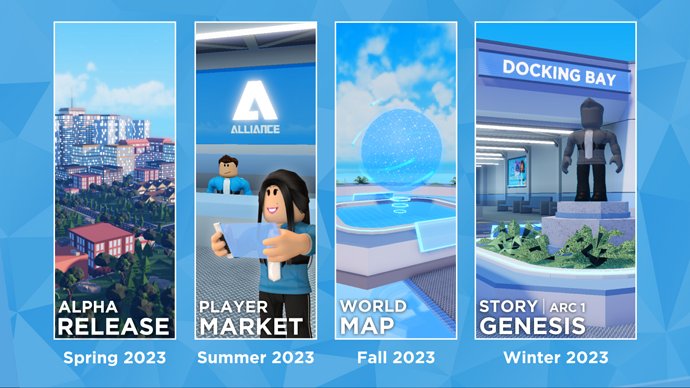
Successful Roblox release management for games involves careful planning, iterative testing, and staged rollouts to ensure a smooth player experience.
Launching a Roblox game can be exciting but also challenging. A good plan for your game’s launch is essential for success. Careful consideration of testing phases prevents unexpected issues. This process is vital to positive reception from players.
Effective Roblox release management for games helps you navigate this complex process. It allows for feedback collection and crucial adjustments. You can improve your game before it reaches a broader audience through consistent updates and monitoring.

Roblox Release Management for Games
Making a Roblox game is super fun, but getting it ready for everyone to play is a big job! It’s not just about building cool stuff; it’s also about making sure your game works great when lots of people are playing it. That’s where release management comes in. Think of it like planning a really big party. You wouldn’t just open the doors and hope for the best, right? You’d plan what food to have, how to decorate, and what games to play. Roblox release management is like that, but for your game. It’s all the steps you take to get your game out to players smoothly and make sure it stays awesome.
Understanding the Game Development Cycle
Before we dive into the nitty-gritty of release, let’s talk about how a game usually gets made. This is called the game development cycle. It’s like a recipe – you follow the steps to create something amazing! Here are the basic stages:
- Idea Time: This is where it all starts! You think about what kind of game you want to make, what makes it fun, and what players might enjoy.
- Building Stage: This is when you use Roblox Studio to actually create your game. You build maps, add characters, write scripts, and design all the cool parts of your game.
- Testing Phase: Before showing your game to the world, you need to play it a lot yourself and have friends play it too. This is where you find bugs and make sure everything works how you want it to.
- Ready to Release: Once you’ve fixed all the problems, you get ready to show off your game to everyone.
- Keep it Awesome: After release you’ll continue to listen to player feedback and improve your game with updates.
Planning Your Roblox Game Release
Good planning is key to a successful game release. It’s like drawing a map before going on a trip; you need to know where you’re going and how you’ll get there. Here’s how you can plan your Roblox game release:
Defining Your Game’s Scope
Think about what your game will be like when it first comes out. Will it have a small map with a few characters, or a large world with many things to do? Knowing what features you will include in your first release helps manage your workload. Here’s how to think about it:
- Core Features: These are the most important parts of your game that make it fun. Think about what players need to be able to do right from the start.
- Nice-to-haves: These are features that would be cool but aren’t essential for the game to work. You can add these later in updates.
- Minimum Viable Product (MVP): This is your game with just the core features. You want to make sure this is really fun before adding more bells and whistles.
Setting Realistic Deadlines
It’s important to not try to do everything at once. Making a great game takes time. Don’t try to finish everything too quickly; it’s better to take your time and make it really good. Here are some tips for setting deadlines:
- Break Tasks: Divide your big game-making goals into smaller, easier to manage parts.
- Estimate Times: Guess how long each of those parts might take. Add a little extra time in case something goes wrong.
- Be Flexible: Remember that things might change, and that’s okay. You can adjust your deadlines as you go.
Choosing a Release Date
Picking a good day to show your game to everyone is important. Consider these things when choosing your date:
- Avoid Holidays: If lots of people are busy with family, less might play your game at release time.
- Weekends Can Be Good: People have more free time then to play games.
- Consider Your Audience: Think about when your players are usually online.
Setting Up Your Roblox Game for Release
Once you’ve planned, it’s time to get your game ready for release. This means making sure it’s safe, easy to play, and looks good. Let’s look at some key steps:
Making Sure Your Game is Safe
Safety is really important, especially when kids are playing your game. Here are some ways to make sure your Roblox game is safe:
- Filtering Text Chat: Roblox has its own way of making sure people don’t say bad words in the chat. Make sure this is turned on in your game settings.
- Dealing with Bad Behavior: If someone isn’t playing fair, make sure that you can stop them by reporting or banning them.
- No Personal Info: Never ask players for personal details like their real names, addresses, or phone numbers.
Game Optimization for Smooth Play
No one likes a slow, glitchy game. Making sure your game runs smoothly is super important. Here are some things to check:
- Lots of Parts: Try not to use too many parts in your game, as this can slow it down. Use models for repeating parts.
- Smart Scripts: Write your code (scripts) in a way that doesn’t use a lot of power from the computer.
- Testing on Different Devices: Check that your game works well on phones, tablets, and computers.
Designing a Good Game Interface
The user interface (UI) is how players interact with your game. It should be easy to use and look good. Here are some things to think about:
- Easy to Understand: Make sure the buttons and menus in your game are clear and easy to use.
- Good Layout: The buttons and menus in your game should be in places that make sense for the way people play.
- Looks Awesome: Your game’s UI should look cool and match the style of your game.
Testing Your Roblox Game
Before you show your game to everyone, you need to test it a lot. It’s like checking your homework before you turn it in, you want to catch any mistakes before other people see them. Testing has two key parts: individual testing and group testing.
Individual Testing
This is where you play your game by yourself a lot. Think of this as checking your own work. Here are some things you can do:
- Play Each Level: Play through every part of your game to make sure everything works.
- Try Everything: Click all the buttons, move in all directions, and do all the things players will do.
- Find Bugs: Write down anything that looks like it’s not working correctly.
Group Testing
After you’ve tested by yourself, it’s time to have others help. Think of this as getting feedback on your work before you show it to the whole class. Here’s how you can test with others:
- Invite Friends: Ask your friends to play your game and give you their honest opinions.
- Use Roblox Groups: If you have a group of players, this is a great place to ask for testers.
- Pay Attention to Feedback: Listen to what your testers say about what they liked, and what they didn’t.
Beta Testing
Beta testing is like the final check before showing your game to everyone. It’s like a dress rehearsal before the big show. Here’s what you can do:
- Select Beta Testers: Choose a few players who can provide detailed and helpful feedback.
- Private Release: Give them a special link or access to play your game before it’s public.
- Track Problems: Monitor closely how the players are playing and how your game performs.
Making Your Game Live on Roblox
After lots of testing, you’re finally ready to make your game live. This is like the big party you’ve planned. Here are the key steps to take:
Publishing Your Game
This step is like opening the doors to your party. This is how people will be able to play it.
- Roblox Studio: Open the game in Roblox Studio and click the publish button.
- Game Settings: Make sure all settings are correct, such as whether people can play with friends only, or if it is open to all players.
- Game Info: Add a great description for your game. Tell players what your game is about, and write eye-catching text.
Game Icon and Thumbnails
These are the first things that players will see about your game. These help get players interested in your game. Here is how you can think about these:
- Eye-Catching Icon: Make sure it shows your game and is fun to look at.
- Interesting Thumbnails: These should show exciting parts of your game and entice players to try it.
- Test Your Images: Ask friends to give their feedback on your game’s images, and which ones they think look the best.
Promoting Your Game
Now that your game is live, it’s time to tell people about it! Think of this as inviting people to your party. Here are some ways to promote your game on Roblox:
- Game Page: Use the text, pictures, and videos on your game’s Roblox page to showcase it.
- Social Media: Tell people about your game on platforms such as X (Twitter), TikTok, Instagram, and other places.
- Robux Advertising: You can pay to have your game shown in Roblox ads that will put your game in front of more people.
- Player Engagement: Talk to your players, create events, and keep your game fun so that people keep playing and tell their friends.
Maintaining Your Roblox Game After Release
The work doesn’t stop when your game is live. In fact, it’s just the beginning! Maintaining your game is like keeping your party fun and exciting. It means listening to players, making improvements, and keeping everything fresh. Here’s what you should do after your game is live:
Collecting Player Feedback
Listening to your players is super important. They’ll give you ideas about how to make your game better. You can do this:
- In-Game Chat: Pay attention to what players are saying in the game’s chat.
- Social Media: Check comments and messages on your game’s social pages.
- Roblox Game Page: Read comments and player feedback on your Roblox game page.
- Surveys: You can ask players questions by using a survey tool in your game.
Planning Updates and Fixes
Sometimes, you’ll need to fix things that aren’t working right or add new features to keep your game exciting. It’s like adding a new game at your party. Here’s how to do it:
- Fixing Bugs: If there are problems in your game, make fixing them a high priority.
- New Content: Add new things to your game on a regular basis to keep players interested. This can be new levels, items, or events.
- Testing Updates: Before adding new updates to your live game, test them carefully in a separate test place.
Version Control
As you make changes to your game, you’ll want to keep track of different versions. This is called version control. It’s like saving multiple drafts of your work in case you need to go back to an older version.
- Save Regularly: Save your game often and before making big changes.
- Use Roblox Team Create: This feature lets you work with others and keeps track of who changed what.
- Test First: Always test changes in a separate testing place before pushing them live.
Community Engagement
Having a good relationship with your players makes them feel like they’re part of something special. It’s like making sure everyone at your party feels welcome and included. Here are a few ways to connect with your players:
- Respond to Players: Interact with players on social media and in the game.
- Listen to Ideas: Consider player ideas when adding new features.
- Host Events: Organize in-game events to make the game more engaging.
Release management is a big part of creating games on Roblox. It involves a lot of planning, testing, and communicating with your community. By following these steps, you’ll give your players the best possible experience and give your game the best opportunity to thrive.
The DO's and DON'Ts of Growing a Game… (Roblox)
Final Thoughts
Effective roblox release management for games requires careful planning and consistent execution. Developers must prioritize testing and gather player feedback. This helps identify and resolve any issues before a major launch.
Version control and phased rollouts are crucial components for a smooth process. A well-structured approach prevents game-breaking problems. Proper roblox release management for games ensures a positive player experience. This also promotes long-term success for a title.

