
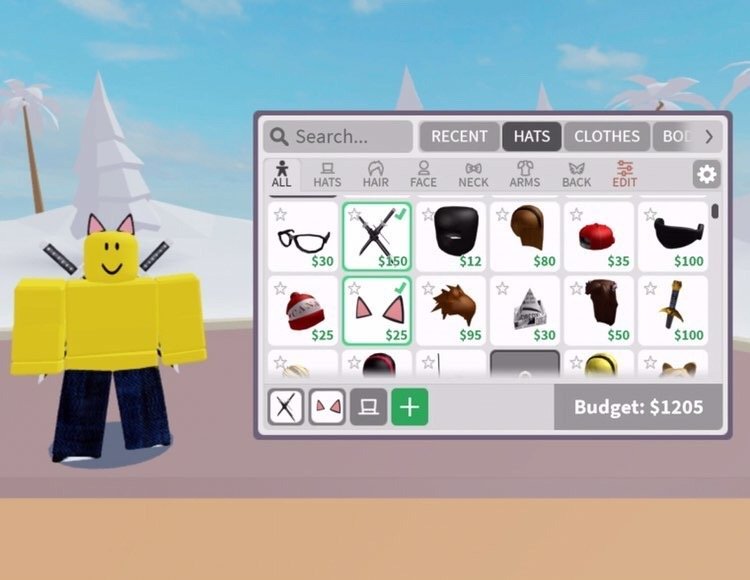
A solid Roblox shop system design uses DataStore for persistent item inventory, utilizes RemoteEvents for client-server communication, and implements clear UI/UX for player interaction.
Creating engaging experiences often hinges on effective in-game economies. A well-structured shop is essential for player engagement, making the design critical. This guide explores key elements that contribute to a good roblox shop system design.
We’ll cover topics from managing player inventories with DataStore, to implementing remote communication between server and client. These systems allow your game shop to run smoothly. Proper UI design is also important. It helps players easily browse and purchase items, enhancing their overall experience.

Roblox Shop System Design: Creating Engaging Experiences
Making a great shop in Roblox is like building a cool clubhouse – you want it to be fun, easy to use, and full of awesome stuff that players will love. It’s not just about putting things up for sale; it’s about creating an experience that makes players want to come back again and again. Think about the games you love to play – what makes their shops so much fun? That’s what we’re going to explore together.
The Core Elements of a Roblox Shop
A good shop isn’t just about the items themselves; it’s also about how players interact with those items. There are a few key pieces that make up a successful shop system.
User Interface (UI): The Face of Your Shop
Think of the UI as the store window. It needs to be clear, attractive, and easy to navigate. A cluttered shop is like a messy toy box – nobody wants to dig through it!
- Clear Navigation: Players should be able to find what they’re looking for without any hassle. Think about using categories, search bars, and sorting options.
- Visually Appealing: Use images or icons that are bright and fun. Think about using colors that match the vibe of your game. If it’s a spooky game, maybe darker colors, and if it’s a sunny beach game, brighter colors will be great.
- Responsive Design: Your shop should look great and work well on different devices. Whether someone is playing on a computer, tablet, or phone, it should be simple to use.
Item Presentation: Showcasing Your Wares
How you present your items can make a huge difference in whether players decide to buy them. Just like at a real store, your items need to look their best.
- High-Quality Icons/Thumbnails: Make sure the images of your items are clear and easy to see. Don’t use blurry or pixelated pictures.
- Descriptive Item Names: Use names that are easy to understand and make sense. “Cool Sword” is good, but “Shiny Diamond Sword” is better.
- Detailed Item Descriptions: Explain what the item does, how to use it, and why someone would want it. Is it for fighting? Is it for looking cool? Make it clear!
- Previews (If Possible): If you can, let players “try on” items or see them in action before they buy. For clothes, this could mean a little preview on their character. For weapons, maybe a quick animation.
Currency and Purchase Process: Making it Easy to Buy
Buying things should be simple and straightforward. It’s important that the buying part is smooth for the players.
- Clear Pricing: Show the price of each item clearly. Make sure it’s easy to see how much it costs, and what currency is used.
- Multiple Currency Options (If Applicable): If you have different currencies (like robux and in-game coins), make it clear what the price is in each type of money.
- Easy Transaction: The process of buying should be fast and easy. A few clicks or taps should be all it takes. No one wants to jump through hoops.
- Confirmation Messages: After someone buys something, show them a message that they were successful. This makes players feel good about their purchase.
Advanced Shop Features
Once you have the basic shop up and running, you can make it even more amazing with extra features.
Categories and Filters: Helping Players Find What They Need
As the shop gets bigger, categories and filters become very important.
- Organized Categories: Group your items into logical categories, like weapons, hats, clothes, and tools.
- Filtering Options: Let players filter items by price, category, or other properties.
Search Functionality: Quickly Finding Items
Sometimes players know exactly what they want. A search bar is a super useful tool.
- Easy-to-Use Search Bar: Make sure the search bar is prominent and easy to use.
- Accurate Search Results: Ensure that the search returns accurate results that match what the player is looking for.
Special Offers and Discounts: Making Shopping Exciting
Who doesn’t love a good deal? Special offers can make your shop even more exciting.
- Limited-Time Sales: Create a sense of urgency with limited-time sales. Players love a deal, especially if it is for a short time.
- Bundles: Offer bundles that combine multiple items at a discounted price.
- Promotional Items: Offer special, unique items that are only available for a limited time or to specific players.
Player Progression and Shop Access: Connecting to Gameplay
How you connect your shop to player progress and overall game goals is crucial for engagement.
- Unlocking Items with Progression: Let players unlock new items as they play and achieve milestones in your game.
- Exclusive Items for Special Achievements: Create special items that can only be obtained by doing certain things in the game.
- Shop Access Restrictions: You might want to make shop available after completing some quests, or based on player level.
Monetization Strategies for your Roblox Shop
A good shop also needs to be good at making money in your game. This helps you keep creating amazing experiences for your players. Here’s a look at a few of common ways to do that.
In-App Purchases (IAPs)
This is the most common way to make money in Roblox games.
- Robux Sales: Offer players cool items they can buy with Robux. This is the main way players help support their favourite Roblox creators.
- Value Offers: Bundle items together to make them more appealing. For example, a pack of useful weapons can be sold together for a price a bit less than buying them all individually.
Cosmetic Items
These don’t give players an advantage, but they let them express themselves.
- Skins and Outfits: Let players dress up their characters with different looks.
- Hats and Accessories: Offer cool hats and other accessories to customize avatars.
- Unique Animations: Allow players to purchase different ways of moving their avatars, giving them a way to show off.
Game Enhancements
These items help players have a better time or to be more effective in the game.
- Power-ups: Offer power-ups that give players a boost in the game. Maybe these boosts make them faster or stronger.
- Premium Access: Provide a paid option to unlock extra content or features in your game. This could let people get to new levels or game features before everyone else.
- Special Abilities: Let players buy special abilities that are unique and valuable.
Design Tips for a Winning Shop
Making a shop is part art and part science. Here are a few design tips to help you.
Keep it Simple
Make sure your shop is easy for everyone to use. Use clear language, and avoid clutter.
- Intuitive Layout: Design the shop so that players can easily figure out how to find and buy items.
- Clear Icons: Use clear, easy-to-understand icons and buttons.
- No Unnecessary Steps: Keep the process of buying things as simple as possible.
Test Your Shop Often
It’s important to see how your shop works before you launch it and after it’s released.
- Get Feedback: Ask other players to try out your shop and tell you what they think.
- Track Player Behavior: See how players are using your shop. Which items are popular? What categories are they browsing?
- Make Changes Based on Data: Use your feedback and data to make your shop even better over time.
Mobile Optimization
Many Roblox players use their phones or tablets, so make sure the shop is easy to use on smaller screens.
- Touch-Friendly Buttons: Make sure buttons are big enough to tap easily on a touch screen.
- Responsive Layout: The shop should look great and work well on any screen size.
- Clear Text: Use text that is easy to read on smaller screens.
Aesthetic Consistency
The look of your shop should match the look and feel of your game. Use colors and fonts that go with your game’s style.
- Use Consistent Branding: The shop should feel like a part of your game.
- Themed Design: If your game is a space game, the shop should have a space theme.
- Consistent Colors and Fonts: Use the same colors and fonts that you use in the game to make the shop look like it belongs.
Regular Updates
Keep your shop fresh by adding new items and features regularly.
- Add New Items: Players love seeing new things in the shop. Add new items on a regular basis.
- Run Regular Sales: Have sales to make the shop exciting and encourage players to purchase new and old items.
- Keep the Shop Fresh: Always be looking for ways to make the shop better.
Creating a successful Roblox shop system is an ongoing process. The most important thing is to focus on what players want and create a fun, easy to use, and visually engaging experience. By following these guidelines, you can build a shop that both your players and you will love. Good luck!
raining WATER, ICE CREAM and JELLY in roblox #shorts
Final Thoughts
Good design for a Roblox shop system involves careful planning of inventory, user interface, and purchase flow. A clean, intuitive layout makes browsing easy for players. Proper categorization helps them find what they want quickly.
Implementing clear pricing, along with visual previews, assists users in making informed decisions. Consider adding a search feature to further enhance the shop’s usability. Smooth, error-free transactions increase player satisfaction.
Ultimately, thoughtful roblox shop system design is key to engaging players and maximizing your game’s monetization potential. Prioritize clarity, functionality, and a user-friendly experience. This will contribute to a thriving in-game economy.

