
Creating Roblox sound effects involves using audio editing software to produce unique sounds and then importing these assets into Roblox Studio for use in your games.
Ever wondered how games in Roblox achieve such immersive experiences? A significant part comes from engaging audio. The key to this auditory magic is Roblox sound effects creation, a process that empowers you to make your own captivating noises and bring your virtual worlds to life. This process allows you to add a layer of creativity and individuality to your Roblox games.
You don’t need to be a professional to dive into audio design. With basic knowledge of audio editing software and Roblox Studio, you can start crafting unique sound effects. Start experimenting, and soon your creations will have a real sonic impact on players.

Roblox Sound Effects Creation: A Deep Dive
Creating awesome sound effects for your Roblox games can really make them pop! Think about it – the satisfying thwack of a sword, the bouncy boing of a character jumping, or the spooky whoosh of a ghost. These sounds are what make your game feel alive and engaging. But how do you actually make these sounds? Don’t worry, it’s not as hard as it might seem. We’ll take you through everything you need to know to get started with Roblox sound design!
Why Sound Effects Are Super Important in Roblox
Let’s face it; a game without sound is like a movie without music – it just feels…flat. Sound effects do more than just fill in the silence. They:
- Enhance Immersion: Sounds make you feel like you’re really there, in the game world. When you hear the crunch of footsteps on snow, you feel the chill in the air!
- Provide Feedback: Sounds tell you what’s going on. Did you hit an enemy? Hear that clang! Did you pick up a coin? Hear the chink! Sound effects confirm player actions.
- Create Atmosphere: The right background sounds, like wind or birds chirping, can set the mood and make your game feel richer. A low, rumbling sound can indicate danger.
- Make Games More Fun: Let’s be honest, a good explosion sound is just cool! Great sound effects make the entire gaming experience more entertaining.
In short, sounds are a key element to any successful Roblox game. Now let’s get to how to create them!
Getting Started: The Tools You’ll Need
Before you start crafting sonic masterpieces, you’ll need a few essential things:
Basic Tools for Roblox Sound Design
- A Computer: This is the obvious one, but you need a computer that can run the programs we’ll talk about.
- Roblox Studio: This is where you’ll be putting all of your hard work. It’s free to download.
- A Sound Editing Program: While Roblox Studio can play sound files, you’ll want something more powerful for creating and editing them. We recommend Audacity (which is also free and open-source!), but there are many other options out there too such as Wavepad or Adobe Audition if you’re looking for a more advanced paid software.
- A Microphone (Optional but recommended): If you want to record your own unique sound effects (like your own voice for a character or a sound from your home), you’ll need a microphone. You don’t need to buy a super expensive one; a basic USB mic will do just fine.
Once you have these basic tools in place you’re ready to start making some noise!
Finding Free Sounds: The Roblox Library & Beyond
You don’t always have to create everything from scratch. Roblox has a great library of sounds you can use, and there are other resources online too!
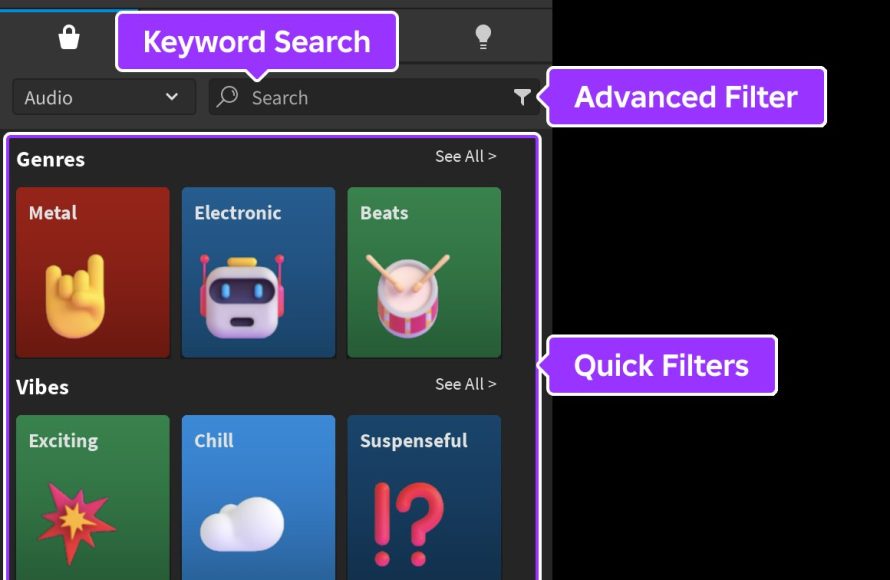
Using the Roblox Asset Library
The Roblox Asset Library is an easy starting point. Here’s how you find sound assets:
- Open Roblox Studio and your game.
- Click on the “View” tab at the top.
- Click “Asset Manager”.
- In the Asset Manager window, select the “Audio” tab.
- Search for sounds using keywords (like “explosion”, “jump”, “door”).
- Preview the sounds by clicking the play button.
- Once you’ve found a sound you like, simply drag and drop it into your game.
Free Sound Resources on the Internet
Beyond the Roblox library, there are tons of websites offering free sound effects for you to use (make sure to check the licensing terms to ensure you are allowed to use it for your game!). Some excellent resources include:
- Freesound.org: This is a huge database of sounds uploaded by users. You can find pretty much anything here, but be careful as some of the files may not be good quality.
- ZapSplat.com: This site has a great collection of free sound effects. They have paid plans that give you access to more sounds, but the free selection is very good too.
- SoundBible.com: This site has a very large collection of free sounds, and some are good for video game use.
Remember to always be respectful of copyright and ensure you have permission to use the sounds you find. Now let’s move to creating your own sounds!
Creating Your Own Unique Sound Effects
While using pre-made sounds is great, nothing beats having your own, unique creations! Here’s how you can do it:
Recording Your Own Sounds
If you have a microphone, the world is your sound studio! You can record anything from your voice to the sound of a door closing. Here’s how you do it with Audacity:
- Plug in your microphone and open Audacity.
- Click the red “Record” button and start making your sound.
- When you’re done, click the yellow “Stop” button.
- Listen to your recording. If you like it, move on. If not, try again!
- Click “File” and then “Export” and choose “Export as MP3” or “Export as WAV.” Select a place to save the file where you know how to find it.
Creating Sounds Using Sound Effect Generators
Sometimes, you might not want to record a real-world sound. You might want a futuristic laser blast or a magical whoosh! Here are a few ways to create synthesized sounds:
- Online Tone Generators: Many online tools allow you to create tones. These can be great for simple beeps and boops.
- Online Synthesizer Programs: Online synthesizers allow you to create interesting sounds by playing with parameters like frequency, wave shape, and envelope.
- Software Synthesizers: Software like FL Studio or Ableton Live (which are paid programs), but allow you to really craft a unique sound if you are serious about sound design.
Editing Your Sound Files
No matter how you get your sound, you might want to make some small edits to make them just right. This can be a key step in making your sounds fit your game perfectly. Here’s how you do basic editing in Audacity:
- Trimming: Remove any silence before or after your sound. Select the part you want to get rid of and press the “Delete” key.
- Adjusting Volume: Make your sounds louder or quieter using the “Gain” slider to adjust how loud it sounds.
- Adding Fade-Ins and Fade-Outs: Make your sounds transition smoothly by using the “Fade In” and “Fade Out” effects. This makes the sound start or end gradually. Select the part of the sound you want to fade, go to “Effects” and then choose “Fade In” or “Fade Out.”
- Adding Effects: Experiment with the “Effects” menu to try out things like echo, reverb, pitch changes and other things that can enhance your sounds.
Implementing Sounds in Your Roblox Game
Okay, you’ve made your sound, now you need to get it into your game. Here’s how you do it:
Uploading Your Sounds to Roblox
- Go to the Roblox website in your web browser.
- Click on “Create” at the top of the screen.
- On the left side, click on “Audio”.
- Click the “Upload Audio” button.
- Browse to the location where you saved the sound file, and then select the file.
- Give your sound a name and a description (optional).
- Click “Upload”. You may have to pay a small fee to upload audio, as this is how Roblox has to maintain their servers.
Adding Sound to Your Game
Now, in Roblox Studio, add your sound:
- In the Explorer window, find the object or part where you want the sound to play. (For example, a door object or a tool)
- Click on the “+” button next to the part to add a new object.
- Type “Sound” into the search box and add a “Sound” object.
- In the “Sound” properties on the right side, look for a field called “SoundId”
- Click the folder icon next to “SoundId.” Find the sound you uploaded from the list. Click on it to choose it.
- The sound is now attached to your part. You can experiment with settings like “Looped”, “PlayOnStart,” and the “Volume” to adjust the sound.
Making Sounds Play at the Right Time
A sound isn’t very useful if it just plays all the time, so you have to be more creative when triggering the sounds to play! You can achieve that using scripts, which is a bit more complicated, but we’ll cover a simple example:
Triggering Sounds With Scripts
Here’s an example of how to play a sound when a player touches a part:
- Add a “Script” object inside the part.
- Copy and paste this script into the script editor:
local sound = script.Parent:FindFirstChild("Sound") script.Parent.Touched:Connect(function(hit) if hit.Parent:FindFirstChild("Humanoid") then if sound then sound:Play() end end end) - Make sure you add a sound object in your parent part, so the script has something to play.
This is just a simple example, but you can use scripts to make sounds play whenever an action happens. Try things like:
- Play a sound when an object breaks.
- Play different footsteps for various terrains.
- Play a sound when a player picks up a power up.
Tips and Tricks for Better Sound Design
Here are some tips to take your sound design to the next level:
- Less is More: Don’t overcrowd your game with too many sounds. It can be distracting.
- Test Your Sounds: Always test your sounds in-game to make sure they work correctly and at the right volume.
- Use Layers: Layer multiple sounds together to create something richer. For example, combine a crash and a glass breaking sound.
- Listen to the Pros: Pay attention to sound design in other games and movies. Try to understand what makes good sounds stand out.
- Keep Practicing: Like anything else, making awesome sounds takes practice. The more you create and experiment the better you’ll become!
Creating fantastic sound effects for your Roblox game takes time and effort, but it’s an important aspect of game development, and the results are very satisfying. Start with simple sounds and work your way up to more complex creations. Remember to be creative, be patient, and have fun with sound. Soon, you’ll be making sounds that add so much more to your games!
How the sounds of Roblox were made
Final Thoughts
In short, crafting impactful Roblox sound effects comes down to experimentation and practice. Use various tools, understand frequencies, and don’t be afraid to test new ideas. Remember that good sound design significantly improves game immersion.
Effective roblox sound effects creation requires a keen ear and a willingness to learn. Pay attention to how sounds interact with your game world. Iterate based on playtests for best user experience.

