
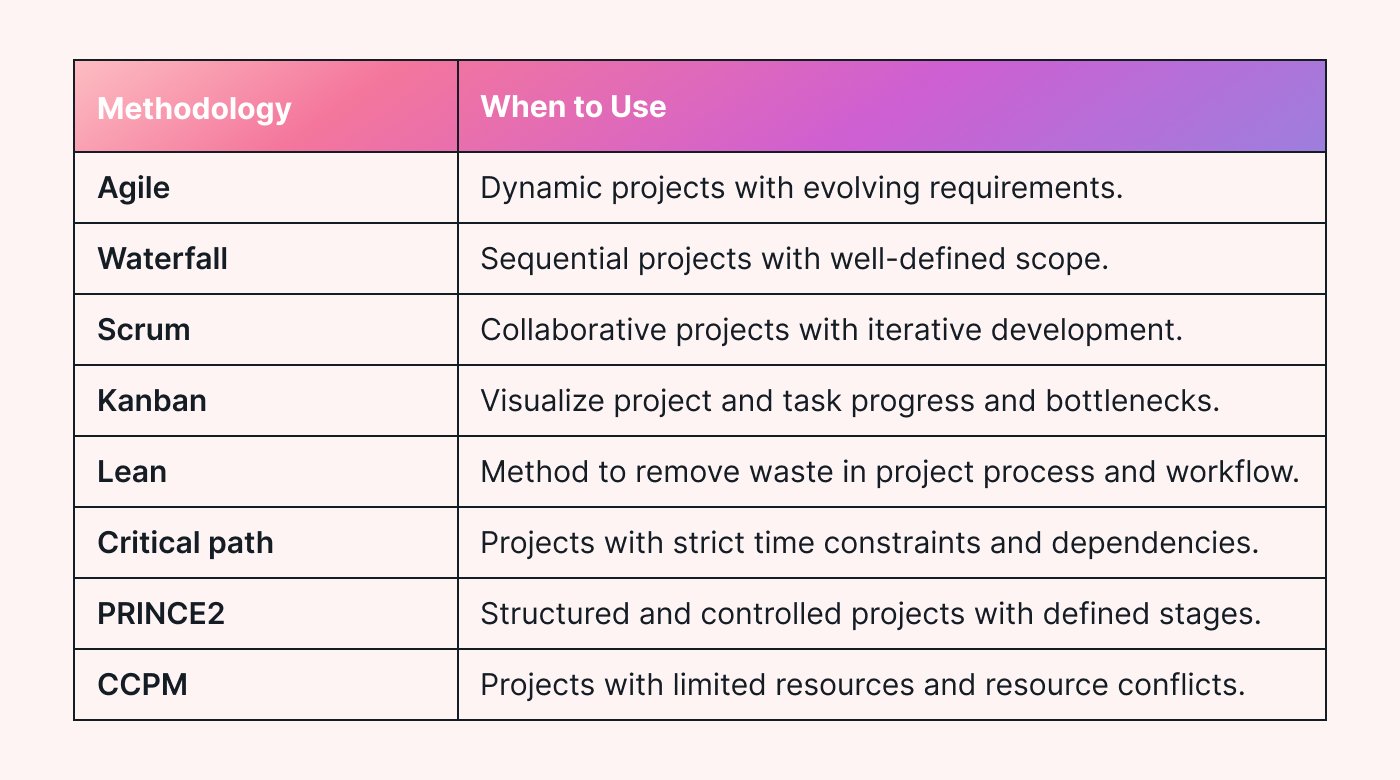
Effective Roblox task management techniques involve breaking down large projects into smaller, achievable steps, setting clear deadlines, and utilizing tools like spreadsheets or project boards to track progress.
Ever felt overwhelmed trying to juggle multiple projects within Roblox Studio? Many creators face this challenge. Learning to manage your tasks efficiently is vital for success on the platform. We’ll explore practical roblox task management techniques that will allow you to keep on top of your development workflow.

Roblox Task Management Techniques
Alright, Roblox fans! Let’s talk about something super important: getting things done in Roblox. Whether you’re building a giant castle, coding a cool game, or just trying to manage your inventory, having a plan is key. Think of it like this: even the best pizza maker needs a recipe! In the world of Roblox, good task management is your recipe for success and fun. We’ll look at some simple but powerful ways to organize your Roblox adventures and become a pro at managing your time and projects.
Understanding Your Roblox Goals
Before we dive into strategies, let’s think about what you actually want to achieve in Roblox. What are your goals? Are you aiming to build the tallest skyscraper in your server? Perhaps you are working on creating a new mini-game? Maybe you just want to collect every single hat in the game! Having a clear goal makes task management much easier. It’s like knowing where you’re going on a treasure hunt; otherwise, you’d just wander around aimlessly.
Setting Specific and Achievable Objectives
Instead of saying “I want to be a great builder,” try something like, “I want to finish the first floor of my house by the end of the week.” See the difference? The second one is much more specific and has a deadline. When you break your big goals into smaller, achievable objectives, you feel accomplished as you complete them. It’s like climbing a ladder one step at a time; much easier than trying to jump to the top all at once. Make sure each small objective is realistic for the time you have. Don’t plan to build a city in a day if you only have an hour of play time.
- Specific: Know exactly what you want to do (build a treehouse, finish a level, etc.)
- Measurable: You should be able to tell when you are done (the treehouse is complete, the level has no more bugs, etc.)
- Achievable: The task should be realistic for your skill level and the time you have.
- Relevant: The task should be helping you get closer to your bigger goal.
- Time-bound: Give yourself a deadline for each task.
Planning Your Roblox Session
Once you know what you want to accomplish, it’s time to plan your game time. Think of it like a map for your Roblox adventure. Without a plan, you might just end up doing random things and not really finishing anything important. Planning doesn’t mean you can’t have fun; it just means being smart about how you use your play time. It’s like deciding which areas of an amusement park to visit first; you maximize your fun that way.
Creating a To-Do List for Roblox
A simple to-do list can be your best friend. Write down all the things you want to do in your Roblox session. This can be a physical list on paper, a note on your computer, or even a simple text document. It’s like writing your grocery list before going to the store; you’re less likely to forget important items (or in this case, tasks). Your to-do list might look like this:
- Finish building the roof of my house
- Gather resources (wood and stone)
- Test the new game level for bugs
- Check my inventory for new items
- Complete daily quest
The order of your list can also help. Try putting the most important tasks at the top, or the tasks that need to be done first. For example, gathering resources might need to be done before building, so put that first. Always make sure your to-do list isn’t too long to achieve in one gaming session, otherwise, you will feel overwhelmed.
Prioritizing Tasks
Not all tasks are created equal. Some things are more important than others, so figuring out what to do first is key to having a successful gaming session. Think of it like this: if you have a school project due tomorrow, you need to do that before you play Roblox. In the Roblox world, some tasks will naturally take precedence over others. Maybe fixing a major bug in your game is more urgent than gathering decorations for your house.
You can use some simple rules to decide what comes first. Ask yourself:
- What is the most urgent? What needs to be done right away to keep things running smoothly in Roblox?
- What has the biggest impact? What will help you get closest to achieving your goal if you get it done now?
- What takes the most time? Sometimes it is good to start with a big task so that it is done, and you can focus on simpler tasks.
Time Management in Roblox
Time flies when you’re having fun in Roblox, right? But to manage your tasks efficiently, it’s important to be mindful of your game time. This doesn’t mean you shouldn’t enjoy your play session, but it does mean having a plan and some boundaries.
Setting Timers and Alarms
Timers and alarms can be your secret weapon against getting lost in the Roblox world. If you decide that you are going to work on building the wall of a structure for 30 minutes, set an alarm for 30 minutes. This will keep you on track and make sure you are not just wasting time on random activities. It’s like having a reminder to go to class when you’re having fun in the school hallway.
Here are some ways you can use timers:
- Focus Blocks: Set a timer for 20-30 minutes and work on one task only. When the timer goes off, take a short break.
- Session Limits: Set a timer for an overall playing session so you don’t end up playing much longer than you planned.
- Task Reminders: Set a timer to remind you to do a specific task, such as checking your inventory or gathering materials.
Taking Breaks
It might sound strange to talk about breaks in a game, but it’s super important. Taking breaks allows you to rest your mind and your eyes. If you are sitting in front of a screen for a long time you can tire and miss important details, or even make a silly mistake while building or coding. When you take short breaks, you can come back to the game with fresh eyes and more energy. It’s like taking a water break during a long hike; you need to pause to keep going strong.
During your breaks, do something different than what you were doing on the game: you can stretch, get some water, do jumping jacks, talk to your family, or check your emails. This will help you return to the game feeling refreshed and ready to take on more tasks.
Organizing Your Roblox Inventory
Inventory management is also a type of task management. If you’re collecting a lot of items in Roblox, it’s easy to get disorganized. It’s like having a messy room; it’s hard to find what you’re looking for when you need it. A well-organized inventory can save you time and headaches.
Sorting Items by Type
One easy way to organize your inventory is to sort your items by type. Put all your building blocks together, all your hats together, all your tools together, and so on. You can do this within the Roblox inventory menus. It will make it much faster to find the item you need. It’s like organizing your books by genre on a shelf; it makes everything easy to find when you need it.
Using Folders or Categories (if applicable)
Some Roblox games allow you to create folders or categories within your inventory. If your game has this feature, use it! For example, you might make a folder for different types of building materials or specific game assets. Think of it like using different folders on your computer to keep files organized. It might take a few minutes to setup, but it will save you a bunch of time in the long run. If you are in a specific game, search the game specific guide on how to sort items, as every game works a little different.
Dealing with Challenges and Setbacks
Not every project in Roblox will go exactly as planned. Sometimes you might run into bugs, or your building might fall apart unexpectedly. It’s important to have a plan for how to deal with these kinds of challenges. It’s like a construction project; sometimes there are delays or issues that need fixing.
Troubleshooting and Problem-Solving
When something goes wrong, don’t panic! Take a deep breath and try to figure out what’s happening. Maybe your game code has a mistake, or maybe you placed a block wrong. Thinking like a detective can help you solve issues. Check your code carefully. Test different parts of your build. Try to understand the steps that led to the problem. It’s like fixing a broken bike; you need to find the broken part before you can fix it.
Adjusting Your Plans
Sometimes, the best thing you can do is change your plan. If something is not working, don’t keep trying the same thing over and over again. It’s like having a roadmap; if there’s a detour, you need to adjust your route. If a task is taking much longer than you planned, or if you found a better way to do it, change your plan accordingly. It’s okay to change direction if it helps you reach your goals faster and better.
Staying Motivated and Having Fun
The most important thing about playing Roblox is to have fun! Task management shouldn’t feel like a chore, but a way to make your game time more enjoyable and productive. Remember to celebrate your achievements, no matter how small. It is like getting a sticker for good work at school, it motivates you to keep going. Congratulate yourself every time you finish a task. Reward yourself with some free play time, or playing your favorite mini game. Find the perfect balance between completing tasks and having fun. If you aren’t having fun, you might want to adjust the way you approach task management in Roblox.
Implementing these task management techniques into your Roblox play will help you to make the most out of your gaming sessions and allow you to accomplish any of your goals. Remember, planning, focusing, and staying organized are the keys to success, whether you are building your dream house or coding a complex game. Happy gaming!
Best Roblox Studio Plugins! #shorts
Final Thoughts
Efficient task organization within Roblox development boosts productivity. Prioritization methods, such as using Trello or spreadsheets, help keep your workflow clear. Breaking down larger projects into smaller, manageable subtasks improves focus.
Effective communication with your team maintains progress, and regular reviews allow for adjustments. Employing these Roblox task management techniques leads to a more successful development process and better outcomes.

