
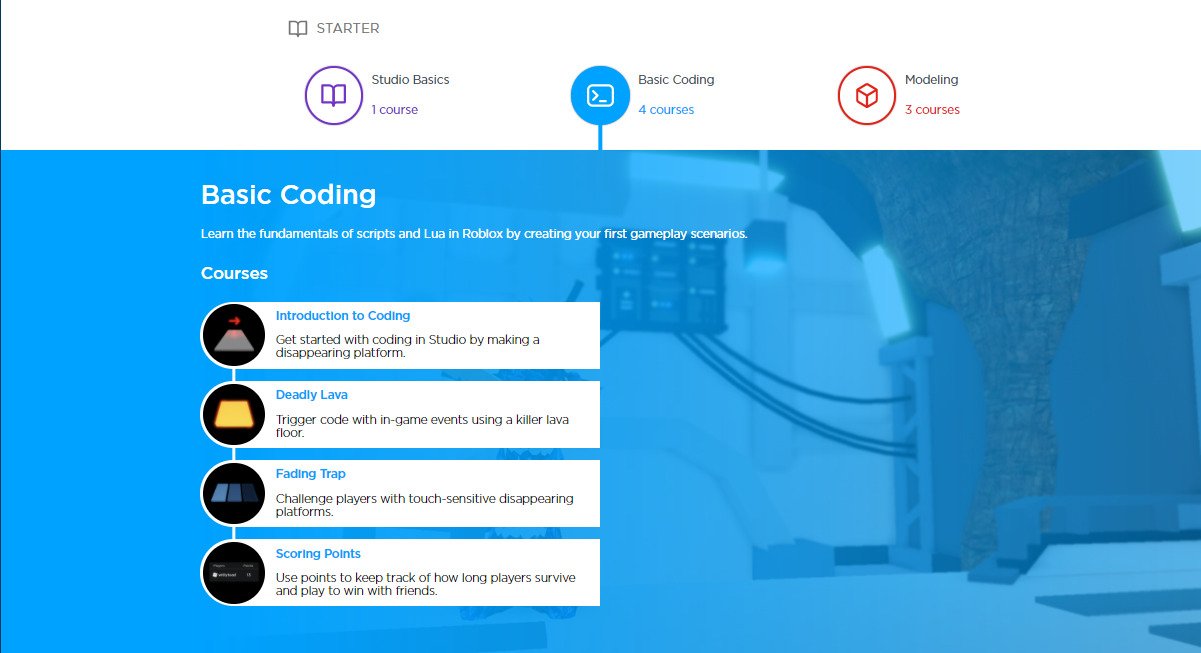
Roblox user onboarding in design should prioritize a clear and engaging initial experience, gently guiding new users through core game mechanics and platform features using simple, interactive tutorials.
Have you ever felt lost when entering a new online world? Many new players on Roblox experience this exact feeling. Effective Roblox user onboarding in design is crucial for retaining these new players. It’s about making the platform feel welcoming and easily understandable from the get-go.
A well-crafted onboarding process helps users quickly grasp how to play games, customize avatars, and connect with others. These initial experiences set the stage for their entire time on Roblox. Designing these moments carefully increases engagement.

Roblox User Onboarding in Design
So, you want to jump into the amazing world of Roblox! It’s like a giant playground where you can build anything you imagine, play tons of games, and make new friends. But, like any awesome playground, it can feel a little overwhelming when you first arrive. That’s where good onboarding comes in. Onboarding is like a super helpful guide that shows you the ropes so you can start having fun right away. In this article, we’ll explore what makes great onboarding in Roblox, focusing on design and how it helps new players learn and get hooked.
What is User Onboarding and Why Does it Matter in Roblox?
User onboarding is simply the process of helping new users understand and use a product or service. Think of it like training wheels on a bike – it gives you the support you need to learn and get going. In Roblox, where there’s so much to do, good onboarding is essential. Without it, new players could easily feel lost, confused, or even frustrated and give up. Good onboarding helps new players understand:
- How to move their avatar.
- How to interact with the world.
- How to find and play games.
- How to make new friends.
- How to start creating their own things.
Effective onboarding makes the platform more enjoyable and keeps players engaged, encouraging them to stay and keep exploring all the cool things Roblox has to offer. In the long run, it turns new players into active members of the community who might even start creating their own awesome experiences!
Key Elements of Effective Roblox Onboarding Design
Now, let’s look at the specific things that make for great onboarding on Roblox. It’s not just about throwing information at new players – it’s about making the learning process fun and easy.
Clear and Concise Instructions
The first thing new players see when entering Roblox matters a lot. The instructions should be super clear and simple. Think short sentences, easy words, and pictures or symbols that make it easy to understand. Nobody likes long paragraphs of text, especially when you are excited to start playing! Avoid using too much jargon or complicated terms. For example, instead of “Press ‘W’ to advance,” use, “Press the ‘W’ key to move forward” or better still have a small image of the ‘W’ key being pressed and have it be animated.
Interactive Tutorials
Instead of just reading instructions, new players should get to try things out themselves. Interactive tutorials let players learn by doing, which is much more engaging. Think of it like a practice level in a game. The tutorial should guide players through the basic movements, interaction mechanics, and how to use the menus without leaving them bored. It can use things like:
- Pop-up prompts: These are little boxes that appear on screen with instructions or tips. They can guide you through specific actions as you play.
- Visual cues: This includes things like arrows that show where to click, glowing objects that you can interact with, or highlighted buttons in the menus.
- Hands-on exercises: The tutorial should ask players to perform actions, like walking to a marked location, opening a menu, or talking to a character, so they can learn by doing.
Remember, it should be a fun experience and not like a chore.
Progressive Learning
Don’t try to teach everything all at once! Onboarding should introduce new features and mechanics gradually. Start with the absolute basics, like movement, and then slowly add more complex things, like chatting or building. This way, new players won’t feel overwhelmed. Imagine learning to ride a bike – you don’t start with a crazy steep hill. You start on a flat surface and then work your way up.
It also helps to introduce concepts just in time, right when players need them. If you teach them how to use the in-game chat only when they enter a game where they’ll need it, it makes more sense than teaching it to them before they have a reason to care.
Personalized Experience
Making the onboarding experience feel personalized can make a big difference. Imagine you could choose a game or theme that you like as the first thing you do. This helps players feel more engaged and connected with the platform right away. Some examples of personalization could be:
- Avatar Customization: Allowing new players to change their avatar’s appearance right away makes the experience feel unique.
- Game Selection: Recommending games based on the players’ stated interests makes it easier for them to find games that they will enjoy.
- Personalized Learning Paths: Offering different paths through the tutorial based on players’ experiences or how they learn.
Clear Feedback
It’s important that players know when they do something correctly. Giving clear feedback will let the new player know they’re progressing. This can be through things like:
- Sound effects: Playing a satisfying sound when an action is completed.
- Visual cues: Showing a checkmark, a star, or some other symbol that indicates success.
- Text prompts: Displaying a message that tells the player they’ve finished a task correctly.
It’s also a good idea to show them what they need to do if they get stuck. This makes it less frustrating when learning the game.
Gameification and Rewards
Who doesn’t love rewards? Adding game-like elements to the onboarding process, like badges for finishing certain tasks or special virtual gifts, can make the learning experience much more fun. Think of it like collecting stickers when you do something good, but this time, it can be virtual. By gamifying the onboarding process, Roblox can get new players more excited about learning and keep them wanting to do more.
This could also be a virtual currency reward that can be used to purchase cosmetic items for their avatar, or unlock certain aspects of the game. These kinds of rewards make the player feel like their progress is meaningful, and motivate them to keep exploring all the content that Roblox has to offer.
The Importance of a Seamless Experience
Imagine getting a new toy that you can’t wait to play with, but you struggle to open the box for hours. You’d get frustrated, right? The same thing can happen with digital platforms. A good onboarding should feel smooth and seamless, with no hiccups or frustrating elements. Things like loading times, confusing interfaces or instructions that don’t work can put off new users and make them want to stop using the app before they’ve even started. When the experience feels smooth, players are more likely to keep playing and exploring.
Analyzing User Behavior to Improve Onboarding
Onboarding isn’t a one-time thing. It’s something that should be constantly improved based on how users interact with it. Roblox should pay close attention to how new players are behaving in the onboarding process. Some things they should monitor are:
- Where do new players get stuck?: Are there certain parts of the tutorial where players get confused or stop progressing?
- How long does onboarding take?: Is the process too long, making new players impatient, or too short, leaving players feeling lost?
- What actions do new players take?: Do new players complete the tutorial, or skip some of the steps?
By observing the behaviour of users during the onboarding, Roblox can identify areas that need improvements, make updates, and constantly improve the first-time user experience.
Tools for User Behavior Analysis
Roblox can use various tools and methods to track and study user behavior, like:
- Analytics dashboards: These give them information on where players are having trouble.
- Heatmaps: These show the areas of the screen where players are clicking or interacting most.
- User surveys and feedback: Getting direct input from new users about their experience is always very valuable.
Examples of Good and Bad Onboarding in Roblox Games
Let’s look at some examples of what works and what doesn’t in Roblox onboarding.
Good Example:
Let’s imagine a game that starts with a very simple tutorial where the player has to walk down a corridor, pick up a tool, and then open a door. It’s all very simple and straightforward. The instructions are displayed on the screen at the bottom, with helpful arrows indicating where the player should move or which object to interact with. Once the player does these tasks they are met with a virtual gift as a reward and are told they are free to explore the game further.
Bad Example:
Imagine another game where the player is immediately thrown into a bustling city with no instructions. There are tons of buildings, vehicles and players all moving around and the player is given a menu of complex options, but they have no idea what to do. It is an overwhelming and frustrating experience for a new user, and they are highly likely to quit the game immediately.
Best Practices for Designing Roblox User Onboarding
To create effective onboarding experiences for new players, Roblox and its game developers should always keep the following best practices in mind.
- Keep it Simple: Don’t overcomplicate things. Focus on the essential things first.
- Make it Fun: Use interactive elements, rewards, and game-like mechanics to make the learning process engaging.
- Provide Clear Feedback: Let players know when they’ve done something right and what they need to do if they’re stuck.
- Personalize the Experience: Let new players customize their avatar and choose content they like.
- Test and Iterate: Continuously monitor user behavior and improve the onboarding process based on the results.
- Prioritize Accessibility: Design the onboarding experience to be accessible for all players, including those with disabilities.
The Future of Roblox Onboarding
As Roblox continues to grow, onboarding will become even more important. We can expect to see more advancements in personalization, AI-driven guidance, and adaptive onboarding experiences that change based on how players are using the platform. There may be an option to choose the type of game the player prefers, or even the type of experience they want. This will make it easier for new players to get what they want right away and have more fun on the platform. The future of onboarding will likely be smarter, more personalized, and more efficient, making it even easier for new players to become active members of the Roblox community.
In conclusion, effective user onboarding is vital for the success of the Roblox platform. It’s not just about teaching new players how to use the platform; it’s about giving them a positive first impression and making them feel welcome and engaged. By focusing on clear instructions, interactive tutorials, and a personalized experience, Roblox can help new users quickly become active members of its vibrant community. Remember, a well-designed onboarding is an investment that pays off by turning casual newcomers into long-time fans.
What are Onboarding Techniques? Roblox Sketch Series
Final Thoughts
Effective Roblox user onboarding in design requires clear pathways. Players need intuitive tutorials and simple initial goals. This helps them quickly understand gameplay and navigate the platform.
A strong start promotes engagement and retention. Poor initial experiences can cause users to abandon the game. Therefore, thoughtful design is vital for smooth adoption.
Prioritizing Roblox user onboarding in design greatly enhances player enjoyment. It ultimately leads to a more successful and vibrant gaming community.

