
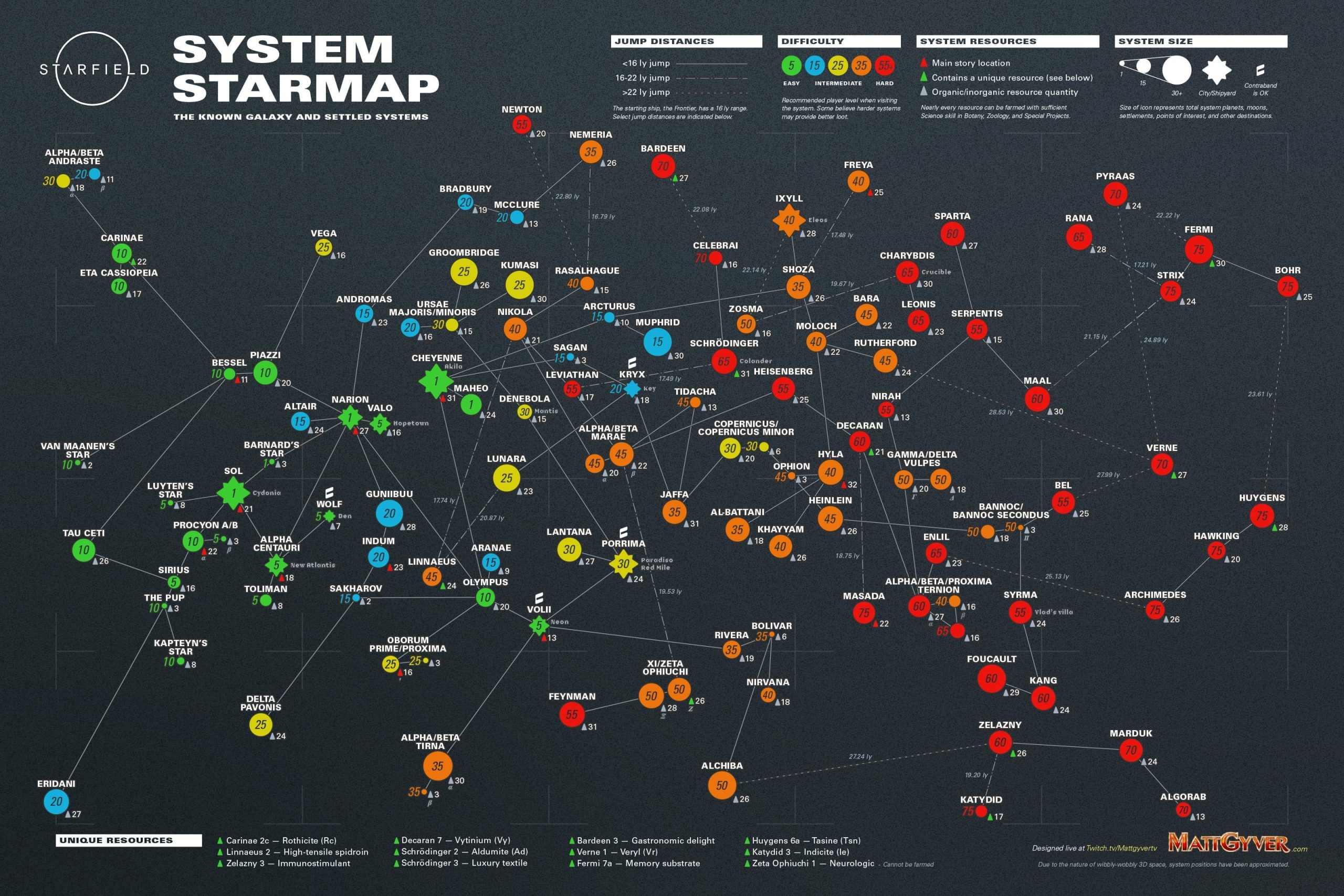
To effectively use the map in Starfield, frequently switch between local and system views. Use the filters to locate points of interest. Pay close attention to fast travel options, they are crucial for quick movement.
Navigating the vast expanse of space in Starfield can feel overwhelming at first. Knowing how to properly use the game’s map system is vital to exploration and progress. Starfield how to effectively use the map hinges on understanding its multiple layers. You must regularly jump between the local and system views.
Utilize filters to identify specific resources or mission-related locations. This feature helps you find what you are seeking easily. Fast travel provides a quick and practical way to traverse long distances. By remembering these points the map becomes simple to use.

Starfield how to effectively use the map
Okay, space explorers! You’re out there in the vastness of Starfield, ready to see new planets and meet all kinds of space critters. But getting lost in space is no fun, right? That’s where your map comes in handy. It’s not just one map, though; it’s like having a bunch of maps all rolled into one. Let’s talk about how to use these maps like a pro so you can travel easily and find everything you need!
Understanding the Starfield Map System
Starfield doesn’t just give you one big, flat map. Instead, it’s a layered system that lets you zoom in and out. You can see the whole galaxy, your specific star system, and even the areas on a single planet. Think of it like having a telescope that can look at very far places and also very near ones. Learning to switch between these views is super important!
The Galaxy Map
The Galaxy Map is where you see all the star systems. Each star system is shown as a little cluster of stars. Here’s what you can do on the galaxy map:
- See different star systems: Each one has planets to explore.
- Plan your route: Choose where you want to travel next.
- See your ship’s range: A line shows how far you can jump with your current fuel.
- Fast travel: If you’ve already been to a place, you can jump there quickly.
When you’re looking at the galaxy map, remember to check the systems you’re going to travel to. Each system has its own story and resources. Some systems might be great for exploring, while others might be full of dangerous pirates.
The System Map
Once you pick a star system on the galaxy map, you jump into the System Map. This shows you all the planets and moons in that system. Here’s what you can do here:
- See all the planets: Each one is different and has its own environment.
- Check the status of each planet: See how much of it you’ve explored.
- Find points of interest (POIs): Look for places like cities, research labs, and other stuff to check out.
- Set course: Choose which planet or moon you want to travel to.
The system map is key to exploring a particular location. Don’t forget to rotate and zoom in and out to see all the details. Some planets may be hiding things that you won’t see unless you look carefully!
The Planet Map
After choosing a planet, you’ll get to see a detailed Planet Map. This is where things get super interesting. This map shows you:
- The overall layout of the planet: You can see all its main areas and landforms.
- Landing spots: Places where your ship can touch down.
- Discovered Locations: Points that you have personally found and marked
- Fast travel points: If you landed before you can quickly return to that spot.
On the planet map, you will notice there are markers for various resources. These are areas where you can find materials to build items. Keep a lookout for these, you’ll need them a lot!
Navigating with Markers and Waypoints
Starfield has a handy way to keep track of where you need to go, and that’s using markers and waypoints. These help you stay on course, even on big planets or inside large star systems.
Setting Waypoints
Waypoints are like digital breadcrumbs. When you see a location or place you want to visit, you can set a waypoint. Here’s how it works:
- Open the map.
- Find the place you want to go.
- Click or select to set your waypoint.
When you set the waypoint, it will show up as a marker on your HUD, that is the screen display you see during gameplay. This marker will guide you as you move around, whether you’re in a spaceship, on a planet, or even inside a building.
Understanding Different Markers
Not all markers are the same. They have different shapes and colors to tell you different things. Here’s a quick guide:
- Mission Markers: These are markers that are part of your quests, they usually stand out very clearly
- Location Markers: These are places you have found or have been told about.
- Resource Markers: These spots show where you can find resources to collect.
- Ship Markers: This shows you where your spaceship is on a planet.
Paying attention to these markers will help you figure out what the point of interest is and where you need to go next. Some places are part of quests, and others have resources for you to mine or collect.
Using the Map for Resource Gathering
Starfield is full of resources, and using the map is very important in finding them. You need these resources to build things, craft items, and upgrade your ship. Here’s how the map helps:
Identifying Resource Locations
The map shows you where to find certain resources. Look for specific icons that show ore deposits or areas with plants you can collect. For example, you might see a marker for iron, copper, or rare plants. Knowing what you need and where to find it helps you get back to exploring quickly!
Efficient Resource Farming
Once you find a resource location, it’s helpful to plan how you will farm that resource. You can set multiple waypoints to check out multiple resource spots on the same planet. This lets you move between the locations quickly and make the most of your time.
Checking Planet Characteristics
Before you land on a planet to gather resources, check the Planet Map. This will show you what kind of environment the planet has and the materials available there. Knowing the planet’s climate will help you prepare for the challenges ahead and decide which resources to go after.
Tips for Getting the Most Out of the Starfield Map
Now that we’ve covered the basics, here are a few tips to help you become a map expert:
Regularly Check Your Map
Make checking your map part of your regular routine. Check it before you land on a planet, after you talk to someone, and when you complete a mission. This way you always know what’s around you and how to move around. You don’t want to get stuck going the wrong way.
Use the Map to Plan Your Travels
Don’t just jump around randomly. Use the map to plan your trips. Think about what resources you need and look for them on the planet maps. Plan routes to go through multiple locations while minimizing travel time. The most efficient way to travel is with a clear plan in place.
Learn How to Read the Icons
Each icon on the map means something specific. Take time to learn what these icons mean. This will help you figure out what places are important and how to reach them quickly. If you know what each icon stands for, you can quickly make decisions on where to go.
Don’t Be Afraid to Experiment
Starfield is a game where you can explore a lot. Don’t be afraid to try out new things on the map. See what happens if you set waypoints to unexplored places or if you go to planets you have never visited before. Every now and then, you might stumble upon a hidden location or some special loot.
Use Quick Travel Wisely
Quick travel is very handy but also remember to explore sometimes. Even if you can quick travel to your spaceship, or city, try taking the long path sometimes as well. You never know what places you will find on the way!
Use the Scan Option
Your scanner is another very important tool. If you are unsure where to go or how to get to a certain area, pull out your scanner and use it to find any important places close by!
Use Notes and Markers
You can leave personal markers or notes on the maps that you can use later! These are great when you’re exploring, if you want to leave a note about some rare resource, or anything of that sort!
Common Mistakes and How to Avoid Them
Sometimes, using the map can be a little tricky. Here are some common mistakes players make and how to avoid them:
Not Checking Your Fuel
Before you jump to a new star system, always check your fuel level on the Galaxy Map. Running out of fuel mid-jump will cause problems. A good habit is to always check how far you can jump using the line and keep an eye on your fuel!
Ignoring Planet Details
Don’t just land on a planet without looking at the map first. Check the Planet Map to see what resources are available and any hazards you should be aware of. Each planet is unique and should be explored with care!
Overlooking Important Markers
Sometimes, there might be important missions or resource markers hiding in plain sight. Make sure to zoom in and move your cursor over everything to be sure that you haven’t missed anything important. It’s worth taking a few extra seconds to look around.
Getting Lost
If you get lost, always remember you can quick travel to your ship. This way, you can get back to your ship, and reorient yourself with your surroundings. Don’t be afraid to use your map to locate your ship!
By learning how to avoid these problems, you’ll be a more efficient explorer!
The map in Starfield is your best friend, and knowing how to use it makes the game more fun and easier to play. Happy exploring!
Go Here on the map to get more XP in Starfield
Final Thoughts
Navigating Starfield’s vast universe requires good map skills. Use the local map for detailed area exploration. The system map enables quick jumps between planets. Understanding both improves your travel.
Pay attention to the icons; they show quest locations and resources. Starfield how to effectively use the map involves switching between these views regularly. This helps you plan routes efficiently. A good grasp of it greatly aids your journey through the game.

