
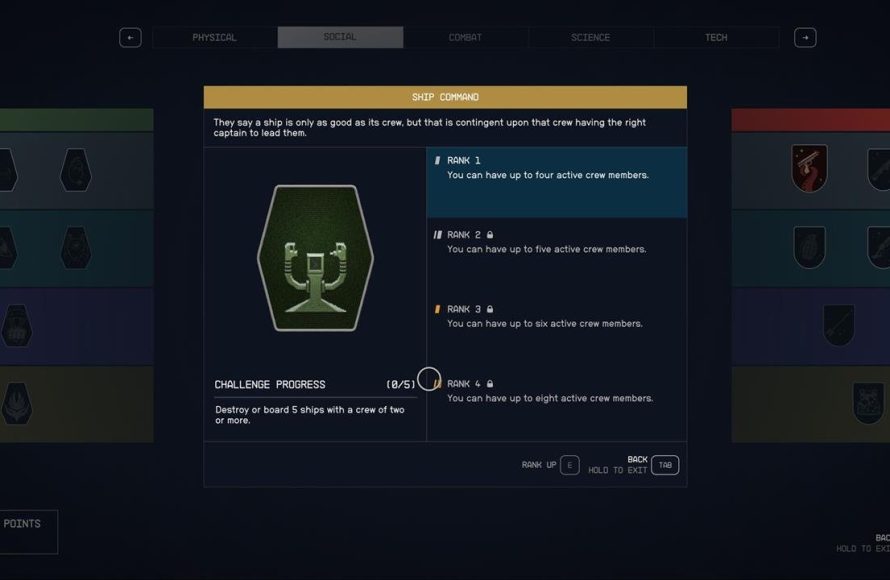
To give commands to your crew in Starfield, use the ship’s console or interact with them directly. Specific options will appear allowing you to assign tasks and manage their actions.
Navigating the vast expanse of Starfield requires a capable crew. But how do you make them work effectively? Many players are asking, “Starfield how to give command to crew?” Don’t worry, getting your crew on the same page is simpler than you might think.
Managing crew tasks is key for any good captain. You’ll find that a little effort goes a long way in maximizing their effectiveness. Learning this aspect of gameplay can make your interstellar journey easier and more enjoyable.

Starfield How to Give Command to Crew
Ever felt like your spaceship in Starfield is just a little too quiet? Or maybe you’re juggling too many tasks at once while trying to explore the galaxy? That’s where your crew comes in! They’re not just there for decoration; they can be a real help if you know how to give them the right commands. This guide will show you everything you need to know about managing your crew in Starfield, from assigning them to roles to using their special skills. We’ll break it down into simple steps, so you can get your crew working like a well-oiled machine. Let’s dive in and get your ship running smoothly!
Understanding Your Crew in Starfield
Before we get into giving commands, let’s talk about who your crew members are and what they do. Your crew is made up of unique characters you meet on your travels. Each crew member has their own special skills, which they are good at. For example, some might be experts in repairing your ship, while others might be better at fighting. Knowing these skills will help you assign them to the best jobs.
Types of Crew Skills
Crew skills are divided into categories, let’s see some common ones:
- Ship Systems: These skills make your ship stronger and help with things like shields and weapons. Think of them as the people who keep the ship running!
- Combat: Crew members with combat skills are good at fighting. They can help you when you’re attacked by pirates or wild creatures.
- Outpost Management: If you want to build outposts, these crew members can help with that by gathering resources and making things run smoothly.
- Science and Research: These crew members are good at research and can help you create new technology.
- Social: Crew members with social skills are good at talking to people and getting you a good deal.
- Medical: These crew members are good at keeping everyone on the ship healthy.
Crew Member Characteristics
Each crew member also has their own special characteristics. Some might be more talkative and outgoing, while others might be quieter and more serious. Some may like being in charge, while others prefer to follow orders. Understanding their individual characteristics can help you manage your crew even more effectively. For instance, a crew member that likes to take charge might not do well in a support role. These little details can make the game more interesting and your crew feel like they have their own personality. Let’s see some examples:
- Personality: How your crew member acts and responds. This can affect how well they work with other members.
- Loyalty: How dedicated they are to you. The more loyal they are, the better they will perform.
- Motivation: What drives them to do their best.
How to Assign Crew to Ship Positions
Okay, now for the fun part: putting your crew to work! In Starfield, you can assign crew members to different jobs on your ship. These positions can be things like:.
- Piloting: This crew member handles the ship’s flight. A good pilot makes travel smoother.
- Shields: Crew members here help your ship’s shields stay strong, making it less likely you’ll take damage.
- Weapons: Crew members who operate the ship’s guns. They’ll be your first line of defense in space battles.
- Engineering: Crew members here keep all of the ship’s systems running. They fix things when they break.
Accessing the Ship Menu
To assign crew members to these positions, you need to access your ship menu. You can do this by:
- Going to the cockpit of your ship.
- Look for a chair or a control panel that activates the ship’s main menu
- A screen or interface will appear, usually on your screen or on a console, with a list of options.
Managing your crew via the ship menu
Once you’re in the ship menu, it’s pretty straightforward. look for a section that says “Crew,” “Crew Assignment,” or something similar. Here’s what you’ll usually see:
- A list of your current crew members.
- A display of the available positions on your ship (pilot, weapons, shields, engineering).
- The ability to drag and drop (or select) each crew member to the position you want them to fill.
Understanding the Effects of Crew Assignment
The most important part of the process is choosing the right person for the right job. If you put a combat expert in charge of engineering, you may not see the best results! Here is what happens when you assign different crew members to different positions:
- Improved Performance: Assigning crew members to positions that match their skills results in better ship performance. A pilot will pilot better, a weapons specialist will shoot more accurately.
- Bonuses and Perks: Some crew members have skills that grant bonuses. An engineering specialist could make your shields charge faster, and a science specialist might grant you an extra damage from the weapon.
- Crew Satisfaction: If crew members are working in the roles that they’re best at, they’re more likely to stay happy and work well for you.
Giving Direct Commands to Crew
While assigning crew to ship positions is a great start, you can also give them direct orders. These commands allow you to use their specific skills on the ground, during a fight or when exploring.
How to access direct command options
The method for giving these commands will depend on the platform you’re playing Starfield on. Here’s how it usually works:
- On PC: Check your controls menu and key binds for the command key. It’s usually a key like “X”.
- On Xbox: There’s usually a specific button to open the commands menu, often it’s the ‘D-pad’ or the ‘Y’ button.
You’ll want to familiarize yourself with the exact buttons or keys early on in your gameplay. Once you find the correct button, you can press it while you are near one of your crew members, which will open up a menu with several options to pick.
Types of Direct Commands
Now that you can open the menu, what kinds of orders can you give? Let’s look at some options:
- Follow: You can tell your crew to follow you around. It’s very handy for making sure your crew is ready to go wherever you are exploring.
- Attack: You can select a crew member to attack a specific target, good to use when you are outnumbered.
- Defend: You can ask crew to defend a specific location or themselves when you are in trouble.
- Heal: If you have a crew member with medical skills, you can tell them to heal you or an injured ally.
- Interact: You can tell crew to interact with objects, including consoles, doors, or crates
- Wait: When you need them to stay put, you can ask them to hold their position.
Utilizing Crew Skills During Commands
The direct command system becomes extra useful when using the skills of your crew, this can help you in fights or when gathering resources.
- Combat Skills in Action: Direct your combat expert to take down that tough pirate while you deal with the smaller ones.
- Medical Assistance: If you are injured, ask a crew member with medical skills to heal you in the middle of battle.
- Tech Help: If you have a crew member who’s good at engineering, have them open those jammed doors or hack into systems.
Troubleshooting Crew Issues
Sometimes, things don’t go as planned. Your crew might not always do what you want them to do, and you may need to troubleshoot some common issues. Here are a few things you might encounter and how to deal with them:
Crew Not Following Orders
Sometimes, your crew might act like they are not listening to you. Here’s what you can do:
- Check Their Mood: If your crew is unhappy, they might not follow orders effectively. Check the crew’s morale. A unhappy crew member will not work effectively, so you have to manage the happiness of your crew.
- Give Clear Commands: Make sure you are giving a clear command to a specific crew member, sometimes they get confused if you order everyone at once.
- Update or Reassign: Try re-assigning a crew member to another position or updating them with better skill set, to see if it solves your issues.
- Game Bugs: Sometimes it could just be a bug. Try reloading an older save or restarting the game.
Crew Member Not Performing Well
If you are not seeing your crew perform like you imagined, consider this:
- Wrong Skill: Make sure you did not assign a crew member to a role for which they are not skilled for. An engineer will not perform well when doing a pilot job.
- Gear Upgrade: Upgrade the gear of your crew member, it makes them perform better.
- Crew Member Level: Maybe you need to level up your crew members to make them more effective. Crew members also have levels in Starfield.
- Consider Replacing Crew: Sometimes it just means that you need to find a new crew member that is better than the one you have.
Crew Member Disappearing
If you notice a crew member is not with you:
- Check Your Ship: A crew member can return to your ship when you fast travel, make sure they are not on the ship.
- Reload: Sometimes they might be just bugged. Try reloading an older save to bring them back with you.
Tips for Better Crew Management
Here are some extra tips to help you manage your crew even better:
- Rotate Crew: Don’t be afraid to try different crew members in different positions, so you can see who is performing the best in each role.
- Boost Skills: You can also give your crew items that can boost their skill in specific areas.
- Pay Attention: Take some time to see what your crew likes and what kind of job they excel at.
Managing your crew effectively can greatly enhance your experience in Starfield. By understanding the skills of your crew members, assigning them to the correct positions on your ship, and giving clear direct commands, you will have a crew ready to tackle any challenge. With practice and patience, your ship will be running smoothly, and your crew will become an invaluable asset to your space adventure.
Starfield – The Beginner's Guide to Building Outposts
Final Thoughts
Controlling your crew involves accessing the ship menu. Select crew, then choose an individual, and pick a command. These commands include things like defending the ship, or going to an outpost.
You can’t directly order a crew member to engage in combat on the ground. Instead, they generally assist during ship battles and at settlements. This covers Starfield how to give command to crew.

