
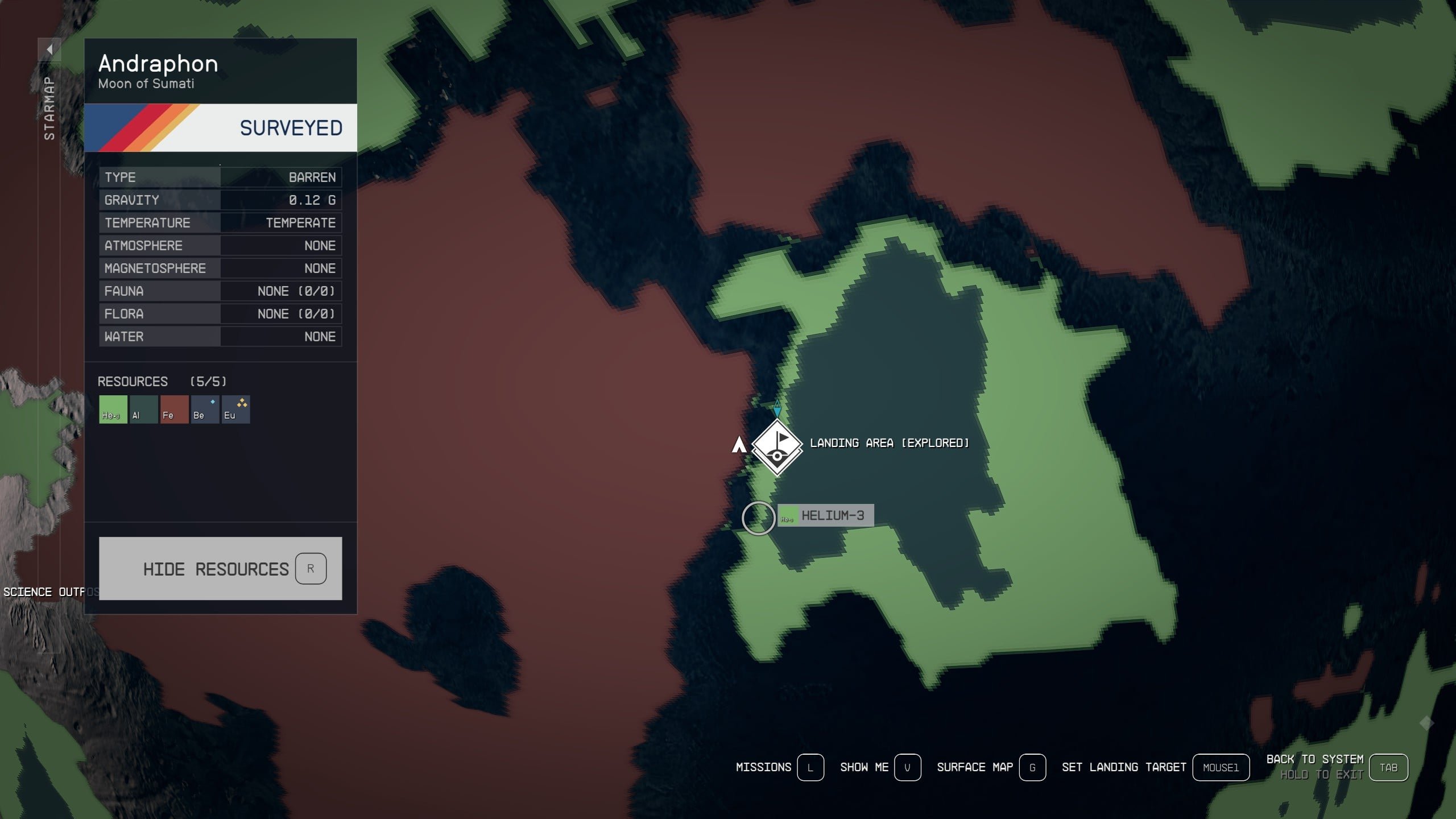
To make best use of resources in Starfield, regularly scan planets for materials, build outposts to automate collection, and prioritize crafting upgrades that improve resource gathering efficiency.
Ever felt like you’re constantly running low on crucial components in Starfield? It’s a common issue for many players. Figuring out how to make best use of resources is vital to progression.
This guide helps you understand how to acquire and manage resources effectively. This allows you to build, craft and explore more of the galaxy. Focus on these tips to get ahead quickly.

Starfield How to Make Best Use of Resources
Okay, space explorers! You’ve jumped into the vast universe of Starfield, and it’s awesome, right? But, just like in real life, you can’t just go around spending everything you have. Resources are important, whether you’re building awesome outposts, upgrading your gear, or just trying to stay alive. This guide is all about how to be smart with your stuff in Starfield, so you can travel, build, and become the best space adventurer ever!
Understanding the Basics: What Are Resources?
First, let’s talk about what resources actually are. In Starfield, they’re the things you find scattered across planets, inside containers, and even on the bodies of your defeated enemies. These aren’t just random junk, they are the building blocks for everything you do! Resources are categorized into different types, including:
- Raw Materials: Things like Iron, Aluminum, Copper, and Nickel. Think of these as the basic building blocks. You need these to craft mods for your weapons and armor and create structures at your outposts.
- Gases: Helium-3 (He-3), Argon, and others are important for fueling reactors and creating other advanced materials. He-3 is especially important for operating outposts and powering starships.
- Organic Materials: These come from plants and animals. Some examples are Adhesive, Fiber, and Cosmetic material. You might use these to craft medicines or create decorative items for your ship and outposts.
- Manufactured Components: Things like Adaptive Frames and Comm Relays. These are used in advanced crafting. These are sometimes found or created from raw materials.
- Food and Drink: Not just to stay alive, some provide small boosts to your stats.
You will see these different resources as you are exploring, and you’ll soon learn which ones are most important for your playstyle.
Scanning and Gathering Resources: The First Step
Before you can use a resource, you need to find it! Here’s how you become a resource-hunting pro:
Using Your Scanner
Your scanner is your best friend in Starfield. By pressing the scanner button (usually LB on Xbox, or F on PC), you’ll enter scanner mode. In this mode, you’ll see markers for:
- Flora and Fauna: Plants and animals that you can scan to get data for research projects. But some can be harvested for resources.
- Resource Deposits: These are marked with icons. Look for iron, aluminum, and other raw materials. Aim at them to see what they are exactly.
- Containers: Boxes, lockers, and other storage units that might contain useful items.
When you look at a resource deposit, you’ll see what kind of resource it contains. You can then hold the interact button (A on Xbox, E on PC) to harvest the resources.
Knowing Where to Look
Different resources are found on different planets and moons. Some locations are great for particular resources. For example, planets with a lot of geological activity may have a lot of raw materials. You will need to visit a variety of different systems and planets to find what you need.
Planetary Surveys
To fully understand a planet’s resources, you should use your scanner and survey each planet. Scanning all the flora, fauna, and resources unlocks the planet’s full description. This data shows which elements are found on the planet. This helps you choose the right places to build outposts and set up resource farms. If you see a resource that has a unique icon it usually means the resource is rarer.
Efficient Inventory Management
Carrying too much stuff can really slow you down. Here’s how to manage your inventory like a pro:
Understanding Carry Weight
Your character has a weight limit. Carrying too much stuff makes you over-encumbered and unable to run or fast travel. You can see how much you’re carrying at the bottom of the inventory menu. Watch this number carefully, so you do not get stuck.
Prioritizing Resources
You won’t be able to carry everything. Focus on picking up resources you actually need for your immediate plans, like those for crafting or building outposts. Ask yourself, “Do I really need this right now?” If the answer is no, leave it behind.
Storing Resources
Here’s where things get cool. You have multiple options for storing your hard-earned resources:
- Ship Cargo Hold: Your ship has a storage space. This is a great place to keep larger quantities of resources while you’re out and about.
- Outpost Storage: You can build storage containers at your outposts. This is useful for long term storage and also allows you to connect your cargo to different outpost locations.
- Personal Storage: You can store stuff at your house/apartment in a safe or container. This is a good place to keep your personal items.
Use these storage options to keep your character inventory light while retaining access to your hard-earned resources.
Organizing Your Inventory
It’s a good idea to organize your inventory. This will make it easier to find the materials that you need. Put things that you use most often at the top of the list.
Use categories when moving your things to a container. You can store your raw materials in a container dedicated to this purpose. You can store components in a second container. This keeps things simple. It’s less clutter and easier to manage.
Crafting and Research: Using Your Resources Wisely
Resources aren’t just for hoarding. They’re also for creating new items and improving your character. Here’s how to use resources for crafting and research:
Crafting Stations
Crafting stations, found at your ship, at settlements, and at outposts, allow you to create a variety of items including:
- Weapon Mods: Improve your weapons with scopes, barrels, and other parts.
- Armor Mods: Upgrade your armor with stat boosting modifications.
- Aid Items: Craft healing items and stat boosting consumables.
- Outpost Structures: You will need certain resources to build habitats, storage, generators, and resource extractors at your outposts.
Research Projects
Research projects, using research stations, require resources and can give you advantages. These can give you new recipes for crafting, better outpost building options, and enhanced weapon and armor modifications.
Understanding Crafting Recipes
Each crafting recipe requires a specific combination of resources. Make sure you always check the resources you need before you start crafting. You can check the ingredients for an item in the crafting menu. If you do not have the ingredients it will tell you exactly what you need.
Prioritizing Upgrades
Not all upgrades are created equal. Some upgrades have more impact than others. Focus on upgrading things that fit your playstyle.
Outpost Building: Turning Resources into Infrastructure
Outposts are essential for resource management. Here’s how to build an outpost, and how to use it to automate resource gathering:
Choosing a Location
The location of your outpost matters. Before you build, use your scanner and find areas with lots of resources, especially the ones you need. You will also want a relatively flat piece of land to make building easier.
Building Extractors
Extractors are machines that mine resources from deposits. You need to place an extractor on top of each resource deposit you find. You will need power for them to function. You can use solar panels or generators to keep your extractors running.
Storage and Transfer
You need a way to store all the resources that your extractors are collecting. Storage containers and transfer containers are key to managing the flow of resources. You can also use cargo links to move resources between different outposts.
Outpost Management Tips
- Expand Slowly: Don’t try to build too much too fast. It’s better to start with a small base and grow over time.
- Plan ahead: Make sure that you have a vision for your base and the flow of resources.
- Connect your Outposts: Cargo links are key to getting resources where you need them.
Starship Customization and Resource Needs
Your ship is your home in the galaxy, and it also needs resources. Here’s how to use resources to keep your ship in top condition:
Upgrading Ship Modules
You can use resources to purchase new parts for your ship. These can improve your ship’s weapons, engines, shields, and cargo capacity. These are a big help when venturing into more dangerous star systems.
Repairing Your Ship
When your ship is damaged, you will need repair parts. Make sure that you have enough resources to keep your ship fully functional.
Fueling Your Ship
Your ship needs He-3 to jump between systems. Make sure that you are gathering enough He-3 to keep exploring the galaxy. If you have an outpost with a He-3 extractor, you can use cargo links to transfer He-3 to your ship at spaceports.
Trading and Selling
Sometimes, you’ll have more resources than you need. Here’s how to trade and sell resources effectively:
Finding Vendors
Vendors can be found in most major cities. These vendors will have specific specialities. You might get a higher price for certain resources at specific locations. Check each vendor before you sell everything in one place.
Trading Tips
- Don’t sell what you need: Before selling, make sure that you have enough of what you need.
- Check vendor prices: Different vendors pay different prices. Shop around for the best deals.
- Sell in bulk: Selling resources in large amounts will make you more credits per trip.
Advanced Resource Techniques
Now that we’ve covered the basics, let’s talk about some more advanced ways to manage your resources:
Automated Resource Chains
Using cargo links, you can create automated resource chains to transport resources between your outposts. If you make a chain of outposts that produce and then refine different resources, you can create complex items without lifting a finger.
Research for Efficiency
You can research improved mining and extraction techniques. This will give you more resources faster and also save on power consumption.
Special Resource Nodes
There are rare, special resource nodes on certain planets. These nodes can give you valuable and uncommon resources. Keep an eye out for these!
By putting these strategies into practice, you will become the best resource manager in the Settled Systems. You’ll be building amazing outposts, customizing your ship, and crafting powerful gear. You’ll be ready for anything the galaxy throws at you. Happy adventuring!
Starfield Outposts INCREDIBLY IMPORTANT! The BEST Planet For Resource Farm & Starfield Outpost Guide
Final Thoughts
Efficient mining, crafting, and selling form the bedrock of resource management. Prioritize valuable materials, such as those needed for weapon and suit upgrades. Regularly visit vendors to offload excess goods and gather credits for needed items.
Strategic outpost building near resource veins can provide constant material influx. Focus on setting up resource gathering and transfer systems to maximize efficiency. Use these techniques for ‘Starfield how to make best use of resources’.
By actively engaging with Starfield’s economy and utilizing these strategies, you can accumulate wealth, improve your equipment, and ultimately, thrive. A structured approach allows you to handle many things efficiently.

