
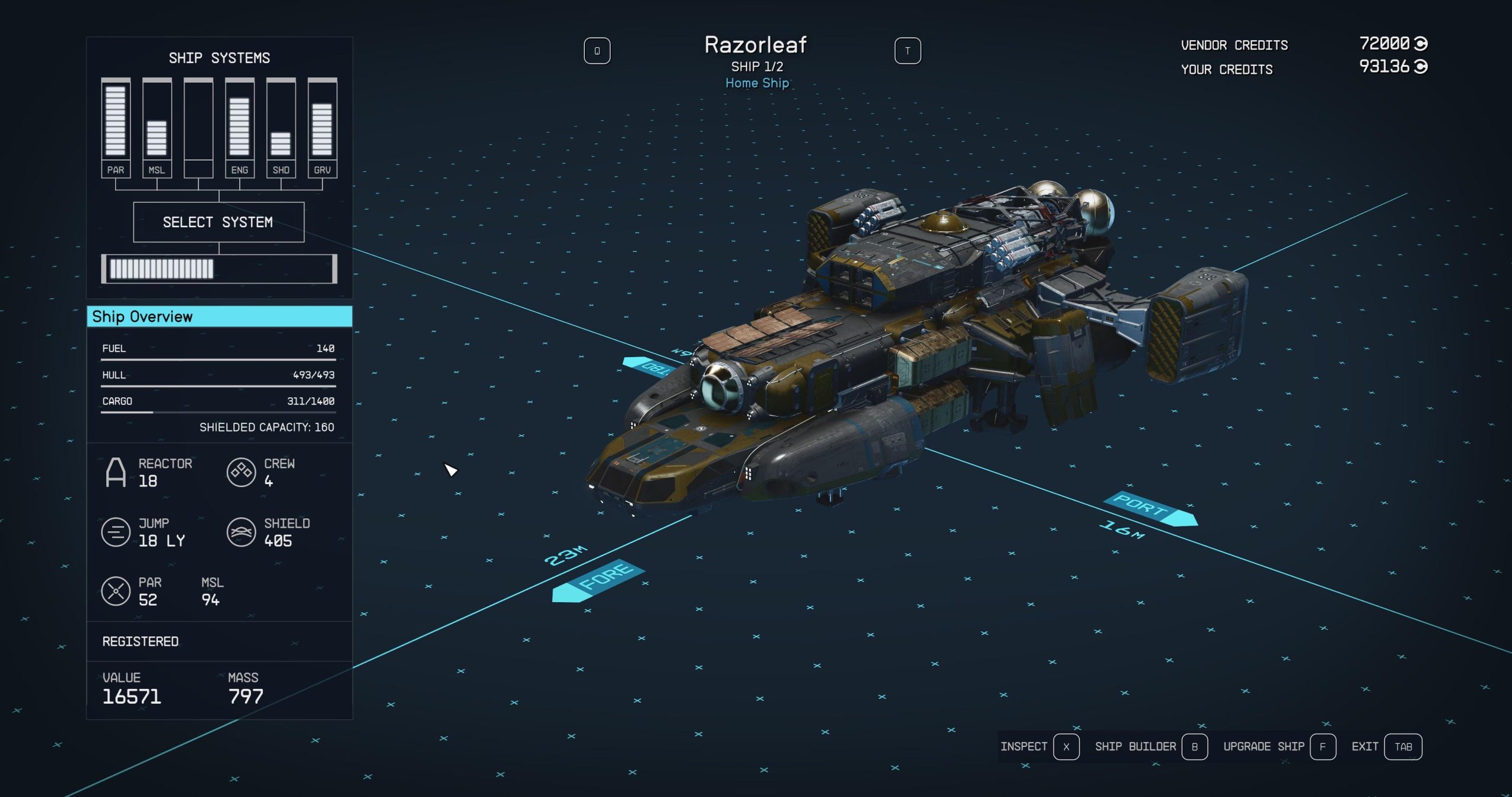
To upgrade your ship in Starfield, you’ll need to visit a ship technician at any major spaceport. There, you can modify and purchase new parts to improve your ship’s performance, weapons, and more using credits.
So, you’re soaring through the vast expanse of space in Starfield but feel like your ship could use a bit of a boost? Well, you’re in the right place! This article will serve as your Starfield ship upgrade guide.
We will walk you through the process of upgrading your vessel, ensuring it’s ready for any challenge the galaxy throws your way. Prepare to make your ship a true force to be reckoned with.

Starfield Ship Upgrade Guide
So you’ve taken to the stars in Starfield, and your trusty ship is feeling a little… well, not so trusty anymore? Maybe it’s slow, maybe its weapons aren’t packing the punch you need, or maybe it just doesn’t look as cool as the ships you’re seeing out there. Don’t worry, spacefarer! This guide will walk you through everything you need to know about making your ship the envy of the galaxy, from swapping out parts to building your dream vessel from scratch.
Understanding Ship Components
Before you start bolting on new lasers and bigger engines, it’s important to understand the different parts of your ship and what they do. Think of it like building with LEGOs, but for spaceships! Here are some of the key components:
- Reactor: This is your ship’s power source. A better reactor means more energy for weapons, shields, and other systems. It’s like the battery for everything on your ship.
- Engines: These determine your ship’s speed and maneuverability. Faster engines let you get around space quicker and can help you win in dogfights.
- Shields: These protect your ship from enemy fire. Stronger shields mean you can take more hits before your ship gets damaged.
- Weapons: These are how you fight. There are different kinds of weapons like lasers, missiles, and cannons, each with its own strengths and weaknesses.
- Grav Drive: This is how you travel between star systems. A better grav drive lets you jump farther distances.
- Cargo Hold: This is where you store all your loot. A bigger cargo hold lets you carry more goodies.
- Hab Modules: These are living areas for you and your crew. They can offer different skills and bonuses.
Each of these parts has different stats, which are important to consider while you’re making upgrades. Pay attention to things like power consumption, weight, and damage output when you’re comparing parts.
Where to Buy Ship Parts
Okay, so you know what all the parts do, but where do you actually get them? Luckily, there are plenty of places to shop for ship upgrades. You’ll find ship technicians at most major spaceports and cities. These technicians will usually have a menu of parts for you to purchase, and they’ll often install them for you, too.
Here are some notable locations:
- New Atlantis (Jemison, Alpha Centauri System): The main city in the game. You’ll find a decent selection of parts at the spaceport.
- Akila City (Akila, Cheyenne System): This is another big city with a reputable ship technician.
- Neon (Volii Alpha, Volii System): Known for its vibrant nightlife, it also has a place with ship parts.
- Cydonia (Mars, Sol System): If you head to Mars, you can find a shop with ship parts.
Each location may have different parts available, so it’s a good idea to check multiple places if you are looking for something specific. Some ship technicians also sell unique parts, or parts with better stats than others you can find elsewhere. Also, as you travel more and explore, you’ll meet other technicians who have various selection.
Modifying Your Ship at the Shipbuilder
Once you’ve got some new parts, it’s time to get your hands dirty! You can modify your ship by speaking to a ship technician and selecting the “I’d like to view and modify my ships” option. This will take you into the shipbuilder, where you can:
- Swap Out Parts: Replace existing parts with better ones you have purchased.
- Add New Parts: Add extra weapons, shields, or hab modules if your ship has the space and power.
- Change the Appearance: Customize your ship’s colors and appearance (to a certain extent).
The Shipbuilder Interface
The shipbuilder interface might look a bit confusing at first, but it’s actually pretty easy to use once you get the hang of it. Here’s a breakdown:
- Ship View: The main part of the screen shows your ship. You can rotate and zoom to see it from different angles.
- Parts List: On the side, you’ll see a list of the different parts you can add to your ship.
- Stats: You’ll see the stats of your current ship on the screen, and you’ll see how it changes as you add new parts. This is where you can see how new components will affect your speed, shields, and weapon damage.
- Connection Points: Different parts have connection points that show where they can fit on your ship.
- Power Management: At the top you’ll see your ship’s reactor power and which parts are using it. Keep an eye on this! You don’t want to overdo it and run out of energy!
Tips for Modifying Your Ship
Here are some important tips to help you modify your ship effectively:
- Power is Key: Always make sure your reactor can supply enough power for all the parts you add. If you run out of power, your weapons or shields might not work.
- Consider Weight: The heavier your ship is, the slower it will be. Don’t just add the biggest and heaviest part! Think about your ship’s weight and the type of fighting you’ll be doing.
- Test Your Ship: After making changes, it’s a good idea to test your ship in combat to see how it performs.
- Don’t Forget the Aesthetics: Make it look how you like it! Don’t just focus on stats, make a cool ship that you will enjoy traveling in!
Building Your Own Ship From Scratch
If you are feeling adventurous, you don’t have to stick to just modifying existing ships. You can completely build your own ship from the ground up! This lets you build your ship to your exact specifications, which is a great option for spacefarers who are very particular. However, it is a bit more expensive. You’ll have to buy every single part for a brand new ship. You can build a small scout ship or big space faring vessel!
How to Start Building Your Own Ship
To start, speak to a ship technician and select the “I’d like to view and modify my ships” option. When you get to the shipbuilder, there is an option on the bottom left that reads “new ship.” Select this and you’ll start with an empty canvas. You’ll then need to add a landing gear, cockpit, reactor, and other parts to get the ship started. Be sure to check the builder interface tips mentioned earlier.
- Choose a Cockpit: Select your cockpit which will dictate how many crew members you can have.
- Attach a Landing Gear: Now add some landing gear to the bottom of the ship.
- Place a Reactor: Add a reactor so that your ship will be able to fly.
- Add essential modules: Put on a grav drive and engines to travel around the universe.
- Start Building: Place different parts to add weapons, hab modules, and shield.
Tips for Building Your Own Ship
- Plan Ahead: Before you start, think about what kind of ship you want to build. Do you want a fast fighter, a big cargo hauler, or something in between? This will help you choose the right parts.
- Start With the Core: Begin with the essential parts like the cockpit, reactor, and engines. Then add the other parts around these basic components.
- Use Symmetry: If you are after an appealing look, consider symmetry. It makes things look nicer.
- Test, Test, Test: After building your ship, take it for a test flight and see how it handles. Make changes as needed until you are happy with how your ship is performing.
Ship Skills
There are some skills that can help you out when it comes to ship building. For example, the “Piloting” skill makes your ship more maneuverable, and the “Shield” skill increases your ship’s shield strength. Skills can make a difference when you are in a space battle. The “Ship Design” skill lets you access and use better ship parts that might not be available otherwise. You can also use the “Starship Engineering” skill to get better performance from your ship’s components.
Ship Registration
If you “acquire” a ship through unofficial means, like boarding an enemy ship and taking it over, it’s important to register it before making big changes or selling it. If you don’t, you can still use the ship, but it will likely get you in trouble with authorities when they find you have an unregistered ship. You can do this at any ship technician, but it’ll cost you some credits. Once registered, you can change any part of it like it was your own ship.
Making Credits to Buy Ship Parts
Buying all those fancy ship parts is going to cost you some serious credits. So, how do you make the money? There are lots of ways. One of the best ways is by completing missions. You can also hunt for bounties, sell items you collect, or try your hand at trading. Space is big and full of opportunity. Some people even try to acquire ships they can register and sell. Just make sure you have enough credits before you commit to some expensive parts.
With a bit of effort and planning, you’ll have the most awesome ship in the entire galaxy!
Upgrading your ship in Starfield is a big part of the game, and something you’ll probably do a lot of. Whether you choose to modify an existing ship or build your own from scratch, understanding ship parts, where to get them, and how to use the shipbuilder are important to building the ultimate spaceship. Go explore, go travel, and enjoy your space journey!
STARFIELD | TIPS – Ship & Inventory Upgrades You Need ASAP
Final Thoughts
Prioritize upgrading your ship’s reactor and grav drive for better jump range and energy allocation. Engine improvements boost speed and maneuverability which are important. Weapons selection should match your combat style; consider lasers or ballistic options.
Shields are essential for survival. You should spend credits on improved shield generators. Following this Starfield ship upgrade guide gives you a significant edge.

