
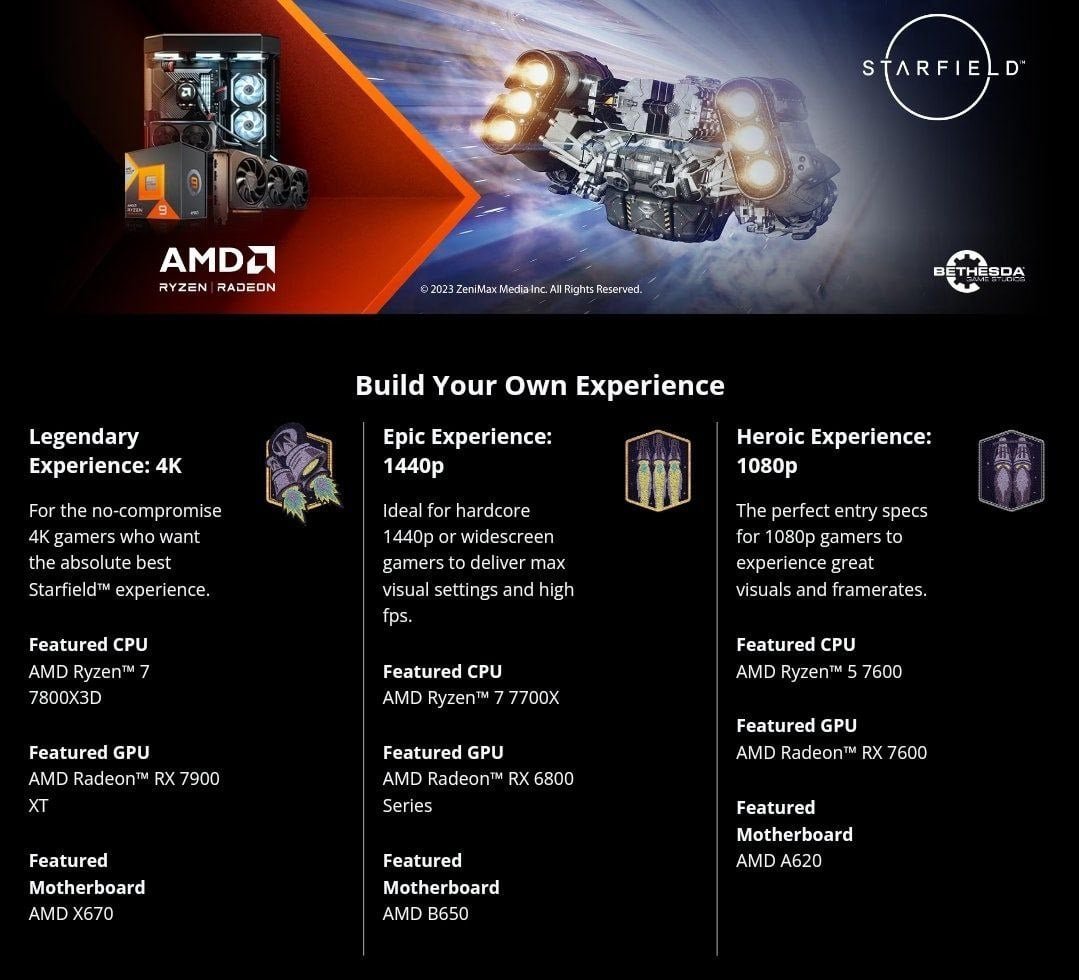
Starfield system requirements for pc include a minimum of an AMD Ryzen 5 2600X or Intel Core i7-6800K CPU, 16GB of RAM, and an AMD Radeon RX 5700 or Nvidia GeForce GTX 1070 Ti GPU.
So, you’re eager to jump into the vast expanse of space in Bethesda’s latest epic? Understanding the Starfield system requirements for pc is crucial before you even think about launching the game. We know you want to explore, but checking your hardware ensures a smooth experience.
This guide will quickly outline what your computer needs to run the game properly. Nobody wants a slideshow while flying through galaxies, so let’s get down to the specifics.

Starfield System Requirements for PC: What You Need to Play
So, you’re excited about Starfield, the new space exploration game from Bethesda? That’s awesome! But before you jump in, let’s talk about what your computer needs to run this big, beautiful game. Just like a spaceship needs fuel, your PC needs the right parts to handle the amazing graphics and gameplay of Starfield. We’re going to go through everything you need to know about the Starfield system requirements for PC, making sure you’re ready for your intergalactic journey.
Minimum System Requirements for Starfield
First up, let’s look at the very basic needs for Starfield. These are the absolute minimum specs your computer needs just to start the game. Think of it like the smallest spaceship that can barely make it to the moon. It might not be the smoothest ride, but it will get you there.
Operating System
You’ll need to have Windows 10 version 22H2 or later, or Windows 11. It’s important to have the latest version of Windows, because Starfield is designed to work best with modern computer tech.
- Windows 10: Version 22H2 or later. Make sure your Windows is up to date.
- Windows 11: No specific version needed as long as it’s Windows 11.
Processor (CPU)
The CPU is the brain of your computer. For Starfield, you’ll need at least an AMD Ryzen 5 2600X or an Intel Core i7-6800K. These are older, but still capable processors that can handle the game at lower settings. If you want the game to run better, you need to have a better processor.
Here is a simple way to understand CPU:
- AMD Ryzen 5 2600X: This is a six-core processor from AMD.
- Intel Core i7-6800K: This is an older, but still powerful Intel processor.
Memory (RAM)
RAM is like the computer’s short-term memory. Starfield needs 16 GB of RAM as the minimum requirement. If you don’t have enough RAM, your game might stutter or run slow. So, be sure to check how much RAM your PC has.
Here’s what RAM does:
- 16GB: You need at least this much to run Starfield.
Graphics Card (GPU)
The GPU is the part that makes the graphics of the game look awesome. For the minimum settings, you’ll need an AMD Radeon RX 5700 or an NVIDIA GeForce GTX 1070 Ti. These are okay, but they aren’t the strongest GPUs. If you want more beautiful visuals and a smoother gaming experience, you’ll need a more powerful one.
Here’s what you should know about graphics cards:
- AMD Radeon RX 5700: This is an older, but still capable card from AMD.
- NVIDIA GeForce GTX 1070 Ti: This is a good, older card from NVIDIA that should run Starfield at low settings.
DirectX Version
Starfield needs DirectX 12. DirectX is a collection of tools that help your computer show graphics properly. If you have an older version of DirectX, you won’t be able to play the game.
Here is how to understand DirectX:
- DirectX 12: This version is a must to play Starfield.
Storage Space
Starfield needs a lot of space, 125 GB to be exact. But not just any space, it needs an SSD or Solid State Drive. An SSD is much faster than a regular hard drive, so the game loads and runs much more smoothly. If you install it on a hard drive, you may have many loading screen times or game stuttering problems.
Here’s how much storage space you’ll need:
- 125 GB: Make sure your drive has at least this much free space for the game files.
- SSD: It must be installed on an SSD for fast loading times.
Recommended System Requirements for Starfield
Now let’s move on to what your computer should have if you want to play Starfield at its best, with high settings and smooth framerates. Think of these as what you need for a rocket that can easily explore far away planets.
Operating System
Just like with the minimum requirements, you’ll want to use Windows 10 (version 22H2) or Windows 11 for the recommended specs. Having the most up-to-date system is key for better compatibility and performance.
- Windows 10: Version 22H2 or later is the best option.
- Windows 11: Also fully compatible for best performance.
Processor (CPU)
For the recommended settings, you will want a more powerful CPU. An AMD Ryzen 5 3600X or an Intel Core i5-10600K will make the game run much smoother. These processors can handle all the complicated calculations needed to make the game look and play great.
Here’s a quick look at these processors:
- AMD Ryzen 5 3600X: A six-core AMD processor with more power.
- Intel Core i5-10600K: An Intel processor that’s great for gaming.
Memory (RAM)
Although 16 GB of RAM is enough to run Starfield, for the recommended experience you should consider 32 GB. This will let the game run smoother and you’ll experience less loading time, better graphic quality.
Here’s how much RAM is needed for optimal performance:
- 32GB: Better game performance with this amount of RAM.
Graphics Card (GPU)
For better graphics, you’ll need a much better GPU for the game. An AMD Radeon RX 6800 XT or an NVIDIA GeForce RTX 2080 are recommended for higher settings. These graphics cards will bring Starfield to life, making all the planets and spaceships look incredibly detailed.
Here’s what you should look for in graphics cards:
- AMD Radeon RX 6800 XT: A powerful graphics card from AMD.
- NVIDIA GeForce RTX 2080: An excellent NVIDIA card for high-quality graphics.
DirectX Version
Just like with the minimum requirements, you must have DirectX 12 installed to play Starfield at the recommended settings.
Here’s why you need DirectX 12:
- DirectX 12: Again, the version is a must for the best performance.
Storage Space
Again, you will still need 125 GB of space with an SSD. The Solid State Drive is very important to load data fast, and if you don’t install the game on an SSD, the game might not be as smooth.
Here’s a reminder about the storage:
- 125 GB: Still need this amount of space, but an SSD is a must to have.
- SSD: Make sure that you install the game on SSD.
Understanding PC Components and Their Impact on Starfield
It’s important to understand what each part of your computer does and how it affects how Starfield runs. Let’s break down the main parts:
The CPU (Processor)
The CPU is the brain of your computer, responsible for all the calculations that happen in a game. A better CPU can handle more calculations, leading to a smoother experience. In Starfield, a good processor will make sure that the many different things happening at once, like ship battles or exploring new planets, go smoothly and without any stuttering. If you have an older CPU, the game may become slow or it might lag.
Here’s what CPU does:
- Handles all calculations.
- Ensures the game runs smoothly.
- Helps process all actions in the game.
The GPU (Graphics Card)
The GPU is the part that shows the graphics on your monitor. It’s very important for games like Starfield, which has beautiful planets and spaceships. A good GPU will help make these graphics look detailed and smooth, and help show the beauty of space. If you have a bad graphics card, you might not be able to see the beautiful views that the game has. In simple words, the GPU makes the game look pretty.
Here’s what GPU does:
- Renders the graphics on your screen.
- Makes the game look beautiful and detailed.
- Helps show the game’s graphics at high quality.
RAM (Memory)
RAM is like the computer’s short-term memory. It keeps data easily accessible so your CPU can get to it quickly. For Starfield, you will need at least 16 GB of RAM. For the recommended experience, you’ll want 32 GB. It helps make the game run smoothly without stuttering or lagging. When you have more RAM, your computer can handle more game data at once without slowing down.
Here’s what RAM does:
- Keeps data easily accessible.
- Helps the game load quickly.
- Makes the game run smoothly.
Storage (SSD)
An SSD, or Solid State Drive, is very important to have in order to run Starfield. An SSD is much faster than a normal hard drive (HDD). It’s how the game gets the files it needs so the game starts up faster and the in-game loading screens go faster. Because Starfield is such a big game with many files, you will see a big difference if you install the game on an SSD.
Here’s what an SSD does:
- Makes the game load faster.
- Reduces loading screen time.
- Makes the game experience smooth.
How to Check Your PC Specs
Not sure what kind of parts your computer has? Don’t worry, it’s easy to find out. Here are some simple steps for Windows:
- Press the Windows Key + I: This will open your Windows Settings.
- Click on ‘System’: This will open the system settings panel.
- Click on ‘About’: This is at the bottom of the system settings menu.
In the “About” section you can see all the details about your computer:
- Processor: Here, you will see the name of your processor (CPU).
- Installed RAM: You can see how much RAM your computer has.
- System type: You can see if you are using 64-bit system.
To find your graphics card info:
- In the search bar, type ‘Device Manager’: Then click on “Device Manager.”
- Expand ‘Display adapters’: Double click on “Display adapters.”
- Your Graphics Card Name: Here, you’ll see the name of your graphics card (GPU).
Tips to Improve Starfield Performance on PC
Even if your computer meets the minimum or recommended specs, you can still do a few things to make the game run better. Here are some tips:
Update Your Drivers
Make sure that all your drivers for your graphics card and other parts are the latest version. This can help make the game run much better. To update your drivers, visit the AMD or NVIDIA websites and download the newest drivers for your card.
Close Unnecessary Programs
Close any programs you’re not using while playing Starfield. These programs use up computer power and may slow the game down. Close any internet browser or any other programs when you start the game to make sure it runs as smooth as possible.
Adjust Graphics Settings
In the game, try turning down the graphics settings. If you see that your game is stuttering or has low framerate, change the graphics settings to low or medium. You can also change other settings like shadows, textures, and view distance. Testing these settings can help you see what settings work best for your computer.
Ensure Enough Storage Space
Even if your SSD has more than 125 GB free space, having enough space can help the game. Always make sure you have enough free storage space and try to avoid filling your drive to the maximum. Also, you should avoid having any other big files on the SSD to help with the game performance.
Monitor Your Computer Temperatures
When playing big games like Starfield, your computer can get hot, especially the CPU and GPU. If these get too hot, your PC can slow down or even cause the game to crash. You should watch the temperatures by using programs that check your PC’s temperature. You can do this by downloading various free software that can monitor your computer temperatures in real time.
Starfield System Requirements: Summary
Let’s have a look at the important things to remember:
Minimum System Requirements
| Component | Minimum Requirement |
|---|---|
| Operating System | Windows 10 version 22H2 or Windows 11 |
| CPU | AMD Ryzen 5 2600X or Intel Core i7-6800K |
| RAM | 16 GB |
| GPU | AMD Radeon RX 5700 or NVIDIA GeForce GTX 1070 Ti |
| DirectX | DirectX 12 |
| Storage | 125 GB SSD |
Recommended System Requirements
| Component | Recommended Requirement |
|---|---|
| Operating System | Windows 10 version 22H2 or Windows 11 |
| CPU | AMD Ryzen 5 3600X or Intel Core i5-10600K |
| RAM | 32 GB |
| GPU | AMD Radeon RX 6800 XT or NVIDIA GeForce RTX 2080 |
| DirectX | DirectX 12 |
| Storage | 125 GB SSD |
Making sure your PC meets these needs is very important. You should check your computer’s parts and see if you meet the minimum system requirements. If you want to play Starfield at its best, you should also see if you meet the recommended system requirements. You can improve your game experience if you follow the tips above.
With the right equipment and a bit of know-how, you will be able to have an amazing experience exploring space in Starfield. Now you are prepared to go to the stars. So, get ready for adventure!
Starfield System Requirements – Is Your PC Ready?
Final Thoughts
In summary, ensuring your PC meets the minimum or recommended ‘Starfield system requirements for pc’ is crucial for a smooth gaming experience. Having sufficient hardware will let you explore space seamlessly. Failing to meet these requirements can result in performance issues.
Check the official specs carefully before you buy the game. This preparation guarantees enjoyable gameplay, letting you fully immerse yourself. With the proper setup, you’ll be set to explore the vastness of Starfield.

