
Prioritize selling excess materials and crafting frequently. Use your ship’s storage wisely, and regularly visit vendors to exchange goods for credits. Proper planning aids in managing resources in Starfield.
Running low on crucial items in Starfield? It’s a common issue, and that’s why we have you covered. This guide will offer some essential Starfield tips to manage your resources. The vast galaxy offers plenty of opportunities, but effective resource management is key to your success. Learning to juggle what you need and what you can let go is key.
Don’t get bogged down with hoarding; learn what items are genuinely valuable. Focusing on what is necessary and then sell or use the rest. This approach will help you stay prepared for whatever challenges await you in the vast expanse of space.

Starfield Tips to Manage Your Resources
Okay, space explorers! Let’s talk about stuff, and not the cool space stuff you find floating around. We’re talking about resources – the things you need to build, upgrade, and survive in Starfield. From basic minerals to exotic materials, keeping track of your inventory can make the difference between thriving and barely surviving. Resource management in Starfield is like being a cosmic squirrel, constantly gathering nuts for the long winter. Let’s get into the nuts and bolts of how to do this right.
Understanding Resource Types
First things first, it helps to know what you’re dealing with. Starfield has tons of different resources, and they all have their uses. Think of them like ingredients in a recipe. You wouldn’t use sugar in your spaghetti, right? Here’s a breakdown of the main categories:
Basic Minerals
These are your bread and butter. You’ll find them everywhere. Think of them as the everyday things that you need in Starfield to get by. These are generally found on planets or by breaking down junk you might find.
- Iron (Fe): Used for crafting, outposts, and lots of other things.
- Aluminum (Al): A light and useful metal for many projects, especially in outposts.
- Copper (Cu): Essential for crafting tech and various components.
- Nickel (Ni): Great for building ship parts and other upgrades.
- Cobalt (Co) : Used in advanced crafting and outpost construction.
- Lead (Pb): Heavy and dense, important for different types of projects.
- Tungsten (W): A strong metal, used in armor and weapons.
Organic Resources
These come from plants and animals you find on planets. It’s important to be mindful when traveling to various planets, that you gather these resources whenever you have a chance. They’re important for crafting and some research projects.
- Fiber: From plant life, it’s used for crafting and medical supplies.
- Nutrients: From plant or animal sources, for food and medical items.
- Adhesive: A sticky substance, important for crafting.
- Toxin: From alien creatures, used in research or weapon modifications.
Gases
These are often found in special areas on planets, and are needed for energy and some crafting.
- Helium-3 (He-3): A key fuel for ship reactors and certain high-tech equipment.
- Argon (Ar): Used in some scientific and crafting applications.
- Neon (Ne): Needed for making things like lights and some research.
Manufactured Components
These are more advanced materials that you create yourself or find in specific locations. They are more advanced than raw minerals, often requiring multiple steps to produce. These are vital for advanced constructions and research projects.
- Adaptive Frame: Used for ship and outpost construction.
- Microsecond Regulator: Used for improving tech and performance.
- Isocentered Magnet: Found in loot or created through crafting, used for upgrades.
Unique Resources
These are special resources that you may only find on particular planets or by completing specific tasks. They are usually associated with specific biomes or unique lifeforms, which are needed for some research projects or quests.
- Luxury Textile: Found in special locations, used for high-end upgrades.
- Zero Wire: Found in special locations, used in rare equipment.
- Very rare components : Found on specific planets, vital for top tier equipment.
The Art of Scanning
Before you start blindly swinging your mining tool around, make sure you’re scanning planets. Scanning is the key to finding resources effectively. Your scanner is your best friend, and here’s how to use it like a pro:
Surface Scan Mode
Use the scanner on any planet’s surface. As you do, it highlights the areas containing different resources. These resources are also shown on your HUD while you walk around. This helps you to pinpoint the best places to gather specific elements, saving a lot of time and energy.
Planetary Scan
You can use your ship’s scanner to scan planets from orbit. When you do this, you can see the resources available on the planet before landing. This way, you don’t waste your time on a planet that does not have what you need. Planetary Scanning is super important for outpost planning.
Tips for Effective Scanning
- Use the scanner often: Get into the habit of scanning new areas and planets.
- Look for the highlighted resource symbols: These symbols show exactly where the resources can be found.
- Scan the area before you start mining: This prevents you from wasting your time at the wrong place.
Mining: Getting Your Hands Dirty
Once you’ve found a good source of resources, it’s time to extract them. Here’s how mining works:
Hand Mining
This is the easiest way to get your hands on basic resources. When you locate a resource deposit you want, just use your mining tool. Make sure you are directly aiming at the rock when using the mining laser, as resources will not be gained if not properly aimed.
Outpost Mining
For larger-scale mining, you will want to use outposts. You can build resource extractors on planets to automate the process. This means that you can collect resources without any additional effort once it is set up. This works best on planets that have high levels of resource deposits. Setting up outposts is a great idea if you are looking to create a strong supply chain.
Tips for Mining
- Upgrade your mining tool: This makes mining faster and more efficient.
- Focus on resource-rich areas: These are usually in areas with a high concentration of symbols.
- Use outposts for large scale production: When you want to create large amounts of a resource, an outpost is ideal.
Inventory Management: The Art of the Pack Rat
So you’ve got resources, great! But now you need to keep track of them. Your inventory will get full very quickly if you aren’t careful. Here’s a breakdown of inventory management:
Ship Storage
Your ship is your main storage unit. It can hold a lot of resources, but it’s important to keep it organized. You can use the inventory management section to access your ship’s cargo storage. You can also transfer items directly from your personal inventory to your ship’s storage.
Personal Inventory
This is where your immediate items are held. Always be mindful of the weight of items in your inventory, as you are limited in how much you can carry.
Outpost Storage
If you have outposts, you can build storage containers that can be used to store lots of resources. This way you will be able to create supply lines that connect your outposts and keep the resources flowing.
Tips for Inventory
- Use containers often: Transfer things from your personal inventory to your ship or outpost storage regularly.
- Sell extra resources: If you have more than you need, sell your surplus to vendors.
- Upgrade your ship cargo: This gives you more space for storing resources.
Crafting: Turning Resources Into Awesome Gear
Resources aren’t just for collecting. You can use them to create weapons, armor, and ship upgrades. Here’s how:
Research Labs
Before you can craft advanced items, you often need to do some research at a research station. This allows you to get new recipes, upgrade stations, and get better crafting skills. Investing in research is a sure way to improve your skills and gameplay.
Workbenches
This is where you craft your items. Make sure you have the correct resources before you begin crafting. There are various different workbenches that focus on different types of gear.
- Spacesuit Workbench: Allows you to make and modify spacesuits.
- Weapon Workbench: Allows you to craft and upgrade weapons.
- Industrial Workbench: Allows you to create advanced structural components.
- Cooking Station: Allows you to create a wide variety of foods.
Tips for Crafting
- Focus on researching important recipes: Research things that will help you to improve your abilities.
- Plan ahead: Check the recipe and make sure you have all the needed resources.
- Always have the correct workbenches available: Make sure you have the right workbench for the job.
Outposts: Your Resource Hubs
Outposts are a big part of resource management in Starfield. They allow you to collect resources, craft items, and more. Here’s what you need to know:
Choosing a Location
When picking a location, it’s a good idea to consider the resources on the planet. Planets that have high-value resources should always be prioritized over others. It’s always beneficial to have more than one type of resource readily available at your outpost.
Building Extractors
Extractors automatically collect resources from the area around the outpost. Make sure your extractors are set up correctly to maximize your resource production.
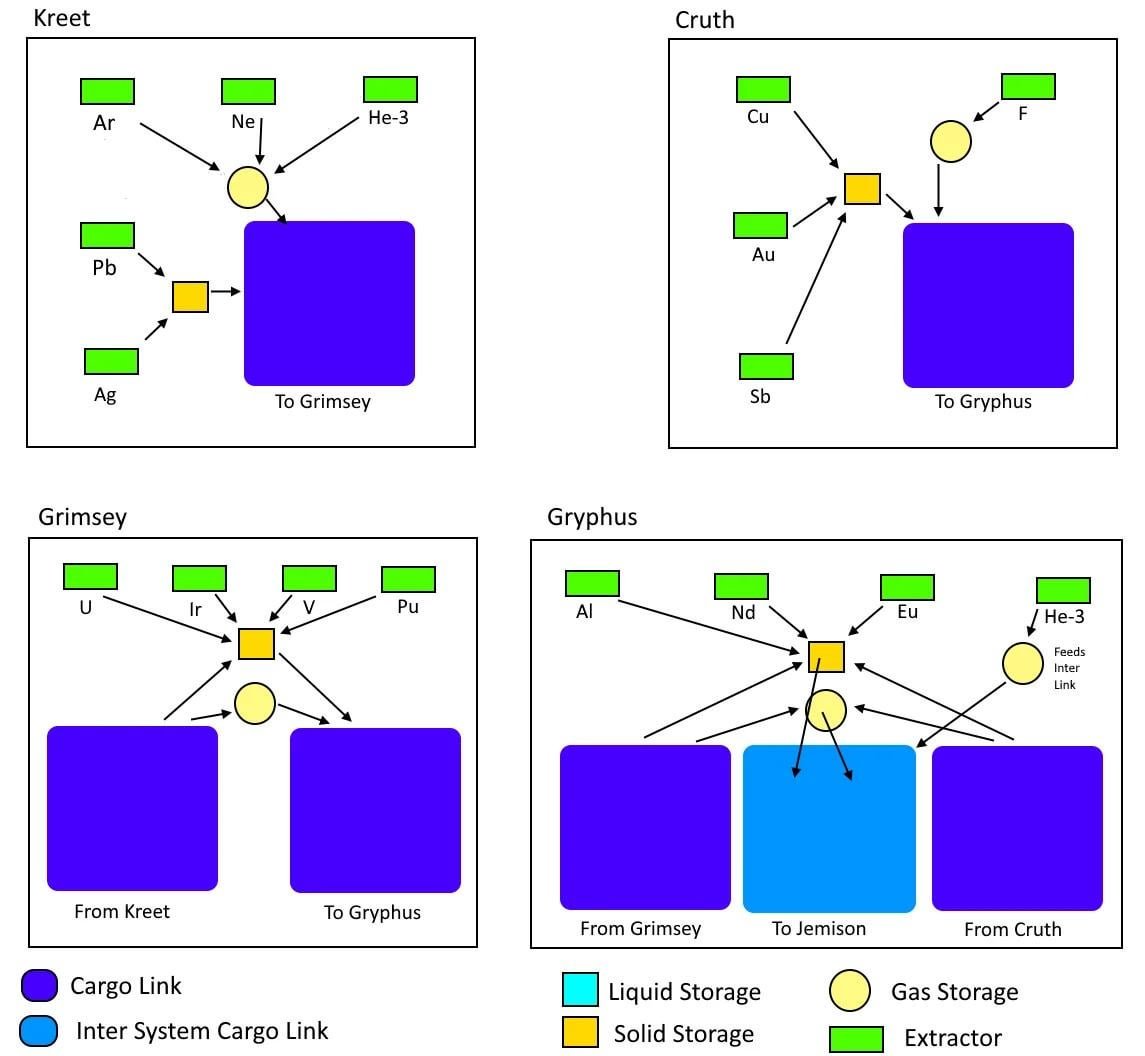
Setting Up Cargo Links
Cargo links allow you to connect multiple outposts. This means you can transfer resources from one outpost to another without physically transporting them yourself.
Tips for Outposts
- Plan your outposts carefully: Choose planets with the resources you need most.
- Build cargo links for efficiency: This makes it easy to move resources around.
- Upgrade your outposts as needed: As you get more comfortable with building outposts, keep them up to date.
Selling Resources: Making a Profit
Sometimes you might have too many resources. You can always sell them to vendors to earn some extra credits. It can be a great way to get more money that you can then use to upgrade your equipment or your ship.
Finding Vendors
Vendors are all over the place. You can find them in cities and space stations. They are your main source of income.
Knowing What to Sell
It’s useful to know which resources are worth more money. Rare or advanced resources are worth more than basic ones.
Tips for Selling
- Check vendor prices: Different vendors pay different prices.
- Sell in bulk: You usually get more money when you sell in large amounts.
- Prioritize selling rare resources: This gives you the biggest bang for your buck.
Using Resources Wisely
It’s not just about collecting and storing resources. It’s about using them wisely. Here are some tips for using your resources effectively:
Prioritizing Needs
Don’t waste resources on things you don’t need. Focus on upgrading your gear and your ship. Prioritize resources for research and crafting.
Planning Ahead
Look at what you want to craft or build. Plan what resources you need, so you don’t waste time. Planning ahead is crucial for getting the most out of Starfield.
Conserving Resources
Don’t be wasteful. You don’t want to throw resources away because you didn’t use them correctly. You can save resources by utilizing your materials wisely.
Tips for Using Resources
- Plan before you spend: Make sure you know what you’re crafting and why.
- Conserve resources: Don’t waste materials carelessly.
- Don’t stockpile what you don’t need: Keep your storage space free by selling extra items.
Resource Management: The Big Picture
Resource management in Starfield is a constant balancing act. It’s not just about mining and crafting, it’s about strategy, planning, and efficiency. By taking the time to manage your resources, you can make sure your playthrough is a smooth and fun experience. Remember to scan, mine, craft, and sell resources smartly. Resource management is essential to your survival and your overall gaming experience. With a little attention to detail, you can go from a struggling space explorer to a resource management pro. Keep exploring and keep those resources coming!
With consistent effort and knowledge of the proper techniques, any explorer can thrive. By taking your time, using your scanner and crafting with your resources, you can make the most of your experience in Starfield.
Starfield Where To Store Resources Guide
Final Thoughts
Prioritize selling excess items and crafting at workbenches. Regularly visit vendors for needed resources. Conserve ammunition during combat.
Scanning flora and fauna provides valuable crafting materials. Store extra resources on your ship to avoid encumbrance. These Starfield tips to manage your resources will keep your inventory organized and your gameplay flowing smoothly. Proper resource management ensures you’re always ready.

