
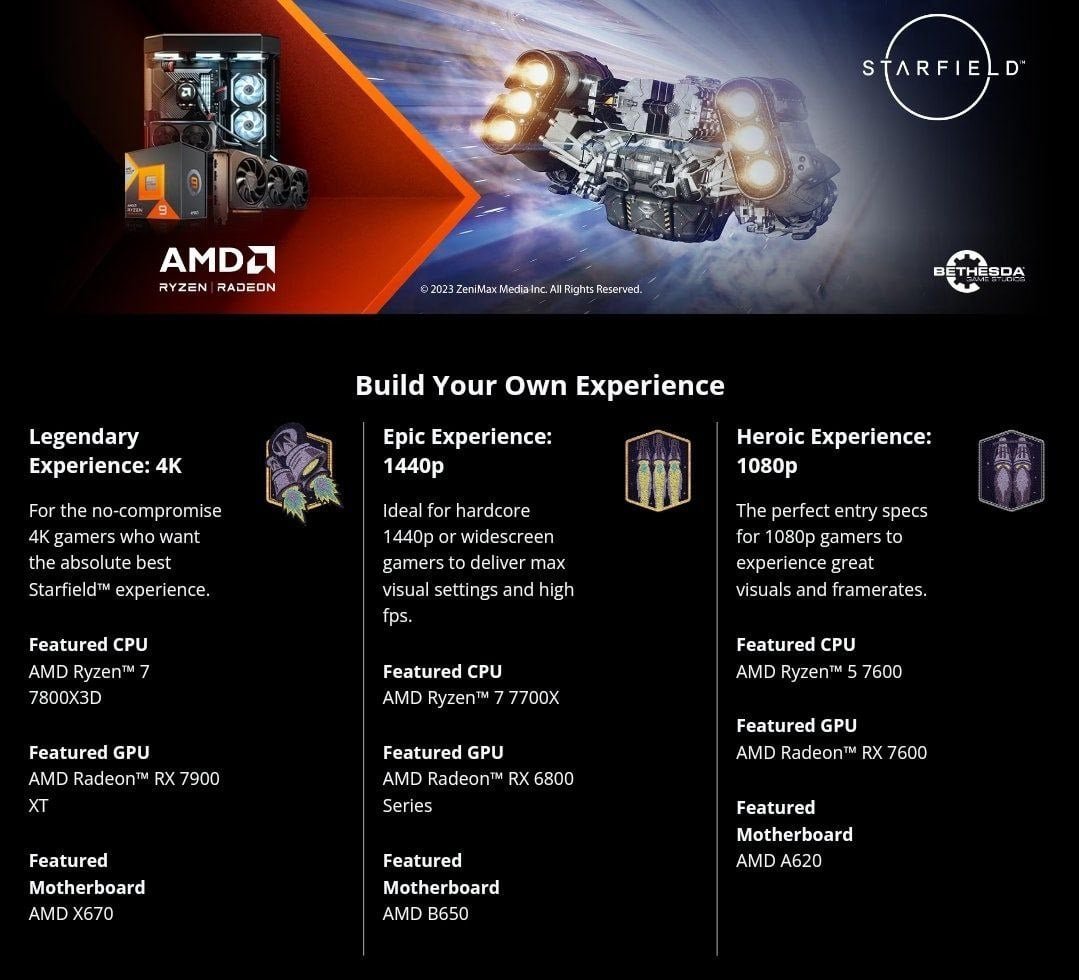
The minimum and recommended specifications for Starfield include details on the operating system, processor, memory, graphics card, and storage needed to play the game.
Eager to jump into the vast expanse of space? You’re not alone! Many players are wondering about “Starfield what are the system requirements of game”, before they invest in this title. Knowing what your PC needs to run this game properly is critical. This helps ensure a smooth and immersive gameplay experience.

Starfield: What are the System Requirements of the Game?
So, you’re excited about Starfield, huh? That’s awesome! It’s a big game, a space adventure where you get to explore all sorts of planets. But before you jump in, it’s super important to make sure your computer is ready. You wouldn’t want to start playing and have the game be all glitchy and slow, right? That’s why we need to talk about the system requirements. Think of these requirements as a checklist – a list of what your computer needs to handle the game smoothly. Let’s dive in and see what it takes to run Starfield.
Understanding Minimum and Recommended Requirements
When we talk about system requirements, you’ll often see two sets of numbers: minimum and recommended. The minimum requirements are what your computer absolutely needs just to run the game. It might not look super pretty, and you might not get the smoothest gameplay, but the game should at least start and be playable. The recommended requirements are what Bethesda, the game makers, suggest for the best possible experience. Meeting these means you’ll get to enjoy Starfield the way it was intended, with pretty graphics and smooth action.
Why are there two sets of requirements?
Think of it like this: imagine you’re trying to bake a cake. The minimum requirements are like having the basic ingredients – flour, sugar, eggs. You can make a cake with just those, but it might not be the most amazing cake ever. The recommended requirements are like having all the extra ingredients too – chocolate chips, frosting, sprinkles! You’ll end up with a much more delicious and satisfying cake. Same goes for gaming! Minimum lets you play, recommended lets you play well. Let’s look at both.
Starfield’s Minimum System Requirements
Okay, let’s get into the nitty-gritty. What does your computer need at the very least to play Starfield? Here’s the breakdown of the minimum specs:
- Operating System: Windows 10 version 21H1 or newer. Make sure you have a recent version of Windows. If you’re still using Windows 7, you’ll need to upgrade.
- Processor: AMD Ryzen 5 2600X or Intel Core i7-6800K. These are the brains of your computer. If you have a processor weaker than these, it might struggle with the game.
- Memory: 16 GB of RAM. Think of RAM like your computer’s short-term memory. Starfield needs a good amount to run well, so make sure you have at least 16 GB.
- Graphics Card: AMD Radeon RX 5700 or NVIDIA GeForce GTX 1070 Ti. This is what makes the game look pretty. If your graphics card is old or weak, the game might look blocky or run slowly.
- DirectX: Version 12. Starfield uses a new version of DirectX for its graphics. Make sure your system supports it.
- Storage: 125 GB of free space on a solid-state drive (SSD). A fast SSD is very important. The game needs to load quickly from the storage, and a regular hard drive will make things much slower.
Think of these minimum specs as the bare minimum. You may be able to play, but you may not get the best graphics and framerate. It is also important to know that, depending on your configurations, you could have a playable game, but with very low settings and framerates, thus ruining the experience a bit.
Starfield’s Recommended System Requirements
Now, let’s talk about the good stuff! These are the specs you’ll want to aim for to really enjoy Starfield and make the most out of the game. Here’s the breakdown of the recommended specs:
- Operating System: Windows 10/11. Similar to the minimum settings, you’ll want a modern version of Windows to run the game the way it was designed.
- Processor: AMD Ryzen 5 3600X or Intel Core i5-10600K. A more powerful processor will handle the game’s complex calculations more easily, meaning smoother gameplay.
- Memory: 16 GB of RAM. 16 GB of RAM is also the recommended amount for this game.
- Graphics Card: AMD Radeon RX 6800 XT or NVIDIA GeForce RTX 2080. A high-end graphics card will allow the game to play in high or ultra settings. This will bring out all of the graphical fidelity that Starfield has to offer.
- DirectX: Version 12. Again, DirectX 12 is required for optimal performance. Make sure your video card supports this version of DirectX.
- Storage: 125 GB of free space on a solid-state drive (SSD). Just like in minimum settings, an SSD is a must to reduce the load times and improve your overall gameplay.
These are the numbers you want to aim for. With these specs, you’ll get the best visuals, the smoothest gameplay, and the most fun out of Starfield. If your system meets the recommended requirements, you can expect a premium, lag-free gaming experience.
Breaking Down the Components
Let’s take a closer look at why each component is important. It will also help you better understand why these system requirements are needed for the game.
The Processor (CPU)
The processor is the brain of your computer. It does all the calculations that make the game work. A faster processor means the game can think faster, and everything will run smoother. When the game runs, the processor is constantly doing computations, for example calculating the physics in game and many other things. For Starfield, you’ll need at least an AMD Ryzen 5 2600X or Intel Core i7-6800K, but a newer chip like the AMD Ryzen 5 3600X or Intel Core i5-10600K is better and will give you a much better gaming experience.
Memory (RAM)
RAM is like your computer’s short-term memory. It stores the things your computer is working on right now. The more RAM you have, the more things your computer can do at the same time without slowing down. Starfield needs at least 16 GB of RAM, and we recommend this amount even for the recommended settings. You don’t really need more than 16GB unless you also run background apps, if that is the case you might want to consider 32 GB. If you have less than 16 GB, the game might become laggy or even crash.
Graphics Card (GPU)
The graphics card is what makes the game look pretty. It’s in charge of rendering all the images you see on the screen. A good graphics card means the game will look sharp, and the animations will be smooth. For Starfield, the minimum is an AMD Radeon RX 5700 or NVIDIA GeForce GTX 1070 Ti, but for better visuals, you’ll need an AMD Radeon RX 6800 XT or NVIDIA GeForce RTX 2080. The better your GPU, the better your game will look and perform.
DirectX
DirectX is a set of tools that help games communicate with your computer’s hardware. Starfield needs DirectX 12 to work correctly. If your computer doesn’t have DirectX 12, you might not be able to play the game at all or you might not be able to enjoy its advanced graphics. Generally, newer operating systems and video cards support the latest version of DirectX.
Storage (SSD)
The storage is where the game’s files live on your computer. A Solid-State Drive (SSD) is much faster than a traditional Hard Disk Drive (HDD). SSDs allow the game to load quickly and reduce loading times within the game. Using an SSD is very important because it will reduce loading times and enhance the game experience. Starfield needs 125 GB of storage space, and the space should be on an SSD for optimal performance.
Checking Your System Specifications
Okay, so now you know what the requirements are, but how do you check if your computer meets them? It’s actually pretty simple. Here’s how you can check your PC specs on Windows:
Checking Your System on Windows
- Press the Windows Key and ‘I’ on your keyboard simultaneously. This will open the Settings window.
- Click on ‘System’. It should be the first option on the list.
- Click on ‘About’. This will be at the bottom of the left menu.
- Here, you’ll find information about your processor (CPU) and memory (RAM). Look under the ‘Device specifications’ section.
- To check your graphics card (GPU), click on ‘Display’. It should be on the left hand side. Then click on ‘Advanced Display Settings’ at the bottom of the right hand side. Then click ‘Display adapter properties for Display 1’. This will open a new window that displays your video card.
Compare this information with the minimum and recommended requirements we discussed earlier. That way you can see if your system is ready for Starfield.
What if My System Doesn’t Meet the Requirements?
Don’t worry, it happens! If your computer doesn’t meet the requirements, you have a few options.
Upgrading Your Computer
The most obvious solution is to upgrade your computer. You can do this by replacing parts like your processor, RAM, and graphics card. This can be a bit expensive and tricky, so if you’re not comfortable doing it yourself, you might want to ask a computer expert for help. Upgrading specific parts can be more cost-effective than buying an entirely new PC.
Adjusting Game Settings
If you cannot upgrade your system, you can try to change the in-game settings. Most modern games will have settings that you can adjust for graphics and performance. Lowering the graphics settings will make the game easier to run, but it might not look as pretty. The lowest settings may allow you to play, but you may not get the full game experience.
Other Options
There might be other options, like playing on a cloud gaming platform. Services such as GeForce Now allow you to stream the game from a server, so you don’t need a powerful PC to play it. This option will however require a stable and fast internet connection, which isn’t available to everyone.
Why System Requirements Matter
System requirements are not just arbitrary numbers thrown out there. They’re there to ensure that your computer can handle the workload a game throws at it. Games like Starfield have a lot of complicated calculations, lots of images, and huge open-world environments. All of these factors need a certain amount of processing power. If your PC doesn’t meet the minimum requirements, the game may not run properly. And if it doesn’t meet the recommended requirements, you won’t be able to enjoy the game to its full potential. This can lead to stuttering, low frame rates, crashes, and a frustrating gaming experience.
Making sure your PC is ready for Starfield is really important for making the experience amazing. By checking your system specs and understanding the requirements, you can figure out if your computer can handle the game and make the necessary adjustments before you play. Happy Gaming!
Starfield System Requirements – Is Your PC Ready?
Final Thoughts
In short, gamers need to check the specific components inside their computers. Meeting these specifications directly affects how smoothly Starfield plays. Therefore, understanding Starfield what are the system requirements of game is vital before purchase.
Proper graphics cards and sufficient RAM are necessary for ideal performance. The storage also matters; ensure enough free space for the game. Checking these specs ensures the best gaming experience.

