
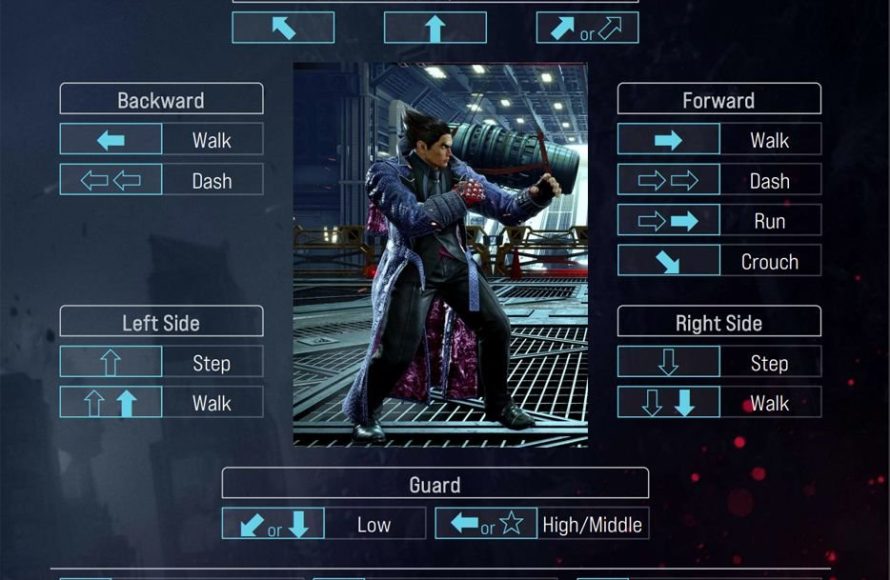
Tekken 8’s control scheme utilizes a standard four-button layout for limbs, with movement controlled by the directional pad or analog stick. Special moves and combos require specific button combinations and directional inputs.
The latest installment in the iconic fighting franchise, Tekken 8, brings back its fast-paced combat. Navigating its complex moveset might seem challenging at first. This is why a thorough Tekken 8 control scheme analysis is valuable. Players need to understand the button configuration to maximize their performance.
The core layout remains similar to previous titles, using a familiar four-button system. Precise directional inputs and timed button presses trigger advanced techniques.

Tekken 8 Control Scheme Analysis
Alright, fighters! Let’s dive deep into the world of Tekken 8 controls. It’s a game where knowing your buttons is just as important as knowing your character’s moves. Tekken has always had a unique control layout, and Tekken 8 builds upon that foundation with some smart changes. So whether you’re a long-time player or a new challenger, this breakdown will help you get a grip on everything.
The Core Layout: Understanding the Face Buttons
Tekken 8 uses a four-button face button system, laid out like a standard arcade stick or console controller. Let’s break down what each one does:
- Left Punch (Square on PlayStation/X on Xbox): This button controls your character’s punches with their left hand. It’s used in many basic attacks and combos. Think of it as your go-to button for quick jabs and pressure.
- Right Punch (Triangle on PlayStation/Y on Xbox): This button executes right-handed punches. It’s often used for more powerful strikes or moves that involve a forward step or stance change.
- Left Kick (Cross on PlayStation/A on Xbox): This button controls kicks with the character’s left leg. Left kicks tend to be used for low pokes, quick movement options, or mixing up your strategy.
- Right Kick (Circle on PlayStation/B on Xbox): This button is for right leg kicks, frequently used for powerful, slow attacks and launchers. These often offer big damage and send your opponent into the air.
Button Combinations and Their Purpose
The real magic of Tekken’s control scheme comes from combining these face buttons together. Instead of just memorizing single button presses, you will learn to input combinations for powerful attacks. Let’s look at a few basic combinations:
- 1+2 (Left Punch + Right Punch): Commonly used for throws, specific character moves, and powerful strikes, this is a fundamental combination that changes from character to character.
- 3+4 (Left Kick + Right Kick): This combination is used for big, slow attacks, power crushes that can absorb hits, or advanced movement options.
- 1+3 (Left Punch + Left Kick): This combination often leads to a throw, some character-specific actions, and allows for side step movement and pressure.
- 2+4 (Right Punch + Right Kick): Another throw, character-specific action or side step movement option. Also can be used for a power moves.
These button combinations might seem basic at first, but they are the key to many different moves. Understanding these core inputs is crucial for progressing from button-masher to fighting game master.
Movement: Navigating the 3D Arena
Tekken is unique because it takes place in a 3D arena, not a side-scrolling 2D plane like some other fighting games. This means that movement is as vital as attacking. The directional pad or analog stick allows you to move around the stage.
Walking and Running
Simply pressing up, down, left, or right on the directional pad or tilting the analog stick allows you to move around the stage. Holding forward while moving, usually allows your character to run for quick advances, however, some characters may have more of a slow run while others have a faster run. Running is great for closing distance and setting up pressure.
Sidestepping: Dodging in 3D Space
A core part of Tekken is sidestepping. Quickly tap up or down on the directional pad or analog stick while you are not locked in an animation allows you to sidestep attacks. Sidestepping is a fundamental part of gameplay that allows you to dodge linear attacks. Some attacks will track players even when they sidestep, so you need to learn your opponent’s move to be able to use sidestepping effectively. Good sidestepping can avoid enemy attacks and allow you to punish enemies for doing linear moves.
Back Dashing: Creating Space
Quickly tapping back twice on the directional pad or analog stick allows you to quickly back dash away from your opponent, creating distance and giving you some breathing room, or an opportunity to use a move that needs some distance to use effectively. It is a fundamental technique that can help you create space to think or make your opponent whiff and allow you to punish him for it.
Crouching and Ducking
Holding down on the directional pad or analog stick will make your character duck or crouch. While crouching, you can block high attacks, and it can also open up new moves that are only available when you are crouching, such as low attacks or crouching launchers. Crouching is also a useful tool when playing defense to react to and avoid high attacks that your enemy throws out.
Specialized Buttons and Their Functions
Beyond the face buttons and movement, Tekken 8 has several more specialized buttons that can open up new avenues in your gameplay. Here are the vital ones:
The Shoulder Buttons (L1/R1, L2/R2)
The shoulder buttons are often used for unique character actions. A common button press is to have the L1 button used for heat activation, and L2 for rage art usage. However, characters may also have special moves mapped to these buttons, or using them along with face button may give different moves. Learning what a character’s specific actions are on these buttons are key to playing a character to their full potential. They can do multiple things, from powerful, unblockable attacks or moves that change your character’s stance.
The Directional Inputs: Using the Numbers
Tekken players often use a numerical notation system to express moves instead of using the up, down, left, and right on the directional pad or analog stick. It makes things easier to explain and follow a move. Think of a keyboard number pad. The directional pad/analog stick has a 9 input system:
| 7 | 8 | 9 |
|---|---|---|
| 4 | 5 | 6 |
| 1 | 2 | 3 |
- 5: This indicates neutral; no input. If you’re just standing there, you’re in 5.
- 8: Up.
- 2: Down.
- 4: Back or Left.
- 6: Forward or Right.
- 7: Up and back.
- 9: Up and forward.
- 1: Down and back.
- 3: Down and forward.
Understanding Notation
Now, when we put these numbers together with the face buttons, we get the notations for Tekken moves. Here’s an example:
- F+1: Forward + Left Punch
- B+2: Back + Right Punch
- DF+1: Down-Forward + Left Punch
- WS+4: While Standing + Right Kick
- 1,2,3: Left Punch, Right Punch, Left Kick
This numerical shorthand makes it much easier to share combo information and understand guides.
Heat System and Rage Arts
Tekken 8 brings the new Heat system, and builds upon the Rage system from previous games. Each has its own specific control input and allows for some of the most powerful and flashy moves in the game.
Heat Activation
You can activate your character’s heat by pressing the L1 button, allowing you to gain special attack properties, stat boosts, and new moves. Heat will last for a small period, indicated by a timer bar that will drain. You can gain some heat back by using a special move with an animation that will do so, but most of your heat will drain as time goes on. This forces players to constantly try and find ways to use their heat, as sitting on it and waiting for it to expire is not very effective. Players need to have knowledge of their character to use the heat mode properly.
Rage Art
When your health is low, you will enter rage mode. You can activate your character’s rage art by pressing the L2 button, which does huge amounts of damage. However, rage arts are usually very slow, so using them can leave you vulnerable. You can use the Rage Art once per round, and its damage will depend on how low your health is. Rage arts are not the same as rage drives, rage drives are moves that are specific to the characters and not universally available.
Advanced Techniques and Their Controls
Beyond the basics, there are many advanced techniques that experienced players use. These might take time to get used to, but when mastered, they can greatly improve your gameplay.
Just Frame Inputs
Some moves in Tekken have ‘Just Frame’ inputs. This means that a specific button must be pressed at a very specific time, usually just a few frames after another input. This is usually denoted with “JF” in move notation. Just frame attacks are usually a very powerful move, and hitting it will give massive advantages.
Punishing
One of the core parts of high-level tekken is punishing mistakes. When your opponent throws an attack that misses or is unsafe, there are ways to counter them for big damage. Knowing which moves are punishable and which moves to use to punish is key to winning many games in Tekken.
Character-Specific Controls
It is important to note that Tekken is a very character-specific fighting game. Each character has a different move list with different inputs and ways to play. For example, some characters are rush down, others play to keep enemies at bay, some characters are very complex while others are easy to use. You must study a character and learn their different move list, stances and specific techniques to use a character to their full capabilities. Each character has their own nuances, unique control inputs, and combos. Make sure you study and learn your character of choice, if you want to play Tekken at a competitive level.
Ultimately, mastering the control scheme in Tekken 8 takes time and practice. Don’t get discouraged if it seems difficult at first. With repetition and a focused approach, you’ll soon be pulling off those powerful combos and dominating the competition. Use this guide as your jumping-off point, explore the game, experiment with different characters and most of all have fun!
Tekken 8 Complete Beginner Guide
Final Thoughts
Tekken 8’s control scheme favors aggressive play, with the Heat system adding complexity. The simplified input commands for special moves make the game more accessible to newcomers. However, veterans will also find depth within the system.
Effective use of the directional inputs is a must, crucial for both movement and complex attack strings. The controls feel responsive, which allows quick and precise actions.
Overall, the Tekken 8 control scheme analysis shows a balanced approach. It retains the core feel of the series while improving accessibility and adding new mechanics.

