
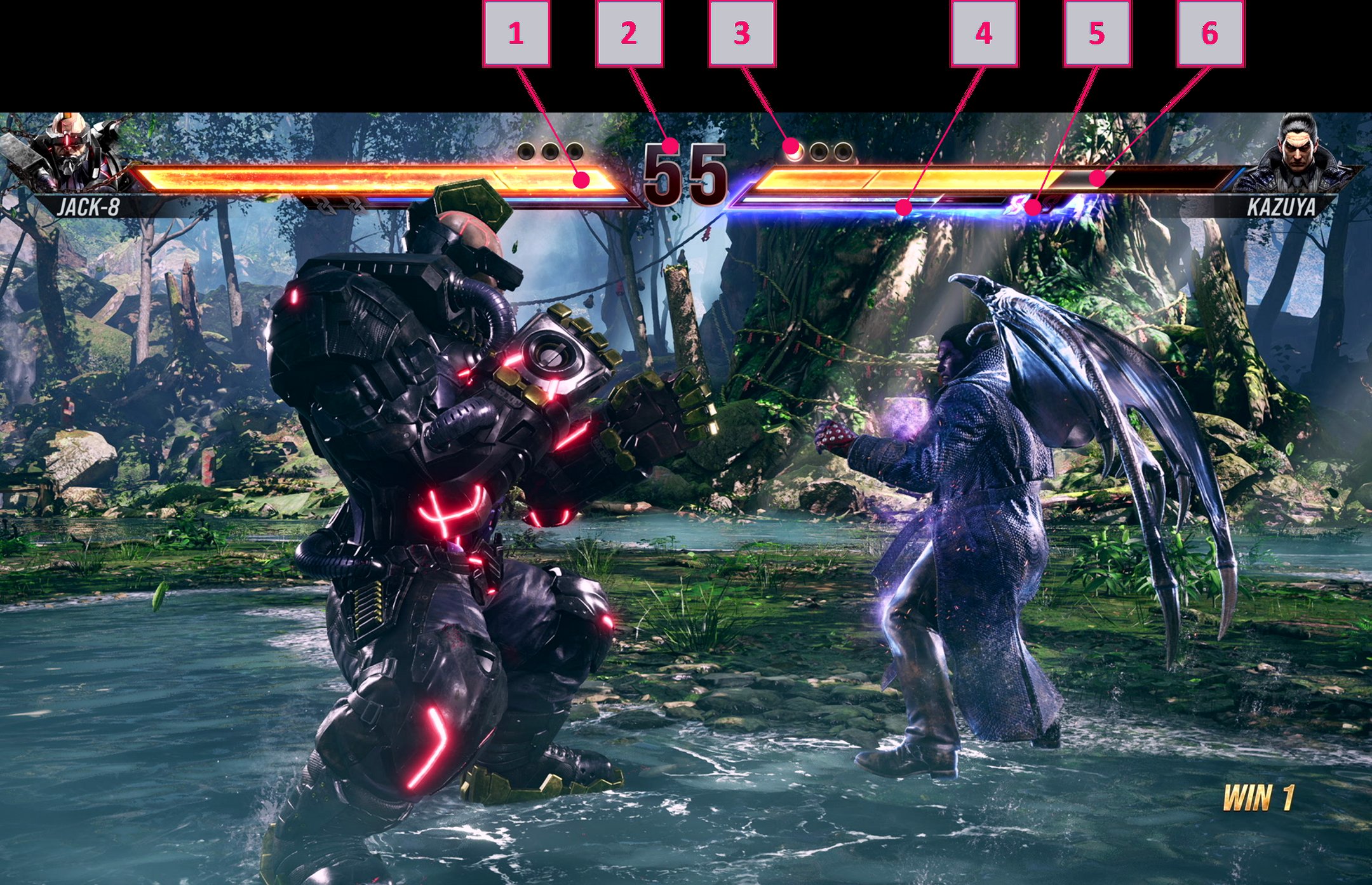
Tekken 8 games user interface details include a revamped health bar, clearer character portraits, and easily accessible move lists during gameplay.
Have you noticed the updated look while battling in the newest Tekken? The fresh Tekken 8 games user interface details bring a cleaner presentation to the fighting experience. Notice how character information appears more intuitively, providing a quick read of health and other critical stats.
These interface changes help players track their progress and react more efficiently in the fast-paced combat. Accessing move lists is simple, allowing players to easily plan their next attack strategy.

Tekken 8 Games User Interface Details
Alright, fighting game fans! Let’s talk about something super important: the user interface, or UI, in Tekken 8. Think of the UI as the dashboard of your game. It’s how you see your health, how you choose characters, and how you know what’s going on in a match. A great UI makes the game easier and more fun to play. Tekken 8 has a new and improved UI, and we’re going to explore all the cool stuff it offers. So, get ready to dive in and check out all the important elements that make Tekken 8’s UI special.
The Main Menu: Your Starting Point
The main menu is the first thing you see when you start Tekken 8. It’s like the game’s home base. From here, you can go anywhere you want in the game. Let’s break down what you’ll find:
- Game Modes: This is where you select what kind of fight you want. You can play the story mode, battle other players online, or train your skills in practice mode. It’s like choosing which adventure you want to go on.
- Customization: Want to change how your favorite characters look? This is the spot! You can pick new outfits, hairstyles, and even add cool accessories. It’s all about making your fighters your own.
- Options: Here, you can adjust the game to your liking. You can change the sound levels, the graphics settings, and even the button layout. Think of it as setting up your perfect gaming environment.
- Profile: See your stats, your win record, and other achievements. It’s like keeping track of your gaming progress. You can see how far you’ve come as a player.
The main menu is easy to navigate. Using your controller or keyboard, you can quickly move between the different options. The design is clean and modern, making it simple to find what you are looking for.
Heads-Up Display (HUD): What You See During a Fight
During a match, the HUD is very important. It shows you everything you need to know while you’re fighting. It’s like the car’s speedometer, telling you how fast you’re going and what to look out for.
Health Bars
At the top of the screen, you’ll see two bars. These are the health bars for you and your opponent. They show how much life each character has left. As you get hit, your health bar goes down. If it reaches zero, you lose the round. The health bars are very clear, so you always know where you stand in the fight. You can easily see at a glance whether you are doing well, or if you need to change strategy.
Round Indicators
Little markers show how many rounds each player has won. Usually, these are small circles or dots. Each time a player wins a round, a marker lights up. The first player to get enough markers wins the match. These round indicators are also easily noticeable so you never forget what the score is.
Rage Art Gauge
Tekken 8 includes the Rage Art mechanic. When your health gets low, your Rage Art Gauge appears. You can use this gauge to perform a super powerful move, capable of changing the whole course of the match. The gauge usually appears in the lower corner of the screen or near your health bar, allowing you to keep track of when you are eligible to launch the special attack. The visual of the gauge makes it easier to see when the Rage Art is ready.
Character Names
Above the health bars, you’ll see each player’s character name. This is great for knowing who you’re playing as and who you’re up against. It also helps keep track of the characters in the heat of the battle. It is also helpful when you are spectating and not actively playing yourself, to know who is on each side.
Timer
There is a timer in the middle top of the screen that counts down during matches. Matches usually have a time limit. If no player is knocked out by the time timer runs out, the player with more health wins the round. The timer is positioned so it doesn’t get in the way and is still visible so both players are aware of the time left.
Character Selection Screen: Picking Your Fighter
Before each match, you get to pick your character. This is where the Character Selection Screen comes in. Tekken 8 features a wide variety of characters, each with their own special fighting styles and unique looks. The selection screen is designed to make finding the character you want easy.
Character Portraits
Each character has a large, clear portrait. This makes it easy to quickly recognize them. You can quickly browse through and find a character you like.
Character Information
When you select a character, you’ll see more details about them. This might include a short description of their fighting style, and maybe some of their signature moves. This is perfect for new players who want to try out different fighters and also for experienced players wanting to familiarize themselves with different character’s capabilities.
Customization Options (Quick Access)
Before the match starts, you may also get the chance to make quick adjustments to your character’s appearance. This can help you choose a look that suits your style, without needing to go to the main customization area.
Stage Selection
After selecting your characters, you will also get to choose the stage to fight in. Each stage in Tekken 8 has its own look and feel. Stage selections allow players to control the environment they battle in, based on their preference.
Pause Menu: Taking a Break or Changing Settings
During a match, you can pause the game and bring up the pause menu. This menu is very useful for many purposes.
Continue/Restart
You can use this to either return to the game or restart the round. If you need to make a change, or just want a quick restart, this will be useful.
Move List
The pause menu also contains access to your character’s move list. This is great for players to study their moves and try them out to see what works. You can even view the move list mid-game and try out different moves that you have just learned.
Options
Here, you can make changes to the game settings during the match. If you need to adjust your difficulty level or button mappings, you can do this from here.
Post-Match Screens: Reviewing Your Performance
After a match, you see the post-match screens. This is where you can see how you did in the fight and gather information to improve your game. This helps you analyze how well you did, what went right, and what to improve on for your next match.
Match Results
This screen shows who won the match and how many rounds each player won. This gives you an immediate summary of the match outcome.
Experience Points & Rewards
You can also see any experience points or rewards you’ve earned for playing. Experience points help you level up and might unlock more stuff in the game.
Replay Option
Players can also save and rewatch their matches. This option can be very helpful for analyzing mistakes and improving strategy.
Accessibility Features in the UI
Tekken 8 is also designed to be user-friendly for all gamers, with its different accessibility features.
Colorblind Options
The game includes options to help players who are colorblind. This makes it easier to see the health bars, the gauges, and other elements on the screen. This setting helps increase inclusivity and improve play for people who have difficulty distinguishing certain colors.
Customizable Button Mapping
Players can change the game button layout to their preferred configuration. This helps players adapt the game controls to their personal playstyle.
Text Size Adjustments
You can adjust the text size in the game. This feature helps players with difficulty reading small text. Larger text can make it easier to navigate the menus, read character bios, and study the move lists.
Specific Visual Elements of the UI
Tekken 8’s UI has certain visual elements that are consistent throughout the game and makes for a cohesive visual experience.
Clean and Modern Design
Tekken 8 boasts a new sleek, modern, and clean look for its UI elements. This makes the game look great and user-friendly. Everything is simple and easy to read. This helps you focus on the game without distractions.
Consistent Color Schemes
The color schemes are used consistently across all menus and screens. This helps the player feel familiar no matter where they are in the game. This also helps to visually represent different teams and player sides.
Animated Transitions
The transitions are animated to help give the game a smooth visual flow. This helps the player smoothly move between the different menus and screens.
Why is the UI so important?
The UI is a big part of why Tekken 8 is so much fun to play. A good user interface does more than just look nice. It gives you the important information in a clear and easy to understand way. A well designed UI:
- Helps You Focus: Clear health bars and gauges let you stay focused on the fight.
- Makes Navigation Easy: Simple menus help you find what you need quickly.
- Enhances the Experience: A stylish UI makes the game feel polished and professional.
The work that has gone into the Tekken 8 UI really shows. It makes the game look and play better for everyone. It is a key component in making the game enjoyable and accessible. The designers have taken great care to build a user-friendly interface and it shows. By taking care of the little things like a good UI, Tekken 8 really stands out.
In conclusion, Tekken 8’s user interface is designed to be clear, efficient, and visually appealing. From the main menu to the post-match screens, every element is created to improve your overall gaming experience. The developers clearly put in effort to create a UI that is both stylish and functional, making the game accessible for new players and enjoyable for seasoned pros. This detailed look at the UI shows how important good design is for a fighting game like Tekken 8. So next time you play, be sure to notice all the little things that make Tekken 8 look and feel so smooth.
How to make UI Goku in Tekken 8 #gaming #trending #tekken #tekken8 #fgc #fightinggames
Final Thoughts
Tekken 8 games user interface details enhance the player experience through clear menus and informative displays. The health bars, rage art gauges, and round counters are easily understood.
These visual elements provide vital information for quick decision-making. The minimal screen clutter keeps the focus on the core gameplay.
Players will find the interface intuitive and easy to navigate. Tekken 8 games user interface details are well-designed, contributing to a seamless fighting experience.

