
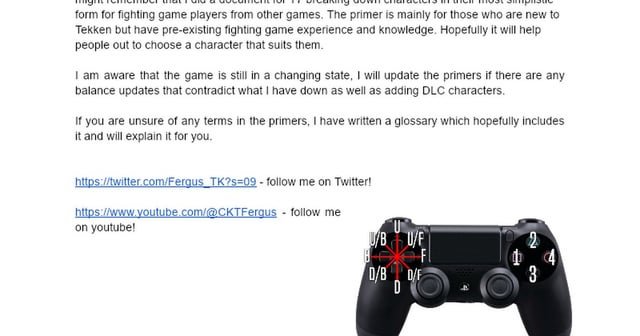
Tekken 8 player control overview focuses on intuitive inputs using a controller or fight stick, allowing players to execute complex moves with precise timing and directional commands.
Stepping into the arena of Tekken 8 feels incredibly engaging. The game’s responsive and fluid control system lets you immediately jump into the action. This article presents a concise Tekken 8 player control overview, giving you a grasp of how you interact with your chosen fighter. We’ll examine the basic movements and attack methods.

Tekken 8 Player Control Overview
Alright, gamers! Let’s dive deep into how you actually control your fighters in Tekken 8. It’s not just about mashing buttons; there’s a real art to it. We’re talking about the nuts and bolts of movement, attacks, and all those special moves that make Tekken so awesome. Whether you’re a seasoned pro or just starting out, this guide will break down the controls in a way that’s easy to understand.
Basic Movement
Moving around in Tekken 8 is the first thing you need to get comfortable with. Think of it like learning to walk before you can run… or in this case, learning to sidestep before you can land a devastating combo. Here’s the lowdown:
- Directional Pad (D-Pad) or Left Analog Stick: This is your main way to move your character.
- Forward: Push the D-pad or stick toward your opponent to walk forward.
- Backward: Push the D-pad or stick away from your opponent to walk backward.
- Sidestep Left/Right: Tap up or down to sidestep around your opponent and try to avoid their attacks.
- Crouch: Press down on the D-pad or stick to make your fighter crouch.
- Jump: Tap up and hold it to make your fighter jump.
- Running: Double tap forward and hold to start running. This is great for closing the gap or escaping trouble.
The Importance of Spacing
Spacing is a big deal in Tekken. It’s all about controlling the distance between you and your opponent. Staying too close can leave you vulnerable to throws, while being too far away can make it hard to land attacks. Learn to use your movement to maintain the perfect distance. This includes walking to bait attacks or running to close gaps when you spot an opening.
Attack Buttons: Your Arsenal
Tekken 8 uses a four-button system for attacks. These buttons are usually mapped to your controller’s face buttons, like X, Y, A, and B on Xbox or Square, Triangle, Circle, and X on PlayStation. Let’s see what each button generally does:
- Left Punch (LP): Usually mapped to the ‘Square’ button on PlayStation controllers or the ‘X’ button on Xbox controllers. It’s a quick jab and good for stopping your opponent’s offense, initiating combos, and for poking.
- Right Punch (RP): Typically mapped to the ‘Triangle’ button on PlayStation or the ‘Y’ button on Xbox. Often a little slower than the left punch, but packs more power and used as combo part or for punishing opponent.
- Left Kick (LK): Normally mapped to the ‘X’ button on PlayStation or the ‘A’ button on Xbox. Left kicks are used for fast, low-damaging hits or for setting up special moves.
- Right Kick (RK): Usually the ‘Circle’ button on PlayStation and the ‘B’ button on Xbox. The right kick can be a more powerful kick, used for combo extensions or for finishing moves.
These four buttons are the base of your fighter’s attack arsenal. The specific moves each button performs will change depending on the character you are using, of course. Getting to know how each button works with your chosen fighter is key to success in Tekken 8.
Combining Buttons: The Basis of Combos
Tekken isn’t just about single button presses; it’s about how you combine them! Many attacks require you to press two buttons at the same time. For example:
- 1+2 (Left Punch + Right Punch): This combination often results in powerful attacks or throws.
- 3+4 (Left Kick + Right Kick): Another combination that often leads to special kick attacks.
- 1+3 (Left Punch+Left Kick): Used for throws and grabs
- 2+4 (Right Punch+Right Kick): Used for throws and grabs.
These combined button presses aren’t just random. They can be used for advanced moves, combo starters, or breakers.
Special Moves and Command Inputs
This is where things get interesting. Every character in Tekken 8 has their own unique set of special moves, which are performed with command inputs. Command inputs are combinations of directional inputs (like forward, back, down, up) and attack buttons. Here are some general command inputs that are common in Tekken.
- Quarter Circle Forward (QCF): Press down, then down-forward, then forward. Often followed by a punch or kick button.
- Quarter Circle Back (QCB): Press down, then down-back, then back. Followed by punch or kick button.
- Half Circle Forward (HCF): Press back, down-back, down, down-forward, forward. Followed by punch or kick button.
- Half Circle Back (HCB): Press forward, down-forward, down, down-back, back. Followed by punch or kick button.
- Dragon Punch Motion (DP): Press forward, down, then down-forward. Usually used for a powerful uppercut attack.
The combination of directional inputs and button presses varies based on character. So make sure you check your character’s move list to see which inputs lead to special attacks.
Throws and Grabs
Throws and grabs are a crucial part of Tekken gameplay. They allow you to break through your opponent’s defense and open them up for more attacks. There are different throws in Tekken 8, and each one has a unique command input. Here’s a quick overview:
- Normal Throws: These are basic throws that are executed by pressing 1+3 or 2+4 when close to your opponent.
- Command Throws: These are unique throws with unique inputs. They can be executed by directional inputs or button presses. They are character-specific and are found in their move list.
- Throw Breaking: When an opponent grabs you, you have a short window to press either 1 or 2 to break the throw. The correct button to break depends on which hand was used to grab you.
Understanding High, Mid, and Low Attacks
Attacks in Tekken 8 aren’t all equal. They have different properties that determine how they connect with your opponent. Here’s a simple breakdown:
- High Attacks: These are attacks that connect with your opponent when they are standing. They can be easily blocked by crouching.
- Mid Attacks: These attacks connect whether the opponent is standing or crouching. They are harder to defend against because your opponent won’t be able to react in time.
- Low Attacks: These attacks must be blocked by crouching. They can catch players off guard if they are always standing.
Understanding the properties of high, mid and low attacks can help you create better combo strings and help you open up your opponents for bigger punishes.
The Rage System
Tekken 8 brings back the Rage system, which gives a big boost to players when their health gets low. It adds a layer of strategy to the match. Here is how Rage works:
- Rage Activation: When your health bar drops to a certain point, your character will enter a ‘Rage’ state. Your character will glow red and gain extra damage.
- Rage Art: While in Rage state, you can perform a Rage Art. It’s a super move that deals huge damage. Usually, its command input is a combination of two buttons at the same time. You only get one Rage Art per round.
- Rage Drive: Similar to Rage Art, Rage Drive is a special move that can be used only when your character is in the rage state. Unlike Rage Art, your character will not exit the rage state. The command inputs vary based on characters.
The rage system is an important comeback mechanic. It’s always best to know the right times to use Rage Art or Rage Drive to turn the tide of the match.
Practice Makes Perfect
Learning the controls for Tekken 8 is just the first step. The real fun starts when you take your knowledge to the practice room and start experimenting. Try different move combinations, get a feel for your character’s timing, and find the combos that suit your playstyle. Don’t be afraid to mess up; everyone does at first. Keep practicing, and you’ll see your skills improve rapidly.
Controller Configurations and Customization
Tekken 8 allows you to customize your controller layout. This lets you assign different functions to any button on the controller. You can also choose your preferred input method. Here are some common controller setups:
- Default Settings: These are the default controller mappings. They are designed to be intuitive for newcomers.
- Custom Configurations: Tekken 8 has a lot of flexibility in how you set up the controls. You can map frequently used moves to specific buttons for easier access.
- Fight Sticks/Arcade Sticks: Many players prefer these arcade-style sticks for inputs.
Experiment with different configurations to see what feels best for you. Don’t be afraid to change things up as you get better at the game.
Advanced Techniques: Beyond the Basics
Once you’ve got the basic controls down, you can explore the more advanced techniques in Tekken 8. These are the moves that will separate the great players from the good ones. Here are a few advanced concepts to look into:
- Punishing: Punishing is about capitalizing on an opponent’s mistakes. If someone does a unsafe move, you need to punish them with a combo.
- Frame Data: Frame data is information about the speed of each move. It helps you understand which moves are fast and which moves are slow. Use frame data to your advantage.
- Okizeme: Okizeme refers to how you continue your offense after knocking someone down. Set up attacks and pressure your opponent when they’re getting up.
- Korean Backdash: This is a very advanced technique used to create space and quickly reposition.
These advanced mechanics add so much depth to Tekken 8. Exploring them will take your game to a whole new level.
Knowing Your Character’s Move List
Every character in Tekken 8 has their own move list. It’s a collection of all their special moves, throws, and combo starters. Go through your character’s move list. This is a vital step in understanding how to play them. You will learn how to perform various attacks.
The controls in Tekken 8 might seem a little complex at first, but with practice and dedication, you’ll be pulling off crazy combos and dominating opponents in no time. Remember to focus on the basics first, and then gradually move on to the more advanced techniques. Have fun and enjoy the thrill of victory!
BEST Controller settings for Tekken 8🔥🔥#tekken8 #rtfiscool #settings
Final Thoughts
Tekken 8 player control overview is intuitive, focusing on responsive movement and attacks. Players use the directional pad and face buttons for basic actions. Special moves and combos require precise button inputs. Practice is key to improve.
Character specific movesets add depth, each having unique control nuances. Knowing these intricacies is vital for competitive play. The game provides a solid system. This makes character selection crucial.
Tekken 8 player control overview provides a great foundation for both new and veteran players. It allows for expression and skill. The controls are fundamental to achieving success in the game.

