
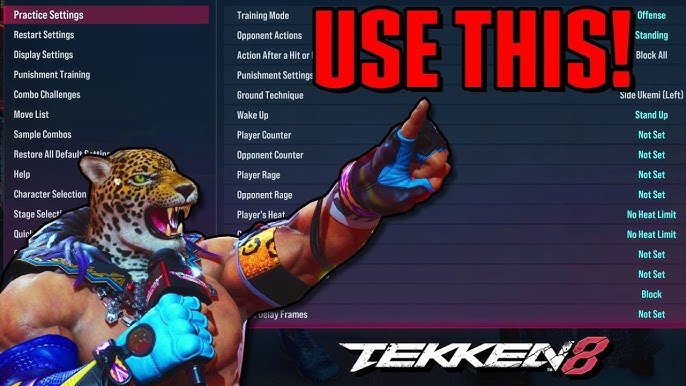
Tekken 8 practice mode settings allow you to customize opponent actions, record inputs, adjust damage, and more, for targeted training.
Want to get better at Tekken 8? The game offers a detailed practice mode. Understanding the Tekken 8 practice mode settings is crucial for improving your skills quickly. This will allow you to focus on specific areas you want to develop.
You can adjust the AI behavior for varied sparring. Record combos and play them back to study frame data and timings. Exploring these options will help you refine your fighting game performance.

Tekken 8 Practice Mode Settings: Your Path to Victory
Welcome, fighters! Are you ready to seriously improve your Tekken 8 game? The practice mode is your secret weapon, a place where you can experiment, learn, and get better at everything this awesome fighting game throws at you. But, just jumping in isn’t enough. To get the most out of it, you need to know all the tools available within. Let’s dive deep into the practice mode settings and figure out how they can help you become a Tekken master.
Understanding the Basics of Practice Mode
Before we get to the specific settings, let’s talk about what practice mode is all about. Think of it as your personal training dojo. You have a training dummy that you can control or set to perform actions and a whole host of options that allow you to see what works and what doesn’t. It’s completely pressure-free, and you can take your time to learn the moves, strings, and combos of your favorite characters.
Choosing Your Opponent
The first thing you’ll notice is the ability to choose your sparring partner. You can select any character in the game to fight against, mirroring real match-ups. You can either control this character manually (useful for trying out specific situations) or leave them as a dummy that does nothing or follows pre-set actions.
Training Stage Selection
Practice mode also offers access to all the stages in the game. This is a great chance to see how your character moves and reacts in each stage, some of which have unique features and wall positions. Knowing the stage is almost as important as knowing your character!
Essential Practice Mode Settings
Now, let’s get into the meat of the matter – the settings that will truly make your practice sessions efficient. These options are your keys to faster improvement.
Player Settings: Customizing Your Own Character
The player settings allow you to change how your character functions in training mode. These are crucial for learning how to play your character with the utmost confidence.
- Character Selection: As mentioned, you can pick any character you want to control, and you can switch them out any time you want, so feel free to experiment.
- Health Regeneration: Want to practice combos without constantly worrying about your health bar? Turn on health regeneration and your health will automatically fill up.
- Infinite Rage: Do you wanna practice your Rage Art and Rage Drive Combos? You can turn Infinite Rage on! Now you can practice Rage moves whenever you want.
- Stance Reset: If you are practicing a specific combo that requires a certain stance then this is a good option for you, just turn it on and you will always have your desired stance, ready for more combos.
Opponent Settings: Controlling the Dummy
Opponent settings focus on what your training dummy is doing. You can set it to behave in all sorts of different ways. This helps you prepare for every type of opponent.
- CPU Control: This allows you to have the CPU controlled character perform a variety of actions. You can make it stand still, block, attack or even perform complex attack patterns.
- Action Recording: You can record specific actions the CPU performs that you want to repeat, this is useful for practicing punishes for specific moves.
- Guard Settings: You can set the dummy to always block, never block, or block high or low randomly. This helps you practice your mixups.
- Action Type: There are many action types you can use from the opponent menu. You can select pre-made actions from this menu or create your own.
Display Settings: Getting More Data
Display settings are incredibly important for getting precise feedback on your moves. It allows you to see things that might be hidden in the heat of battle.
- Input Display: See what buttons you’re pressing on screen. This allows you to check if you are entering your combos correctly.
- Frame Data: This shows you the frame data of each move, allowing you to find frame traps and combo opportunities. A must-have for advanced players.
- Damage Display: See the exact amount of damage dealt by your moves. Useful to identify which combos have the most value.
- Hitbox Display: This shows you the hitboxes of characters, useful for seeing how moves connect and figuring out why your moves might not be landing.
Additional Practice Options
Beyond these core settings, practice mode also offers options that will improve your gameplay even further.
- Punish Training: Set the dummy to perform a move with negative frames, and see if you can punish it effectively. A fast way to learn how to punish your opponent.
- Wall Carry Practice: Tekken has many wall carry combos, these combos will make the difference between victory and defeat. Spend time practicing the wall carry combos in practice mode.
- Movement Practice: Practice movement techniques such as sidesteps, wavedash and backdashes, these movement options are essential to mastering the game.
Specific Training Scenarios and How to Set Them Up
Now that we’ve gone through the settings, let’s look at some ways you can use them to improve your game.
Practicing Combos and Punishes
Here’s how to use practice mode to learn some effective combos.
- Pick Your Character: First things first, select the character you want to learn combos with.
- Turn on Input Display: Turn the Input Display on so you can see your button presses, and see if you are executing your combo properly.
- Record the CPU: If the combo has some movement options, record these movement options and try to perform them with the combo.
- Keep Practicing: Keep practicing until you get the combo consistent.
- Turn On Frame Data: Turn on the frame data display and see the frame advantage each move has to make the combo more consistent.
Here is how to practice punishes
- Pick Your Character: Select the character you want to practice your punish game with.
- Choose an Opponent: Pick a character who you want to learn the punishes of.
- Record CPU Action: Record the CPU action which you want to punish, for example an unsafe move that is minus on block.
- Find The Punish: Try to find a punish for the CPU recorded move, and try to perform it consistently.
- Turn On Frame Data: Turn on frame data to see which moves you can use to punish the recorded CPU action.
Improving Movement and Spacing
Good movement can make all the difference in a match, here is how to set up movement training.
- Set Opponent to Do Nothing: Start by setting the opponent to do nothing at all, so you can focus on movement alone.
- Practice Specific Movements: Focus on one movement technique at a time, such as sidestepping or backdashing.
- Add CPU Movement: Once you are comfortable with your movement techniques, add some CPU actions that have some gaps in between.
- Practice Movement Against CPU Actions: You can use your movement techniques to avoid the CPU actions, and make your character harder to hit.
Mastering Tech and Mix-Ups
Tekken is a game with a lot of depth, and mastering certain tech options is essential to victory, here is how you can train this
- Record a Setup: First record an action of the CPU which you want to tech against, or perform mixups against.
- Practice Against the Setup: After you have recorded the setup, you can now practice against it, you can do mixups or tech the recorded actions.
- Change Recorded Setup: Keep changing the recorded setup to get used to different scenarios.
Advanced Practice Techniques
As you get more familiar with practice mode, you can start experimenting with more advanced techniques. You can use the practice mode to learn many things.
Using Frame Data to Your Advantage
Frame data is a powerful tool. It tells you how many frames a move takes to start up, how long it’s active, and how many frames it takes to recover. This is important if you want to start playing at a high level. Here’s how you can use it:
- Identify Punishable Moves: Look for moves with negative frames on block. These are opportunities to counter attack.
- Find Frame Traps: Look for sequences of moves where you leave the opponent at a disadvantage, even if they block.
- Understand Move Speed: Knowing how fast your moves are will help you land them effectively.
Creating Specific Training Scenarios
Don’t just practice in random situations. Create scenarios you often encounter in real matches. This could include:
- Wall Carry Practice: As mentioned before, mastering wall carry is essential, practice these wall carries until you can perform them consistently.
- Oki Setup: Oki is the practice of timing your actions on the ground right after you knocked an opponent down, set the dummy in a knocked down state and practice your oki.
- Wake Up Options: Practice how to deal with an opponent who’s using wakeup options after a knockdown.
Recording Advanced CPU Actions
Don’t just record basic attacks. Try to record complex sequences of attacks to push your own skills. Try out things like:
- Character specific combos: The CPU can perform character specific combos. Record these and try to punish them effectively.
- Mix Up Strings: Record strings that mix up highs, lows and mids to train your defense.
- Character Specific Setups: Record character specific setups from the opponent and try to find counterplay against them.
Tips for Effective Practice
Here are a few more tips to make your practice sessions more beneficial:
- Focus on One Thing at a Time: Don’t try to learn everything at once. Focus on one aspect of the game per training session.
- Take Breaks: Don’t burn yourself out! Take breaks to avoid fatigue and keep your mind fresh.
- Record and Review: Record your training sessions and review what you did well and what needs improvement.
- Practice Consistently: Set up a regular practice schedule, you don’t need to play every day, but consistent practice does produce better results.
- Have Fun: At the end of the day, fighting games are supposed to be fun. Don’t get too caught up in winning or losing, enjoy the process of learning.
By using Tekken 8’s practice mode effectively, you can become a better player in no time. It’s your secret training ground, where you can hone your skills, experiment with new strategies, and prepare to dominate your opponents. So, go forth, train hard, and become the best Tekken fighter you can be!
Get Good at Tekken 8! Using Training Mode Efficiently
Final Thoughts
Fine-tuning your gameplay begins with understanding Tekken 8 practice mode settings. These options allow you to customize training sessions and significantly improve your skills. Experiment with different parameters, such as guard behavior and opponent actions.
By adjusting these settings, you can target specific weaknesses and develop new strategies. This focused approach is crucial for success in online battles. The Tekken 8 practice mode settings are powerful tool that you should take full advantage of.

