
Tekken 8 provides options like customizable button layouts, adjustable game speed, and audio cues to enhance gameplay for various needs.
Fighting games can be intense, and Tekken 8 is no exception. However, everyone should have a fair chance to enjoy the King of Iron Fist Tournament. This naturally leads us to the question, Tekken 8 what accessibility options are available? It is great that the developers have put effort into making the game more inclusive.
The availability of different customization options can make a real difference to players. They can fine tune the gameplay to their preference. These features are making Tekken 8 accessible to a broader audience.

Tekken 8 What Accessibility Options Are Available
Hey everyone! So, you’re excited about Tekken 8, right? We are too! But a super important thing to talk about is how accessible the game is. This means, how easy is it for everyone to play and enjoy, no matter what? Luckily, the developers have put in a lot of thought into making Tekken 8 playable for as many people as possible. Let’s dive into the awesome accessibility options they’ve included!
Visual Accessibility Features
Let’s start by talking about how the game looks. For some players, seeing everything clearly can be tricky. Tekken 8 has a bunch of cool features to help with this.
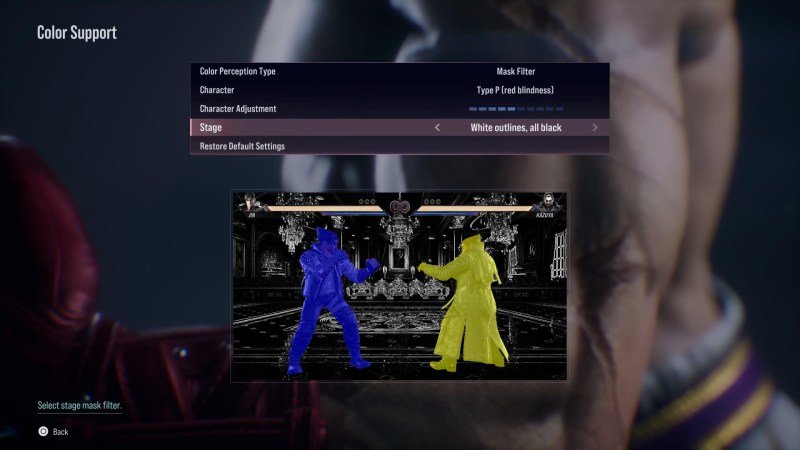
Colorblindness Options
Imagine playing a fighting game and not being able to tell the difference between your character and your opponent because of colors. That’s what it can be like for people with colorblindness. Tekken 8 has you covered! It includes different color presets designed for common types of colorblindness. You can choose the one that makes the game look the most clear and comfortable for you. This is a really helpful feature and is quite a good addition for players to enjoy the game.
- Protanopia (Red-Weak): This adjusts the game for those who have difficulty seeing red colors.
- Deuteranopia (Green-Weak): If you have trouble seeing green colors, this setting will be very helpful.
- Tritanopia (Blue-Weak): For those who struggle with blue colors, this option will enhance visibility.
Brightness and Contrast
Sometimes, a game is just too bright or too dark. In Tekken 8, you have the power to adjust the brightness and contrast. This helps you make sure that the game looks just right for your specific setup, so you can play comfortably without straining your eyes. You can tailor the game’s appearance based on your specific needs, which gives players an enhanced visual experience.
Visual Effects
Tekken 8 also includes options to adjust visual effects which makes sure it is not distracting for any players. This is very important for the game so that visual effects never come in the way of players. Also you can also disable those effects. If you feel that these are very distracting you can try it out, and this will enable you to see everything clear in the game.
Auditory Accessibility Features
Now, let’s talk about sound! Sound is a huge part of Tekken 8, from the music to the sounds of punches and kicks. Here’s how the game caters to different auditory needs.
Volume Controls
It’s great to have full control over how loud different sounds are. Tekken 8 has lots of volume settings, so you can change how loud the music is, the sound effects, and even the voices of the characters. Want the punches to be super loud? You can do that! Or maybe you want the music to be quiet and in the background? That’s also easy to set up. By having good volume controls, Tekken 8 ensures that every player can find the perfect balance for their comfort.
- Master Volume: Controls the overall sound output.
- Music Volume: Adjusts the loudness of the background music.
- SFX Volume: Controls the volume of in-game sound effects.
- Voice Volume: Changes the loudness of character dialogue and voiceovers.
Subtitles
For players who might be hard of hearing or who just prefer to read the dialogue, Tekken 8 includes subtitles! This means you can see the words being spoken on the screen. This way you never miss a piece of the story or important in-game communications. The subtitles are clearly visible and come in various sizes and colors to improve readability for players.
Sound Directional Cues
In the game, directional cues are very important. So, it helps the players to identify where the opponent is, and where the attacks are coming from. This helps the players a lot in reacting faster and accurately. It plays an important role in sound design of the game, which is very good.
Control Accessibility Options
Let’s talk about how you control the game. For some players, using a standard controller can be difficult. Tekken 8 provides various options to customize controls. There are many features that will help anyone to play and master the game.
Button Remapping
One of the best things you can do for accessibility is to change the button layout. Tekken 8 lets you change which button does what. If you find it more comfortable to use the shoulder buttons for punches, you can switch it around! This can make a huge difference for players who struggle with the standard controls, as you can play in whatever way you prefer and are comfortable.
Here is a table of controls with button remapping.
| Control | Description |
|---|---|
| Punch | Usually assigned to face buttons, can be remapped to shoulder or trigger buttons |
| Kick | Generally assigned to different face buttons, but customizable to other buttons |
| Guard | Normally a shoulder button, can be mapped to trigger or face buttons |
| Special Moves | Various combinations, can be tailored for easier access with button remapping |
Simplified Inputs
Some fighting games have complicated button combos for moves. Tekken 8 offers a way to use simplified inputs to perform powerful attacks. This way, players can focus on the strategy of the game rather than trying to pull off very difficult combos. Simplified inputs will enable many players to have fun and enjoy the game.
Controller Vibration
Controller vibration can be helpful to many players to understand actions, also it can be very distracting for many players. So, in Tekken 8, players can adjust the intensity of the vibration, or they can turn it off completely. This will ensure every player enjoys the game in their comfort. Also, players can turn this on or off depending on their need at that time.
Customizable Controller Sensitivity
Players can also tweak how sensitive the controls are in the game. So, based on their preference players can adjust the sensitivity of the controller. This can be very helpful for many players so that they can have complete and accurate control of the game.
Difficulty Adjustments
Tekken 8 also lets players adjust the game’s difficulty, which is very important for accessibility. Whether you’re a beginner or a seasoned Tekken master, you can adjust the difficulty level of the game. This ensures that you enjoy the game without feeling too overwhelmed or bored.
Easy Difficulty Mode
The game has an ‘easy’ mode, which is designed for players who are new to Tekken or the fighting game genre in general. In this mode, the computer-controlled opponents are not as tough, so you can learn the game without getting beaten very easily. It’s a great way to understand game mechanics before jumping into higher difficulty levels. This setting also allows player to enjoy the storyline mode, without getting stuck on any particular fight.
Adjustable AI Difficulty
For those who want more challenge without going to the highest setting, Tekken 8 allows for customization of the AI difficulty. You can adjust the AI of computer opponents to find a sweet spot that matches your level. This is a very good option to challenge players and keep them engaged in the game, without being too hard on them.
Other Accessibility Features
Tekken 8 includes various other settings to make it a more accessible game. These small improvements are very good and go a long way for many players.
Tutorials and Training Modes
Tekken 8 has a very detailed tutorial mode that teaches the players about all the basics, also it offers training mode to practice. These modes help any beginner to understand the game and improve the skills, without putting them directly into a fight. It is very important for newcomers to learn the game and get their basics correct. These features help the player to get up to speed.
Menu Navigation
Tekken 8 has made sure that the menu is easy to read and move around. This is very useful for all players because it gives easy access to the settings menu and other features of the game. Players can customize different settings easily without a lot of struggle and can enjoy the game.
Game Speed Options
Tekken 8 allows players to adjust the game speed to slow down or increase the pace of the game based on their preferences. This option is very useful in practicing complex combos and can also be very helpful for players who have slower reaction times.
Tekken 8 is shaping up to be a fighting game that is made for everyone. The amount of accessibility options they’ve included means that many more people will be able to play and enjoy the game. Whether you need help with seeing, hearing, or controlling the game, there are options to make it comfortable for you. We’re very glad to see this type of inclusion in modern games, and we’re sure you’ll have a great time playing Tekken 8!
Tekken 8 Accessibility Options #accessibility #spectrumgames #Tekken8
Final Thoughts
Tekken 8 includes several key accessibility features. Players can adjust button mapping for customized controls. Subtitles and audio cues assist individuals with hearing or visual limitations. The game provides various difficulty settings to accommodate different skill levels.
These options aim to make Tekken 8 more inclusive and enjoyable. With these additions, a wider audience can experience the fighting game. Tekken 8 what accessibility options are available shows a dedication to player needs. The game’s effort to welcome everyone is clear.

