
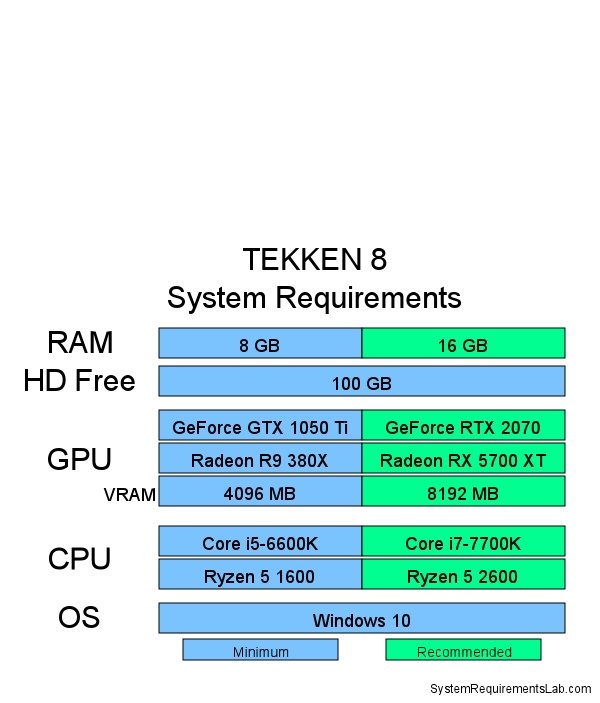
The Tekken 8 system requirements include a minimum of an Intel Core i5-6600K or AMD Ryzen 5 1600 processor, 8GB of RAM, and an NVIDIA GeForce GTX 1050Ti or AMD Radeon R9 380X graphics card.
Eager to jump into the action of the next King of Iron Fist Tournament? You’re probably wondering about Tekken 8 what are the system requirements. Getting your PC ready for the new battles is key to a smooth gaming experience.
We will get straight to it. This will help you decide if you need an upgrade before the game’s launch.

Tekken 8: What Are the System Requirements?
Ready to jump into the action of Tekken 8? Before you start practicing your combos, it’s super important to make sure your computer is ready to handle this awesome fighting game. We’re going to break down everything you need to know about the system requirements for Tekken 8, so you can have the best possible gaming experience. Let’s get started!
Understanding Minimum vs. Recommended Specs
You’ll often see two sets of system requirements: minimum and recommended. Think of them like this:
- Minimum Specs: These are the bare minimum your computer needs to run Tekken 8. You’ll be able to play, but you might have to turn the graphics settings way down and the game might not run as smoothly as you’d like. It’s like driving a car on an empty tank – it will go, but maybe not very far or fast.
- Recommended Specs: These are the specs that will give you the best Tekken 8 experience. With these, you can crank up the graphics, enjoy smooth gameplay, and experience the game as it was intended to be. This is like having a full tank of gas and a powerful engine!
It’s always better to aim for the recommended specs if you can. This way, you won’t be held back by performance issues and can fully immerse yourself in the world of Tekken 8.
Breaking Down the Minimum System Requirements
Let’s dive into the specifics. Here’s what your computer needs at the very least to run Tekken 8:
Operating System
Your computer needs a relatively recent version of Windows. Tekken 8 requires Windows 10 64-bit or a newer version. You can’t play the game on older operating systems like Windows 7 or 8. Make sure you check your operating system to see if it’s compatible.
Processor
The “brain” of your computer, the processor, needs to be up to the task. For Tekken 8, you’ll need an Intel Core i5-6600K or an AMD Ryzen 5 1600. These processors are capable enough to run the game at its basic settings. These processors are older, but still work with the minimum settings of Tekken 8.
Memory (RAM)
RAM is like your computer’s short-term memory. Tekken 8 requires at least 8 GB of RAM to run. This is the minimum amount needed to keep the game running without frequent slowdowns or freezes. If your RAM is lower, you might encounter problems when the game is running. In general, the more RAM, the better.
Graphics Card (GPU)
The graphics card is responsible for the visuals you see on your screen. For Tekken 8, you’ll need an Nvidia GeForce GTX 1050Ti or an AMD Radeon R9 380X. These cards are able to handle the game’s basic graphics settings. These graphic cards are on the lower side for modern games, but they fulfill the minimum needs of the Tekken 8 game.
DirectX
Make sure you have DirectX Version 12 installed. This software is vital for the game’s graphics to work correctly. Most newer Windows systems already include this, but it’s worth a quick check.
Storage
You’ll need at least 100 GB of free hard drive space to install Tekken 8. This is a big game with lots of detailed environments and character models, so you need a good amount of room on your hard drive to fit it all.
Aiming for the Recommended System Requirements
Want the best possible Tekken 8 experience? Then check out the recommended specs:
Operating System
Again, you’ll need Windows 10 64-bit or newer. This requirement remains the same as the minimum specifications.
Processor
For a smoother experience, you’ll want a better processor. The recommended options are an Intel Core i7-7700K or an AMD Ryzen 5 2600. These processors will handle the game’s processing needs better, helping the game run without any lags. This will help the game run with more frame rates.
Memory (RAM)
To really enjoy the game without slowdowns, aim for 16 GB of RAM. This will let your computer handle all the action happening in Tekken 8 with ease. Having 16 GB RAM makes your experience smoother and better than 8 GB of RAM.
Graphics Card (GPU)
To get the best graphical fidelity, you’ll need a stronger graphics card. The recommended cards are an Nvidia GeForce RTX 2070 or an AMD Radeon RX 5700 XT. These cards will allow you to play Tekken 8 at high settings with smooth frame rates. These are high end graphic cards compared to minimum graphic cards.
DirectX
You still need DirectX Version 12 for the game. Having the latest version will help with any compatibility issues in the future.
Storage
The amount of storage stays the same. You still need at least 100 GB of free hard drive space. If you install any additional features in the game in the future, it is a good idea to keep at least 120 GB of free storage.
A Quick Comparison Table
Here’s a quick table to compare the minimum and recommended system requirements side-by-side:
| Component | Minimum Requirements | Recommended Requirements |
|---|---|---|
| Operating System | Windows 10 64-bit | Windows 10 64-bit |
| Processor | Intel Core i5-6600K or AMD Ryzen 5 1600 | Intel Core i7-7700K or AMD Ryzen 5 2600 |
| Memory (RAM) | 8 GB | 16 GB |
| Graphics Card (GPU) | Nvidia GeForce GTX 1050Ti or AMD Radeon R9 380X | Nvidia GeForce RTX 2070 or AMD Radeon RX 5700 XT |
| DirectX | DirectX Version 12 | DirectX Version 12 |
| Storage | 100 GB free space | 100 GB free space |
Why Meeting the Requirements is Important
Playing Tekken 8 with the right system requirements is really important because it makes the game run smoothly and look great. If your computer doesn’t meet the minimum requirements, the game might be choppy, slow, or even crash. If you aim for the recommended system requirements, you can enjoy the game at its best. You get higher frame rates and better graphics, which make the gaming experience way more fun and immersive. Also, matching the system requirements will make sure that the game is running at its full potential, without creating any technical problems for you.
How to Check Your Computer’s Specs
Not sure what kind of computer you have? Don’t worry; it’s easy to find out. Here’s how you can check your system specs in Windows:
- Right-click on the Start button (the Windows logo in the bottom-left corner).
- Select System.
- Look for the Device specifications and Windows specifications sections.
- Here you’ll find information about your processor, RAM, operating system, and more.
For checking your graphics card, follow these steps:
- Right-click on the Start button.
- Select Device Manager.
- Expand the Display adapters category.
- Here you will see the name of your graphics card.
Once you have this information, you can compare it with the Tekken 8 requirements to see if your computer is ready. If it’s not, maybe you can do some upgrades, or you can use another device if you have one.
What if My Computer Doesn’t Meet the Requirements?
If you find that your computer is falling short of the minimum system requirements, you have a few options.
Upgrading Your Components
The most common solution is upgrading your computer. You may consider swapping out your current parts for better ones. Some of the components you might think about are:
- RAM: Adding more RAM is a relatively easy and affordable upgrade that can make a noticeable difference.
- Graphics card: If your graphics card is underpowered, upgrading to a newer one will significantly improve your gaming experience.
- Processor: If your processor is old, upgrading it will give your system a boost in performance.
Make sure that your computer can handle new components before buying them. Check whether the components are compatible with the other components of your computer.
Adjusting Game Settings
If upgrading isn’t an option, you can still try to play the game with lower settings. You can reduce the graphics settings in the game settings menu. Turning off advanced settings like antialiasing and shadow quality can help increase the frame rate. The game may not look as great, but it might be playable. You can also reduce the resolution of the game to reduce the load on the system.
Using Game Streaming Services
If you cannot use the game directly on your computer, you might consider the use of game streaming services. Cloud-based game streaming services such as NVIDIA GeForce Now let you play games on the cloud. So, you don’t need a powerful local PC. You’ll need a fast and stable internet connection and also, you have to pay a subscription fee. With this service, you might be able to play the game without having high system requirements.
Optimizing Your PC for Tekken 8
Even if your computer meets the system requirements, there are some things you can do to make sure the game runs as smoothly as possible:
- Update Your Drivers: Make sure your graphics card drivers are up to date. New drivers often contain optimizations for the latest games, which can improve performance.
- Close Background Applications: When playing Tekken 8, close any other unnecessary programs or apps. The closed apps might eat up your RAM and your CPU processing power, which will slow down the game.
- Monitor Your System: Check your CPU and GPU usage. Use the tools available in Windows to check the real-time performance of the system. You may use third party software for this. This way, you can figure out if there is any particular software causing the performance issue.
- Adjust Game Settings: As mentioned earlier, play around with the in-game graphics settings to find a balance between visual quality and performance. If you don’t have high-end hardware, playing on low settings is the best option.
Keeping Up with Updates
Sometimes game developers release updates, and these updates can change the system requirements or the performance of the game. It’s a good idea to stay updated on official game news, game forums, and social media pages. When new updates are released, the developers often tell if any changes are made to the system requirements. This is a great way to stay informed and make sure that you always have the best experience playing Tekken 8.
Having the right computer for playing Tekken 8 makes a big difference in how much you enjoy the game. Whether you’re aiming for the minimum or going all out with the recommended specs, taking the time to check and prepare your PC is totally worth it. By understanding the system requirements and taking steps to optimize your setup, you will get ready to experience Tekken 8 at its full potential. Now, go, pick your favorite character and begin the battle!
Tekken 8 System Requirements | PC , PS5 , XBOX | File Size Explained
Final Thoughts
To play Tekken 8, you need at least an Intel Core i5-6600K or AMD Ryzen 5 1600 CPU, and a GTX 1050Ti or Radeon R9 380X graphics card. The game must run on a Windows 10 64-bit operating system with 8 GB RAM.
The recommended specifications for smooth gameplay includes an Intel Core i7-4770K or Ryzen 5 2600 CPU. You also need a GTX 1060 or Radeon RX 480 GPU and 16 GB of RAM. Meeting these minimum or recommended levels will ensure a playable experience.
Tekken 8 what are the system requirements are vital for proper function. Therefore, check your computer’s specifications before purchasing. The must needed settings will help you enjoy this fighting game.

